

Python tkinter实现弹球小游戏完整代码与运行解析

发布时间:2026-10-15| 5人浏览过
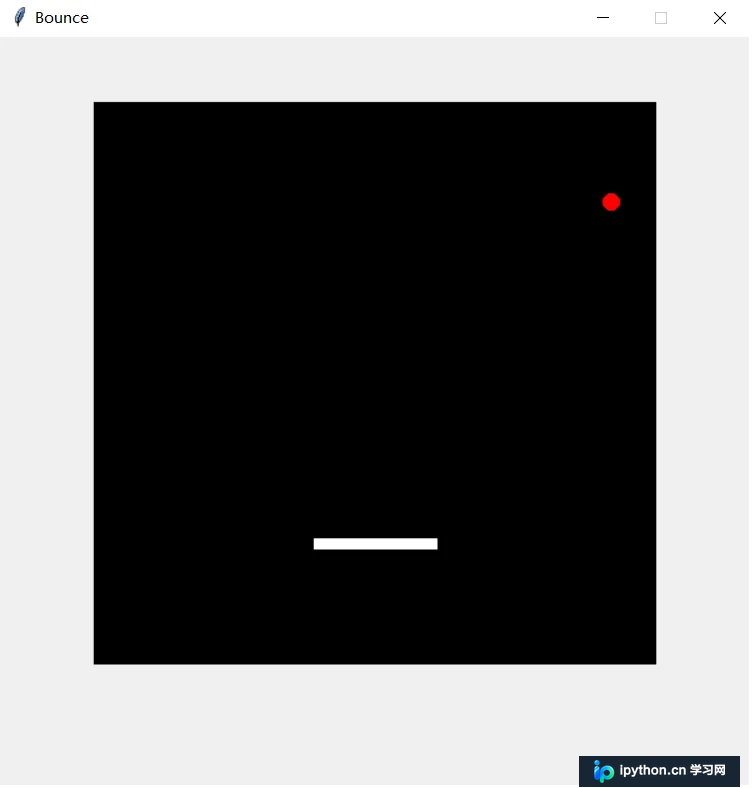
本文介绍如何使用Python的tkinter库开发一个简单的弹球游戏。通过定义Ball和Paddle类,利用Canvas绘制图形并处理碰撞逻辑,实现通过键盘左右键控制平板接球的功能。文章提供了完整的源代码结构及运行结果展示,适合Python初学者了解GUI编程基础。
一、弹球游戏代码
以下示例展示了如何利用tkinter库构建一个弹球游戏。玩家可以使用键盘上的左箭头(<--)和右箭头(-->)键来控制平板的移动,从而接住下落的球。
from tkinter import *
import random
import time

# Creating the window:
window = Tk()
window.title("Bounce")
window.geometry('600x600')
window.resizable(False, False)

# Creating the canvas containing the game:
canvas = Canvas(window, width = 450, height = 450, bg = "black")
canvas.pack(padx = 50, pady= 50)
score = canvas.create_text(10, 20, fill = "white")

window.update()

class Ball:
    def __init__(self, canvas1, paddle1, color):
        self.canvas = canvas1
        self.paddle = paddle1
        self.id = canvas1.create_oval(10, 10, 25, 25, fill = color)  # The starting point of the ball
        self.canvas.move(self.id, 190, 160)
        starting_direction = [-3, -2, -1, 0, 1, 2, 3]
        random.shuffle(starting_direction)
        self.x = starting_direction[0]
        self.y = -3
        self.canvas_height = self.canvas.winfo_height()
        self.canvas_width = self.canvas.winfo_width()

    # Detecting the collision between the ball and the paddle:
    def hit_paddle(self, ballcoords):
        paddle_pos = self.canvas.coords(self.paddle.id)
        if ballcoords[0] <= paddle_pos[2] and ballcoords[2] >= paddle_pos[0]:
            if paddle_pos[3] >= ballcoords[3] >= paddle_pos[1]:
                return True
        return False

    # Detecting the collision between the the ball and the canvas sides:
    def draw(self):
        self.canvas.move(self.id, self.x, self.y)
        ballcoords = self.canvas.coords(self.id)
        if ballcoords[1] <= 0:
            self.y = 3
        if ballcoords[3] >= self.canvas_height:
            self.y = 0
            self.x = 0
            self.canvas.create_text(225, 150, text = "Game Over!", font = ("Arial", 16), fill = "white")
        if ballcoords[0] <= 0:
            self.x = 3
        if ballcoords[2] >= self.canvas_width:
            self.x = -3
        if self.hit_paddle(ballcoords):
            self.y = -3


class Paddle:
    def __init__(self, canvas1, color):
        self.canvas1 = canvas
        self.id = canvas.create_rectangle(0, 0, 100, 10, fill = color)
        self.canvas1.move(self.id, 180, 350)
        self.x = 0
        self.y = 0
        self.canvas1_width = canvas1.winfo_width()
        self.canvas1.bind_all("<Left>", self.left)
        self.canvas1.bind_all("<Right>", self.right)

    def draw(self):
        self.canvas1.move(self.id, self.x, 0)
        paddlecoords = self.canvas1.coords(self.id)
        if paddlecoords[0] <= 0:
            self.x = 0
        if paddlecoords[2] >= self.canvas1_width:
            self.x = 0

    def right(self, event):
        self.x = 3

    def left(self, event):
        self.x = -3


paddle = Paddle(canvas, color = "white")
ball = Ball(canvas, paddle, color = "red")

# New code after here
def handler():
    global run
    run = False

window.protocol("WM_DELETE_WINDOW", handler)
run = True

while run:
    # New code before here
    ball.draw()
    paddle.draw()
    window.update_idletasks()
    window.update()
    time.sleep(0.01)

window.destroy()    # should always destroy window before exit
二、程序结果
总结
至此,关于使用Python实现弹球小游戏的介绍便告一段落。如需了解更多Python弹球游戏相关内容,欢迎查阅本站过往文章或继续浏览后续教程。感谢大家的支持!
免责声明:本文内容仅供参考,不代表本站观点。转载或引用请注明出处。









