

Python实现原神抽卡模拟器的完整代码与界面展示

发布时间:2026-10-15| 5人浏览过
本文分享使用Python实现的《原神》抽卡模拟器完整代码。通过Tkinter构建桌面GUI界面,利用random模块模拟R、SR、SSR不同稀有度武器与角色的抽取概率。文章包含核心数据定义、UP池合并逻辑及主程序运行效果,旨在为Python初学者提供直观的随机数应用案例。
本文直接提供实现该功能的全部源代码。
import random
import sys
import tkinter as tk  # 导入一个第三方库,用于制作桌面软件
import tkinter.font as tf
# 数据部分
R = {
    "name": "R",
    "color": "blue",
    "size": "20",
    "font": "微软雅黑",
    "data": ["冷刃", "黑缨枪", "白缨枪", "翡玉法球", "飞天大御剑", "暗铁剑", "旅行剑", "钢轮弓",
             "吃鱼虎刀", "沾染龙血的剑", "以理服人", "异世界行记", "甲级宝钰", "翡玉法球"],
    "person": []
}
SR = {
    "name": "SR",
    "color": "purple",
    "size": "20",
    "font": "微软雅黑",
    "data": ["腐殖之剑", "祭礼剑", "西风剑", "试作斩岩", "笛剑", "螭骨剑", "钢轮弓", "西风猎弓",
             "钢轮弓", "绝弦", "祭礼弓", "万国诸海图谱", "匣里日月", "千岩古剑", "黑岩绯玉"],
    "person": ["香菱", "菲谢尔", "菲谢尔", "北斗", "芭芭拉", "北斗", "凝光", "托马", "重云",
              "砂糖", "烟绯", "安柏", "凯亚", "丽莎", "诺艾尔"]
}
SSR = {
    "name": "SSR",
    "color": "yellow",
    "size": "20",
    "font": "微软雅黑",
    "data": ["天空之卷", "四风原典", "天空之傲", "天空之脊", "风鹰剑", "风鹰剑", "狼的末路"],
    "person": ["迪卢克", "七七", "琴", "莫娜", "刻晴"]
}

ten_count = 0
ninety_count = 0
max_count = 0
person_up = "优菈"
data_up = "松籁响起之时"
ALL = [R, SR, SSR]
tag_id = "0"

# 单抽
def one():
    _res = get()
    count_flush(_res["level"], _res["thing"])
    insert_text(conf=_res["level"], message=_res["thing"])
    text.insert("end", "\n")
    text.see("end")

# 十连抽
def ten():
    text.tag_add('tag', "end")
    text.tag_config('tag', foreground="white")
    text.insert("end", "\nstart\n", 'tag')
    for i in range(10):
        one()
    text.insert("end", f"\nend{ten_count}/{ninety_count}/{max_count}\n", "tag")
    text.see("end")

# 根据抽奖出的物品index获取物品等级
def found(index):
    for i in ALL:
        if pool[index] in i["person"]:
            return i
        if pool[index] in i["data"]:
            return i

# 每次抽卡后刷新当前计数器
def count_flush(level, thing):
    global ten_count
    global ninety_count
    global max_count
    if level["name"] == "SR":
        ten_count = 0
    if level["name"] == "SSR":
        ninety_count = 0
    if level["name"] == "SSR" and ((thing in person_up) or (thing in data_up)):
        max_count = 0

# 抽卡规则
def get():
    global ten_count
    global ninety_count
    global max_count
    level = None
    ten_count += 1
    ninety_count += 1
    max_count += 1
    if ten_count == 10:
        level = SR
    if ninety_count == 90:
        level = SSR
    if level is SR or level is SSR:
        index = random.randrange(len(level[what]))
        thing = level[what][index]
    if max_count != ninety_count and level is SSR:
        level = SSR
        thing = person_up if what == "person" else data_up
    if max_count == 180:
        level = SSR
        thing = person_up if what == "person" else data_up
    if level is None:
        index = random.randrange(len(pool))
        level = found(index)
        thing = pool[index]
    return {
        "level": level,
        "thing": thing
    }

# 建立一个主窗口 root
root = tk.Tk()
# 设置窗口标题
root.title("原神模拟抽卡器")
# 设置单抽图片
image_one = tk.PhotoImage(file="单抽图片.png")
# 设置十连抽图片
image_ten = tk.PhotoImage(file="十连抽.png")
# 在窗口上创建一个按钮 button,用于单抽,它依赖于父窗口root
button_one = tk.Button(root, text="单抽", image=image_one, command=one)
button_ten = tk.Button(root, text="十连抽", image=image_ten, command=ten)
# 布局创建的按钮,rou代表行,column代表列
button_one.grid(row=0, column=0)
button_ten.grid(row=0, column=1)
# 创建一个文本框,用于打印抽奖日志
text = tk.Text(root, bg="black")
# columnspan代表合并两列
text.grid(row=1, columnspan=2)

# 添加日志到Text框
def insert_text(message, conf):
    global tag_id
    # 设置字体大小和颜色
    ft = tf.Font(family=conf["font"], size=conf["size"])
    text.tag_add('tag'+tag_id, "end")
    text.tag_config('tag'+tag_id, foreground=conf["color"], font=ft)
    text.insert("end", message + "\n", "tag"+tag_id)
    text.see("end")
    tag_id = str(int(tag_id) + 1)

# mian函数,程序会运行这里面的东西
if __name__ == '__main__':
    # 修改为武器抽武器池
    what = "角色"
    if what == "角色":
        what = "person"
    if what == "武器":
        what = "data"
    if what not in ["data", "person"]:
        sys.exit(1)
    # 把up角色和武器加入池
    SSR["data"].append(data_up)
    SSR["person"].append(person_up)
    # 合并在一个总池,实现概率,可以通过算法实现,难得弄..
    pool = list()
    for i in range(90):
        pool.extend(R["data"])
    for i in range(10):
        pool.extend(SR[what])
    pool.extend(SSR[what])
    # 运行窗口
    root.mainloop()
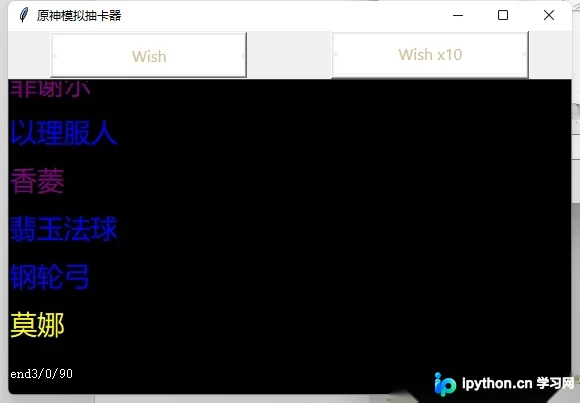
程序运行后的实际效果展示。
实现该界面所需的背景图片素材说明。


对实现过程及代码逻辑的简要总结。
以上就是本文的全部内容,希望能为读者提供有价值的参考,同时也欢迎大家关注本站以获取更多技术分享。
免责声明:本文内容仅供参考,不代表本站观点。转载或引用请注明出处。









