

Python绘制强化学习损失曲线及方差范围

本文介绍使用Python和seaborn库绘制强化学习训练过程中回报曲线的方法。通过正则表达式提取日志数据,利用matplotlib绘制迭代次数与总回报的关系,并重点演示如何使用fill_between函数添加方差范围,展示收敛线及置信区间,帮助优化模型可视化效果。
导入必要的库文件。
引入seaborn库,利用sns.set_style设置绘图风格,使生成的图像更加美观,并支持切换多种样式主题。
import re
import seaborn as sns
import matplotlib.pyplot as plt
import matplotlib.cm as cm
import shutil
import os
sns.set_style('whitegrid')
获取训练数据(此步骤可选)。
使用的数据来源于深度强化学习生成的回报曲线。数据结构包含日志信息,重点提取从“train”标记开始的部分,分别对应总回报、平均回报和回报的标准差(方差)。采用re.findall正则表达式提取所需数据,具体实现可参考源码。
日志示例如下: 10-15 22:23:15 DATA/traffic DEBUG train 0 totalreward : -99477.0 ReturnAvg : -102.55360824742269 ReturnStd : 34.34301970480272 10-15 22:23:29 DATA/traffic DEBUG train 1 totalreward : -83131.0 ReturnAvg : -85.70206185567011 ReturnStd : 53.442993000985545
file_path = 'log.txt'
content = []
with open(file_path, 'r') as f:
    for line in f.readlines():
        line = line.strip('\n')
        content.append(line)
iter = []
totalreward = []
returnavg = []
returnstd = []
for line in content:
    str1 = re.findall('train.+', line)
    v = [float(x) for x in re.findall('-?\d+.?\d+|\d+', str1[0])]
    iter.append(v[0])
    totalreward.append(v[1])
    returnavg.append(v[2])
    returnstd.append(v[3])
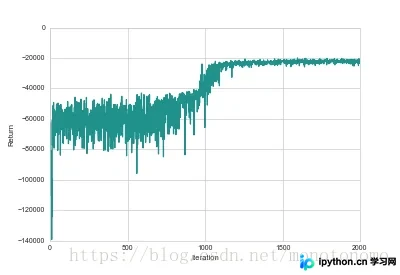
绘制回报曲线。
将图像保存至Plot文件夹。注意,直接保存jpg格式可能失败,建议保存为png格式以确保成功。设置分辨率为1000,虽然数值相近,但更高的分辨率能使线条更清晰。
color = cm.viridis(0.5)
f, ax = plt.subplots(1,1)
ax.plot(iter, totalreward, color=color)
ax.legend()
ax.set_xlabel('Iteration')
ax.set_ylabel('Return')
exp_dir = 'Plot/'
if not os.path.exists(exp_dir):
    os.makedirs(exp_dir, exist_ok=True)
else:
    os.makedirs(exp_dir, exist_ok=True)
f.savefig(os.path.join('Plot', 'reward' + '.png'), dpi=1000)
生成的曲线可通过plt.show()显示,或在控制台输入变量f后回车查看。
绘制包含方差范围的平均回报曲线。
在强化学习论文中,常见一条收敛主线及周围浅色的范围线,这些范围线代表方差。绘制代码主要使用了fill_between函数,具体实现如下。
color = cm.viridis(0.7)
f, ax = plt.subplots(1,1)
ax.plot(iter, returnavg, color=color)
r1 = list(map(lambda x: x[0]-x[1], zip(returnavg, returnstd)))
r2 = list(map(lambda x: x[0]+x[1], zip(returnavg, returnstd)))
ax.fill_between(iter, r1, r2, color=color, alpha=0.2)
ax.legend()
ax.set_xlabel('Iteration')
ax.set_ylabel('Return')
exp_dir = 'Plot/'
if not os.path.exists(exp_dir):
    os.makedirs(exp_dir, exist_ok=True)
f.savefig(os.path.join('Plot', 'avgreward' + '.png'), dpi=50)
最终结果如图所示。
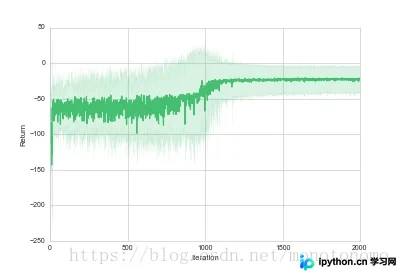
图中深绿色线条被浅绿色区域包裹,体现了fill_between的功能。可通过调整alpha参数来改变填充颜色的透明度。
至此,关于Python绘制损失曲线及方差范围的介绍完成。如需了解更多Python损失曲线相关内容,请搜索本站历史文章或继续阅读后续文章,感谢支持!
免责声明:本文内容仅供参考,不代表本站观点。转载或引用请注明出处。









