

Django Admin 搜索框占位符实现:自定义 search_fields 提示文字

发布时间:2026-10-14| 2人浏览过
Django 后台默认搜索框缺少提示文字,体验不佳。本文介绍通过定制模板标签和继承 PlaceholderMixin 类,为 search_fields 添加自定义 placeholder 提示文字的方法。
Django Admin 搜索框占位符实现概述
本文主要介绍如何在 Django Admin 管理后台的 search_fields 中为搜索框添加提示文字(placeholder),该方法可供参考使用。
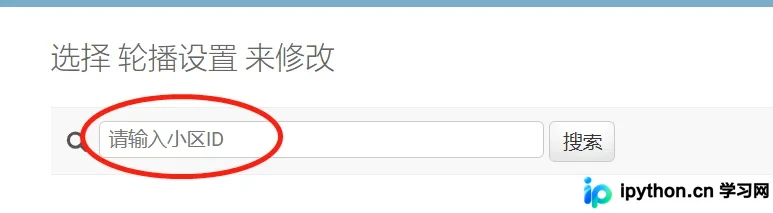
如截图所示,Django Admin 后台生成的搜索框默认不显示提示文字,交互体验不够友好。由于网上缺乏完善的示例,此处提供一种自行实现的方案。
基础 App 配置
0. 假设已存在名为 carousel 的 app,其基础配置大致如下操作或代码所示。
$ python manage.py startapp carousel
# settings.py
```
INSTALLED_APPS = [
  ...
  'carousel',
]
```
# carousel/models.py
```
from django.db import models

class Carousel(models.Model):
  community = models.IntegerField('小区ID')

  class Meta:
    verbose_name = verbose_name_plural = '轮播设置'
```
定制模板标签
1. 定制模板标签 templatetags
mkdir -p carousel/templatetags
touch carousel/templatetags/__init__.py
touch carousel/templatetags/search_with_placeholder.py
# carousel/templatetags/search_with_placeholder.py
from django.contrib.admin.templatetags.admin_list import (
  InclusionAdminNode,
  register,
  search_form,
)


def search_form_plus(cl, search_placeholder: str = ""):
  """
  Display a search form for searching the list with placeholder.
  """
  return dict(search_form(cl), search_placeholder=search_placeholder)


@register.tag(name="search_form_plus")
def search_form_tag(parser, token):
  return InclusionAdminNode(
    parser,
    token,
    func=search_form_plus,
    template_name="search_form_plus.html",
    takes_context=False,
  )
定制模板文件
2. 定制模板 template
mkdir -p carousel/templates/admin
mkdir -p carousel/templates/custom_admin
touch carousel/templates/admin/search_form_plus.html
touch carousel/templates/custom_admin/change_list.html
<!-- carousel/templates/admin/search_form_plus.html -->
{% load i18n static %}
{% if cl.search_fields %}
<div id="toolbar"><form id="changelist-search" method="get">
<div><!-- DIV needed for valid HTML -->
<label for="searchbar"><img src="{% static "admin/img/search.svg" %}" alt="Search"></label>
<input type="text" size="40" name="{{ search_var }}" placeholder="{{ search_placeholder }}" value="{{ cl.query }}" id="searchbar" autofocus>
<input type="submit" value="{% translate 'Search' %}">
{% if show_result_count %}
  <span class="small quiet">{% blocktranslate count counter=cl.result_count %}{{ counter }} result{% plural %}{{ counter }} results{% endblocktranslate %} (<a href="?{% if cl.is_popup %}_popup=1{% endif %}" rel="external nofollow" >{% if cl.show_full_result_count %}{% blocktranslate with full_result_count=cl.full_result_count %}{{ full_result_count }} total{% endblocktranslate %}{% else %}{% translate "Show all" %}{% endif %}</a>)</span>
{% endif %}
{% for pair in cl.params.items %}
  {% if pair.0 != search_var %}<input type="hidden" name="{{ pair.0 }}" value="{{ pair.1 }}">{% endif %}
{% endfor %}
</div>
</form></div>
{% endif %}
<!-- carousel/templates/custom_admin/change_list.html -->
{% extends "admin/change_list.html" %}
{% load search_with_placeholder %}

{% block search %}{% search_form_plus cl search_placeholder %}{% endblock %}
定制 Admin 类
3. 定制 admin.py
查看文件 cat carousel/admin.py
# Django3.1
from django.contrib import admin

from .models import BoxCarousel, Carousel,


class PlaceholderMixin:
  change_list_template = "custom_admin/change_list.html"

  def changelist_view(self, request, extra_context=None):
    search_placeholder = getattr(self, "search_placeholder", False)
    if search_placeholder:
      extra_context = extra_context or {}
      extra_context["search_placeholder"] = search_placeholder
    return super().changelist_view(request, extra_context)


@admin.register(Carousel)
class CarouselAdmin(PlaceholderMixin, admin.ModelAdmin):
  search_fields = ["=community"]
  search_placeholder = "请输入小区ID"
若其他列表页也希望显示提示文字,只需继承 PlaceholderMixin 类,并定义 search_placeholder 属性即可。
至此,关于 Django Admin search_fields placeholder 管理后台添加搜索框提示文字的介绍结束。更多相关 Django Admin search_fields placeholder 搜索框内容,请搜索本站以前的文章或继续浏览下面的相关文章,希望大家以后多多支持本站!
免责声明:本文内容仅供参考,不代表本站观点。转载或引用请注明出处。









