

Python基于爬虫实现全网音乐搜索与下载

本文介绍如何利用Python爬虫技术实现全网音乐搜索与下载功能。通过调用第三方音频解析接口,获取歌曲直链并保存为MP3文件。文章详细讲解了从命令行工具到Tkinter图形界面的代码优化过程,包括请求模拟、JSON数据解析及文件下载逻辑,最终打包为可执行文件供用户使用。
撰写技术博客时,明确需求与应用场景至关重要,缺乏实际价值的内容往往难以产生意义。本文的初衷源于一个常见需求:如何免费获取全网优质音乐资源。此前在B站曾看到一位开发者制作的歌曲搜索神器,其界面效果如下:
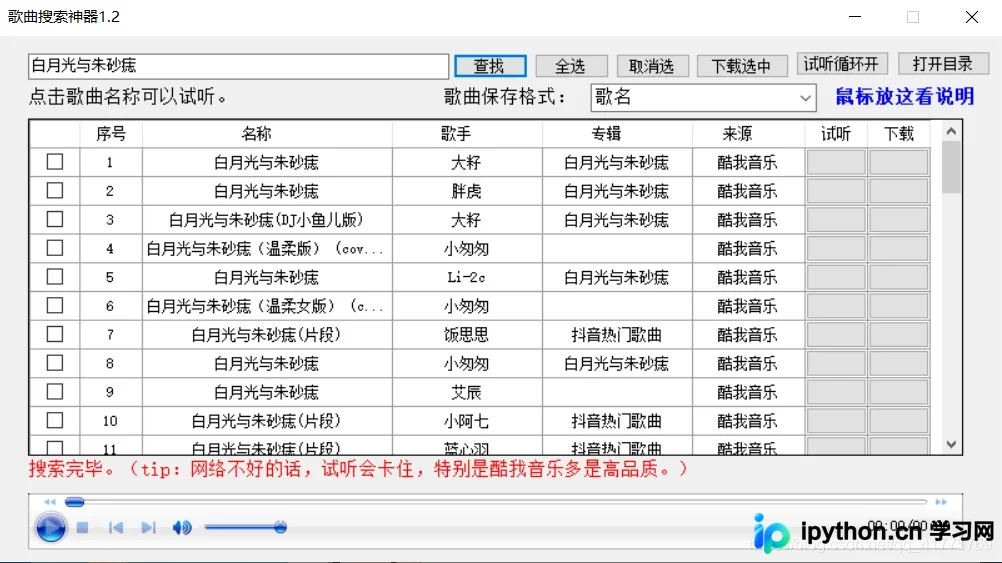
该工具确实实用,涵盖了互联网上大多数主流音乐网站,且支持多种版本,可谓功能全面。然而,作为技术人员,我们的追求不应止步于使用,更应探究其背后的原理。众所周知,传统爬虫通常只能抓取特定页面的资源,因此该工具如何实现全网搜索令人好奇。笔者长期基于Python 3.7版本进行网络爬虫开发,本文也将以此为基础进行学习与记录。需要注意的是,此处爬取的目标并非直接的音乐网站,而是一个汇聚了各大音频解析功能的音乐直链搜索服务,其界面如下:
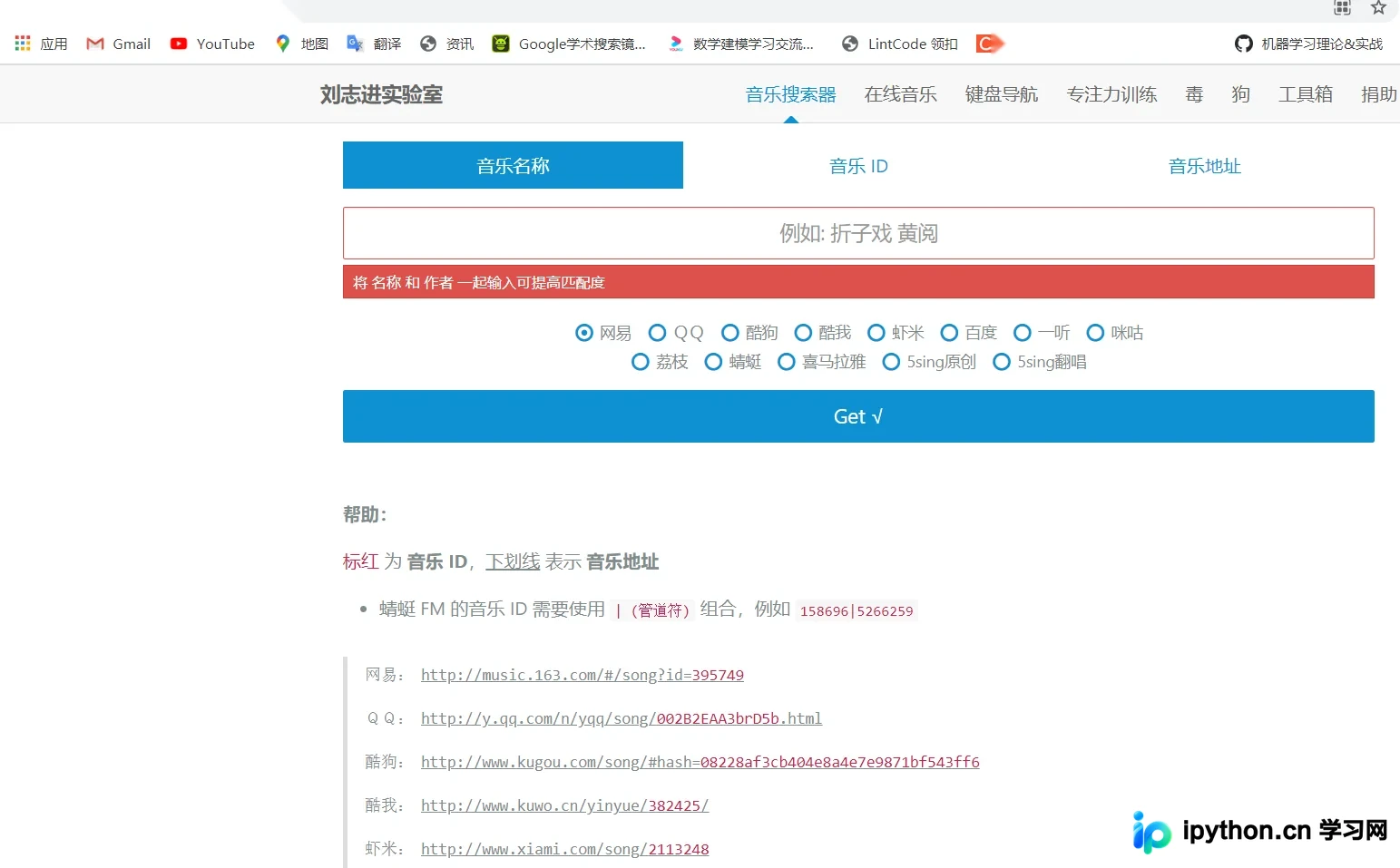
因此,自制搜索引擎的思路十分直观:利用第三方接口,直接向服务器发起请求,随后对获取的数据进行解析与保存。以下以近期热门歌曲“白月光与朱砂痣”的下载为例进行说明:
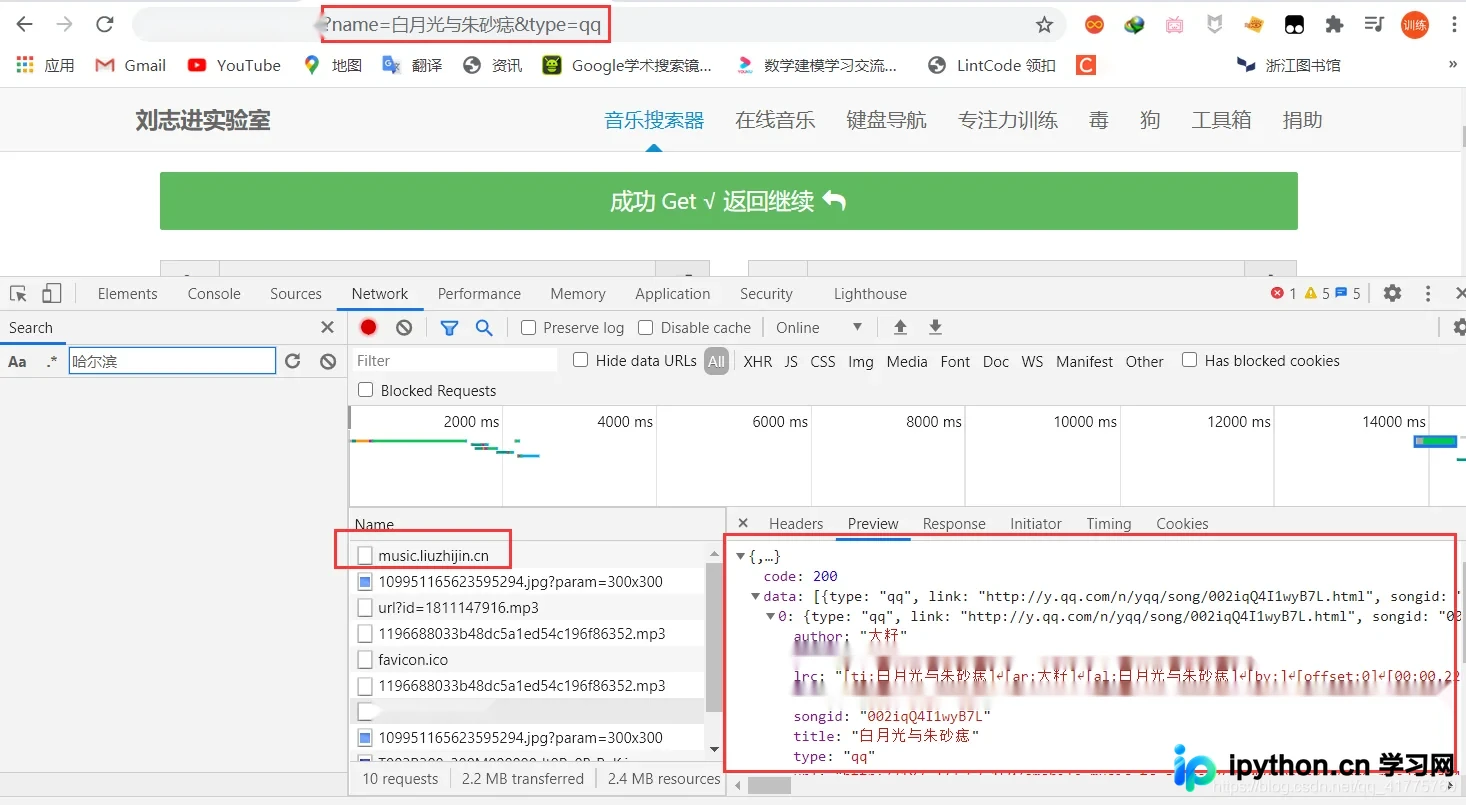
解析结果如上所示,获取的数据格式为JSON类型。除了歌曲名称外,还需要指定音乐平台以获取准确的资源链接。
基础源代码实现如下:
import requests
import jsonpath
import os
"""
  1.url
  2.模拟浏览器请求
  3.解析网页源代码
  4.保存数据
"""
def song_download(url,title,author):
  # 创建文件夹
  os.makedirs("music",exist_ok=True)
  path = 'music\{}.mp3'.format(title)
  print('歌曲:{0}-{1},正在下载...'.format(title,author))
  # 下载(这种读写文件的下载方式适合少量文件的下载)
  content = requests.get(url).content
  with open(file = title + author + '.mp3',mode='wb') as f:
    f.write(content)
  print('下载完毕,{0}-{1},请试听'.format(title,author))

def get_music_name():
  """
  搜索歌曲名称
  :return:
  """
  name = input("请输入歌曲名称:")
  print("1.网易云:netease\n2.QQ:qq\n3.酷狗:kugou\n4.酷我:kuwo\n5.百度:baidu\n6.喜马拉雅:ximalaya")
  platfrom = input("输入音乐平台类型:")
  print("-------------------------------------------------------")
  url = 'https://music.liuzhijin.cn/'
  headers = {
    "user-agent":"Mozilla/5.0 (Windows NT 10.0; Win64; x64) AppleWebKit/537.36 (KHTML, like Gecko) Chrome/87.0.4280.141 Safari/537.36",
    # 判断请求是异步还是同步
    "x-requested-with":"XMLHttpRequest",
  }
  param = {
    "input":name,
    "filter":"name",
    "type":platfrom,
    "page": 1,
  }
  res = requests.post(url=url,data=param,headers=headers)
  json_text = res.json()

  title = jsonpath.jsonpath(json_text,'$..title')
  author = jsonpath.jsonpath(json_text,'$..author')
  url = jsonpath.jsonpath(json_text, '$..url')
  if title:
    songs = list(zip(title,author,url))
    for s in songs:
      print(s[0],s[1],s[2])
    print("-------------------------------------------------------")
    index = int(input("请输入您想下载的歌曲版本:"))
    song_download(url[index],title[index],author[index])
  else:
    print("对不起,暂无搜索结果!")

if __name__ == "__main__":
  get_music_name()
运行效果演示如下:
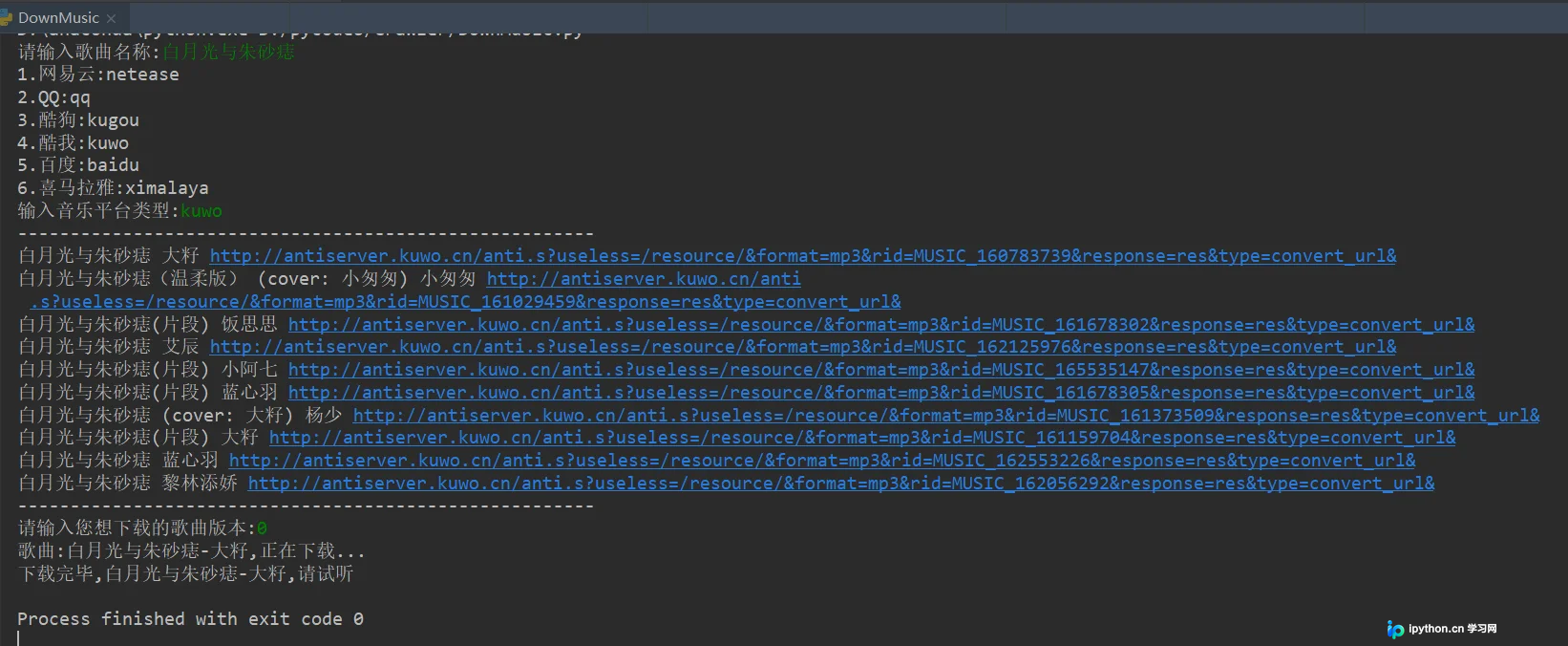
执行后,当前目录下将生成对应的歌曲.mp3文件。

然而,上述歌曲检索过程均在PyCharm专业版的控制台中进行,这种交互方式的用户体验较为糟糕。针对上述两个问题(体验差与功能单一),我对源代码进行了改进。
# 导入模块
from tkinter import *
import requests
import jsonpath
import os
from urllib.request import urlretrieve

# 2.功能实现
"""
  1.url
  2.模拟浏览器请求
  3.解析网页源代码
  4.保存数据
"""
def song_download(url,title,author):
  # 创建文件夹
  os.makedirs("music",exist_ok=True)
  path = 'music\{}.mp3'.format(title)
  text.insert(END,'歌曲:{0}-{1},正在下载...'.format(title,author))
  # 文本框滑动
  text.see(END)
  # 更新
  text.update()
  # 下载
  urlretrieve(url,path)
  text.insert(END,'下载完毕,{0}-{1},请试听'.format(title,author))
  # 文本框滑动
  text.see(END)
  # 更新
  text.update()

def get_music_name():
  """
  搜索歌曲名称
  :return:
  """
  name = entry.get()
  platfrom = var.get()
  # name = '白月光与朱砂痣'
  url = 'https://music.liuzhijin.cn/'
  headers = {
    "user-agent":"Mozilla/5.0 (Windows NT 10.0; Win64; x64) AppleWebKit/537.36 (KHTML, like Gecko) Chrome/87.0.4280.141 Safari/537.36",
    # 判断请求是异步还是同步
    "x-requested-with":"XMLHttpRequest",
  }
  param = {
    "input":name,
    "filter":"name",
    "type":platfrom,
    "page": 1,
  }
  res = requests.post(url=url,data=param,headers=headers)
  json_text = res.json()

  title = jsonpath.jsonpath(json_text,'$..title')
  author = jsonpath.jsonpath(json_text,'$..author')
  url = jsonpath.jsonpath(json_text, '$..url')
  print(title,author,url)
  song_download(url[0],title[0],author[0])


# 1.用户界面
# 创建画板
root = Tk()
# 设置窗口标题
root.title('全网音乐下载器')
# 设置窗口大小以及出现的位置
root.geometry('560x450+400+200')
# 标签组件
label = Label(root,text="请输入下载的歌曲:",font=('楷体',20))
# 定位与布局
label.grid(row=0)
# 输入框组件
entry = Entry(root,font=('宋体',20))
entry.grid(row=0,column=1)
# 单选按钮
var = StringVar()
r1 = Radiobutton(root,text='网易云',variable=var,value='netease')
r1.grid(row=1,column=0)
r2 = Radiobutton(root,text='QQ',variable=var,value='qq')
r2.grid(row=1,column=1)
# 列表框
text = Listbox(root,font=('楷体',16),width=50,height=15)
text.grid(row=2,columnspan=2)
# 下载按钮
button1 = Button(root,text='开始下载',font=('楷体',15),command=get_music_name)
button1.grid(row=3,column=0)
button2 = Button(root,text='退出程序',font=('楷体',15),command=root.quit)
button2.grid(row=3,column=1)
# 显示界面
root.mainloop()
改进后的效果如下:
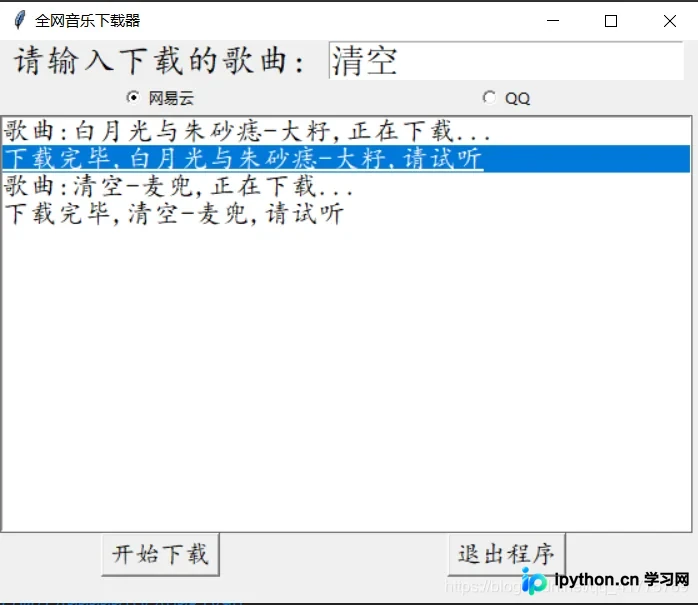
在添加UI界面及部分代码优化后,可以通过.py代码打包成.exe文件,以便分发给普通用户使用。
以上即为Python基于爬虫实现全网搜索并下载音乐的详细内容,更多关于python 爬虫下载音乐的资料请关注本站其它相关文章!
免责声明:本文内容仅供参考,不代表本站观点。转载或引用请注明出处。









