

Python3使用matplotlib绘制Sigmoid函数及激活函数可视化

发布时间:2026-10-14| 5人浏览过
本文介绍如何在Python3中使用matplotlib库绘制Sigmoid函数曲线,并提供包含Tanh、ReLU及PReLU函数的完整可视化代码。通过调整坐标轴样式与范围,清晰展示各激活函数的数学特性,适用于深度学习入门及模型训练中的激活函数对比分析。
以下直接展示相关实现代码。
Python3绘制Sigmoid函数基础示例
import matplotlib.pyplot as plt
import numpy as np
def sigmoid(x):
  # 直接返回sigmoid函数
  return 1. / (1. + np.exp(-x))

def plot_sigmoid():
  # param:起点,终点,间距
  x = np.arange(-8, 8, 0.2)
  y = sigmoid(x)
  plt.plot(x, y)
  plt.show()

if __name__ == '__main__':
  plot_sigmoid()
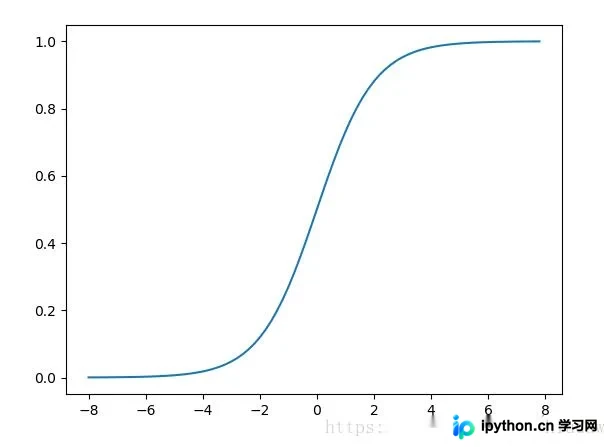
效果如图所示:
补充知识:Python实现并绘制Sigmoid、Tanh、ReLU及PReLU函数
具体实现如下:
多激活函数(Sigmoid/Tanh/ReLU/PReLU)综合可视化
# -*- coding:utf-8 -*-
from matplotlib import pyplot as plt
import numpy as np
import mpl_toolkits.axisartist as axisartist

def sigmoid(x):
  return 1. / (1 + np.exp(-x))

def tanh(x):
  return (np.exp(x) - np.exp(-x)) / (np.exp(x) + np.exp(-x))

def relu(x):
  return np.where(x<0,0,x)

def prelu(x):
  return np.where(x<0,0.5*x,x)

def plot_sigmoid():
  x = np.arange(-10, 10, 0.1)
  y = sigmoid(x)
  fig = plt.figure()
  # ax = fig.add_subplot(111)
  ax = axisartist.Subplot(fig,111)
  ax.spines['top'].set_color('none')
  ax.spines['right'].set_color('none')
  # ax.spines['bottom'].set_color('none')
  # ax.spines['left'].set_color('none')
  ax.axis['bottom'].set_axisline_style("-|>",size=1.5)
  ax.spines['left'].set_position(('data', 0))
  ax.plot(x, y)
  plt.xlim([-10.05, 10.05])
  plt.ylim([-0.02, 1.02])
  plt.tight_layout()
  plt.savefig("sigmoid.png")
  plt.show()

def plot_tanh():
  x = np.arange(-10, 10, 0.1)
  y = tanh(x)
  fig = plt.figure()
  ax = fig.add_subplot(111)
  ax.spines['top'].set_color('none')
  ax.spines['right'].set_color('none')
  # ax.spines['bottom'].set_color('none')
  # ax.spines['left'].set_color('none')
  ax.spines['left'].set_position(('data', 0))
  ax.spines['bottom'].set_position(('data', 0))
  ax.plot(x, y)
  plt.xlim([-10.05, 10.05])
  plt.ylim([-1.02, 1.02])
  ax.set_yticks([-1.0, -0.5, 0.5, 1.0])
  ax.set_xticks([-10, -5, 5, 10])
  plt.tight_layout()
  plt.savefig("tanh.png")
  plt.show()

def plot_relu():
  x = np.arange(-10, 10, 0.1)
  y = relu(x)
  fig = plt.figure()
  ax = fig.add_subplot(111)
  ax.spines['top'].set_color('none')
  ax.spines['right'].set_color('none')
  # ax.spines['bottom'].set_color('none')
  # ax.spines['left'].set_color('none')
  ax.spines['left'].set_position(('data', 0))
  ax.plot(x, y)
  plt.xlim([-10.05, 10.05])
  plt.ylim([0, 10.02])
  ax.set_yticks([2, 4, 6, 8, 10])
  plt.tight_layout()
  plt.savefig("relu.png")
  plt.show()

def plot_prelu():
  x = np.arange(-10, 10, 0.1)
  y = prelu(x)
  fig = plt.figure()
  ax = fig.add_subplot(111)
  ax.spines['top'].set_color('none')
  ax.spines['right'].set_color('none')
  # ax.spines['bottom'].set_color('none')
  # ax.spines['left'].set_color('none')
  ax.spines['left'].set_position(('data', 0))
  ax.spines['bottom'].set_position(('data', 0))
  ax.plot(x, y)
  plt.xticks([])
  plt.yticks([])
  plt.tight_layout()
  plt.savefig("prelu.png")
  plt.show()

if __name__ == "__main__":
  plot_sigmoid()
  plot_tanh()
  plot_relu()
  plot_prelu()
以上关于Python3使用matplotlib绘制Sigmoid函数的案例全部内容已分享完毕,希望能对读者有所帮助,也欢迎大家继续支持本站。
免责声明:本文内容仅供参考,不代表本站观点。转载或引用请注明出处。









