

利用Python Matplotlib实现TensorFlow数据可视化

发布时间:2026-10-13| 6人浏览过
本文介绍如何使用Python的Matplotlib库对TensorFlow模型训练过程中的数据进行可视化分析。通过动态绘图展示预测结果与真实数据的对比,帮助开发者直观监控模型优化过程。文中包含关键代码示例及注意事项,如变量初始化方法的更新,为AI初学者提供实用的调试与展示技巧。
借助Matplotlib库提供的多种函数,可以将TensorFlow生成的数据转化为直观的图形,从而更便捷地进行数据分析与模型效果评估。
import tensorflow as tf
import numpy as np
import matplotlib.pyplot as plt

def add_layer(inputs, in_size, out_size, activation_function=None):
  Weights = tf.Variable(tf.random_normal([in_size, out_size]))
  biases = tf.Variable(tf.zeros([1, out_size]) + 0.1)
  Wx_plus_b = tf.matmul(inputs, Weights) + biases
  if activation_function is None:
    outputs = Wx_plus_b
  else:
    outputs = activation_function(Wx_plus_b)
  return outputs

# Make up some real data
x_data = np.linspace(-1, 1, 300)[:, np.newaxis]
noise = np.random.normal(0, 0.05, x_data.shape)
y_data = np.square(x_data) - 0.5 + noise


# define placeholder for inputs to network
xs = tf.placeholder(tf.float32, [None, 1])
ys = tf.placeholder(tf.float32, [None, 1])
# add hidden layer
l1 = add_layer(xs, 1, 10, activation_function=tf.nn.relu)
# add output layer
prediction = add_layer(l1, 10, 1, activation_function=None)

# the error between prediction and real data
loss = tf.reduce_mean(tf.reduce_sum(tf.square(ys-prediction), reduction_indices=[1]))
train_step = tf.train.GradientDescentOptimizer(0.1).minimize(loss)
# important step

#initialize_all_variables已被弃用,使用tf.global_variables_initializer代替。
init = tf.global_variables_initializer()
sess = tf.Session()
sess.run(init)

# plot the real data
fig = plt.figure()
ax = fig.add_subplot(1,1,1)
ax.scatter(x_data, y_data)
plt.ion() #使plt不会在show之后停止而是继续运行
plt.show()


for i in range(1000):
  # training
  sess.run(train_step, feed_dict={xs: x_data, ys: y_data})
  if i % 50 == 0:
    # to visualize the result and improvement
    try:
      ax.lines.remove(lines[0]) #在每一次绘图之前先讲上一次绘图删除,使得画面更加清晰
    except Exception:
      pass
    prediction_value = sess.run(prediction, feed_dict={xs: x_data})
    # plot the prediction
    lines = ax.plot(x_data, prediction_value, 'r-', lw=5) #'r-'指绘制一个红色的线
    plt.pause(1) #指等待一秒钟
运行上述代码后,预期结果应呈现为动态变化的图形。建议使用IPython环境执行以获得最佳动态展示效果;若使用Jupyter Notebook运行,图片可能无法呈现动态效果。
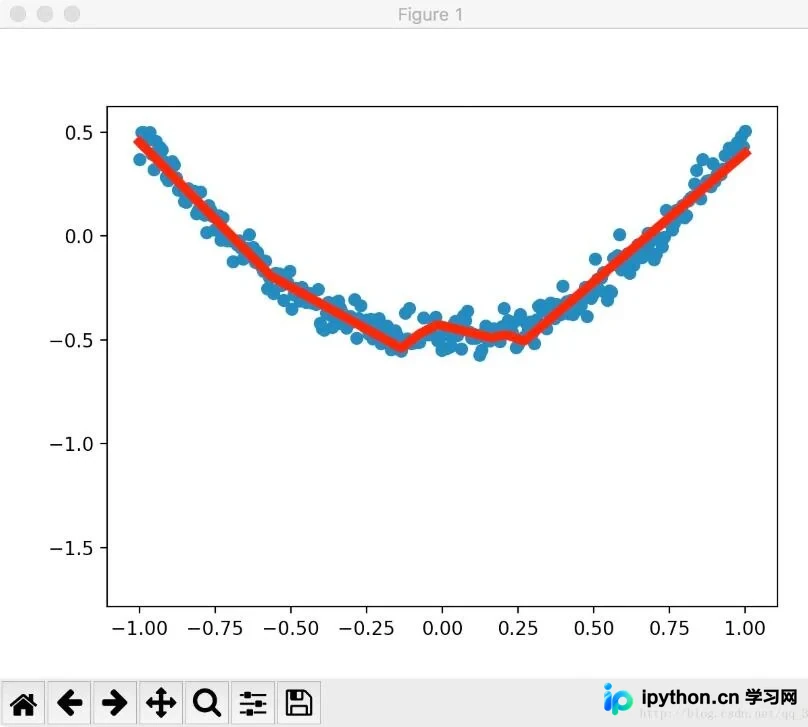
需要特别注意:旧版API中的initialize_all_variables函数已被官方弃用,请统一改用tf.global_variables_initializer来进行全局变量初始化。
以上就是通过Python Matplotlib包实现TensorFlow数据可视化的完整介绍。希望本文内容能为各位读者提供有价值的参考,欢迎继续支持本站获取更多技术分享。
免责声明:本文内容仅供参考,不代表本站观点。转载或引用请注明出处。









