

Python Matplotlib多子图图例管理与外部定位技巧

发布时间:2026-10-13| 3人浏览过
本文介绍在Python Matplotlib中处理多子图时图例重复的问题,通过调用legend_.remove()移除冗余图例,并利用loc和bbox_to_anchor参数将单个图例精确放置在图表外部,提升可视化效果。
Matplotlib多子图图例处理与外部定位
在使用Matplotlib进行数据可视化时,常遇到如何控制图例位置、将图例移至图表外部,以及在包含多个子图的图形中消除重复图例的需求。以下通过一个具体示例演示这些操作。
import pandas as pd
import numpy as np
import matplotlib.pyplot as plt

fig = plt.figure(1)
ax1 = fig.add_subplot(2,2,1)
ax2 = fig.add_subplot(2,2,2)
ax3 = fig.add_subplot(2,2,3)
ax4 = fig.add_subplot(2,2,4)

df1 = pd.DataFrame(np.random.randn(3,5),columns = ['one','two','three','four','five'])
df2 = pd.DataFrame(np.random.randn(3,5),columns = ['one','two','three','four','five'])
df3 = pd.DataFrame(np.random.randn(3,5),columns = ['one','two','three','four','five'])
df4 = pd.DataFrame(np.random.randn(3,5),columns = ['one','two','three','four','five'])

df1.plot(ax = ax1, title = "df1", grid = 'on')
df2.plot(ax = ax2, title = "df1", grid = 'on')
df3.plot(ax = ax3, title = "df1", grid = 'on')
df4.plot(ax = ax4, title = "df1", grid = 'on')

plt.show()
执行上述代码后的运行结果如下图所示。
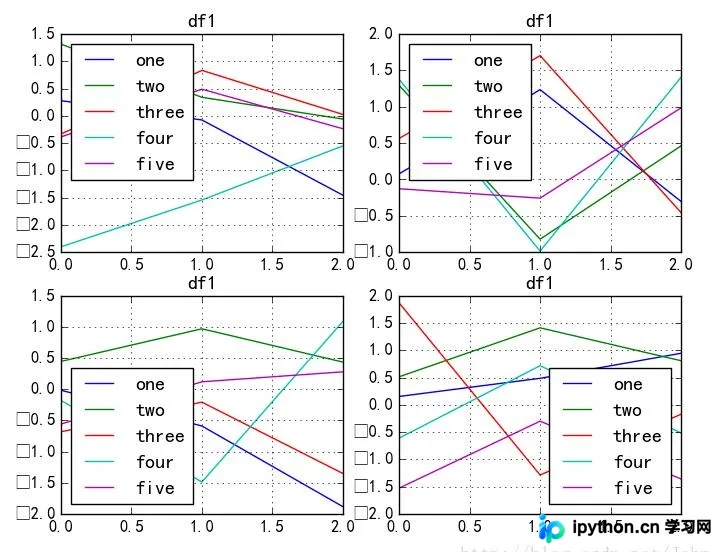
从结果可见,代码随机生成了几个DataFrame,并在一个figure()中创建了四个子图。由于每个子图都绘制了数据,其图例均显示为DataFrame的列名(即dataframe.columns中的值)。此时需要解决如何去除这些重复图例的问题。
import pandas as pd
import numpy as np
import matplotlib.pyplot as plt

fig = plt.figure(1)
ax1 = fig.add_subplot(2,2,1)
ax2 = fig.add_subplot(2,2,2)
ax3 = fig.add_subplot(2,2,3)
ax4 = fig.add_subplot(2,2,4)

df1 = pd.DataFrame(np.random.randn(3,5),columns = ['one','two','three','four','five'])
df2 = pd.DataFrame(np.random.randn(3,5),columns = ['one','two','three','four','five'])
df3 = pd.DataFrame(np.random.randn(3,5),columns = ['one','two','three','four','five'])
df4 = pd.DataFrame(np.random.randn(3,5),columns = ['one','two','three','four','five'])

df1.plot(ax = ax1, title = "df1", grid = 'on')
df2.plot(ax = ax2, title = "df1", grid = 'on')
df3.plot(ax = ax3, title = "df1", grid = 'on')
df4.plot(ax = ax4, title = "df1", grid = 'on')

ax1.legend_.remove()  ##移除子图ax1中的图例
ax2.legend_.remove()  ##移除子图ax2中的图例
ax3.legend_.remove()  ##移除子图ax3中的图例

plt.show()
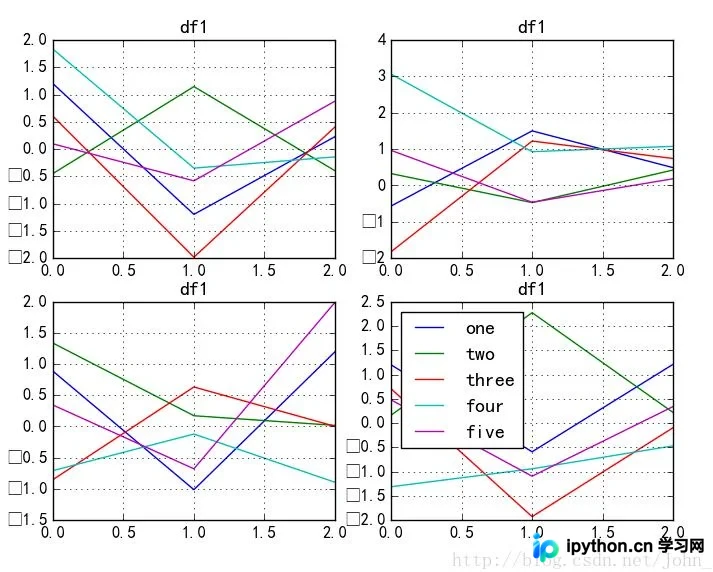
可以看到,ax1、ax2和ax3中的图例已被成功移除,但上图的整体美观度仍有提升空间。是否有方法将图例放置在图表外部?具体实现如下所示。
import pandas as pd
import numpy as np
import matplotlib.pyplot as plt

fig = plt.figure(1)
ax1 = fig.add_subplot(2,2,1)
ax2 = fig.add_subplot(2,2,2)
ax3 = fig.add_subplot(2,2,3)
ax4 = fig.add_subplot(2,2,4)

df1 = pd.DataFrame(np.random.randn(3,5),columns = ['one','two','three','four','five'])
df2 = pd.DataFrame(np.random.randn(3,5),columns = ['one','two','three','four','five'])
df3 = pd.DataFrame(np.random.randn(3,5),columns = ['one','two','three','four','five'])
df4 = pd.DataFrame(np.random.randn(3,5),columns = ['one','two','three','four','five'])

df1.plot(ax = ax1, title = "df1", grid = 'on')
df2.plot(ax = ax2, title = "df1", grid = 'on')
df3.plot(ax = ax3, title = "df1", grid = 'on')
df4.plot(ax = ax4, title = "df1", grid = 'on')

ax1.legend_.remove()
ax2.legend_.remove()
ax3.legend_.remove()
ax4.legend(loc=2, bbox_to_anchor=(1.05,1.0),borderaxespad = 0.)  ##设置ax4中legend的位置,将其放在图外

plt.show()
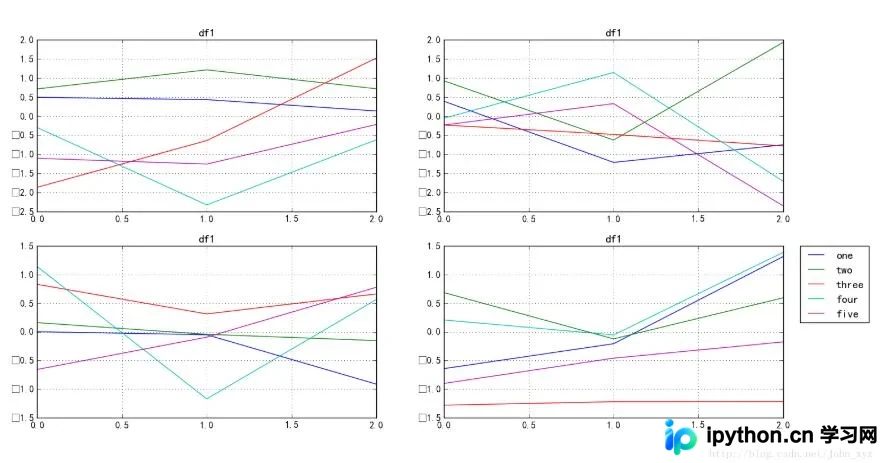
其中,参数loc用于指定图例的基本位置。
bbox_to_anchor用于在bbox_transform坐标系(默认为轴坐标系)中为图例定义任意精确位置。
以上关于Python Matplotlib实现将图例放在图外的内容即为分享的全部技巧,希望能对大家有所帮助,也欢迎大家继续支持本站。
免责声明:本文内容仅供参考,不代表本站观点。转载或引用请注明出处。









