

Python制作简易版小工具之计算天数的实现思路

发布时间:2026-10-14| 6人浏览过
本文介绍如何使用Python的Tkinter库构建一个简易的日期天数计算工具。通过结合calendar模块与GUI界面,实现输入指定日期后自动计算该日期在当年中的第几天,并包含对格式错误、月份越界及天数异常的完整处理逻辑。
需求分析与实现思路
需求分析
核心功能要求:接收一个格式为“YYYY-M-D”(例如“2020-2-12”)的日期字符串,并计算该日期是给定年份的第几天。
实现思路梳理
- 界面构建:利用tkinter和tkinter.ttk模块搭建图形用户界面;
- 核心逻辑:调用calendar模块进行天数计算;
- 数据校验:严格规范输入日期的格式;
- 逻辑判断:对输入的月份和天数进行有效性校验;
- 错误处理:当输入不符合规范时,抛出异常并给出提示。
代码实现与运行效果
代码实现部分
# -*- coding: utf-8 -*-
'''
@File: calc_day_v2.py
@Time: 2020/02/12 20:33:22
@Author: 大梦三千秋
@Contact: yiluolion@126.com
'''
# Put the import lib here
from tkinter import *
import tkinter.messagebox as messagebox
from tkinter import ttk
import calendar
class MyException(BaseException):
  '''自定义异常类
  '''
  def __init__(self, message):
    self.message = message
def calculate(*args):
  '''计算天数方法
  '''
  try:
    # 用以存储天数
    nums = 0
    # 获取输入框中的数据
    year, month, day = [int(elem) for elem in date.get().split('-')]
    # 判断月份,规定在 1-12 之间
    if 1 <= month <= 12:
      # 遍历计算天数
      for month_x in range(1, month + 1):
        # 计算每月的天数
        _, month_day = calendar.monthrange(year, month_x)
        # 遍历的月份等于当前月份,对天数进行规整
        if month_x == month:
          # 文本输入框给出的天数不符合,则抛出异常
          if day > month_day:
            raise MyException("信息输入错误,注意天数!")
          continue
        nums += month_day
      nums += day
      # 设置值到文本框
      days.set(nums)
      the_year.set(year)
    else: # 月份超出范围抛出异常
      raise MyException("信息输入错误,注意月份!")
  except MyException as e:
    messagebox.showinfo(title="输入信息错误", message=e)
  except Exception as e:
    # print(e)
    messagebox.showinfo(title="输入信息错误", message="输出格式错误,按照 2020-2-12 这样的格式输入。注意月份,天数!")
root = Tk()
root.title("计算天数")
# 设置框架
mainframe = ttk.Frame(root, padding="3 3 12 12")
mainframe.grid(column=0, row=0, sticky=(N, S, E, W))
root.columnconfigure(0, weight=1)
root.rowconfigure(0, weight=1)
date = StringVar()
the_year = StringVar()
days = StringVar()
# 文本框部件布置
date_entry = ttk.Entry(mainframe, width=10, textvariable=date)
date_entry.grid(column=2, row=1, sticky=(W, E))
# 标签及按钮的布置
ttk.Label(mainframe, text="例如:2020-2-12").grid(column=5, row=1, sticky=(W, E))
ttk.Label(mainframe, textvariable=days).grid(column=4, row=2, sticky=(W, E))
ttk.Label(mainframe, textvariable=the_year).grid(column=2, row=2, sticky=(W, E))
ttk.Button(mainframe, text="Calculate", command=calculate).grid(column=5, row=3)
ttk.Label(mainframe, text="日期:").grid(column=1, row=1, sticky=E)
ttk.Label(mainframe, text="这一天是").grid(column=1, row=2, sticky=E)
ttk.Label(mainframe, text="年的第").grid(column=3, row=2, sticky=E)
ttk.Label(mainframe, text="天").grid(column=5, row=2, sticky=W)
# 设置内边距
for child in mainframe.winfo_children():
  child.grid_configure(padx=5, pady=5)
date_entry.focus()
root.bind('<Return>', calculate)
root.mainloop()
运行效果展示
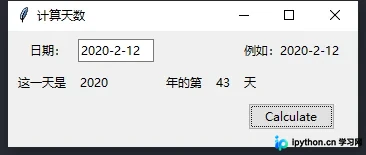
当输入格式正确且数据合法时,界面显示如下结果:
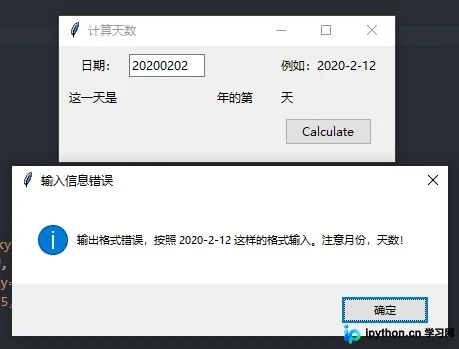
若未按照“YYYY-M-D”格式输入,系统将弹出错误提示:
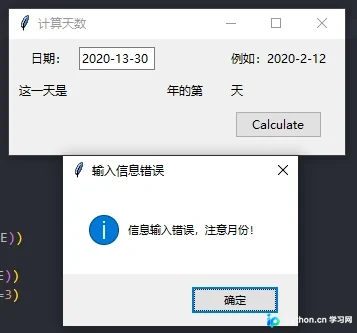
若输入的月份数值不在1至12之间,提示效果如下:
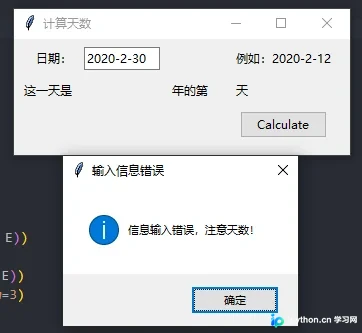
若输入的天数超过了当月实际天数,错误提示效果如下:
本文内容主要基于前文对tkinter模块的讲解进行延伸,旨在通过一个计算天数的具体案例,展示Tkinter在实际小工具开发中的应用。
以上即为Python制作简易版小工具之计算天数的完整实现思路,希望能为读者提供有益参考。
免责声明:本文内容仅供参考,不代表本站观点。转载或引用请注明出处。









