

Python实现Ping连通性与端口开放状态检测

发布时间:2026-10-13| 5人浏览过
本文介绍使用Python脚本检测主机IP连通性及指定端口开放状态的方法。通过封装Socket连接与ICMP协议,可设置超时时间并直观判断网络状况。文中对比了Python实现与传统命令行工具(如telnet、wget、ssh、curl)的优劣,展示了不同权限及网络状态下的测试结果与代码示例。
Python网络检测方案概述
采用Python语言进行网络检测
相较于依赖各种系统命令的方式,Python方案更为便捷。它允许用户自定义超时时间,从而能够清晰、直观地判断目标主机是否可达以及指定端口是否处于开放状态。
相关命令执行与返回结果分析
在拥有完整系统权限的情况下,测试结果显示Ping连通且端口开放,具体表现如下:
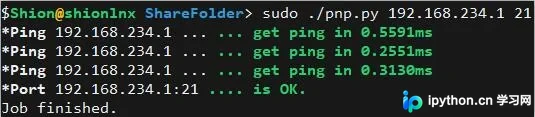
在无root权限(跳过Ping测试)的环境中,端口状态显示为开放,具体表现如下:

在拥有完整系统权限的情况下,Ping测试连通,但远端端口处于关闭状态,具体表现如下:
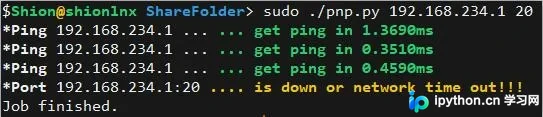
在拥有完整系统权限的情况下,Ping测试连通,但本地端口处于关闭状态,具体表现如下:
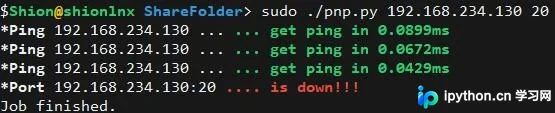
在拥有完整系统权限的情况下,Ping测试无法连通(此时端口自然也无法访问),具体表现如下:
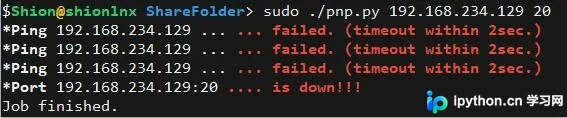
Python检测脚本实现
核心脚本pnp.py的代码实现
#!/usr/bin/python
#name pnp.py
#ping and port
#coding:utf-8

import os, sys, socket, struct, select, time
ICMP_ECHO_REQUEST = 8 # Seems to be the same on Solaris.
socket.setdefaulttimeout(4)

#first argument
host=sys.argv[1]

#second argument
port=int(sys.argv[2])

#socket try connect

def PortOpen(ip,port):
 print( '\033[1m*Port\033[0m %s:%d' %(ip,port)),
 s=socket.socket(socket.AF_INET,socket.SOCK_STREAM)

 try:
  s.connect((ip,port))
  s.shutdown(2)
  print( '\033[1;32m.... is OK.\033[0m' )
  return True

 except socket.timeout:
  print( '\033[1;33m.... is down or network time out!!!\033[0m' )
  return False

 except:

  print( '\033[1;31m.... is down!!!\033[0m' )
  return False

def checksum(source_string):
 """
 I'm not too confident that this is right but testing seems
 to suggest that it gives the same answers as in_cksum in ping.c
 """
 sum = 0
 countTo = (len(source_string)/2)*2
 count = 0
 while count<countTo:
 thisVal = ord(source_string[count + 1])*256 + ord(source_string[count])
 sum = sum + thisVal
 sum = sum & 0xffffffff # Necessary?
 count = count + 2
 if countTo<len(source_string):
 sum = sum + ord(source_string[len(source_string) - 1])
 sum = sum & 0xffffffff # Necessary?
 sum = (sum >> 16) + (sum & 0xffff)
 sum = sum + (sum >> 16)
 answer = ~sum
 answer = answer & 0xffff
 # Swap bytes. Bugger me if I know why.
 answer = answer >> 8 | (answer << 8 & 0xff00)
 return answer
def receive_one_ping(my_socket, ID, timeout):
 """
 receive the ping from the socket.
 """
 timeLeft = timeout
 while True:
 startedSelect = time.time()
 whatReady = select.select([my_socket], [], [], timeLeft)
 howLongInSelect = (time.time() - startedSelect)
 if whatReady[0] == []: # Timeout
  return
 timeReceived = time.time()
 recPacket, addr = my_socket.recvfrom(1024)
 icmpHeader = recPacket[20:28]
 type, code, checksum, packetID, sequence = struct.unpack(
  "bbHHh", icmpHeader
 )
 if packetID == ID:
  bytesInDouble = struct.calcsize("d")
  timeSent = struct.unpack("d", recPacket[28:28 + bytesInDouble])[0]
  return timeReceived - timeSent
 timeLeft = timeLeft - howLongInSelect
 if timeLeft <= 0:
  return
def send_one_ping(my_socket, dest_addr, ID):
 """
 Send one ping to the given >dest_addr<.
 """
 dest_addr = socket.gethostbyname(dest_addr)
 # Header is type (8), code (8), checksum (16), id (16), sequence (16)
 my_checksum = 0
 # Make a dummy heder with a 0 checksum.
 header = struct.pack("bbHHh", ICMP_ECHO_REQUEST, 0, my_checksum, ID, 1)
 #a1 = struct.unpack("bbHHh",header) #my test
 bytesInDouble = struct.calcsize("d")
 data = (192 - bytesInDouble) * "Q"
 data = struct.pack("d", time.time()) + data
 # Calculate the checksum on the data and the dummy header.
 my_checksum = checksum(header + data)
 # Now that we have the right checksum, we put that in. It's just easier
 # to make up a new header than to stuff it into the dummy.
 header = struct.pack("bbHHh", ICMP_ECHO_REQUEST, 0, socket.htons(my_checksum), ID, 1)
 packet = header + data
 my_socket.sendto(packet, (dest_addr, 1)) # Don't know about the 1
def do_one(dest_addr, timeout):
 """
 Returns either the delay (in seconds) or none on timeout.
 """
 delay=None
 icmp = socket.getprotobyname("icmp")
 try:
 my_socket = socket.socket(socket.AF_INET, socket.SOCK_RAW, icmp)
 my_ID = os.getpid() & 0xFFFF
 send_one_ping(my_socket, dest_addr, my_ID)
 delay = receive_one_ping(my_socket, my_ID, timeout)
 my_socket.close()
 except socket.error, (errno, msg):
 if errno == 1:
  # Operation not permitted
  msg = msg + (
  " - not root."
  )
  raise socket.error(msg)
 #raise # raise the original error
 return delay
def verbose_ping(dest_addr, timeout = 2, count = 100):
 """
 Send >count< ping to >dest_addr< with the given >timeout< and display
 the result.
 """
 for i in xrange(count):
 print "\033[1m*Ping\033[0m %s ..." % dest_addr,
 try:
  delay = do_one(dest_addr, timeout)
 except socket.error, e:
  print "\033[1;31m... failed. (%s)" % e
  break
 if delay == None:
  print "\033[1;31m... failed. (timeout within %ssec.)\033[0m" % timeout
 else:
  delay = delay * 1000
  print "\033[1;32m... get ping in %0.4fms\033[0m" % delay

if __name__ == '__main__':
 if os.geteuid() == 0:
 verbose_ping(host,2,3)
 else:
 	print "\033[1m*Ping\033[0m test must be sudo or root..."
 PortOpen(host,port)
 print( 'Job finished.')
传统命令行检测工具对比
传统命令行检测方式介绍
关于使用ping命令检测连通性的方法此处不再赘述,对于端口检测,可以使用以下命令行工具。
目前telnet命令已基本不再使用,部分系统可能已不再预装telnet客户端。
使用命令行测试时,若连接失败通常会等待较长时间;即使端口连接成功,也需要通过返回的具体内容来自行判断服务状态。
使用telnet命令
telnet ip port
$telnet 192.168.234.1
Trying 192.168.234.1...
Connected to 192.168.234.1.
Escape character is '^]'.
......
使用wget命令
wget ip:port
$wget 192.168.234.1:21
--2019-03-22 15:42:27-- http://192.168.234.1:21/
正在连接 192.168.234.1:21... 已连接。
已发出 HTTP 请求,正在等待回应... 200 没有 HTTP 头,尝试 HTTP/0.9
长度:未指定
正在保存至: “index.html”
......
使用SSH命令
ssh -v ip -p port
$ssh -v 192.168.234.1 -p 21
OpenSSH_7.4p1, OpenSSL 1.0.2k-fips 26 Jan 2017
debug1: Reading configuration data /etc/ssh/ssh_config
debug1: /etc/ssh/ssh_config line 58: Applying options for *
debug1: Connecting to 192.168.234.1 [192.168.234.1] port 21.
debug1: Connection established.
......
使用curl命令
culr ip:port
$curl 192.168.234.1:21
220 Serv-U FTP Server v15.1 ready...
530 Not logged in.
......
以上即为使用Python测试Ping主机IP及端口开放状态的完整实例,希望能对读者有所帮助,欢迎大家参考与支持。
免责声明:本文内容仅供参考,不代表本站观点。转载或引用请注明出处。









