

Python实现高斯分布模拟与可视化详解

发布时间:2026-10-13| 6人浏览过
本文详细介绍如何使用Python模拟高斯分布。通过NumPy和SciPy库计算均值、标准差、偏度和峰度,并利用Matplotlib绘制一维及二元高斯分布的3D图像。内容涵盖标准正态分布定义、参数影响及不同方差下的二元分布对比,提供完整代码示例与可视化效果分析。
高斯分布基本概念
正态分布,亦称常态分布或高斯分布,是统计学中一种极其重要的连续概率分布。
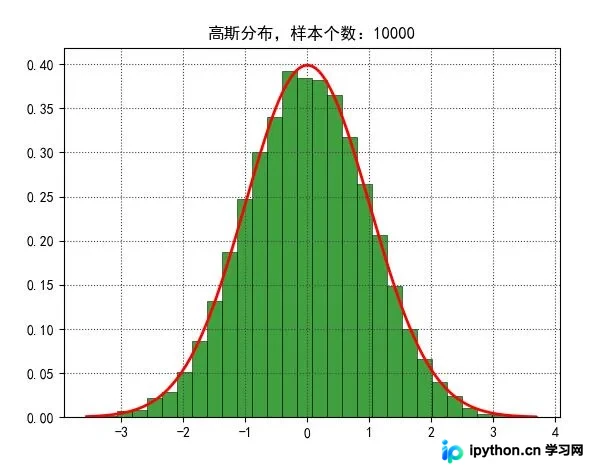
其概率密度函数图像呈现典型的钟形曲线特征:两端较低,中间高耸,且关于中心轴左右对称。这种独特的形状使其在学术界和工程领域常被直观地称为钟形曲线。
若随机变量X服从正态分布,其分布由数学期望μ和方差σ^2两个参数完全确定。概率密度函数中,期望值μ决定了分布中心的位置,而标准差σ(方差的平方根)则控制了分布的离散程度或幅度。特别地,当μ=0且σ=1时,该分布被称为标准正态分布。
Python模拟一维高斯分布
接下来,我们将通过Python代码来模拟这一分布过程。
#!/usr/bin/python
# -*- coding:utf-8 -*-

import numpy as np
from scipy import stats
import math
import matplotlib as mpl
import matplotlib.pyplot as plt
from mpl_toolkits.mplot3d import Axes3D
from matplotlib import cm
import seaborn


def calc_statistics(x):
  n = x.shape[0] # 样本个数
  # 手动计算
  m = 0
  m2 = 0
  m3 = 0
  m4 = 0
  for t in x:
    m += t
    m2 += t*t
    m3 += t**3
    m4 += t**4
  m /= n
  m2 /= n
  m3 /= n
  m4 /= n

  mu = m
  sigma = np.sqrt(m2 - mu*mu)
  skew = (m3 - 3*mu*m2 + 2*mu**3) / sigma**3
  kurtosis = (m4 - 4*mu*m3 + 6*mu*mu*m2 - 4*mu**3*mu + mu**4) / sigma**4 - 3
  print('手动计算均值、标准差、偏度、峰度:', mu, sigma, skew, kurtosis)

  # 使用系统函数验证
  mu = np.mean(x, axis=0)
  sigma = np.std(x, axis=0)
  skew = stats.skew(x)
  kurtosis = stats.kurtosis(x)
  return mu, sigma, skew, kurtosis


if __name__ == '__main__':
  d = np.random.randn(10000)
  print(d)
  print(d.shape)
  mu, sigma, skew, kurtosis = calc_statistics(d)
  print('函数库计算均值、标准差、偏度、峰度:', mu, sigma, skew, kurtosis)
  # 一维直方图
  mpl.rcParams['font.sans-serif'] = 'SimHei'
  mpl.rcParams['axes.unicode_minus'] = False
  plt.figure(num=1, facecolor='w')
  y1, x1, dummy = plt.hist(d, bins=30, normed=True, color='g', alpha=0.75, edgecolor='k', lw=0.5)
  t = np.arange(x1.min(), x1.max(), 0.05)
  y = np.exp(-t**2 / 2) / math.sqrt(2*math.pi)
  plt.plot(t, y, 'r-', lw=2)
  plt.title('高斯分布,样本个数:%d' % d.shape[0])
  plt.grid(b=True, ls=':', color='#404040')
  # plt.show()

  d = np.random.randn(100000, 2)
  mu, sigma, skew, kurtosis = calc_statistics(d)
  print('函数库计算均值、标准差、偏度、峰度:', mu, sigma, skew, kurtosis)

  # 二维图像
  N = 30
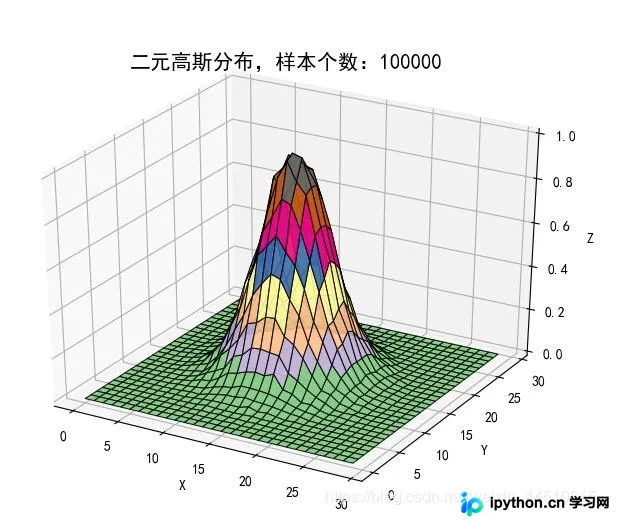
  density, edges = np.histogramdd(d, bins=[N, N])
  print('样本总数:', np.sum(density))
  density /= density.max()
  x = y = np.arange(N)
  print('x = ', x)
  print('y = ', y)
  t = np.meshgrid(x, y)
  print(t)
  fig = plt.figure(facecolor='w')
  ax = fig.add_subplot(111, projection='3d')
  # ax.scatter(t[0], t[1], density, c='r', s=50*density, marker='o', depthshade=True, edgecolor='k')
  ax.plot_surface(t[0], t[1], density, cmap=cm.Accent, rstride=1, cstride=1, alpha=0.9, lw=0.75, edgecolor='k')
  ax.set_xlabel('X')
  ax.set_ylabel('Y')
  ax.set_zlabel('Z')
  plt.title('二元高斯分布,样本个数:%d' % d.shape[0], fontsize=15)
  plt.tight_layout(0.1)
  plt.show()
首先展示一个包含6个样本点的简单模拟案例。
二元高斯分布可视化与方差对比
随后,我们将对比不同方差参数下的二元高斯分布形态。
#!/usr/bin/python
# -*- coding:utf-8 -*-

import numpy as np
from scipy import stats
import matplotlib as mpl
import matplotlib.pyplot as plt
from mpl_toolkits.mplot3d import Axes3D
from matplotlib import cm


if __name__ == '__main__':
  x1, x2 = np.mgrid[-5:5:51j, -5:5:51j]
  x = np.stack((x1, x2), axis=2)
  print('x1 = \n', x1)
  print('x2 = \n', x2)
  print('x = \n', x)

  mpl.rcParams['axes.unicode_minus'] = False
  mpl.rcParams['font.sans-serif'] = 'SimHei'
  plt.figure(figsize=(9, 8), facecolor='w')
  sigma = (np.identity(2), np.diag((3,3)), np.diag((2,5)), np.array(((2,1), (1,5))))
  for i in np.arange(4):
    ax = plt.subplot(2, 2, i+1, projection='3d')
    norm = stats.multivariate_normal((0, 0), sigma[i])
    y = norm.pdf(x)
    ax.plot_surface(x1, x2, y, cmap=cm.Accent, rstride=1, cstride=1, alpha=0.9, lw=0.3, edgecolor='#303030')
    ax.set_xlabel('X')
    ax.set_ylabel('Y')
    ax.set_zlabel('Z')
  plt.suptitle('二元高斯分布方差比较', fontsize=18)
  plt.tight_layout(1.5)
  plt.show()
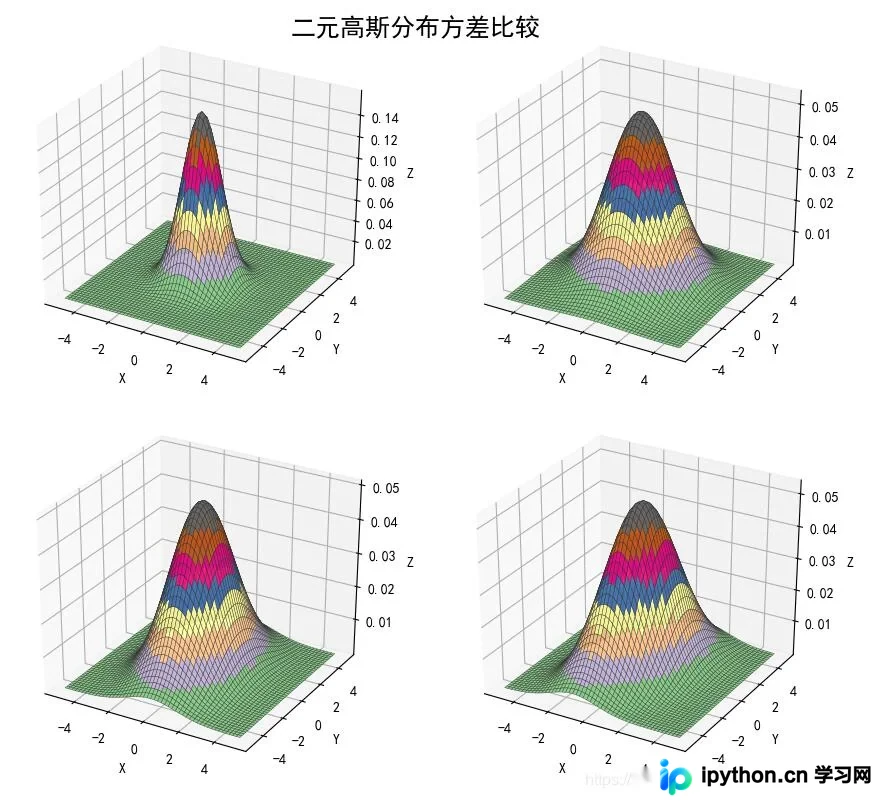
观察生成的3D图像,可以清晰看到分布形态随参数变化的视觉效果。
以上即为利用Python模拟高斯分布的完整示例,希望能为读者提供有价值的参考。
免责声明:本文内容仅供参考,不代表本站观点。转载或引用请注明出处。









