

Python实现基于百度AI的颜值打分系统

发布时间:2026-10-13| 6人浏览过
本文介绍如何使用Python结合百度AI开放平台接口,开发一个颜值打分系统。通过调用百度人脸检测API,获取用户的年龄、性别及颜值评分,并利用Tkinter构建图形界面。代码包含完整的配置、图像预处理及UI交互逻辑,适合Python初学者及AI应用开发者参考。
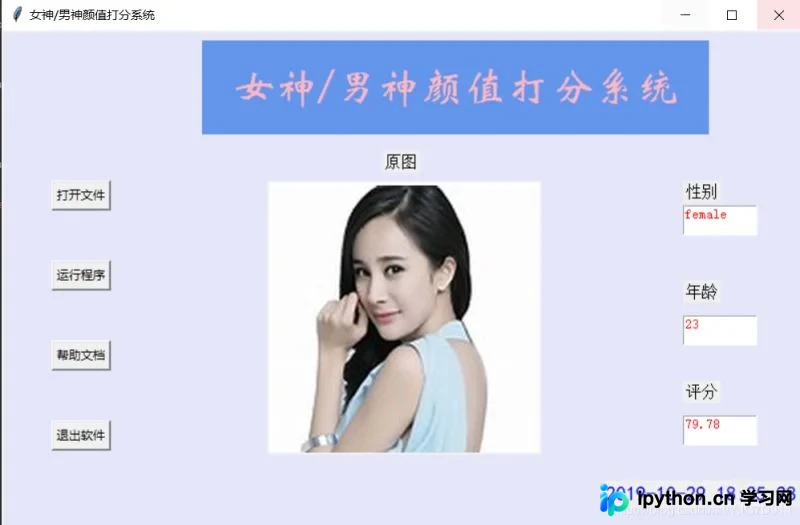
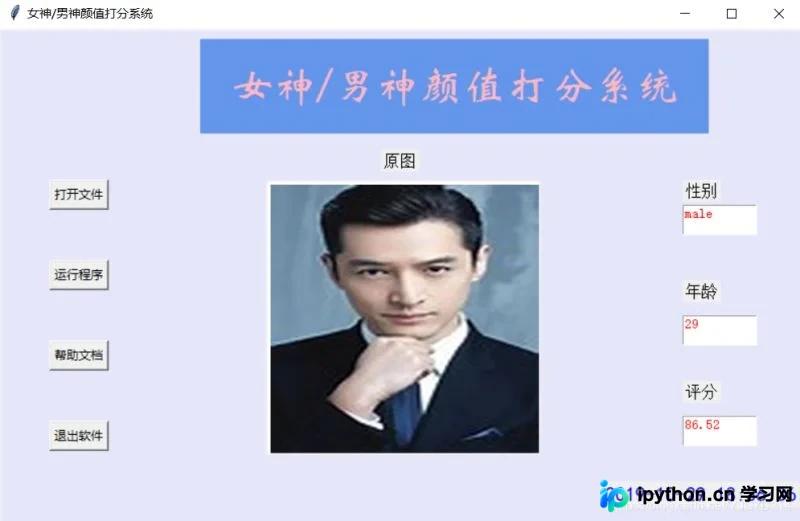
系统效果展示
首先展示系统运行效果,若效果符合预期,请继续参考下方的实现代码。
核心代码实现
具体实现代码如下:
#!/usr/bin/env python
# -*- coding:utf-8 -*-
"""
pip install pillow
pip install baidu-aip
pip install tkinter
"""
import PIL
import time
import base64
import tkinter as tk
from PIL import Image
from PIL import ImageTk
from aip import AipFace
from tkinter.filedialog import askopenfilename
# 配置百度aip参数
APP_ID = '15768642'
API_KEY = 'xhiiGmGPRCRj10XIqVlVeCky'
SECRET_KEY = 'ZDMMAO7StwTKzW8BspVQxvoGtdgSW4yI'
a_face = AipFace(APP_ID, API_KEY, SECRET_KEY)
image_type = 'BASE64'
options = {'face_field': 'age,gender,beauty'}
def get_file_content(file_path):
  """获取文件内容"""
  with open(file_path, 'rb') as fr:
    content = base64.b64encode(fr.read())
    return content.decode('utf8')
def face_score(file_path):
  """脸部识别分数"""
  result = a_face.detect(get_file_content(file_path), image_type, options)
  print(result)
  age = result['result']['face_list'][0]['age']
  beauty = result['result']['face_list'][0]['beauty']
  gender = result['result']['face_list'][0]['gender']['type']
  return age, beauty, gender
class ScoreSystem():
  """打分系统类"""
  root = tk.Tk()
  # 修改程序框的大小
  root.geometry('800x500')
  # 添加程序框标题
  root.title('女神/男神颜值打分系统')
  # 修改背景色
  canvas = tk.Canvas(root,
            width=800, # 指定Canvas组件的宽度
            height=500, # 指定Canvas组件的高度
            bg='#E6E6FA') # 指定Canvas组件的背景色
  canvas.pack()
  def start_interface(self):
    """主运行函数"""
    self.title()
    self.time_component()
    # 打开本地文件
    tk.Button(self.root, text='打开文件', command=self.show_original_pic).place(x=50, y=150)
    # 进行颜值评分
    tk.Button(self.root, text='运行程序', command=self.open_files2).place(x=50, y=230)
    # 显示帮助文档
    tk.Button(self.root, text='帮助文档', command=self.show_help).place(x=50, y=310)
    # 退出系统
    tk.Button(self.root, text='退出软件', command=self.quit).place(x=50, y=390)
    # 显示图框标题
    tk.Label(self.root, text='原图', font=10).place(x=380, y=120)
    # 修改图片大小
    self.label_img_original = tk.Label(self.root)
    # 设置显示图框背景
    self.cv_orinial = tk.Canvas(self.root, bg='white', width=270, height=270)
    # 设置显示图框边框
    self.cv_orinial.create_rectangle(8, 8, 260, 260, width=1, outline='red')
    # 设置位置
    self.cv_orinial.place(x=265, y=150)
    # 显示图片位置
    self.label_img_original.place(x=265, y=150)
    # 设置评分标签
    tk.Label(self.root, text='性别', font=10).place(x=680, y=150)
    self.text1 = tk.Text(self.root, width=10, height=2)
    tk.Label(self.root, text='年龄', font=10).place(x=680, y=250)
    self.text2 = tk.Text(self.root, width=10, height=2)
    tk.Label(self.root, text='评分', font=10).place(x=680, y=350)
    self.text3 = tk.Text(self.root, width=10, height=2)
    # 填装文字
    self.text1.place(x=680, y=175)
    self.text2.place(x=680, y=285)
    self.text3.place(x=680, y=385)
    # 开启循环
    self.root.mainloop()
  def show_original_pic(self):
    """放入文件"""
    self.path_ = askopenfilename(title='选择文件')
    # 处理文件
    img = Image.open(fr'{self.path_}')
    img = img.resize((270, 270), PIL.Image.ANTIALIAS) # 调整图片大小至270*270
    # 生成tkinter图片对象
    img_png_original = ImageTk.PhotoImage(img)
    # 设置图片对象
    self.label_img_original.config(image=img_png_original)
    self.label_img_original.image = img_png_original
    self.cv_orinial.create_image(5, 5, anchor='nw', image=img_png_original)
  def open_files2(self):
    # 获取百度API接口获得的年龄、分数、性别
    age, score, gender = face_score(self.path_)
    # 清楚text文本框内容并进行插入
    self.text1.delete(1.0, tk.END)
    self.text1.tag_config('red', foreground='RED')
    self.text1.insert(tk.END, gender, 'red')
    self.text2.delete(1.0, tk.END)
    self.text2.tag_config('red', foreground='RED')
    self.text2.insert(tk.END, age, 'red')
    self.text3.delete(1.0, tk.END)
    self.text3.tag_config('red', foreground='RED')
    self.text3.insert(tk.END, score, 'red')
  def show_help(self):
    """显示帮助"""
    pass
  def quit(self):
    """退出"""
    self.root.quit()
  def get_time(self, lb):
    """获取时间"""
    time_str = time.strftime("%Y-%m-%d %H:%M:%S") # 获取当前的时间并转化为字符串
    lb.configure(text=time_str) # 重新设置标签文本
    self.root.after(1000, self.get_time, lb) # 每隔1s调用函数 get_time自身获取时间
  def time_component(self):
    """时间组件"""
    lb = tk.Label(self.root, text='', fg='blue', font=("黑体", 15))
    lb.place(relx=0.75, rely=0.90)
    self.get_time(lb)
  def title(self):
    """标题设计"""
    lb = tk.Label(self.root, text='女神/男神颜值打分系统',
           bg='#6495ED',
           fg='lightpink', font=('华文新魏', 32),
           width=20,
           height=2,
           # relief=tk.SUNKEN
           )
    lb.place(x=200, y=10)
score_system = ScoreSystem()
score_system.start_interface()
总结
总结
以上介绍了使用Python实现男神女神颜值打分系统的完整过程,希望能为读者提供有益的帮助。如有任何疑问,欢迎留言,小编将及时回复。在此感谢大家对本站的支持! 若本文对您有帮助,欢迎转载,请注明出处,谢谢!
免责声明:本文内容仅供参考,不代表本站观点。转载或引用请注明出处。









