

Python matplotlib修改子图背景色的方法

发布时间:2026-10-13| 6人浏览过
本文介绍在Python中使用matplotlib库时,如何修改子图的背景颜色。虽然plt.plot()函数不支持直接设置背景色,但可以通过plt.subplot()函数的axisbg参数来实现。文章提供了具体的代码示例,展示了如何为多个子图分别设置不同的背景颜色,帮助读者掌握这一技巧。
问题背景
在主图中,背景颜色的修改似乎没有直接的参数可用,因为plt.plot()函数中并没有提供axisbg这一选项。
子图背景色修改方法
然而,我们可以通过调整plt.subplot()函数的参数来改变子图的背景颜色。以下是实现子图背景颜色修改的具体代码示例。
代码示例
import matplotlib.pyplot as plt
import numpy as np

# Fixing random state for reproducibility
np.random.seed(19680801)

dt = 0.01
t = np.arange(0, 30, dt)
nse1 = np.random.randn(len(t))         # white noise 1
nse2 = np.random.randn(len(t))         # white noise 2
s1 = np.sin(2 * np.pi * 10 * t) + nse1
s2 = np.sin(2 * np.pi * 10 * t) + nse2
s3 = np.sin(2 * np.pi * 10 * t) + nse1
s4 = np.sin(2 * np.pi * 10 * t) + nse2

fig= plt.figure(1) # 创建图表1
axs0=plt.subplot(221,axisbg='#FFDAB9') #在图标1中创建子图
axs0.plot(t, s1) #横轴与纵轴数据
axs0.set_xlim(0, 2) #限制x轴的取值范围
axs1=plt.subplot(222,axisbg='#7FFF00')
axs1.plot(t, s2)
axs1.set_xlim(0, 2)
axs2=plt.subplot(223,axisbg='#FF7F50')
axs2.plot(t, s3)
axs2.set_xlim(0, 2)
axs3=plt.subplot(224,axisbg='#A9A9A9')
axs3.plot(t, s4)
axs3.set_xlim(0, 2)

plt.show()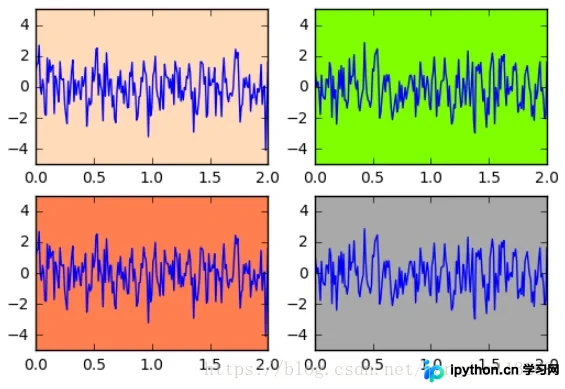
总结
以上就是本文的全部内容,希望对大家的学习有所帮助,也希望大家多多支持本站。
免责声明:本文内容仅供参考,不代表本站观点。转载或引用请注明出处。









