

Python使用NetworkX绘制关系网络图教程

本文介绍如何在Python中利用NetworkX和Matplotlib库绘制关系网络图。内容涵盖环境安装、节点与边的数据准备、核心绘图参数(如大小、颜色、形状)及多种布局算法(如圆形、弹簧布局)的使用,并提供了基于CSV数据的完整代码示例。
前言与数据说明
前言
笔者昨日初涉此领域,耗时一下午进行尝试。后续将持续更新相关内容,若文中存在疏漏或错误,恳请各位专家指正,非常感谢!
数据描述
本示例涉及两个数据文件:一个文件定义了网络图的节点及其所属类别(分为0、1、2、3四类),其中类别为0的节点将被剔除,不参与绘图;另一个文件定义了网络图的边。数据的基本特征如下:
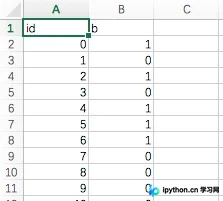
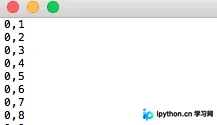
如图1所示,id代表节点标识,b代表节点类别;如图2所示,每行数据中的两个数字代表一条边所连接的两个节点。
NetworkX安装与基础使用
Networkx
安装
笔者操作系统为Mac OS,可直接在终端执行命令 sudo pip install networkx 进行安装。由于代码中部分函数在Python 3环境中可能报错,此处使用Python 2.7.13版本实现。
基本使用方法
import networkx as nx          #导入networkx包
import matplotlib.pyplot as plt   #导入绘图包matplotlib(需要安装,方法见第一篇笔记)
G =nx.random_graphs.barabasi_albert_graph(100,1)  #生成一个BA无标度网络G
nx.draw(G)             #绘制网络G
plt.savefig("ba.png")      #输出方式1: 将图像存为一个png格式的图片文件
plt.show()              #输出方式2: 在窗口中显示这幅图像
绘图参数详解
参数介绍
- `node_size`:指定节点尺寸大小(默认值为300,单位未明确,即图中所示点的大小) - `node_color`:指定节点颜色(默认值为红色,可用字符串简写标识,如'r'代表红色,'b'代表蓝色等,详见手册) - `node_shape`:节点形状(默认值为圆形,用字符串'o'标识,详见手册) - `alpha`:透明度(默认值为1.0,即不透明;0表示完全透明) - `width`:边的宽度(默认值为1.0) - `edge_color`:边的颜色(默认值为黑色) - `style`:边的样式(默认值为实线,可选值包括:solid、dashed、dotted、dashdot) - `with_labels`:是否显示节点标签(默认值为True) - `font_size`:节点标签字体大小(默认值为12) - `font_color`:节点标签字体颜色(默认值为黑色)
节点布局算法
布局
- circular_layout:节点在圆环上均匀分布
- random_layout:节点随机分布
- shell_layout:节点在同心圆上分布
- spring_layout:使用Fruchterman-Reingold算法排列节点
- spectral_layout:根据图的拉普拉斯特征向量排列节点
完整绘图代码示例
代码
# coding:utf-8


import networkx as nx
import matplotlib.pyplot as plt
import csv

with open('node-8.csv','rb') as csvfile:
	reader = csv.DictReader(csvfile)
	column = [row['b'] for row in reader]
	id_tag0 = [row['id'] for row in reader]
#print column
id_tag = []
for item in id_tag0:
	id_tag.append(int(item))

# =================Setting node parameters====================
node_0 = []
node_1 = []
node_2 = []
node_3 = []
node_color = []
node_color_y = []
node_color_r = []
node_color_g = []
node_color_b = []
node_shape = []
node_shape_0 = []
node_shape_1 = []
node_shape_2 = []
node_shape_3 = []

for i in range(len(column)):
	if int(column[i]) == 0:
		pass
	elif int(column[i]) == 1:
		color = 'r'
		shape = 'o'
		node_1.append(i)
		node_color_r.append(color)
		node_shape_1.append(shape)
	elif int(column[i]) == 2:
		color = 'g'
		shape = 'o'
		node_2.append(i)
		node_color_g.append(color)
		node_shape_2.append(shape)
	else:
		color = 'b'
		shape = '*'
		node_3.append(i)
		node_color_b.append(color)
		node_shape_3.append(shape)
	node_color.append(color)
	node_shape.append(shape)
# ==============================================================


with open('node-8.csv','rb') as csvfile:
	reader = csv.DictReader(csvfile)
	column1 = [row['b'] for row in reader]
	id_tag1 = [row['id'] for row in reader]
#print column
id_tag11 = []
for item in id_tag1:
	id_tag11.append(int(item))


edge = []
with open('edge-8.txt','r') as f:
	data = f.readlines()
	for line in data:
		#print line
		line = tuple(line.replace('\r','').replace('\n','').replace('\t','').split(','))
		edge.append(line)
#print edge

# ===============Setting edge parameters=========================
edge_color = []
edge_style = []

for item in edge:
	#print item
	if int(column1[int(item[0])]) == 0 or int(column1[int(item[1])]) == 0:
		pass
	elif int(column1[int(item[0])]) == 1 or int(column1[int(item[1])]) == 1:
		color = 'r'
		#style0 = 'dashdot'
		#color_r_list.append(color)
	elif int(column1[int(item[0])]) == 2 or int(column1[int(item[1])]) == 2:
		color = 'g'
		#style0 = 'dashed'
		#color_r_list.append(color)
	else:
		color = 'b'
		#style0 = 'dotted'
		#color_b_list.append(color)
	edge_color.append(color)
	#edge_style.append(style0)


G = nx.Graph()
#G.add_nodes_from(id_tag)
G.add_edges_from(edge)

#nx.draw(G,pos=nx.random_layout(G), nodelist = node_0, node_color = node_color_y, node_size=120, node_shape=node_shape_0)
#nx.draw(G,pos=nx.random_layout(G), nodelist = node_1, node_color = node_color_r, node_size=120, node_shape=node_shape_1)
#nx.draw(G,pos=nx.random_layout(G), nodelist = node_2, node_color = node_color_g, node_size=120, node_shape=node_shape_2)
#nx.draw(G,pos=nx.random_layout(G), nodelist = node_3, node_color = node_color_b, node_size=120, node_shape=node_shape_3)

nx.draw_networkx(G,pos=nx.random_layout(G),node_color=node_color,node_size=10,node_shape='o',edge_color=edge_color,width=0.3,style='solid',font_size=8)
#nx.draw_networkx(G,pos=nx.random_layout(G),nodelist = node_1,node_color=node_color,node_size=100,node_shape='o',style='dashdot')
#nx.draw_networkx(G,pos=nx.random_layout(G),node_color=color_g_list,node_size=150,node_shape='^',style='dashed')
#nx.draw_networkx(G,pos=nx.random_layout(G),node_color=color_b_list,node_size=150,node_shape='*',style='dotted')

#plt.legend()
#nx.draw_networkx(G)
plt.show()
画图
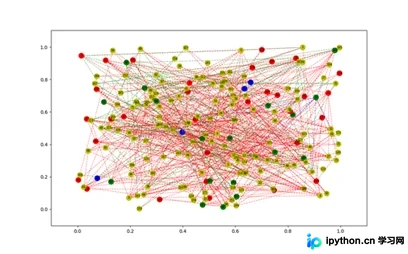
以上就是本文的全部内容,希望对大家的学习有所帮助,也希望大家多多支持本站。
免责声明:本文内容仅供参考,不代表本站观点。转载或引用请注明出处。









