

Python爬虫实战:抓取马云微博数据详解

本文通过Python代码演示如何抓取马云的微博内容。首先利用浏览器开发者工具分析Ajax请求,识别GET请求中的关键参数及分页机制。接着解析返回的JSON数据,提取cardlistInfo中的总数量及cards中的微博正文、点赞、评论和转发数。最后结合Requests与PyQuery库,实现批量获取并保存微博信息至本地文件。
本文通过具体实例介绍使用Python抓取马云微博数据的方法,供读者参考学习。
分析请求
在浏览器中启用Ajax的XHR过滤器,持续滑动页面加载新微博,可观察到系统不断发出Ajax请求。
选取其中一个请求进行参数分析,点击该请求进入详情页面,具体界面如图所示:
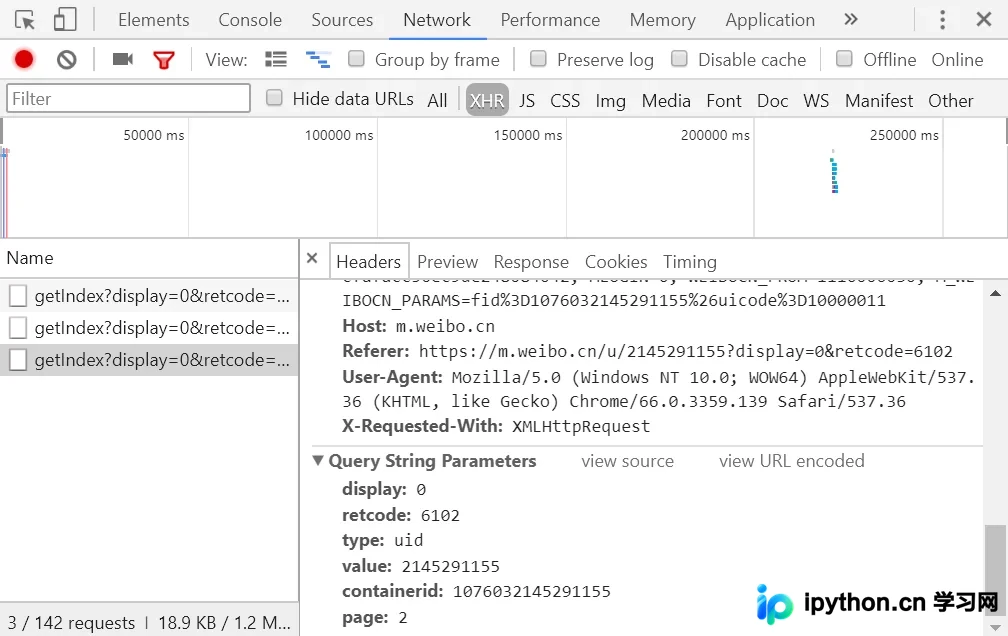
该请求为GET类型,包含6个参数:display、retcode、type、value、containerid和page。对比多个请求发现,仅page参数发生变化,显然该参数用于控制分页。
分析响应
响应结构如图所示:
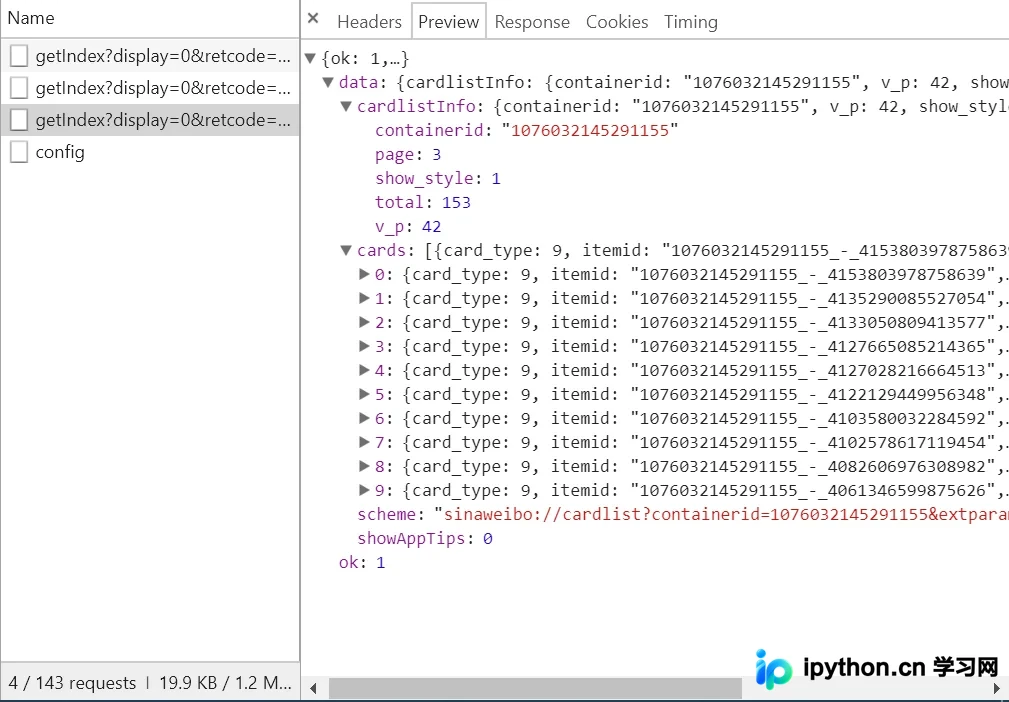
响应内容为JSON格式,浏览器开发者工具已自动解析以便查看。关键信息分为cardlistInfo和cards两部分。展开cardlistInfo,其中包含total字段,代表微博总数,据此可估算分页数量。
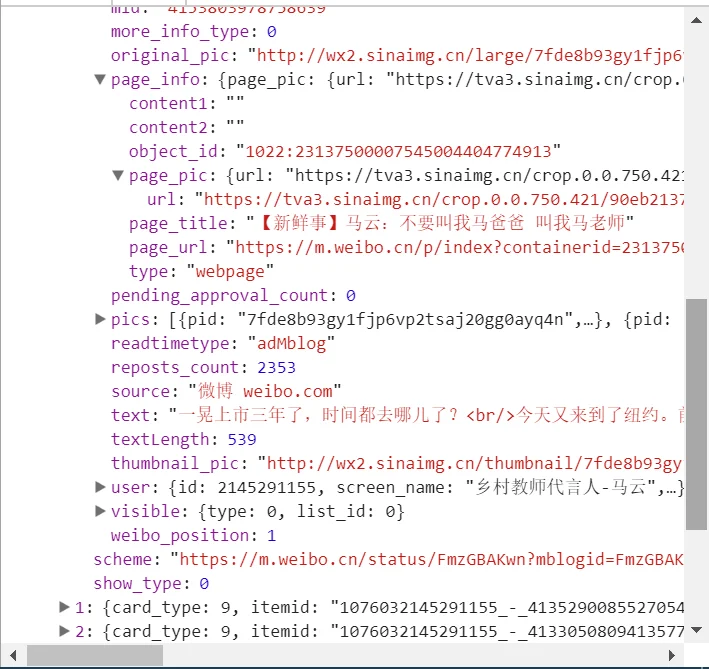
cards中还有一个重要字段mblog,展开后可见其包含微博的具体信息,如attitudes_count(点赞数)、comments_count(评论数)、reposts_count(转发数)、created_at(发布时间)以及text(微博正文)。这些数据格式规范,便于提取。
每次请求接口可获取10条微博,只需调整page参数即可。通过简单的循环结构,即可获取全部微博内容。
实战演练
接下来编写程序模拟上述Ajax请求,以爬取马云的所有微博。
首先定义一个方法获取每次请求的结果。由于page是可变参数,将其作为方法参数传入,代码如下:
from urllib.parse import urlencode
import requests
base_url = 'https://m.weibo.cn/api/container/getIndex?'
headers = {
  'Host': 'm.weibo.cn',
  'Referer': 'https://m.weibo.cn/u/2145291155',
  'User-Agent': 'Mozilla/5.0 (Macintosh; Intel Mac OS X 10_12_3) AppleWebKit/537.36 (KHTML, like Gecko) Chrome/58.0.3029.110 Safari/537.36',
  'X-Requested-With': 'XMLHttpRequest',
}
def get_page(page):
  params = {
    'display': '0',
    'retcode': '6102',
    'type': 'uid',
    'value': '2145291155',
    'containerid': '1076032145291155',
    'page': page
  }
  url = base_url + urlencode(params)
  try:
    response = requests.get(url, headers=headers)
    if response.status_code == 200:
      return response.json()
  except requests.ConnectionError as e:
    print('Error', e.args)
代码中定义base_url表示请求URL的前半部分,随后构建参数字典。其中display、retcode、type、value、containerid为固定参数,page为可变参数。调用urlencode()将参数转换为URL GET请求格式,例如display=0&retcode=6102&type=uid&value=2145291155&containerid=1076032145291155&page=2。将base_url与参数拼接形成完整URL,使用Requests发送请求并传入headers。若响应状态码为200,则调用json()方法解析内容并返回;否则不返回信息;若出现异常,则捕获并打印异常信息。
随后定义解析方法,从结果中提取所需信息,如微博正文、点赞数、评论数和转发数。遍历cards,获取mblog中的各项数据,赋值给新字典后返回。
from pyquery import PyQuery as pq
def parse_page(json):
  if json:
    items = json.get('cards')
    for item in items:
      item = item.get('mblog')
      weibo = {}
      weibo['微博内容:'] = pq(item.get('text')).text()
      weibo['转发数'] = item.get('attitudes_count')
      weibo['评论数'] = item.get('comments_count')
      weibo['点赞数'] = item.get('reposts_count')
      yield weibo
此处使用PyQuery去除正文中的HTML标签。
最后遍历page参数,打印提取到的结果。
if __name__ == '__main__':
  for page in range(1, 50):
    json = get_page(page)
    results = parse_page(json)
    for result in results:
      print(result)
此外,可添加一个方法将结果保存至本地TXT文件。
def save_to_txt(result):
  with open('马云的微博.txt', 'a', encoding='utf-8') as file:
    file.write(str(result) + '\n')
代码整理
import requests
from urllib.parse import urlencode
from pyquery import PyQuery as pq
base_url = 'https://m.weibo.cn/api/container/getIndex?'
headers = {
  'Host': 'm.weibo.cn',
  'Referer': 'https://m.weibo.cn/u/2145291155',
  'User-Agent': 'Mozilla/5.0 (Macintosh; Intel Mac OS X 10_12_3) AppleWebKit/537.36 (KHTML, like Gecko) Chrome/58.0.3029.110 Safari/537.36',
  'X-Requested-With': 'XMLHttpRequest',
}
max_page = 50
def get_page(page):
  params = {
    'display': '0',
    'retcode': '6102',
    'type': 'uid',
    'value': '2145291155',
    'containerid': '1076032145291155',
    'page': page
  }
  url = base_url + urlencode(params)
  try:
    response = requests.get(url, headers=headers)
    if response.status_code == 200:
      return response.json(), page
  except requests.ConnectionError as e:
    print('Error', e.args)
def parse_page(json, page: int):
  if json:
    items = json.get('data').get('cards')
    for index, item in enumerate(items):
      if page == 1 and index == 1:
        continue
      else:
        item = item.get('mblog')
        weibo = {}
        weibo['微博内容:'] = pq(item.get('text')).text()
        weibo['转发数:'] = item.get('attitudes_count')
        weibo['评论数:'] = item.get('comments_count')
        weibo['点赞数:'] = item.get('reposts_count')
        yield weibo
def save_to_txt(result):
  with open('马云的微博.txt', 'a', encoding='utf-8') as file:
    file.write(str(result) + '\n')
if __name__ == '__main__':
  for page in range(1, max_page + 1):
    json = get_page(page)
    results = parse_page(*json)
    for result in results:
      print(result)
      save_to_txt(result)
本文内容参考崔庆才所著《python3 网络爬虫开发实战》。
希望本文所述内容对大家的Python程序设计有所帮助。
免责声明:本文内容仅供参考,不代表本站观点。转载或引用请注明出处。









