

Python实现验证码识别:从图像预处理到调用OCR接口

发布时间:2026-10-13| 2人浏览过
本文介绍利用Python进行验证码识别的完整流程。首先通过PIL库对图像进行灰度转换与二值化处理,去除干扰线及孤立噪点。随后结合百度AI开放平台的通用文字识别接口,获取识别结果并清洗空格与特殊字符,实现自动化验证码解析。
本文分享使用Python完成验证码识别的具体实现方案,供读者参考。
第一步:通过二值化处理去除图像中的干扰线条。
第二步:对黑白图像执行降噪操作,剔除独立的黑色像素点。
第三步:清除附着在图像边框上的黑色像素点。
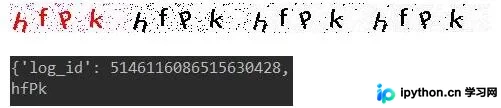
第四步:识别图像中的文字内容,并移除识别结果中的空格与点号('.')。
Python实现代码如下:
from PIL import Image
from aip import AipOcr

file='1-1-7'

# 二值化处理,转化为黑白图片
def two_value():
 for i in range(1, 5):
 # 打开文件夹中的图片
 image = Image.open(file+'.jpg')
 # 灰度图
 lim = image.convert('L')
 # 灰度阈值设为165,低于这个值的点全部填白色
 threshold = 165
 table = []

 for j in range(256):
  if j < threshold:
  table.append(0)
  else:
  table.append(1)

 bim = lim.point(table, '1')
 bim.save(file+'.1.jpg')

two_value()

# 去除干扰线
im = Image.open(file+'.1.jpg')
# 图像二值化
data = im.getdata()
w, h = im.size
black_point = 0

for x in range(1, w - 1):
 for y in range(1, h - 1):
 mid_pixel = data[w * y + x] # 中央像素点像素值
 if mid_pixel < 50: # 找出上下左右四个方向像素点像素值
  top_pixel = data[w * (y - 1) + x]
  left_pixel = data[w * y + (x - 1)]
  down_pixel = data[w * (y + 1) + x]
  right_pixel = data[w * y + (x + 1)]

  # 判断上下左右的黑色像素点总个数
  if top_pixel < 5: #小于5比小于10更精确
  black_point += 1
  if left_pixel < 5:
  black_point += 1
  if down_pixel < 5:
  black_point += 1
  if right_pixel < 5:
  black_point += 1
  if black_point < 1:
  im.putpixel((x, y), 255)
  # print(black_point)
  black_point = 0

im.save(file+'.2.jpg')

# 去除干扰线
im = Image.open(file+'.2.jpg')
# 图像二值化
data = im.getdata()
w, h = im.size
black_point = 0

for x in range(1, w - 1):
 for y in range(1, h - 1):
 if x < 2 or y < 2:
  im.putpixel((x - 1, y - 1), 255)
 if x > w - 3 or y > h - 3:
  im.putpixel((x + 1, y + 1), 255)

im.save(file+'.3.jpg')

# 定义常量
APP_ID = '11352343'
API_KEY = 'Nd5Z1NkGoLDvHwBnD2bFLpCE'
SECRET_KEY = 'A9FsnnPj1Ys2Gof70SNgYo23hKOIK8Os'

# 初始化AipFace对象
aipOcr = AipOcr(APP_ID, API_KEY, SECRET_KEY)

# 读取图片
filePath=file+'.3.jpg'
def get_file_content(filePath):
 with open(filePath, 'rb') as fp:
 return fp.read()

# 定义参数变量
options = {
 'detect_direction': 'true',
 'language_type': 'CHN_ENG',
}

# 调用通用文字识别接口
result = aipOcr.basicGeneral(get_file_content(filePath), options)
print(result)
words_result=result['words_result']
for i in range(len(words_result)):
 print(words_result[i]['words'].replace(' ','').replace('.','')) #去掉可能被识别的空格与.
以上内容为本文的全部分享,希望能为读者的学习提供协助,同时也欢迎继续支持本站。
免责声明:本文内容仅供参考,不代表本站观点。转载或引用请注明出处。









