

Python批量清理服务器过期文件脚本实战

发布时间:2026-10-13| 3人浏览过
本文介绍利用Python脚本自动清理服务器中超过30天的图片文件。针对数十万张图片导致的高内存与CPU消耗问题,提供基于os模块的批量删除代码。通过计算文件修改时间与当前时间的差值,自动移除旧文件,有效释放硬盘空间并降低服务器负载。
本文主要探讨如何使用Python编程实现服务器文件的删除操作,具体实现代码如下。
实例1
#coding:utf-8
import paramiko
"""
  创建文件 删除文件 root权限
"""

ssh=paramiko.SSHClient()
ssh.set_missing_host_key_policy(paramiko.AutoAddPolicy())
ssh.connect(hostname="192.168.1.37",port=22,username="test",password="test")
stdin,stdout,stderr=ssh.exec_command('sudo -i touch /a.txt',get_pty=True)
stdin.write("test\n")
# stdin.write("\n")
stdin.close()
stdout.close()
print(stderr.read())
stderr.close()
stdin,stdout,stderr=ssh.exec_command('sudo -i rm -f /a.txt',get_pty=True)
stdin.write("test\n")
# stdin.write("\n")
stdin.close()
print(stderr.read())
ssh.close()
实例2
由于用户微信目录长期积累大量上传的图片,导致硬盘资源面临耗尽风险。但客户要求至少保留一个月内的文件。
然而,面对包含几十万张图片的文件夹,无论是手动打开、排序还是删除,都会极大消耗服务器性能。加载这10多个G的文件必然造成内存和CPU的大量消耗,因此编写了Python脚本来自动删除30天以前的文件。
代码如下:
#-*- coding:utf-8 -*-
import os
import time
import datetime

f = list(os.listdir(‘G:\\qtp‘))
for i in range(len(f)):
  filedate = os.path.getmtime(‘G:\\qtp\\‘ + f[i])
  time1 = datetime.datetime.fromtimestamp(filedate).strftime(‘%Y-%m-%d‘)
  date1 = time.time()
  num1 =(date1 - filedate)/60/60/24
  if num1 >= 30:
    os.remove(‘G:\\qtp\\‘ + f[i])
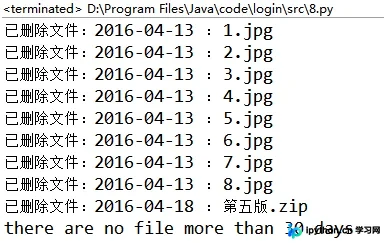
    print("已删除文件:%s : %s" % (time1, f[i]))
else:
  print("there are no file more than 30 days")
结果:
总结
以上就是本文关于Python删除服务器文件代码示例的全部内容,希望对大家有所帮助。感兴趣的朋友可以继续参阅本站其他相关专题,如有不足之处,欢迎留言指出。感谢朋友们对本站的支持!
免责声明:本文内容仅供参考,不代表本站观点。转载或引用请注明出处。









