

Python Tkinter实现简易计算器功能

发布时间:2026-10-13| 2人浏览过
本文介绍使用Python Tkinter库构建简易计算器的方法。通过Button和Entry控件实现加减乘除运算,利用functools.partial简化按钮参数传递。文章包含完整代码示例及运行效果,适合Python初学者学习GUI编程与事件处理。
在空闲时间,我使用tkinter编写了一个简易计算器,支持基础的加减乘除运算。该程序主要使用了Button和Entry两个控件。以下是具体代码实现:为了简化大量按钮相同参数的传递过程,代码中使用了偏函数partial。由于大部分按钮的参数一致,使用偏函数可以有效简化参数传递逻辑,避免重复编写相同的参数代码N次。
# -*- coding: utf-8 -*-
#author: Cullen

#import the module
from Tkinter import *
import tkFont
import os
from functools import partial
from PIL import Image, ImageTk

def get_input(entry, argu):
  entry.insert(END, argu)

def backspace(entry):
  input_len = len(entry.get())
  entry.delete(input_len - 1)

def clear(entry):
  entry.delete(0, END)

def calc(entry):
  input = entry.get()
  output = str(eval(input.strip()))
  clear(entry)
  entry.insert(END, output)

def cal():
  root = Tk()
  root.title("Calc")
  root.resizable(0,0)

  entry_font = tkFont.Font(size=12)
  entry = Entry(root, justify="right", font=entry_font)
  entry.grid(row=0, column=0, columnspan=4, sticky=N+W+S+E, padx=5, pady=5)

  button_font = tkFont.Font(size=10, weight=tkFont.BOLD)
  button_bg = '#D5E0EE'
  button_active_bg = '#E5E35B'

  myButton = partial(Button, root, bg=button_bg, padx=10, pady=3, activebackground = button_active_bg)

  button7 = myButton(text='7', command=lambda : get_input(entry, '7'))
  button7.grid(row=1, column=0, pady=5)

  button8 = myButton(text='8', command=lambda : get_input(entry, '8'))
  button8.grid(row=1, column=1, pady=5)

  button9 = myButton(text='9', command=lambda : get_input(entry, '9'))
  button9.grid(row=1, column=2, pady=5)

  button10 = myButton(text='+', command=lambda : get_input(entry, '+'))
  button10.grid(row=1, column=3, pady=5)

  button4 = myButton(text='4', command=lambda : get_input(entry, '4'))
  button4.grid(row=2, column=0, pady=5)

  button5 = myButton(text='5', command=lambda : get_input(entry, '5'))
  button5.grid(row=2, column=1, pady=5)

  button6 = myButton(text='6', command=lambda : get_input(entry, '6'))
  button6.grid(row=2, column=2, pady=5)

  button11 = myButton(text='-', command=lambda : get_input(entry, '-'))
  button11.grid(row=2, column=3, pady=5)

  button1 = myButton(text='1', command=lambda : get_input(entry, '1'))
  button1.grid(row=3, column=0, pady=5)

  button2 = myButton(text='2', command=lambda : get_input(entry, '2'))
  button2.grid(row=3, column=1, pady=5)

  button3 = myButton(text='3', command=lambda : get_input(entry, '3'))
  button3.grid(row=3, column=2, pady=5)

  button12 = myButton(text='*', command=lambda : get_input(entry, '*'))
  button12.grid(row=3, column=3, pady=5)

  button0 = myButton(text='0', command=lambda : get_input(entry, '0'))
  button0.grid(row=4, column=0, columnspan=2, padx=3, pady=5, sticky=N+S+E+W)

  button13 = myButton(text='.', command=lambda : get_input(entry, '.'))
  button13.grid(row=4, column=2, pady=5)

  button14 = Button(root, text='/', bg=button_bg, padx=10, pady=3,
           command=lambda : get_input(entry, '/'))
  button14.grid(row=4, column=3, pady=5)

  button15 = Button(root, text='<-', bg=button_bg, padx=10, pady=3,
           command=lambda : backspace(entry), activebackground = button_active_bg)
  button15.grid(row=5, column=0, pady=5)

  button16 = Button(root, text='C', bg=button_bg, padx=10, pady=3,
           command=lambda : clear(entry), activebackground = button_active_bg)
  button16.grid(row=5, column=1, pady=5)

  button17 = Button(root, text='=', bg=button_bg, padx=10, pady=3,
           command=lambda : calc(entry), activebackground = button_active_bg)
  button17.grid(row=5, column=2, columnspan=2, padx=3, pady=5, sticky=N+S+E+W)

  root.mainloop()

if __name__ == '__main__':
  cal()
以下是程序的实际运行效果截图:
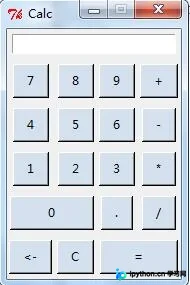
以上就是本文的全部内容,希望对读者的学习有所帮助,同时也欢迎大家继续支持本站。
免责声明:本文内容仅供参考,不代表本站观点。转载或引用请注明出处。









