

Python实现图片转HTML页面:利用Pillow与像素映射技术

本文介绍如何使用Python的PIL(Pillow)库将图片转换为HTML网页。通过获取图片二进制数据,利用BytesIO处理并压缩图像,遍历像素RGB值生成带有颜色的HTML标签,最终填充模板输出HTML文件。该方法适用于简单的图像文字化展示场景。
PIL 图像处理库
PIL(Python Imaging Library)是 Python 平台上的标准图像处理库。需要注意的是,PIL 目前暂不支持 Python3 版本,开发者可以使用功能相同的 Pillow 库作为替代方案。
安装 PIL 库
若系统中已安装 pip,可直接执行 pip install PIL 命令来安装 Pillow 库。
或者在 PyCharm 开发环境中,依次点击 [File] >> [settings] >> [project github] >> [project interpreter] 来添加标准库:
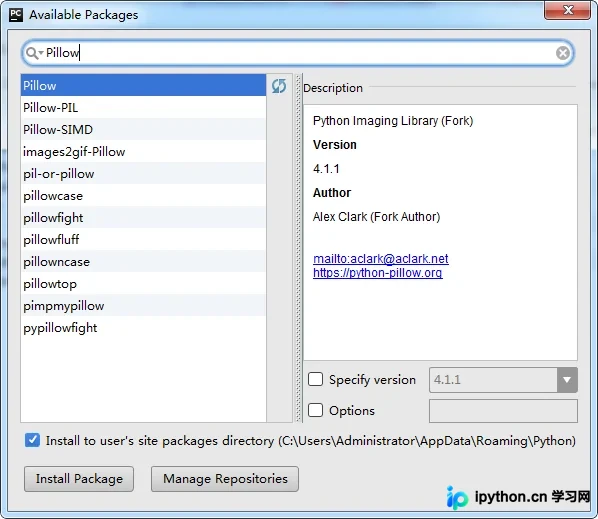
↑ 在搜索框中输入 Pillow 包,选中 Pillow 后,点击 Install Package 按钮完成安装。
PIL 使用方法
from PIL import Image

img = Image.open('source.jpg') # 打开图片
width, height = img.size # 图片尺寸

img.thumbnail((width / 2, height / 2)) # 缩略图
img = img.crop((0, 0, width / 2, width / 2)) # 图片裁剪
img = img.convert(mode='L') # 图片转换
img = img.rotate(180) # 图片旋转
img.save('output.jpg') # 保存图片
↑ PIL 库包含多个常用模块,如 Image、ImageFilter、ImageDraw、ImageFont、ImageEnhance 等。
图片处理过程
将图片转换为网页的过程可分为五个主要步骤。首先,需要选择一个合适的 HTML 模板,并精确控制字体大小及字符间距。
接着,利用 Python 的网络访问模块,根据指定的 URL 获取图片数据。随后使用 PIL 模块载入二进制图片数据,并将图片压缩至合适的尺寸。
然后,遍历图片的每一个像素点,获取其颜色值,并将这些颜色值应用到 HTML 标签中。最后,将生成的字符串信息输出到文件中,从而生成完整的 HTML 文档。
定制模板
TEMPLATE = '''
<!DOCTYPE html>
<html>
<head>
  <meta charset="UTF-8">
  <title>{title}</title>
  <style>
    body {{
      line-height: 1em;
      letter-spacing: 0;
      font-size: 0.6rem;
      background: black;
      text-align: center;
    }}
  </style>
</head>
<body>
  {body}
</body>
</html>
'''
↑ 大括号代表一个占位符,最终会被替换为实际内容;双大括号中的内容则不会被替换。
获取图片
from urllib import request
url = 'https://pic.cnblogs.com/avatar/875028/20160405220401.png'
binary = request.urlopen(url).read()
↑ 通过 URL 获取 byte 数组形式的图片数据。
处理图片
from PIL import Image
from io import BytesIO
img = Image.open(BytesIO(binary))
img.thumbnail((100, 100)) # 图片压缩
↑ byte 类型的图片数据需要通过 BytesIO 转换为 string 类型,才能被 PIL 模块正确处理。
生成HTML
piexl = img.load() # 获取像素信息
width, height = img.size # 获取图像尺寸
body, word = '', '博客园'
font = '<font color="{color}">{word}</font>'
for y in range(height):
  for x in range(width):
    r, g, b = piexl[x, y] # 获取像素RGB值
    body += font.format(
      color='#{:02x}{:02x}{:02x}'.format(r, g, b),
      word=word[((y * width + x) % len(word))]
    )
  body += '\n<br />\n'
↑ 使用 <font> 标签包裹文字,并根据对应像素的 RGB 值,设置 <font> 标签的 color 属性。
导出网页
html = TEMPLATE.format(title=word, body=body)
fo = open('index.html', 'w', encoding='utf8')
fo.write(html)
fo.close()
↑ 向 HTML 模板中填充处理完成的数据,使用文件流将字符串以 utf8 格式输出到文档中。
img2html
wo 将上述五个步骤封装成了一个类,这样调用起来非常方便。
from io import BytesIO
from PIL import Image
from PIL import ImageFilter
from urllib import request

TEMPLATE = '''
<!DOCTYPE html>
<html>
<head>
  <meta charset="UTF-8">
  <title>{title}</title>
  <style>
    body {{
      line-height: 1em;
      letter-spacing: 0;
      font-size: 0.6rem;
      background: black;
      text-align: center;
      min-width: {size}em;
    }}
  </style>
</head>
<body>
  {body}
</body>
</html>
'''
class Converter(object):
  def __init__(self, word='田', size=100):
    self.word, self.size = word, size
    self.font = '<font color="{color}">{word}</font>'

  # 读取url内容
  def __network(self, url):
    return request.urlopen(url).read()

  # 处理图片信息
  def __handle(self, binary):
    img = Image.open(BytesIO(binary)) # 打开制图片
    img.thumbnail((self.size, self.size)) # 压缩图片
    img.filter(ImageFilter.DETAIL) # 图片增强
    return img

  # 分析图片像素
  def __analysis(self, img):
    body = ''
    piexls = img.load()
    width, height = img.size
    for y in range(height):
      for x in range(width):
        r, g, b = piexls[x, y]
        body += self.font.format(
          color='#{:02x}{:02x}{:02x}'.format(r, g, b),
          word=self.word[((y * width + x) % len(self.word))]
        )
      body += '\n<br />\n'
    return body
  # 写入文件内容
  def __writefile(self, file, str):
    fo = open(file, 'w', encoding='utf8')
    try:
      fo.write(str)
    except IOError:
      raise Exception
    finally:
      fo.close()

  # 生成html文档
  def buildDOC(self, url, output):
    try:
      binary = self.__network(url)
      img = self.__handle(binary)
      html = TEMPLATE.format(
        title=self.word,
        body=self.__analysis(img),
        size=self.size
      ) # 向模板中填充数据
      self.__writefile(output, html)
    except Exception as err:
      print('Error:', err)
      return False
    else:
      print('Successful!')
      return True
导入 img2html.Converter,并调用 buildDOC(url, out) 方法。
from img2html import Converter
conv = Converter('卷福', 120)
url = 'http://www.sznews.com/ent/images/attachement/jpg/site3/20140215/001e4f9d7bf91469078115.jpg'
out = 'index.html'
conv.buildDOC(url, out)
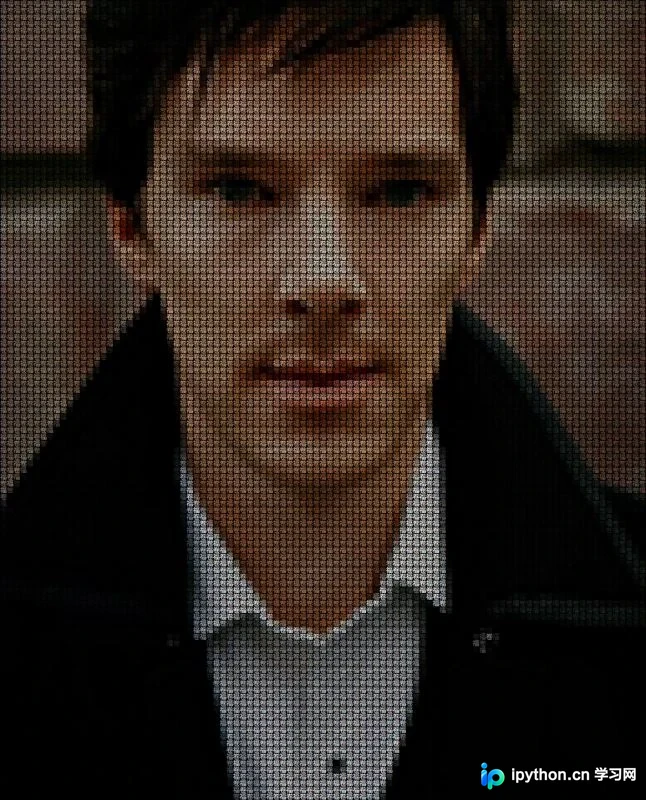
↑ 程序会在当前目录下生成 index.html 文件,需要使用浏览器打开后才能查看效果。
转换效果
| 原始图片 | 输出HTML |
 |
 |
总结
以上就是本文关于 Python 实现将图片转化为 HTML 页面的全部内容,希望对大家有所帮助。感兴趣的朋友可以继续查阅本站其他相关专题,如有不足之处,欢迎留言指出。感谢朋友们对本站的支持!
免责声明:本文内容仅供参考,不代表本站观点。转载或引用请注明出处。









