

Python实现模拟购物车系统:功能详解与代码解析

本文详细介绍使用Python编写的模拟购物车程序。系统涵盖用户登录验证、商品购买、历史消费查询及余额更新等功能。通过分解任务定义多个函数,利用文件持久化存储用户账户信息与消费记录,实现完整的人机交互流程。
1.功能简介
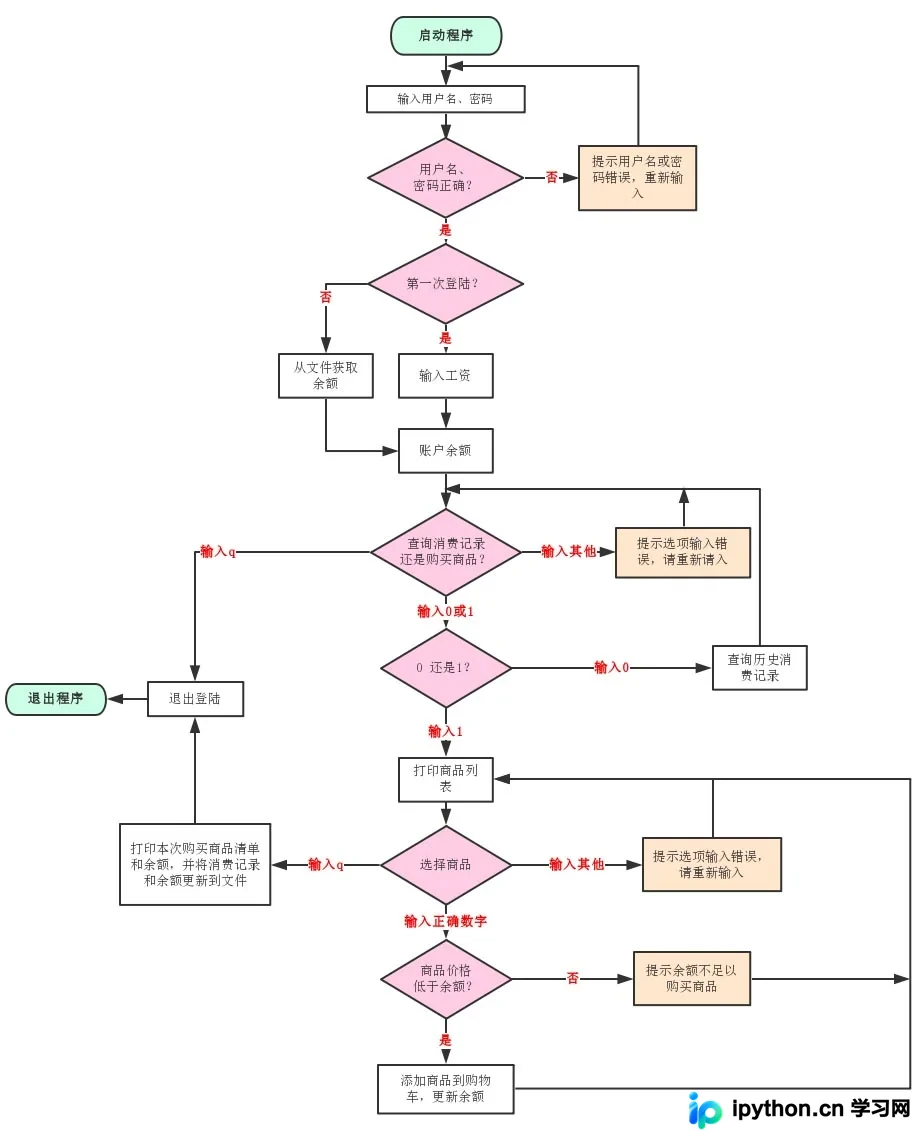
该程序旨在模拟用户登录商城后进行商品购买的完整流程。系统具备用户身份验证、商品选购、历史消费记录查询以及余额与消费信息的动态更新能力。首次登录时需输入初始账户资金,后续登录则自动从文件中读取上次消费后的剩余余额。每次完成商品购买后,系统会自动扣除相应金额并更新账户余额;退出程序时,会将最新的余额和消费记录写入文件,以便后续查询使用。
2.实现方法
架构设计:
本程序基于Python语言开发,通过将复杂任务分解为独立模块并定义对应函数来处理,确保程序结构清晰易懂。主要实现了以下六个核心函数:
(1)login(name,password)
用户登录函数,负责验证用户名和密码。验证成功后,返回当前的登录次数。
(2)get_balance(name)
获取指定用户的当前余额数据。
(3)update_balance(name,balance)
更新用户余额数据。当用户按下“q”键退出程序时,该函数会将最新余额写入文件。
(4)inquire_cost_record(name)
查询用户的历史消费记录。
(5)update_cost_record(name,shopping_list)
更新用户的消费记录。当用户按下“q”键退出时,本次的消费明细将同步更新至文件。
(6)shopping_chart()
主函数,负责处理人机交互界面、调用其他功能函数,并有序实现各项业务逻辑。
主要操作流程:
(1)根据屏幕提示,按数字键选择对应选项以执行相应操作。
(2)在任何操作阶段,按下“q”键即可退出登录。退出前,系统会自动完成用户消费数据和余额信息的更新保存。
涉及的文件资源:
(1)userlist.txt
用于存储用户账户信息的文件,包含用户名、密码、登录次数及当前余额。每次用户成功登录后,系统会更新该用户的登录次数;每次按下“q”键退出时,会更新并保存余额信息。
(2)***_cost_record.txt
用于存储特定用户(***)消费记录的文件。该文件在用户首次购买商品时创建,若用户从未购买过商品,则不会生成此文件。每次按下“q”键退出时,最新的消费记录会被更新并保存至该文件。
3.流程图
4.代码
# Author:Byron Li
#-*-coding:utf-8-*-

'''----------------------------------------------使用文件说明----------------------------------------------------------
使用文件说明
userlist.txt     存放用户账户信息文件,包括用户名、密码、登陆次数和余额
***_cost_record.txt 存放某用户***消费记录的文件,用户首次购买商品后创建,没有购买过商品的用户不会产生该文件
---------------------------------------------------------------------------------------------------------------------'''
import os
import datetime

def login(name,password):  #用户登陆,用户名和密码验证,登陆成功则返回登陆次数
  with open('userlist.txt', 'r+',encoding='UTF-8') as f:
    line = f.readline()
    while(line):
      pos=f.tell()
      line=f.readline()
      if [name,password] == line.split()[0:2]:
        times=int(line.split()[2])
        line=line.replace(str(times).center(5,' '),str(times+1).center(5,' '))
        f.seek(pos)
        f.write(line)
        return times+1
  return None

def get_balance(name):  #获取用户余额数据
  with open('userlist.txt', 'r',encoding='UTF-8') as f:
    line = f.readline()
    for line in f:
      if name == line.split()[0]:
        return line.split()[3]
  print("用户%s不存在,无法获取其余额信息!"%name)
  return False

def update_balance(name,balance):  #更新用户余额数据
  with open('userlist.txt', 'r+',encoding='UTF-8') as f:
    line = f.readline()
    while(line):
      pos1=f.tell()
      line=f.readline()
      if name == line.split()[0]:
        pos1=pos1+line.find(line.split()[2].center(5,' '))+5
        pos2=f.tell()
        f.seek(pos1)
        f.write(str(balance).rjust(pos2-pos1-2,' '))
        return True
  print("用户%s不存在,无法更新其余额信息!" % name)
  return False

def inquire_cost_record(name):   #查询用户历史消费记录
  if os.path.isfile(''.join([name,'_cost_record.txt'])):
    with open(''.join([name,'_cost_record.txt']), 'r',encoding='UTF-8') as f:
      print("历史消费记录".center(40, '='))
      print(f.read())
      print("".center(46, '='))
      return True
  else:
    print("您还没有任何历史消费记录!")
    return False

def update_cost_record(name,shopping_list):  #更新用户消费记录
  if len(shopping_list)>0:
    if not os.path.isfile(''.join([name, '_cost_record.txt'])):   #第一次创建时第一行标上“商品 价格”
      with open(''.join([name, '_cost_record.txt']), 'a',encoding='UTF-8') as f:
        f.write("%-5s%+20s\n" % ('商品', '价格'))
        f.write(''.join([datetime.datetime.now().strftime('%c'), ' 消费记录']).center(40,'-'))  #写入消费时间信息方便后续查询
        f.write('\n')
        for product in shopping_list:
          f.write("%-5s%+20s\n"%(product[0],str(product[1])))
    else:
      with open(''.join([name, '_cost_record.txt']), 'a',encoding='UTF-8') as f:
        f.write(''.join([datetime.datetime.now().strftime('%c'), ' 消费记录']).center(40, '-'))
        f.write('\n')
        for product in shopping_list:
          f.write("%-5s%+20s\n"%(product[0],str(product[1])))
    return True
  else:
    print("您本次没有购买商品,不更新消费记录!")
    return False

def shopping_chart():  #主函数,用户交互,函数调用,结果输出
  product_list=[
    ('Iphone',5000),
    ('自行车',600),
    ('联想电脑',7800),
    ('衬衫',350),
    ('洗衣机',1000),
    ('矿泉水',3),
    ('手表',12000)
  ]  #商店商品列表
  shopping_list=[]  #用户本次购买商品列表
  while(True):
    username = input("请输入用户名:")
    password = input("请输入密码:")
    login_times=login(username,password)  #查询输入用户名和密码是否正确,正确则返回登陆次数
    if login_times:
      print('欢迎%s第%d次登陆!'.center(50,'*')%(username,login_times))
      if login_times==1:
        balance = input("请输入工资:")  #第一次登陆输入账户资金
        while(True):
          if balance.isdigit():
            balance=int(balance)
            break
          else:
            balance = input("输入工资有误,请重新输入:")
      else:
        balance=int(get_balance(username)) #非第一次登陆从文件获取账户余额
      while(True):
        print("请选择您要查询消费记录还是购买商品:")
        print("[0] 查询消费记录")
        print("[1] 购买商品")
        choice=input(">>>")
        if choice.isdigit():
          if int(choice)==0:         #查询历史消费记录
            inquire_cost_record(username)
          elif int(choice)==1:        #购买商品
            while (True):
              for index,item in enumerate(product_list):
                print(index,item)
              choice=input("请输入商品编号购买商品:")
              if choice.isdigit():
                if int(choice)>=0 and int(choice)<len(product_list):
                  if int(product_list[int(choice)][1])<balance:  #检查余额是否充足,充足则商品购买成功
                    shopping_list.append(product_list[int(choice)])
                    balance = balance - int(product_list[int(choice)][1])
                    print("\033[31;1m%s\033[0m已加入购物车中,您的当前余额是\033[31;1m%s元\033[0m" %(product_list[int(choice)][0],balance))
                  else:
                    print("\033[41;1m您的余额只剩%s元,无法购买%s!\033[0m" %(balance,product_list[int(choice)][0]))
                else:
                  print("输入编号错误,请重新输入!")
              elif choice=='q':   #退出账号登陆,退出前打印本次购买清单和余额信息,并更新到文件
                if len(shopping_list)>0:
                  print("本次购买商品清单".center(50,'-'))
                  for product in shopping_list:
                    print("%-5s%+20s"%(product[0],str(product[1])))
                  print("".center(50, '-'))
                  print("您的余额:\033[31;1m%s元\033[0m"%balance)
                  update_cost_record(username,shopping_list)
                  update_balance(username, balance)
                  print("退出登陆!".center(50, '*'))
                  exit()
                else:
                  print("您本次没有消费记录,欢迎下次购买!")
                  print("退出登陆!".center(50, '*'))
                  exit()
              else:
                print("选项输入错误,请重新输入!")
          else:
            print("选项输入错误,请重新输入!")
        elif choice=='q':  #退出账号登陆
          print("退出登陆!".center(50, '*'))
          exit()
        else:
          print("选项输入错误,请重新输入!")
      break
    else:
      print('用户名或密码错误,请重新输入!')

shopping_chart() #主程序运行
以上这篇Python 模拟购物车的实例讲解就是小编分享给大家的全部内容了,希望能给大家一个参考,也希望大家多多支持本站。
免责声明:本文内容仅供参考,不代表本站观点。转载或引用请注明出处。









