

基于PyQt5的Windows定时关机工具实现与配置详解

针对Windows原生shutdown命令操作繁琐的问题,本文介绍使用Python结合PyQt5开发桌面版定时关机工具的完整流程。通过整合QTimer定时器、QSystemTrayIcon系统托盘及configparser配置管理,实现支持定时、延时关机的图形化界面,并附带单实例运行检测与开机自启功能,提供可直接运行的生产级源码。
工具概述与核心目标
日常使用电脑时,常需要在文件下载完成、长时间运行结束后或限定使用周期后自动处理系统状态。虽然Windows自带shutdown命令行工具,但缺乏直观的可视化交互与后台常驻能力。本工具旨在利用PyQt5构建轻量级桌面客户端,实现以下核心能力:
- 定时关机 / 延时关机:精确设定执行时刻或倒计时时长。
- 多操作支持:除关机外,覆盖系统重启与用户注销。
- 托盘常驻与提醒:最小化至系统托盘后台运行,执行前弹出明确状态提示。
- 配置持久化:自动保存任务参数,支持开机自启与防重复运行校验。
第1步:安装核心依赖
项目主要依赖PyQt5进行GUI渲染,高级版源码中包含win32api模块用于读取/写入系统注册表以实现开机自启。请在终端中执行以下命令完成环境准备:
pip install PyQt5 pyqt5-tools pywin32
注:pywin32并非强制项,若仅需基础定时关机功能,可在代码中移除注册表读写相关段落。
第2步:搭建主窗口与UI布局
主界面需包含当前时间显示、时间类型切换(定时/延时)、操作类型单选框(关机/重启/注销)及状态按钮。通过QVBoxLayout与QHBoxLayout组合布局,配合QGroupBox划分功能区,并使用QSS样式表统一视觉风格。
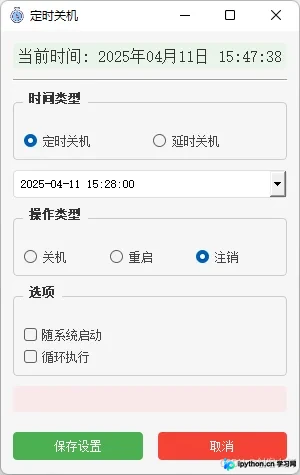
布局初始化时,默认启用固定时间模式,通过QDateTimeEdit提供日期与日历下拉面板。切换单选按钮时,利用信号槽动态控制对应输入控件的显隐,确保交互流畅。
第3步:实现倒计时调度与托盘交互
任务调度依赖QTimer每秒触发刷新事件。核心逻辑为计算目标时间与当前时间的秒数差值:
remaining = self.target_time - now
if remaining.total_seconds() <= 0:
    self.execute_action()
执行动作时直接调用系统指令。例如定时关机使用shutdown -s -t 0,重启使用shutdown -r -t 0。界面提供实时剩余时间文本更新,并在托盘图标悬停时同步显示倒计时信息。
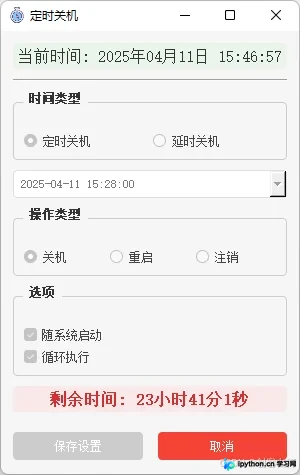
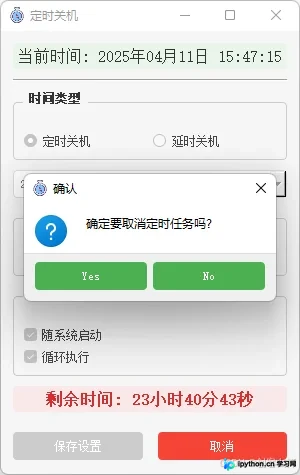
关闭主窗口时重写closeEvent拦截默认行为,改为隐藏窗口并显示托盘图标,避免意外退出任务管理器中的进程。
第4步:持久化配置与多实例限制
为保证用户重启电脑后不丢失设置,采用configparser将任务参数序列化为INI文件存放于APPDATA目录。配合win32api.RegSetValueEx可将程序路径写入注册表Run键,实现随系统启动。
此外,为防止同一时段多次点击运行导致后台冲突,使用QSharedMemory创建命名共享内存锁。若创建失败则判定程序已在运行,直接拦截并提示。
第5步:查看完整工程代码
以下为整合上述所有功能的生产级完整实现。代码已包含资源路径适配(兼容开发环境与打包后的单文件模式),可直接复制至main.py运行。
import os
import sys
import time
import configparser
import win32api
import win32con
from datetime import datetime, timedelta
from PyQt5.QtWidgets import (
    QApplication, QMainWindow, QWidget, QVBoxLayout, QHBoxLayout,
    QGroupBox, QRadioButton, QDateTimeEdit, QLabel, QPushButton,
    QCheckBox, QSystemTrayIcon, QMenu, QMessageBox, QSpacerItem,
    QSizePolicy, QFrame
)
from PyQt5.QtCore import Qt, QTimer, QDateTime, QTime, QSize, QSharedMemory
from PyQt5.QtGui import QIcon, QFont, QPalette, QColor

def resource_path(relative_path):
    if hasattr(sys, '_MEIPASS'):
        return os.path.join(sys._MEIPASS, relative_path)
    return os.path.join(os.path.abspath('.'), relative_path)

class ShutdownApp(QMainWindow):
    def __init__(self):
        super().__init__()
        self.task_running = False
        self.config_file = os.path.join(os.getenv('APPDATA'), 'shutdown_config.ini')
        self.first_show = True
        self.setup_ui_style()
        self.init_ui()
        self.load_config()
        self.tray_icon = QSystemTrayIcon(self)
        self.tray_icon.setIcon(QIcon(resource_path("icon.ico")))
        self.tray_icon.setToolTip("定时关机")
        self.tray_icon.activated.connect(self.tray_icon_activated)
        self.tray_menu = QMenu()
        self.show_action = self.tray_menu.addAction("显示")
        self.exit_action = self.tray_menu.addAction("退出")
        self.show_action.triggered.connect(self.show_normal)
        self.exit_action.triggered.connect(self.confirm_exit)
        self.tray_icon.setContextMenu(self.tray_menu)
        self.tray_icon.show()
        self.timer = QTimer(self)
        self.timer.timeout.connect(self.update_current_time)
        self.timer.start(1000)
        self.countdown_timer = QTimer(self)
        self.countdown_timer.timeout.connect(self.update_remaining_time)

    def setup_ui_style(self):
        self.setStyleSheet('''
            QMainWindow { background-color: #f5f5f5; }
            QGroupBox { border: 1px solid #ccc; border-radius: 4px; margin-top: 10px; padding-top: 15px; font-weight: bold; color: #333; }
            QPushButton { background-color: #4CAF50; color: white; border: none; padding: 8px 16px; border-radius: 4px; min-width: 80px; }
            QPushButton:hover { background-color: #45a049; }
            QPushButton:disabled { background-color: #cccccc; }
            QPushButton#cancel_btn { background-color: #f44336; }
            QPushButton#cancel_btn:hover { background-color: #d32f2f; }
            QLabel#current_time_label { font-size: 16px; color: #333; padding: 5px; background-color: #e9f5e9; border-radius: 4px; }
            QLabel#remaining_time_label { font-size: 16px; color: #d32f2f; font-weight: bold; padding: 5px; background-color: #f9e9e9; border-radius: 4px; }
        ''')

    def init_ui(self):
        self.setWindowTitle("定时关机")
        self.setWindowIcon(QIcon(resource_path("icon.ico")))
        self.resize(300, 440)
        main_widget = QWidget()
        self.setCentralWidget(main_widget)
        layout = QVBoxLayout(main_widget)
        layout.setContentsMargins(12, 12, 12, 12)
        layout.setSpacing(10)
        self.current_time_label = QLabel()
        self.current_time_label.setAlignment(Qt.AlignCenter)
        self.current_time_label.setObjectName("current_time_label")
        layout.addWidget(self.current_time_label)
        line = QFrame()
        line.setFrameShape(QFrame.HLine)
        line.setFrameShadow(QFrame.Sunken)
        layout.addWidget(line)
        time_type_group = QGroupBox("时间类型")
        time_type_layout = QHBoxLayout()
        time_type_layout.setContentsMargins(10, 15, 10, 10)
        self.fixed_time_radio = QRadioButton("定时关机")
        self.delay_time_radio = QRadioButton("延时关机")
        self.fixed_time_radio.setChecked(True)
        time_type_layout.addWidget(self.fixed_time_radio)
        time_type_layout.addWidget(self.delay_time_radio)
        time_type_group.setLayout(time_type_layout)
        layout.addWidget(time_type_group)
        self.fixed_datetime = QDateTimeEdit()
        self.fixed_datetime.setDisplayFormat("yyyy-MM-dd HH:mm:ss")
        self.fixed_datetime.setDateTime(QDateTime.currentDateTime())
        self.fixed_datetime.setCalendarPopup(True)
        layout.addWidget(self.fixed_datetime)
        self.delay_datetime = QDateTimeEdit()
        self.delay_datetime.setDisplayFormat("HH:mm:ss")
        self.delay_datetime.setTime(QTime(0, 0, 0))
        self.delay_datetime.setVisible(False)
        layout.addWidget(self.delay_datetime)
        self.fixed_time_radio.toggled.connect(self.on_time_type_changed)
        action_group = QGroupBox("操作类型")
        action_layout = QHBoxLayout()
        action_layout.setContentsMargins(10, 15, 10, 10)
        self.shutdown_radio = QRadioButton("关机")
        self.restart_radio = QRadioButton("重启")
        self.logoff_radio = QRadioButton("注销")
        self.shutdown_radio.setChecked(True)
        action_layout.addWidget(self.shutdown_radio)
        action_layout.addWidget(self.restart_radio)
        action_layout.addWidget(self.logoff_radio)
        action_group.setLayout(action_layout)
        layout.addWidget(action_group)
        options_group = QGroupBox("选项")
        options_layout = QVBoxLayout()
        options_layout.setContentsMargins(10, 15, 10, 10)
        self.auto_start_check = QCheckBox("随系统启动")
        self.loop_exec_check = QCheckBox("循环执行")
        options_layout.addWidget(self.auto_start_check)
        options_layout.addWidget(self.loop_exec_check)
        options_group.setLayout(options_layout)
        layout.addWidget(options_group)
        self.remaining_time_label = QLabel()
        self.remaining_time_label.setAlignment(Qt.AlignCenter)
        self.remaining_time_label.setObjectName("remaining_time_label")
        layout.addWidget(self.remaining_time_label)
        button_layout = QHBoxLayout()
        button_layout.setContentsMargins(0, 10, 0, 0)
        button_layout.setSpacing(15)
        self.save_btn = QPushButton("保存设置")
        self.cancel_btn = QPushButton("取消")
        self.cancel_btn.setObjectName("cancel_btn")
        self.cancel_btn.setEnabled(False)
        self.save_btn.clicked.connect(self.save_config)
        self.cancel_btn.clicked.connect(self.cancel_task)
        button_layout.addWidget(self.save_btn)
        button_layout.addWidget(self.cancel_btn)
        layout.addLayout(button_layout)
        layout.addSpacerItem(QSpacerItem(20, 10, QSizePolicy.Minimum, QSizePolicy.Expanding))

    def on_time_type_changed(self, checked):
        self.fixed_datetime.setVisible(checked)
        self.delay_datetime.setVisible(not checked)

    def update_current_time(self):
        current_time = datetime.now().strftime("%Y年%m月%d日 %H:%M:%S")
        self.current_time_label.setText(f"当前时间: {current_time}")

    def save_config(self):
        config = configparser.ConfigParser()
        config['task'] = {
            'time_type': 'fixed' if self.fixed_time_radio.isChecked() else 'delay',
            'time': self.fixed_datetime.dateTime().toString("HHmmss") if self.fixed_time_radio.isChecked() else self.delay_datetime.time().toString("HHmmss"),
            'execute_type': 'shutdown' if self.shutdown_radio.isChecked() else 'restart' if self.restart_radio.isChecked() else 'logoff',
            'auto_start': '1' if self.auto_start_check.isChecked() else '0',
            'task_circ': '1' if self.loop_exec_check.isChecked() else '0'
        }
        with open(self.config_file, 'w') as f:
            config.write(f)
        self.set_auto_start(self.auto_start_check.isChecked())
        self.cancel_btn.setEnabled(True)
        self.start_task()

    def load_config(self):
        if not os.path.exists(self.config_file): return
        config = configparser.ConfigParser()
        config.read(self.config_file)
        if 'task' in config:
            task_config = config['task']
            if task_config.get('time_type', 'fixed') == 'fixed':
                self.fixed_time_radio.setChecked(True)
                time_str = task_config.get('time', '000000')
                qtime = QTime.fromString(time_str, "HHmmss")
                current_date = QDateTime.currentDateTime()
                self.fixed_datetime.setDateTime(QDateTime(current_date.date(), qtime))
            else:
                self.delay_time_radio.setChecked(True)
                time_str = task_config.get('time', '000000')
                qtime = QTime.fromString(time_str, "HHmmss")
                self.delay_datetime.setTime(qtime)
            execute_type = task_config.get('execute_type', 'shutdown')
            if execute_type == 'shutdown': self.shutdown_radio.setChecked(True)
            elif execute_type == 'restart': self.restart_radio.setChecked(True)
            else: self.logoff_radio.setChecked(True)
            self.auto_start_check.setChecked(task_config.get('auto_start', '0') == '1')
            self.loop_exec_check.setChecked(task_config.get('task_circ', '0') == '1')
            if self.loop_exec_check.isChecked():
                self.cancel_btn.setEnabled(True)
                self.start_task()

    def set_auto_start(self, enable):
        key = win32con.HKEY_CURRENT_USER
        sub_key = r"Software\Microsoft\Windows\CurrentVersion\Run"
        try:
            reg_key = win32api.RegOpenKey(key, sub_key, 0, win32con.KEY_ALL_ACCESS)
            if enable: win32api.RegSetValueEx(reg_key, "定时关机", 0, win32con.REG_SZ, sys.executable)
            else:
                try: win32api.RegDeleteValue(reg_key, "定时关机")
                except: pass
            win32api.RegCloseKey(reg_key)
        except Exception as e:
            QMessageBox.warning(self, "警告", f"设置自启动失败: {str(e)}")

    def start_task(self):
        if self.task_running: return
        self.task_running = True
        self.toggle_components(True)
        if self.fixed_time_radio.isChecked():
            target_time = self.fixed_datetime.dateTime().toPyDateTime()
            now = datetime.now()
            if target_time < now: target_time += timedelta(days=1)
            self.target_time = target_time
        else:
            delay = self.delay_datetime.time()
            self.target_time = datetime.now() + timedelta(hours=delay.hour(), minutes=delay.minute(), seconds=delay.second())
        self.countdown_timer.start(1000)
        self.update_remaining_time()

    def update_remaining_time(self):
        now = datetime.now()
        remaining = self.target_time - now
        if remaining.total_seconds() <= 0:
            self.execute_action()
            if self.loop_exec_check.isChecked(): self.start_task()
            else: self.cancel_task()
            return
        hours, remainder = divmod(int(remaining.total_seconds()), 3600)
        minutes, seconds = divmod(remainder, 60)
        remaining_str = f"{hours}小时{minutes}分{seconds}秒"
        self.remaining_time_label.setText(f"剩余时间: {remaining_str}")
        self.tray_icon.setToolTip(f"定时关机\n剩余时间: {remaining_str}")

    def execute_action(self):
        if self.shutdown_radio.isChecked(): os.system("shutdown -s -t 0")
        elif self.restart_radio.isChecked(): os.system("shutdown -r -t 0")
        else: os.system("shutdown -l")

    def cancel_task(self):
        if not self.task_running:
            QMessageBox.warning(self, "警告", "没有正在运行的任务")
            return
        reply = QMessageBox.question(self, "确认", "确定要取消定时任务吗?", QMessageBox.Yes | QMessageBox.No)
        if reply == QMessageBox.Yes:
            self.task_running = False
            self.countdown_timer.stop()
            self.remaining_time_label.setText("")
            self.tray_icon.setToolTip("定时关机")
            self.toggle_components(False)
            self.cancel_btn.setEnabled(False)
            QMessageBox.information(self, "提示", "定时任务已取消", QMessageBox.Ok)

    def toggle_components(self, disabled):
        for ctrl in [self.fixed_time_radio, self.delay_time_radio, self.fixed_datetime, self.delay_datetime,
                     self.shutdown_radio, self.restart_radio, self.logoff_radio, self.auto_start_check,
                     self.loop_exec_check, self.save_btn]:
            ctrl.setDisabled(disabled)

    def tray_icon_activated(self, reason):
        if reason == QSystemTrayIcon.DoubleClick: self.show_normal()

    def show_normal(self):
        self.show()
        self.setWindowState(self.windowState() & ~Qt.WindowMinimized)
        self.activateWindow()
        self.raise_()

    def closeEvent(self, event):
        if self.isVisible():
            self.hide()
            self.tray_icon.show()
            if not self.first_show:
                self.tray_icon.showMessage("定时关机", "程序已最小化到托盘", QSystemTrayIcon.Information, 2000)
            self.first_show = False
            event.ignore()
        else:
            self.tray_icon.hide()
            event.accept()

    def confirm_exit(self):
        reply = QMessageBox.question(self, '确认', '是否退出?', QMessageBox.Yes | QMessageBox.No, QMessageBox.No)
        if reply == QMessageBox.Yes:
            self.tray_icon.hide()
            QApplication.quit()

def main():
    shared = QSharedMemory("定时关机")
    if not shared.create(512, QSharedMemory.ReadWrite):
        QMessageBox.warning(None, "警告", "程序已经在运行!")
        sys.exit(0)
    QApplication.setAttribute(Qt.AA_EnableHighDpiScaling)
    app = QApplication(sys.argv)
    window = ShutdownApp()
    config_file = os.path.join(os.getenv('APPDATA'), 'shutdown_config.ini')
    if os.path.exists(config_file):
        config = configparser.ConfigParser()
        config.read(config_file)
        if 'task' in config and config['task'].get('auto_start', '0') == '1':
            if config['task'].get('task_circ', '0') == '1': window.showMinimized()
            else: window.show()
        else: window.show()
    else: window.show()
    sys.exit(app.exec_())

if __name__ == '__main__':
    main()
运行状态确认与排错
完成代码保存后,在终端执行python main.py启动程序。成功运行的判断标准如下:
- 主窗口正常渲染,顶部实时更新时间。
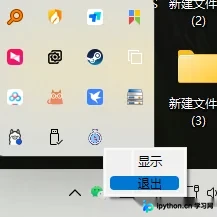
- 点击右上角最小化后,任务栏消失但右下角托盘出现新图标。
- 设置时间点击“保存设置”后,托盘提示文字显示倒计时,且输入框进入禁用状态以防篡改。
- 再次双击窗口图标可恢复前台交互,右键托盘菜单可选择安全退出。
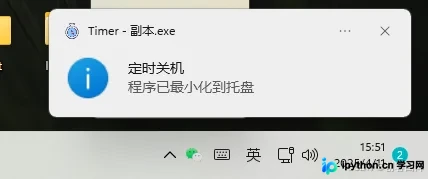
常见异常处理:
- 启动报错
ModuleNotFoundError: No module named 'win32api':说明未安装环境包,执行pip install pywin32后重试。 - 托盘图标无法显示或报错:检查同级目录是否存在
icon.ico文件。若缺失可临时注释掉self.tray_icon.setIcon()行使用系统默认图标。 - 注册表权限拒绝:现代Windows系统对
HKEY_CURRENT_USER\Run写入限制较严。若权限不足,自启勾选将触发警告弹窗,此时可手动删除该段代码仅保留基础定时功能。
总结
本方案通过PyQt5快速搭建了具备图形交互与后台守护能力的定时管理系统。代码实现了时间差精准换算、多模式任务下发、持久化配置读写及防重入锁等关键机制,可直接作为自动化运维脚本或桌面小工具的底座。如需扩展多任务队列或增加Web端远程管控,可在当前架构上引入多线程管理与Socket通信层。以上就是基于PyQt5实现的Windows定时关机工具的详细内容,更多关于Python桌面应用开发的资料请关注本站其它相关文章!
免责声明:本文内容仅供参考,不代表本站观点。转载或引用请注明出处。









