

WordPress主题添加Widget侧边栏支持的方法

发布时间:2026-10-13| 4人浏览过
本文将详细讲解如何在WordPress主题中添加对小工具(Widget)的支持,包括单侧边栏和双侧边栏的配置方法。
准备工作
在开始之前,请确保您正在编辑的主题文件位于正确的位置。通常,您需要修改两个核心文件:functions.php用于注册侧边栏,sidebar.php用于显示侧边栏内容。
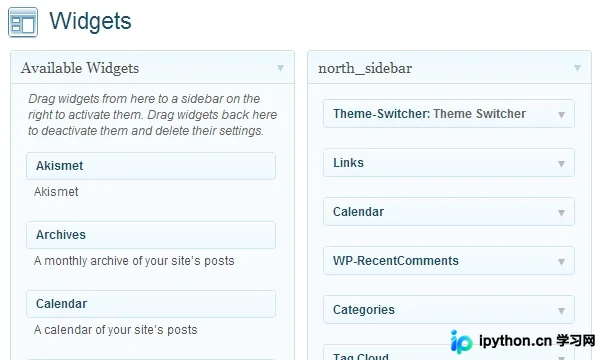
注册单个侧边栏
第一步:在functions.php中注册侧边栏
目的:向WordPress注册一个新的侧边栏区域。
入口:functions.php
动作:使用register_sidebar()函数定义侧边栏的HTML结构和样式。
<?php

if( function_exists('register_sidebar') ) {

 register_sidebar(array(

 'before_widget' => '<li class="widget">', // widget 的开始标签

 'after_widget' => '</li>', // widget 的结束标签

 'before_title' => '<h3>', // 标题的开始标签

 'after_title' => '</h3>' // 标题的结束标签

 ));

}

?>
第二步:在sidebar.php中调用侧边栏
目的:在前端页面显示已注册的侧边栏及其内容。
入口:sidebar.php
动作:使用dynamic_sidebar()函数输出小工具,并提供默认内容的回退机制。
<div id="sidebar">

 <ul class="widgets">

<?php if ( !function_exists('dynamic_sidebar') || !dynamic_sidebar() ) : ?>

 <!-- widget 1 -->

 <li class="widget">

 <h3>标题 1</h3>

 <ul>

  <li>条目 1.1</li>

  <li>条目 1.2</li>

  <li>条目 1.3</li>

 </ul>

 </li>

 <!-- widget 2 -->

 <li class="widget">

 <h3>标题 2</h3>

 <ul>

  <li>条目 2.1</li>

  <li>条目 2.2</li>

  <li>条目 2.3</li>

 </ul>

 </li>

<?php endif; ?>

 </ul>

</div>
注册多个侧边栏
第三步:在functions.php中注册额外侧边栏
目的:为同一个主题创建多个独立的侧边栏区域。
入口:functions.php
动作:再次调用register_sidebar()函数,并为每个侧边栏指定唯一的名称。
<?php

if( function_exists('register_sidebar') ) {

 register_sidebar(array(

 'name' => 'Sidebar_1', // 侧边栏 1 的名称

 'before_widget' => '<li class="widget">',

 'after_widget' => '</li>',

 'before_title' => '<h3>',

 'after_title' => '</h3>'

 ));


 register_sidebar(array(

 'name' => 'Sidebar_2', // 侧边栏 2 的名称

 'before_widget' => '<li class="widget">',

 'after_widget' => '</li>',

 'before_title' => '<h3>',

 'after_title' => '</h3>'

 ));

}

?>
第四步:在sidebar.php中调用特定侧边栏
目的:在前端页面分别显示不同的侧边栏内容。
入口:sidebar.php
动作:使用dynamic_sidebar()函数并传入侧边栏的唯一标识符(如ID或名称)来加载对应的内容。
<div id="sidebar_1">

 <ul class="widgets">

<?php if ( !function_exists('dynamic_sidebar') || !dynamic_sidebar('sidebar_1') ) : ?>

 <!-- widget 1 -->

 <li class="widget">

 <h3>标题 1</h3>

 <ul>

  <li>条目 1.1</li>

  <li>条目 1.2</li>

  <li>条目 1.3</li>

 </ul>

 </li>

<?php endif; ?>

 </ul>

</div>
<div id="sidebar_2">
<ul class="widgets">
<?php if ( !function_exists('dynamic_sidebar') || !dynamic_sidebar('sidebar_2') ) : ?>
<!-- widget 2 -->
<li class="widget">
<h3>标题 2</h3>
<ul>
<li>条目 2.1</li>
<li>条目 2.2</li>
<li>条目 2.3</li>
</ul>
</li>
<?php endif; ?>
</ul>
</div>更多侧边栏的处理建议
如果您需要支持N个侧边栏,可以使用循环结构来动态注册和调用它们,避免重复编写冗余代码。
以上内容即为WordPress主题添加Widget侧边栏支持的详细内容,更多关于WordPress主题开发的资料请关注本站其它相关文章!
免责声明:本文内容仅供参考,不代表本站观点。转载或引用请注明出处。









