

C++ IO设备读写功能实现详解

C++中的输入输出依赖于定义好的类库,本文详细介绍如何通过fstream、ifstream和ofstream实现文本及二进制文件的读写,并演示了使用文件指针进行精确位置控制和格式化数据处理的方法。
1 输入输出IO流
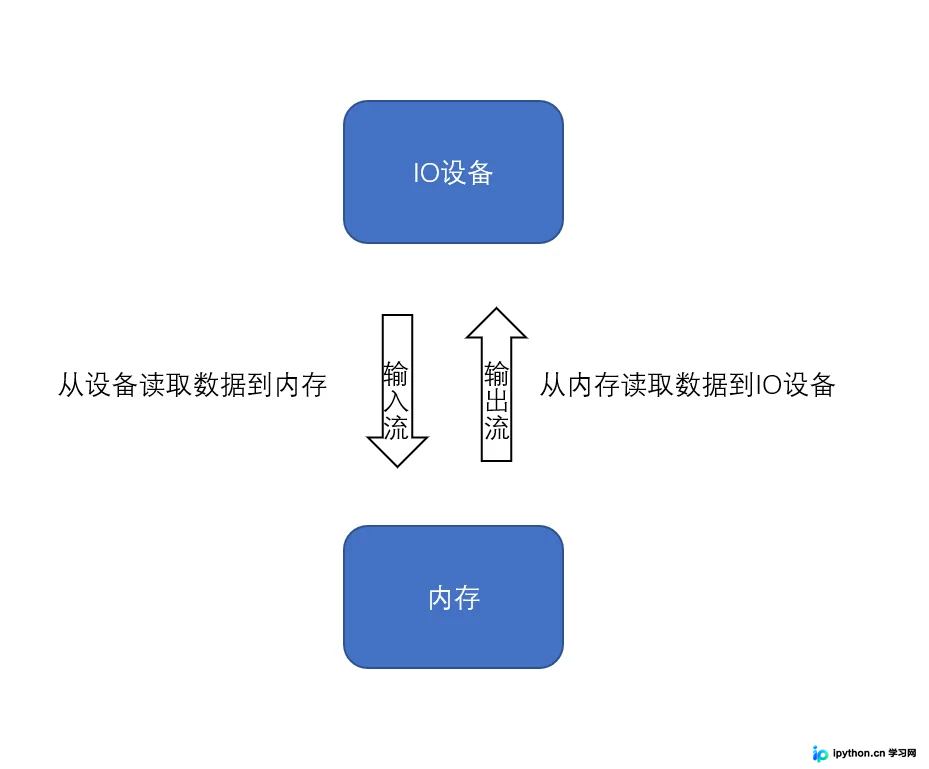
1.1 图解输入输出流
IO设备主要包含文件、终端(如DOS命令行窗口)以及特殊的数据类型(如字符串流)。理解这些基本组件是掌握C++输入输出的前提。
1.2 输入输出流类库
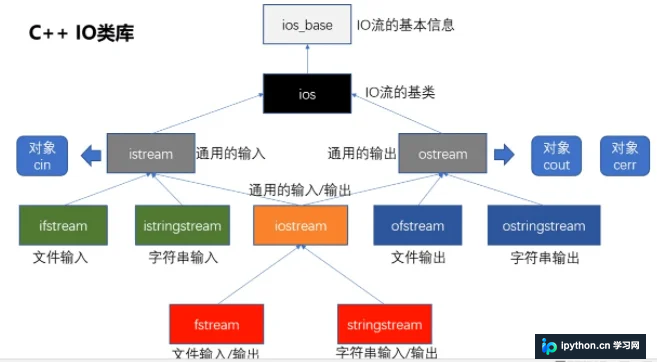
C++中的输入输出流是通过一套预先定义好的类库来操作的,这套类库提供了丰富的接口来处理不同类型的设备。
2 文件读写操作
2.1 文件的打开方式
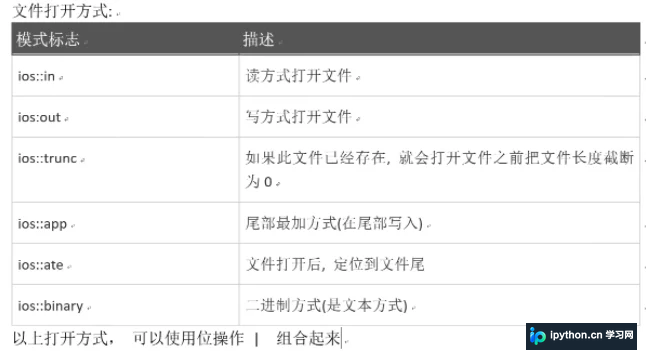
在进行文件操作前,需要明确文件的打开模式,不同的模式决定了文件被访问的方式。
2.2 文件读写类库的头文件
核心头文件为 #include <fstream>。该类库主要包含以下三个类:
ofstream:用于写操作(Output File Stream)。ifstream:用于读操作(Input File Stream)。fstream:同时支持读和写操作。
2.3 文本文件读写
使用ofstream来写文本
ofstream在写入文件时,默认的打开方式是 ios::trunc。这意味着如果文件已存在且包含内容,原有内容会被清空;如果文件不存在,则会新建一个文件。
#include <iostream>
#include <windows.h>
#include <fstream>
using namespace std;
int main() {
    ofstream outfile;
    string name;
    int age;
    cin >> name >> age;
    // 写入文件,没有文件会新建
    outfile.open("C:/Users/98207/desktop/test.txt", ios::out);
    outfile << name << endl;
    outfile << age;
    outfile.close();  // 文件结束需要关闭
    return 0;
}
使用ifstream读取文件
在使用 ifstream 读取文件时,可以通过循环判断是否到达文件末尾(EOF)。
#include <iostream>
#include <windows.h>
#include <string>
#include <fstream>
using namespace std;
int main() {
    ifstream infile;
    string str;
    int age;
    infile.open("C:/Users/98207/desktop/test.txt", ios::in);  // 读取文件
    while (1) {
        if (infile.eof()) {
            break;
        }
        infile >> str;
        cout << str << endl;;
        // getline(infile, str);
        // cout << str << endl;
    }
    infile .close();
    return 0;
}
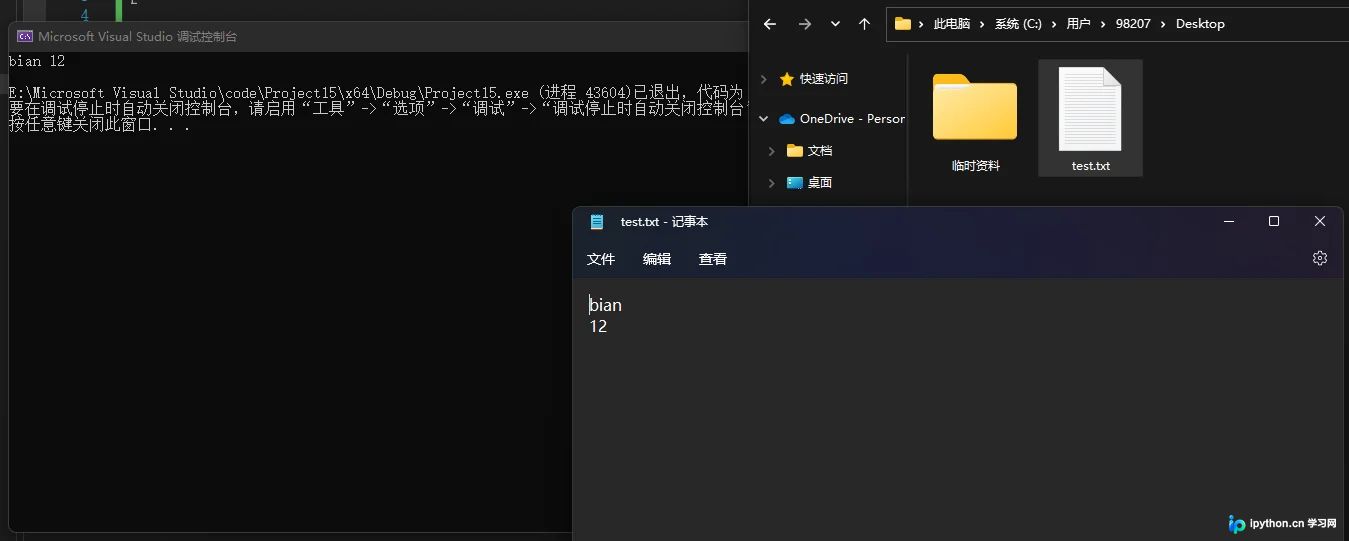
运行结果示例:
bian
12
使用fstream来读写文件
fstream 类默认不会像 ofstream 那样截断文件,适合需要同时处理读写逻辑的场景。在写入时需注意打开模式的选择。
#include <iostream>
#include <windows.h>
#include <string>
#include <fstream>
using namespace std;
int main() {
    string name;
    int age;
    fstream outfile;
    // 注意:此处未指定 trunc,可能会保留原文件或追加
    outfile.open("C:/Users/98207/Desktop/test2.txt", ios::out);
    cin >> name >> age;
    outfile << name << endl;
    outfile << age;
    outfile.close();
    return 0;
}
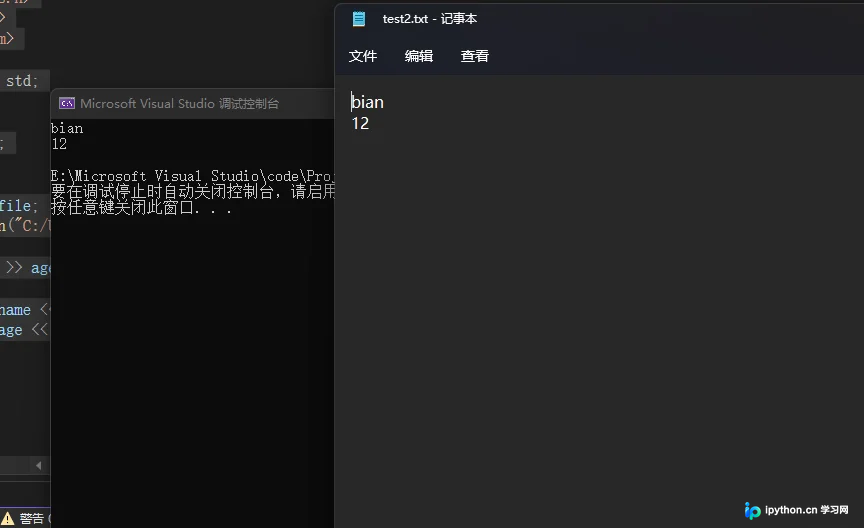
对应的读取代码同样适用于 fstream 对象:
#include <iostream>
#include <windows.h>
#include <string>
#include <fstream>
using namespace std;
int main() {
    string str;
    fstream infile;
    infile.open("C:/Users/98207/Desktop/test2.txt", ios::in);
    while (1) {
        if (infile.eof()) {
            break;
        }
        infile >> str;
        cout << str << endl;
    }
    infile.close();
    return 0;
}

2.4 二进制的读写
二进制文件与文本文件的主要区别在于数字的存储方式。二进制模式直接写入实际的字节数,而非人类可读的字符序列。例如整数9,在二进制模式下可能写入4个字节的内存数据,具体大小端取决于CPU架构。
2.4.1 二进制写
使用 write() 函数进行二进制写入,通常需要强制转换指针类型,并指定写入的字节长度。
#include <iostream>
#include <string>
#include <fstream>
using namespace std;
int main() {
    fstream outfile;
    char name[20];
    int age;
    // 建议保存格式为.dat,因为使用文本格式解析会产生乱码
    outfile.open("C:/Users/98207/Desktop/1.dat", ios::trunc | ios::out | ios::binary);
    cin >> name >> age;
    outfile << name << '\t';
    outfile.write((char*)&age, sizeof(age));  // 二进制写
    outfile.close();
    return 0;
}
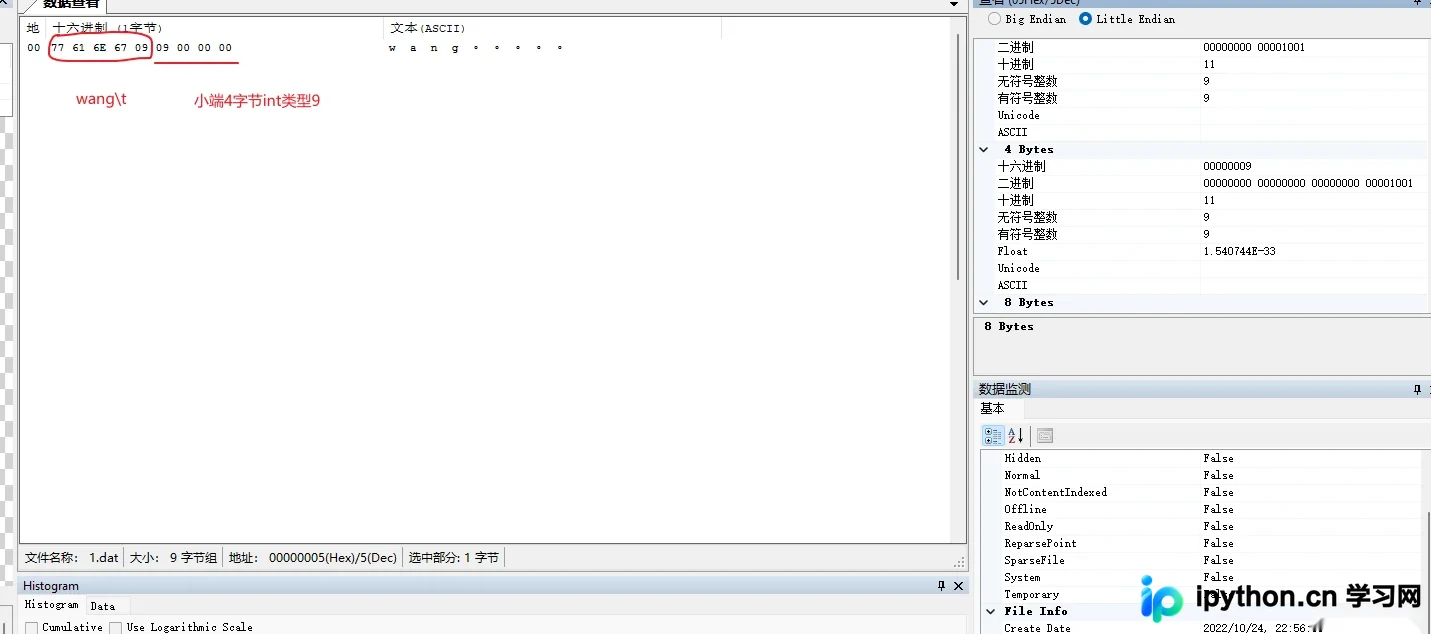
2.4.2 二进制读
读取二进制文件需使用 read() 函数,同样需要进行指针类型转换。在读取数值前,可能需要跳过分隔符等非数值字节。
#include <iostream>
#include <string>
#include <fstream>
using namespace std;
int main() {
    fstream infile;
    char name[20];
    char temp;
    int age;
    infile.open("C:/Users/98207/Desktop/1.dat", ios::in | ios::binary);
    infile >> name;
    infile.read((char*)&temp, sizeof(temp));  // 丢弃制表符
    infile.read((char*)&age, sizeof(age));
    cout << name << '\t' << age << endl;
    infile.close();
    return 0;
}
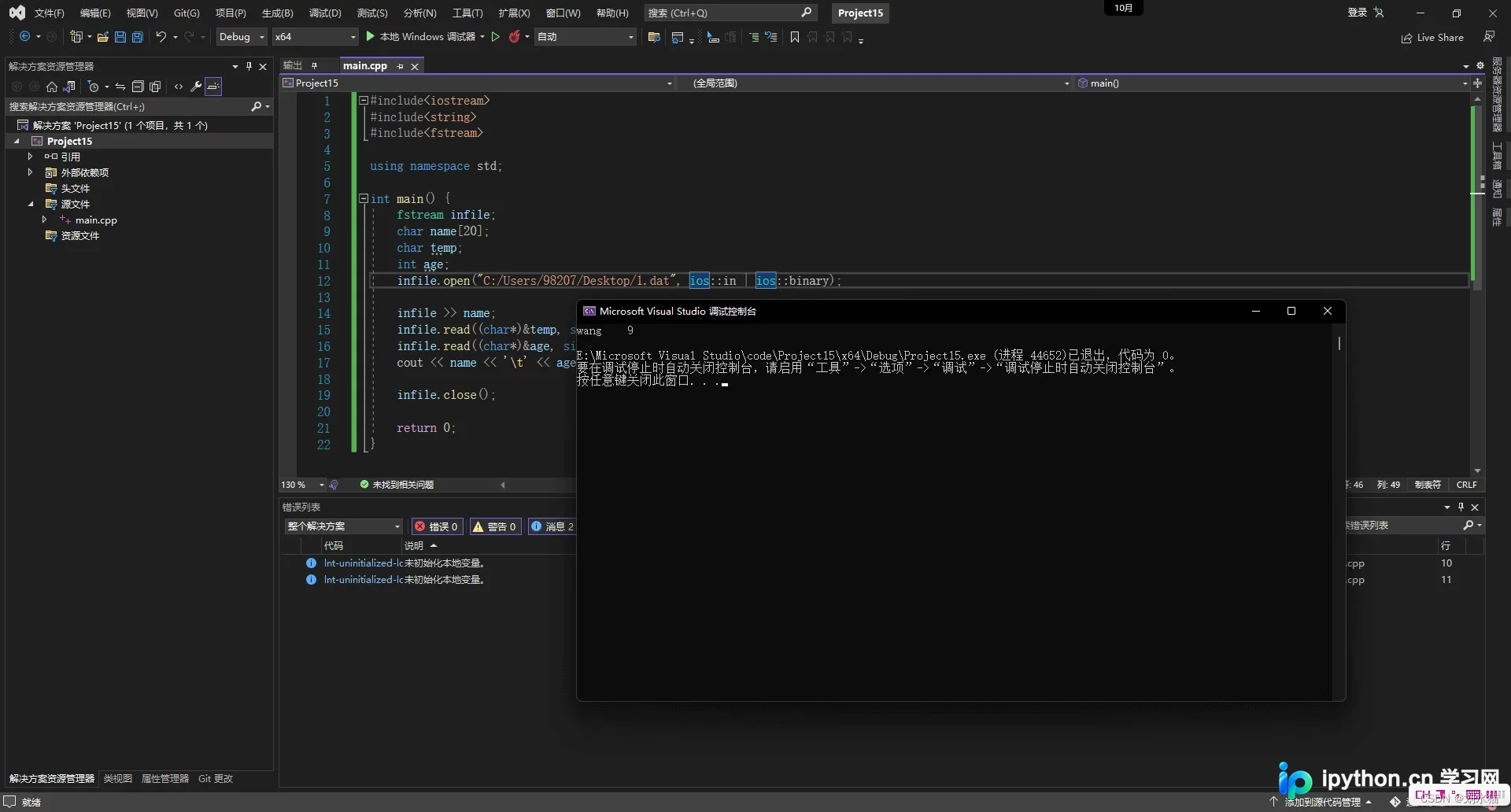
2.5 按照特殊格式读写
对于结构化较强或包含特殊分隔符的数据,可以使用 stringstream 辅助处理,先在内存中格式化字符串,再批量写入文件。
2.5.1 特殊格式写入
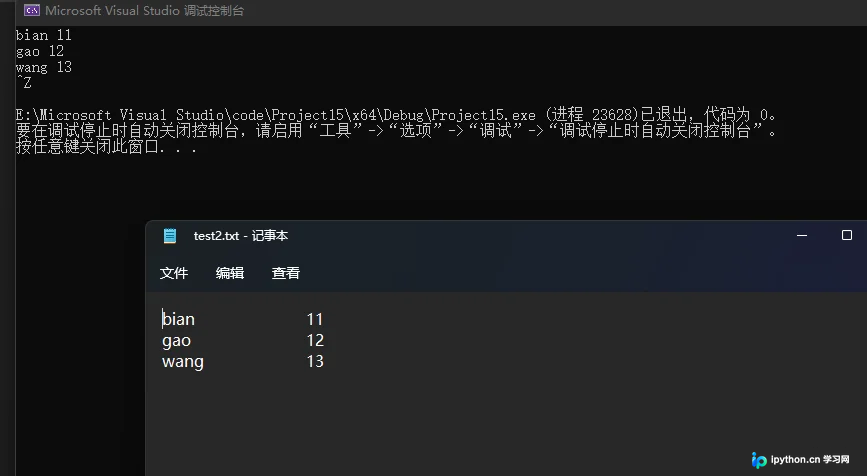
利用 stringstream 累积数据,最后一次性写入文件,提高效率。
#include <iostream>
#include <fstream>  //ofstream
#include <sstream>  // stringstream
using namespace std;
int main() {
    stringstream ret;
    ofstream outfile;
    string name;
    int age;
    outfile.open("C:/Users/98207/Desktop/test2.txt", ios::out | ios::trunc);
    while (1) {
        cin >> name >> age;
        if (cin.eof()) {
            break;
        }
        ret << name << "\t\t\t" << age << endl;  // ret会累积
        // outfile << ret.str();
        // ret.clear();
    }
    outfile << ret.str();
    outfile.close();
    return 0;
}
2.5.2 特殊格式读取
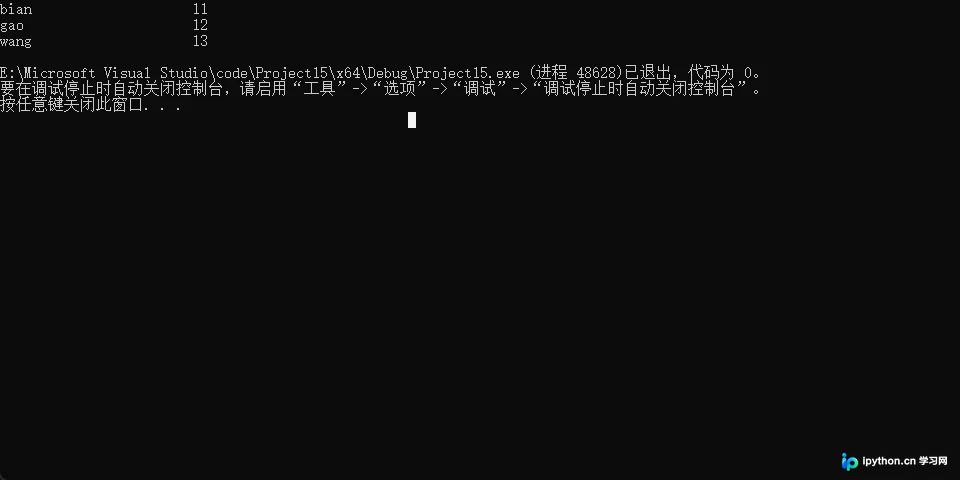
读取结构化数据时,可以使用 getline 整行读取,再通过 sscanf 解析内容。注意 sscanf_s 在安全要求较高的环境中常作为替代方案,需确保参数类型匹配。
#include <iostream>
#include <fstream>
#include <string>  // getline, string
using namespace std;
int main() {
    fstream infile;
    string str;
    char name[20];
    int age;
    infile.open("C:/Users/98207/Desktop/test2.txt", ios::in);
    while (1) {
        getline(infile, str);
        if (infile.eof()) {
            break;
        }
        // sscanf_s 这里的参数只能是char类型,这里的空格会替换文件的制表符或者空格
        sscanf_s(str.c_str(), "%s %d", name, sizeof(name), &age);
        cout << name << "\t\t\t" << age << endl;
    }
    infile.close();
}
2.6 文件流标志
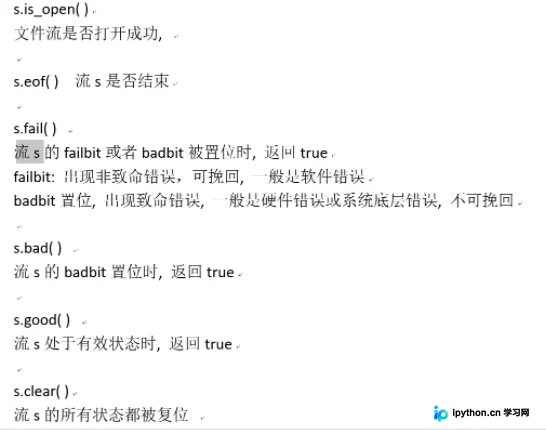
在文件操作过程中,监控流的状态非常重要。常用的状态检查方法包括:
is_open():检查文件是否成功打开。eof():检查是否到达文件结尾。
2.7 文件指针
C++允许通过移动文件指针来精确控制读写位置,这对于处理大型文件或特定协议至关重要。
输入流指针seekg
seekg() 用于设置输入流的当前位置。
原型:
basic_istream& seekg( off_type off,std::ios_base::seekdir dir);
off:偏移量。dir:起始位置基准,可选ios::beg(开头)、ios::cur(当前位置)、ios::end(末尾)。
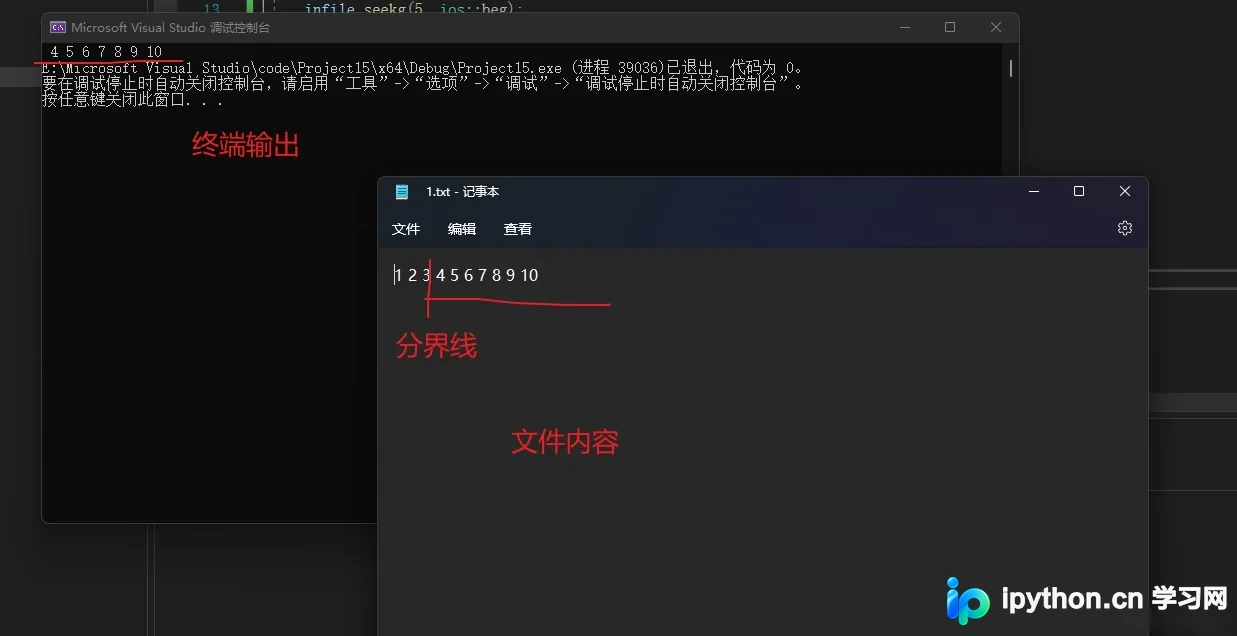
示例:从文件开头偏移5个字节开始读取剩余内容。
#include <iostream>
#include <fstream>
#include <string>
using namespace std;
int main() {
    ifstream infile;
    string str;
    infile.open("C:/Users/98207/Desktop/1.txt", ios::in);
    infile.seekg(5, ios::beg);  // 从开始位置偏移5个字节
    while (1) {
        getline(infile, str);
        cout << str;
        if (infile.eof()) {
            break;
        }
    }
    infile.close();
    return 0;
}
输入流指针tellg
tellg() 返回当前输入流的位置相对于文件起始位置的偏移量。
#include <iostream>
#include <fstream>
#include <string>
using namespace std;
int main() {
    ifstream infile;
    string str;
    infile.open("C:/Users/98207/Desktop/1.txt", ios::in);
    infile.seekg(5, ios::beg);  // 设置偏移量位5个字节
    cout << "文件指针偏移量:" << infile.tellg() << endl;  // 相对于文件起始位置
    infile.close();
    return 0;
}
结果输出:
文件指针偏移量:5
输出流指针seekp
seekp() 用于设置输出流的位置,行为与 seekg() 类似,但作用于写操作。
原型:
basic_ostream& seekp( off_type off,std::ios_base::seekdir dir );
#include <iostream>
#include <string>
#include <fstream>
using namespace std;
int main() {
    ofstream outfile;
    outfile.open("user1.txt", ios::out | ios::trunc);
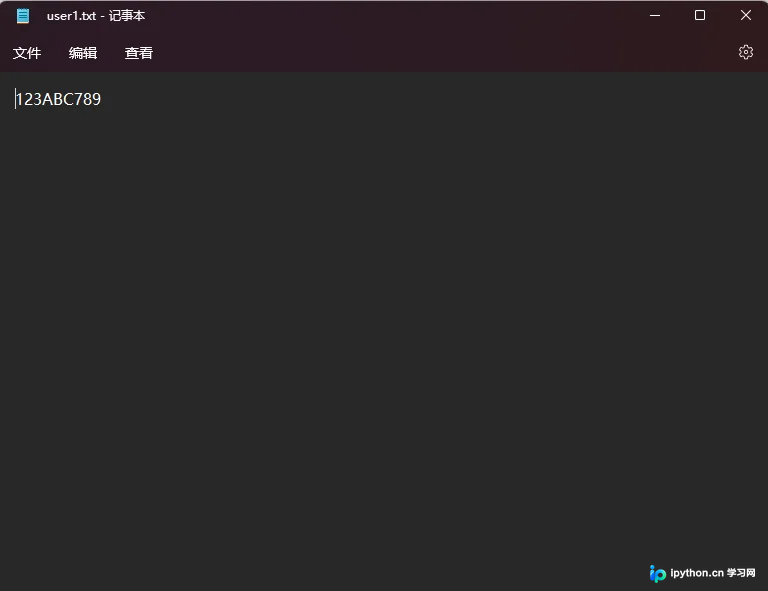
    outfile << "123456789";
    outfile.seekp(3, ios::beg);  // 指针先指向开头,然后向后偏移三个字节
    outfile << "ABC";
    outfile.close();
    return 0;
}
 以上就是C++ IO设备读写功能实现的详细内容,更多关于C++ IO设备读写资料请关注本站其它相关文章!
免责声明:本文内容仅供参考,不代表本站观点。转载或引用请注明出处。









