

C++实现单链表:增删查改与头尾插入完整代码示例

在数据结构学习中,单链表是连接数组与树图的重要桥梁。很多初学者在面对复杂的指针移动和内存分配时容易混淆,导致段错误或逻辑死循环。本文将通过一个完整的控制台项目,展示如何使用C++构建具备健壮的边界检查的单链表,实现包括头插、尾插、任意节点插入以及对应删除在内的九项核心操作。
任务目标与设计思路
为了实现一个可独立运行的单链表系统,我们需要解决以下几个关键问题:
- 结构定义:需要包含数据域和指针域的结构体,并考虑是否使用虚拟头结点来简化边界处理。
- 状态保持:为了方便查看当前状态(如长度),可以在头结点中冗余存储元素个数。
- 交互流程:通过控制台菜单切换不同的操作模块,并在每次修改后刷新视图以验证结果。
第1步:定义核心结构与初始化入口
我们采用含“计数字段”的虚拟头结点设计。这样在计算链表长度时无需遍历,且头插法无需判断链表是否为空,统一了操作路径。
首先定义节点结构 Node:
data:整型数据域。next:指向下一节点的指针域。
接着编写初始化函数 initLinkList。该函数通过输入长度进行循环尾插赋值,建立初始数据集:
// 伪代码示意:
L = new Node;       // 1. 分配头结点
L->next = NULL;     // 2. 头结点后续暂为空
L->data = count;    // 3. 记录期望长度
// ... 循环创建新节点并挂接至末尾 ...
第2步:实现视图更新与调试工具
在进行任何增删操作前,必须保证有查看当前状态的出口。函数 printLinkList 负责从首元结点开始遍历,将每个 data 输出并以箭头拼接,最终追加 NULL 标识结束符。同时,printLength 直接读取头结点的 data 成员返回链表规模,O(1) 时间复杂度。
第3步:执行多场景插入逻辑
链表的操作核心在于断链与重连。以下是三种典型插入方式的逻辑区别:
指定位置插入 (Location Insert)
这是最基础的通用操作。逻辑顺序为:
- 校验索引范围(需在
1到总长+1之间)。 - 创建一个新节点填入数据。
- 移动辅助指针至目标位置的前驱节点。
- 先让新节点的
next指向旧后继,再让前驱的next指向新节点(防止断链)。
头插法 (Head Insert)
适用于栈式或逆序数据录入。其优势在于不需要从头遍历寻找插入点,效率最高:
- 新节点
temp->next指向当前头结点的后继。 - 头结点的
next覆盖为新节点地址。
尾插法 (Tail Insert)
适用于队列式数据录入,虽然本例初始化使用了尾插,但作为独立功能需再次强调步骤:
- 寻找最后一个
next为空的节点。 - 将该尾节点的
next赋值为新节点,并将新节点自身的next设为NULL。
第4步:安全执行删除与回收机制
删除操作的难点在于释放内存的同时不造成越界。我们的实现采取了分类讨论策略:
- 判断依据:始终首先检测
L->data <= 0,防止对空链表进行无效操作引发异常。 - 头删:保存待删节点的地址,跳过它连接其后继,然后调用
delete释放内存。 - 尾删:遍历至倒数第二个节点,修改其
next为空,释放原尾节点。 - 中间/随机删除:定位到待删节点的前驱,将其
next指向待删的后继,随后释放待删内存。
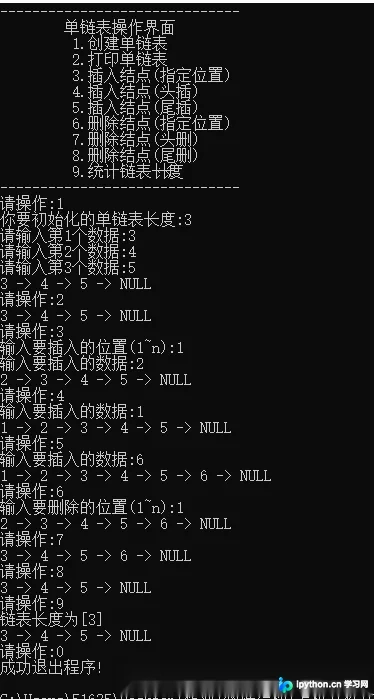
在实际的 main 循环中,我们将上述功能封装进选项卡。用户在终端依次输入指令,程序会在每次操作后自动输出当前链表序列及长度,这提供了一个直观的自我检验环境。
完整源代码清单
以下为整合了菜单驱动、全功能增删改查的单链表实现,可直接编译运行:
#include <iostream>
#include <string>
using namespace std;

// 定义结构体: 利用 data 字段存数量,next 存指针
typedef struct Node {
	int data;		// 数据域 (头结点用于存数量)
	Node* next;		// 指针域
}Node, *LinkList;

// 打印菜单
void printMenu() {
	string temp(10, '-');
	cout << temp + temp + temp << endl;
	cout << "\t单链表操作界面\n";
	cout << "\t 1.创建单链表\n";
	cout << "\t 2.打印单链表\n";
	cout << "\t 3.插入结点(指定位置)\n";
	cout << "\t 4.插入结点(头插)\n";
	cout << "\t 5.插入结点(尾插)\n";
	cout << "\t 6.删除结点(指定位置)\n";
	cout << "\t 7.删除结点(头删)\n";
	cout << "\t 8.删除结点(尾删)\n";
	cout << "\t 9.统计链表长度\n";
	cout << temp + temp + temp << endl;
}

// 初始化链表 (带头结点,尾插法建立)
bool initLinkList(LinkList& L) {
	cout << "你要初始化的单链表长度:";
	int count;
	cin >> count;

	// 初始化头结点
	L = new Node;
	L->next = NULL;
	L->data = count;

	// 按长度循环插入
	Node* p = L;
	for (int i = 0; i < count; i++) {
		Node* temp = new Node;
		cout << "请输入第" + to_string(i+1) + "个数据:";
		cin >> temp->data;
		temp->next = NULL;
		p->next = temp;
		p = p->next;
	}
	return true;
}

// 打印链表 (遍历首元结点)
bool printLinkList(LinkList& L) {
	if (L == NULL) {
		cout << "未初始化单链表"<<endl ;
		return false;
	}
	Node* temp = L->next;
	while (temp != NULL) {
		cout << to_string(temp->data) + " -> ";
		temp = temp->next;
	}
	cout << "NULL" << endl;
	return true;
}

// 指定位置插入 (index从1开始)
bool locationInsert(LinkList& L) {
	if (L == NULL) {
		cout << "未初始化单链表" << endl;
		return false;
	}
	// 获取位置并严格校验
	int index;
	while (true) {
		cout << "输入要插入的位置(1~n):";
		cin >> index;
		if (index <= L->data + 1 && index >= 1) break;
		cout << "输入的位置有误" <<endl;
	}
	Node* temp = new Node;
	cout << "输入要插入的数据:";
	cin >> temp->data;

	// 找到前驱节点
	Node* p = L;
	for (int i = 1; i < index; i++) {
		p = p->next;
	}
	// 插入核心:断链与重连
	temp->next = p->next;
	p->next = temp;
	L->data += 1;
	return true;
}

// 头插
bool headInsert(LinkList& L) {
	if (L == NULL) return false;
	Node* temp = new Node;
	cout << "输入要插入的数据:";
	cin >> temp->data;

	temp->next = L->next;
	L->next = temp;
	L->data += 1;
	return true;
}

// 尾插
bool tailInsert(LinkList& L) {
	if (L == NULL) return false;
	Node* temp = new Node;
	cout << "输入要插入的数据:";
	cin >> temp->data;

	Node* p = L->next;
	while (p->next != NULL){
		p = p->next;
	}
	p->next = temp;
	temp->next = NULL;
	L->data += 1;
	return true;
}

// 头删
bool headDelete(LinkList& L) {
	if (L->data < 1) {
		cout << "单链表没有元素" << endl;
		return false;
	}
	if (L->data > 1) { // 有多个节点
		Node* temp = L->next;
		L->next = L->next->next;
		delete temp;
	} else { // 仅剩一个首元结点
		delete L->next;
		L->next = NULL;
	}
	L->data -= 1;
	return true;
}

// 尾删
bool tailDelete(LinkList& L) {
	if (L->data < 1) {
		cout << "单链表没有元素" << endl;
		return false;
	}
	if (L->data > 1) {
		Node* p = L;
		for (int i = 0; i < L->data-1 ; i++) {
			p = p->next;
		}
		delete p->next;
		p->next = NULL;
	} else {
		delete L->next;
		L->next = NULL;
	}
	L->data -= 1;
	return true;
}

// 指定位置删除
bool locationDelete(LinkList& L) {
	if (L->data < 1) {
		cout << "单链表没有元素" << endl;
		return false;
	}
	int index;
	while (true) {
		cout << "输入要删除的位置(1~n):";
		cin >> index;
		if (index <= L->data && index >= 1) break;
		cout << "输入的位置有误" << endl;
	}

	// 复用头删/尾删逻辑,减少重复代码
	if (index == 1) headDelete(L);
	else if (index == L->data) tailDelete(L);
	else {
		Node* p = L;
		for (int i = 1; i < index; i++) p = p->next;
		Node* temp = p->next;
		p->next = p->next->next;
		delete temp;
		L->data -= 1;
	}
	return true;
}

// 打印链表长度
bool printLength(LinkList& L) {
	if (L == NULL) {
		cout << "未初始化单链表" << endl;
		return false;
	}
	cout << "链表长度为[" + to_string(L->data) + "]" << endl;
	return true;
}

// 主程序
int main() {
	bool flag = true;
	int option;
	LinkList L = NULL;
	printMenu();
	while (flag) {
		cout << "请操作:";
		cin >> option;
		switch (option) {
			case 1: initLinkList(L); printLinkList(L); break;
			case 2: printLinkList(L); break;
			case 3: locationInsert(L); printLinkList(L); break;
			case 4: headInsert(L); printLinkList(L); break;
			case 5: tailInsert(L); printLinkList(L); break;
			case 6: locationDelete(L); printLinkList(L); break;
			case 7: headDelete(L); printLinkList(L); break;
			case 8: tailDelete(L); printLinkList(L); break;
			case 9: printLength(L); printLinkList(L); break;
			case 0: cout << "成功退出程序!" << endl; flag = false; break;
			default: cout << "操作有误,重新输入!" << endl;
		}
	}
	return 0;
}
以上就是C++实现单链表增删查改功能的详细内容,更多关于C++数据结构单链表应用的资料请关注本站其它相关文章!
免责声明:本文内容仅供参考,不代表本站观点。转载或引用请注明出处。









