

Python协程实践指南:从yield基础到asyncio高并发应用

本文详解Python协程的核心原理与实战应用。通过yield表达式、生产者-消费者模式掌握基础通信机制,对比gevent monkey补丁与asyncio事件循环的差异,并结合aiohttp完成异步HTTP请求与Web服务搭建,提供可直接运行的完整代码与执行结果分析。
什么是协程及核心优势
协程(Coroutine)可理解为一种更轻量级的线程,它不由操作系统内核调度,完全由应用程序在用户态控制。与多线程相比,协程拥有独立的寄存器上下文和栈;调度切换时,仅需保存或恢复这些局部状态,避免了内核态切换的系统开销。这使得协程上下文切换极快,且访问全局变量时无需加锁,非常适合处理大量I/O密集型任务。
使用yield实现基础协程与状态管理
第1步:掌握yield表达式与send通信机制
在Python中,yield通常出现在表达式的右侧(如 x = yield data)。当右侧无表达式时,默认产出 None。协程支持外部通过调用 send(x) 传入数据,该调用同时包含隐式 next() 的作用,推动协程继续执行,并在合适时机中断转向其他协程。
def hello():
    data = "mima"
    while True:
        x = yield data
        print(x)
a = hello()
next(a)
data = a.send("hello")
print(data)执行逻辑:实例化 a 后函数体不会立即运行。首次调用 next(a) 启动生成器,执行至 yield 处暂停并返回初始值。随后 a.send("hello") 将值注入并恢复执行,打印接收到的数据后再次进入循环等待下一次触发。
第2步:理解协程的四种运行状态
GEN_CREATE:已创建但尚未启动GEN_RUNNING:解释器当前正在执行GEN_SUSPENDED:在yield表达式处暂停挂起GEN_CLOSED:正常结束或被显式关闭
生产者-消费者模式实践
利用协程可以天然实现生产者和消费者的协作。无需线程锁,数据通过 send 传递并由 yield 返回值确认处理结果。
import time

def consumer():
    r = ""
    while True:
        res = yield r
        if not res:
            print("Starting.....")
            return
        print(f"[CONSUMER] Consuming {res}....")
        time.sleep(1)
        r = "200 OK"

def produce(c):
    next(c)
    n = 0
    while n < 6:
        n += 1
        print(f"[PRODUCER] Producing {n} ....")
        r = c.send(n)
        print(f"[CONSUMER] Consumer return: {r} ....")
    c.close()

c = consumer()
produce(c)运行流程:先调用 next(c) 预热消费者。循环中生产者通过 c.send(n) 递交任务并获取消费者返回的状态码。消费者处理完毕后重置响应字符串。任务队列清空后调用 c.close() 安全终止协程。
基于gevent与asyncio的并发方案对比
第1步:利用gevent自动切换处理IO阻塞
gevent 是经典的第三方协程库。其核心原理是拦截标准库中的阻塞I/O调用,遇到等待时自动挂起当前 greenlet 并切换到其他就绪协程,待I/O完成后无缝切回。需在脚本入口打上猴子补丁以拦截内置模块。
#!/usr/bin/env python3
# coding=utf8
from gevent import monkey
monkey.patch_all()
import gevent
import requests

def handle_html(url):
    print(f"Starting {url}。。。。")
    response = requests.get(url)
    code = response.status_code
    print(f"{url}: {code}")

if __name__ == "__main__":
    urls = ["https://www.baidu.com", "https://www.douban.com", "https://www.qq.com"]
    jobs = [gevent.spawn(handle_html, url) for url in urls]
    gevent.joinall(jobs)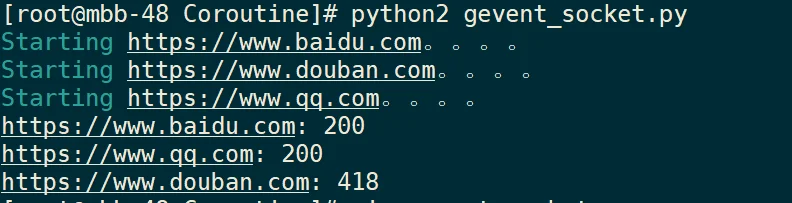
第2步:通过asyncio事件循环调度协程
Python 3.4+ 内置 asyncio 采用消息循环(Event Loop)架构。它将协程对象注册到事件循环中,遇到 await 时主动让出控制权,实现单线程下的异步I/O。
import asyncio
import threading

async def hello():
    print(f"hello, world: {threading.current_thread().name}")
    await asyncio.sleep(1)
    print(f'hello, man {threading.current_thread().name}')

if __name__ == "__main__":
    loop = asyncio.new_event_loop()
    asyncio.set_event_loop(loop)
    loop.run_until_complete(asyncio.wait([hello(), hello()]))
    loop.close()
第3步:结合aiohttp完成异步爬虫与服务端搭建
aiohttp 是基于 asyncio 的高性能 HTTP 客户端与服务端框架。以下示例展示如何使用它并发抓取网页,以及如何快速构建微型Web服务。
#!/usr/bin/env python3
import aiohttp
import asyncio

async def fetch(url, session):
    print(f"starting: {url}")
    async with session.get(url) as response:
        print(f"{url} : {response.status}")
        return await response.read()

async def run():
    urls = ["https://www.baidu.com", "https://www.douban.com", "http://www.mi.com"]
    tasks = []
    async with aiohttp.ClientSession() as session:
        tasks = [asyncio.ensure_future(fetch(url, session)) for url in urls]
        response = await asyncio.gather(*tasks)
        for body in response:
            print(len(body))

if __name__ == "__main__":
    loop = asyncio.new_event_loop()
    asyncio.set_event_loop(loop)
    loop.run_until_complete(run())
    loop.close()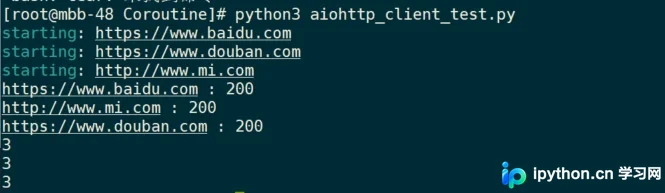
除客户端外,aiohttp 同样适用于搭建高性能服务器。只需定义路由规则并绑定到TCP服务即可:
from aiohttp import web

async def index(request):
    await asyncio.sleep(0.5)
    print(request.path)
    return web.Response(text='Hello, World')

async def hello(request):
    await asyncio.sleep(0.5)
    name = request.match_info['name']
    print(request.path)
    return web.Response(text=f'hello, {name}')

async def init(loop):
    app = web.Application(loop=loop)
    app.router.add_get('/', index)
    app.router.add_get('/hello/{name}', hello)
    srv = await loop.create_server(app.make_handler(), '127.0.0.1', 8000)
    print("Server started at http://127.0.0.1:8000....")
    return srv

if __name__ == "__main__":
    loop = asyncio.new_event_loop()
    asyncio.set_event_loop(loop)
    loop.run_until_complete(init(loop))
loop.run_forever()配置说明:通过 app.router.add_get 映射URI至对应处理函数。服务启动后保持事件循环监听端口,任何到达的HTTP请求都会触发对应的协程方法处理,全程无需额外加锁或创建线程池。
完成判断与排错提示
- 状态验证:通过输出日志的时间戳或顺序变化,若多个I/O操作未出现明显排队延迟,则表明协程切换生效。
- 资源清理:长期运行的服务需确保协程正确关闭(调用
.close()或配合async with),避免内存泄漏或僵尸任务堆积。 - 兼容提醒:旧版代码中使用
asyncio.get_event_loop()在新版Python中可能引发RuntimeWarning,推荐改用asyncio.new_event_loop()或直接使用asyncio.run()接管生命周期。
以上就是Python协程从基础原理到高并发实战的详细内容,更多关于Python异步IO开发与网络编程的资料请关注本站其它相关文章!
免责声明:本文内容仅供参考,不代表本站观点。转载或引用请注明出处。









