

Python pytest命令行运行测试用例全攻略

本文详细介绍Python中pytest框架通过命令行运行测试用例的方法。涵盖PyCharm终端及Windows/Linux环境下的基本操作,深入解析-v详细输出、-m标记分组、-k表达式筛选、-x失败即停等核心参数,并演示如何指定文件、类及方法运行,帮助开发者高效管理测试流程。
前言
通过命令行调用测试用例是日常开发中最常用的方式,相比Java的TestNG框架,pytest在此方面表现更为便捷,无需编写复杂的XML配置文件。为了支持更灵活的测试执行策略,pytest提供了丰富的命令行选项,允许用户定制化地运行特定类别或单个测试用例。
在PyCharm中通过命令行运行用例
在PyCharm中编写完测试用例后,如何高效执行?虽然PyCharm没有像Eclipse中TestNG插件那样提供一键执行的图形界面,但我们可以通过调用命令行工具来实现。以下是一个示例用例文件的展示。
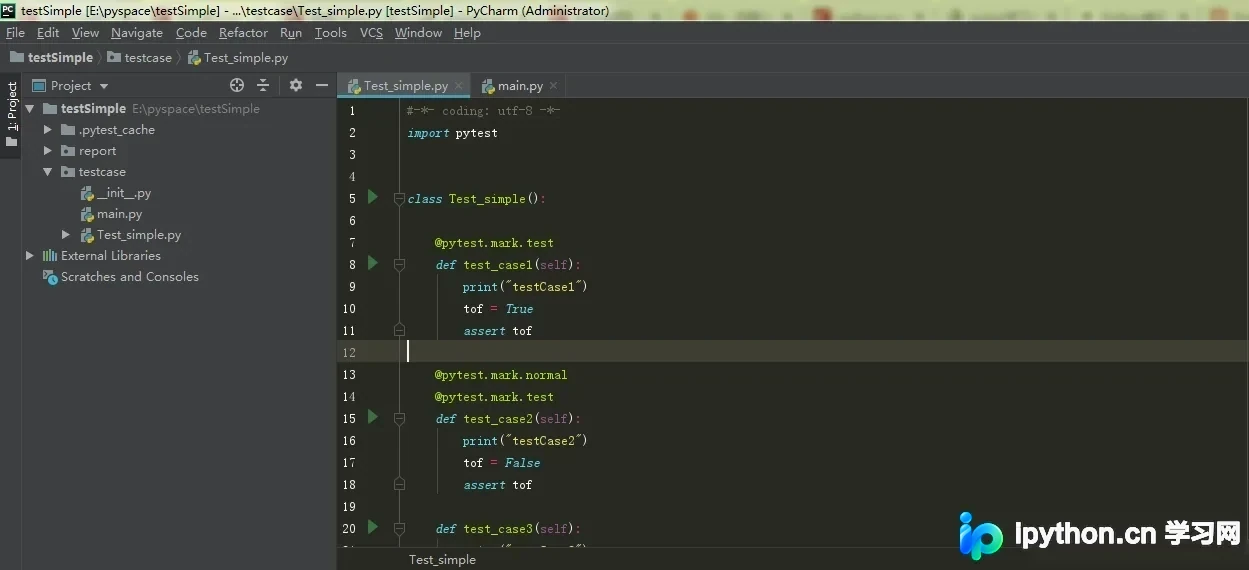
代码实现如下:
#-*- coding: utf-8 -*-
import pytest


class Test_simple():

    @pytest.mark.test
    def test_case1(self):
        print("testCase1")
        tof = True
        assert tof

    @pytest.mark.normal
    @pytest.mark.test
    def test_case2(self):
        print("testCase2")
        tof = False
        assert tof

    def test_case3(self):
        print("testCase3")
        assert True

    @pytest.mark.test
    def setup_class(self):
        print("用于test组")

    @pytest.mark.normal
    def setup_class(self):
        print("用于normal组")
如上所示,我们创建了一个名为testSimple的工程,并在其中添加了若干测试用例,文件命名为Test_simple。
若要运行这些用例,可以打开PyCharm下方的Terminal(终端)窗口。
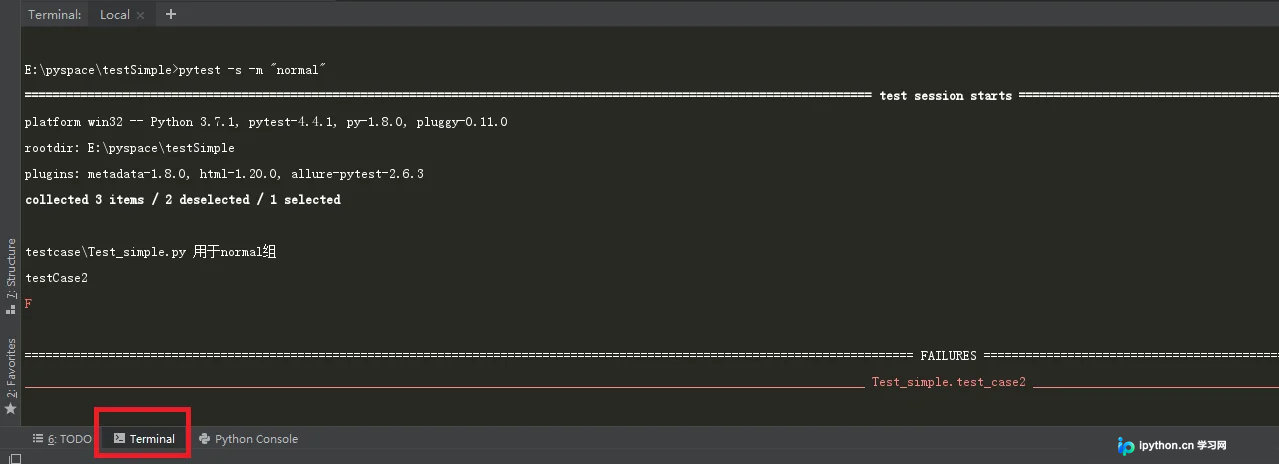
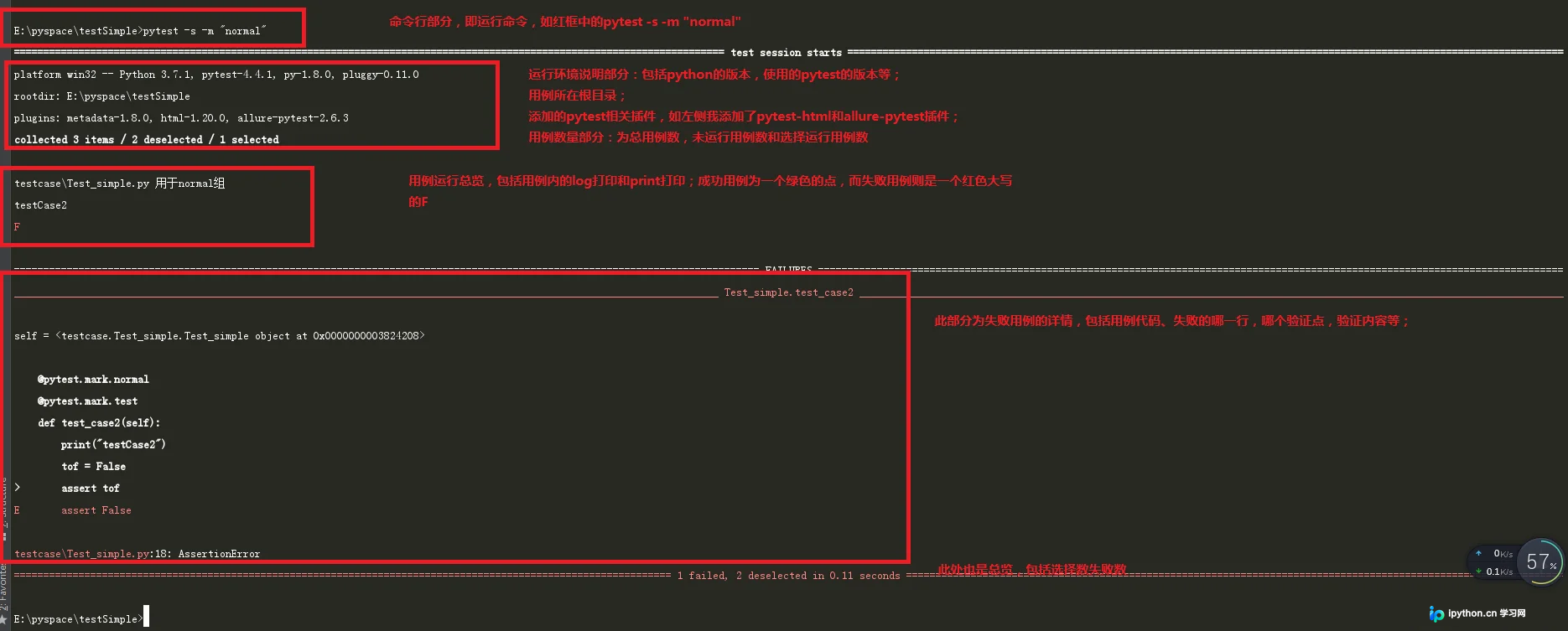
终端会自动切换至当前工程目录,此时即可使用pytest命令。以下是对运行结果的简要说明。
在终端中使用pytest
在终端中执行pytest的操作与在PyCharm内部类似,以下以Windows系统为例进行演示。
首先切换到包含用例的工程或目录,然后直接运行pytest命令,具体操作如下。
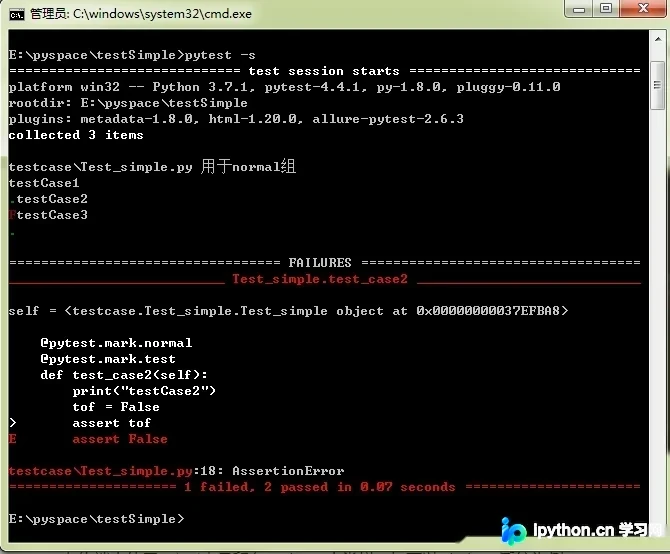
在Linux系统中使用方法相同,区别在于如果未为pytest设置软链接,则需要在命令前加上python以调用解释器。
运行全部用例
运行所有用例时无需添加任何后缀参数,直接输入命令pytest即可。此时终端打印的信息较为简洁。
E:\pyspace\testSimple>pytest
========================================================================================================================= test session starts ==========================================================================================================================
platform win32 -- Python 3.7.1, pytest-4.4.1, py-1.8.0, pluggy-0.11.0
rootdir: E:\pyspace\testSimple
plugins: metadata-1.8.0, html-1.20.0, allure-pytest-2.6.3
collected 3 items

testcase\Test_simple.py .F.                                                                                                                                                                                                                                       [100%]

=============================================================================================================================== FAILURES ===============================================================================================================================
________________________________________________________________________________________________________________________ Test_simple.test_case2 ________________________________________________________________________________________________________________________

self = <testcase.Test_simple.Test_simple object at 0x00000000038508D0>

    @pytest.mark.normal
    @pytest.mark.test
    def test_case2(self):
        print("testCase2")
        tof = False
>       assert tof
E       assert False

testcase\Test_simple.py:18: AssertionError
------------------------------------------------------------------------------------------------------------------------- Captured stdout call -------------------------------------------------------------------------------------------------------------------------
testCase2
================================================================================================================== 1 failed, 2 passed in 0.08 seconds ==================================================================================================================

E:\pyspace\testSimple>
使用-v参数打印详细信息
如上图所示,默认输出仅显示用例是成功还是失败,并未打印具体的日志信息。若需查看详细的运行日志,可添加-v参数,具体操作如下。
E:\pyspace\testSimple>pytest -v
========================================================================================================================= test session starts ==========================================================================================================================
platform win32 -- Python 3.7.1, pytest-4.4.1, py-1.8.0, pluggy-0.11.0 -- e:\software\python\python3.7\python.exe
cachedir: .pytest_cache
metadata: {'Python': '3.7.1', 'Platform': 'Windows-7-6.1.7601-SP1', 'Packages': {'pytest': '4.4.1', 'py': '1.8.0', 'pluggy': '0.11.0'}, 'Plugins': {'metadata': '1.8.0', 'html': '1.20.0', 'allure-pytest': '2.6.3'}, 'JAVA_HOME': 'D:\\project\\jdk1.8'}
rootdir: E:\pyspace\testSimple
plugins: metadata-1.8.0, html-1.20.0, allure-pytest-2.6.3
collected 3 items

testcase/Test_simple.py::Test_simple::test_case1 PASSED                                                                                                                                                                                                           [ 33%]
testcase/Test_simple.py::Test_simple::test_case2 FAILED                                                                                                                                                                                                           [ 66%]
testcase/Test_simple.py::Test_simple::test_case3 PASSED                                                                                                                                                                                                           [100%]

=============================================================================================================================== FAILURES ===============================================================================================================================
________________________________________________________________________________________________________________________ Test_simple.test_case2 ________________________________________________________________________________________________________________________

self = <testcase.Test_simple.Test_simple object at 0x000000000382EDA0>

    @pytest.mark.normal
    @pytest.mark.test
    def test_case2(self):
        print("testCase2")
        tof = False
>       assert tof
E       assert False

testcase\Test_simple.py:18: AssertionError
------------------------------------------------------------------------------------------------------------------------- Captured stdout call -------------------------------------------------------------------------------------------------------------------------
testCase2
================================================================================================================== 1 failed, 2 passed in 0.08 seconds ==================================================================================================================

E:\pyspace\testSimple>
如上图所示,添加该参数后会将详细的运行信息全部打印出来。
指定运行特定组别
如果测试用例中包含多个分组标记,希望仅运行其中一个组,可使用-m "组名"参数。继续使用上述代码,运行命令及结果如下。
E:\pyspace\testSimple>pytest -s -m "normal"
========================================================================================================================= test session starts ==========================================================================================================================
platform win32 -- Python 3.7.1, pytest-4.4.1, py-1.8.0, pluggy-0.11.0
rootdir: E:\pyspace\testSimple
plugins: metadata-1.8.0, html-1.20.0, allure-pytest-2.6.3
collected 3 items / 2 deselected / 1 selected

testcase\Test_simple.py 用于normal组
testCase2
F

=============================================================================================================================== FAILURES ===============================================================================================================================
________________________________________________________________________________________________________________________ Test_simple.test_case2 ________________________________________________________________________________________________________________________

self = <testcase.Test_simple.Test_simple object at 0x00000000036D27F0>

    @pytest.mark.normal
    @pytest.mark.test
    def test_case2(self):
        print("testCase2")
        tof = False
>       assert tof
E       assert False

testcase\Test_simple.py:18: AssertionError
================================================================================================================ 1 failed, 2 deselected in 0.07 seconds ================================================================================================================

E:\pyspace\testSimple>
使用表达式指定特定用例(-k)
通过-k选项,我们可以设置表达式来筛选并运行特定的用例。如下示例中,传参后仅运行了test_case1和test_case2。
E:\pyspace\testSimple>pytest -v -k "case1 or case2"
========================================================================================================================= test session starts ==========================================================================================================================
platform win32 -- Python 3.7.1, pytest-4.4.1, py-1.8.0, pluggy-0.11.0 -- e:\software\python\python3.7\python.exe
cachedir: .pytest_cache
metadata: {'Python': '3.7.1', 'Platform': 'Windows-7-6.1.7601-SP1', 'Packages': {'pytest': '4.4.1', 'py': '1.8.0', 'pluggy': '0.11.0'}, 'Plugins': {'metadata': '1.8.0', 'html': '1.20.0', 'allure-pytest': '2.6.3'}, 'JAVA_HOME': 'D:\\project\\jdk1.8'}
rootdir: E:\pyspace\testSimple
plugins: metadata-1.8.0, html-1.20.0, allure-pytest-2.6.3
collected 3 items / 1 deselected / 2 selected

testcase/Test_simple.py::Test_simple::test_case1 PASSED                                                                                                                                                                                                           [ 50%]
testcase/Test_simple.py::Test_simple::test_case2 FAILED                                                                                                                                                                                                           [100%]
表达式的写法非常灵活,可以使用全称如test_case1,也可以简化为前缀如test_。除了使用or进行逻辑或运算外,还可以使用not来排除某些用例不执行。
遇到失败即停止运行(-x)
pytest的默认行为是执行所有用例,无论中间是否有失败。如果希望遇到第一个失败用例时立即停止运行,可以使用-x参数。如下所示,当第二条用例失败后,第三条用例将不再执行。
E:\pyspace\testSimple>pytest -v -x
========================================================================================================================= test session starts ==========================================================================================================================
platform win32 -- Python 3.7.1, pytest-4.4.1, py-1.8.0, pluggy-0.11.0 -- e:\software\python\python3.7\python.exe
cachedir: .pytest_cache
metadata: {'Python': '3.7.1', 'Platform': 'Windows-7-6.1.7601-SP1', 'Packages': {'pytest': '4.4.1', 'py': '1.8.0', 'pluggy': '0.11.0'}, 'Plugins': {'metadata': '1.8.0', 'html': '1.20.0', 'allure-pytest': '2.6.3'}, 'JAVA_HOME': 'D:\\project\\jdk1.8'}
rootdir: E:\pyspace\testSimple
plugins: metadata-1.8.0, html-1.20.0, allure-pytest-2.6.3
collected 3 items

testcase/Test_simple.py::Test_simple::test_case1 PASSED                                                                                                                                                                                                           [ 33%]
testcase/Test_simple.py::Test_simple::test_case2 FAILED                                                                                                                                                                                                           [ 66%]

=============================================================================================================================== FAILURES ===============================================================================================================================
________________________________________________________________________________________________________________________ Test_simple.test_case2 ________________________________________________________________________________________________________________________

self = <testcase.Test_simple.Test_simple object at 0x00000000037A9B00>

    @pytest.mark.normal
    @pytest.mark.test
    def test_case2(self):
        print("testCase2")
        tof = False
>       assert tof
E       assert False

testcase\Test_simple.py:18: AssertionError
------------------------------------------------------------------------------------------------------------------------- Captured stdout call -------------------------------------------------------------------------------------------------------------------------
testCase2
================================================================================================================== 1 failed, 1 passed in 0.08 seconds ==================================================================================================================

E:\pyspace\testSimple>
指定运行某个测试py文件
若要指定运行某个特定的py文件,只需在命令后跟上该文件的相对路径即可。
E:\pyspace\testSimple>pytest -v testcase/Test_example.py
========================================================================================================================= test session starts ==========================================================================================================================
platform win32 -- Python 3.7.1, pytest-4.4.1, py-1.8.0, pluggy-0.11.0 -- e:\software\python\python3.7\python.exe
cachedir: .pytest_cache
metadata: {'Python': '3.7.1', 'Platform': 'Windows-7-6.1.7601-SP1', 'Packages': {'pytest': '4.4.1', 'py': '1.8.0', 'pluggy': '0.11.0'}, 'Plugins': {'metadata': '1.8.0', 'html': '1.20.0', 'allure-pytest': '2.6.3'}, 'JAVA_HOME': 'D:\\project\\jdk1.8'}
rootdir: E:\pyspace\testSimple
plugins: metadata-1.8.0, html-1.20.0, allure-pytest-2.6.3
collected 1 item

testcase/Test_example.py::Test_example::test_aaa PASSED                                                                                                                                                                                                           [100%]

======================================================================================================================= 1 passed in 0.02 seconds =======================================================================================================================

E:\pyspace\testSimple>
指定运行某个class
指定运行特定类的写法为:py文件路径::class名称,具体范例如下。
E:\pyspace\testSimple>pytest -v testcase/Test_example.py::Test_example2
========================================================================================================================= test session starts ==========================================================================================================================
platform win32 -- Python 3.7.1, pytest-4.4.1, py-1.8.0, pluggy-0.11.0 -- e:\software\python\python3.7\python.exe
cachedir: .pytest_cache
metadata: {'Python': '3.7.1', 'Platform': 'Windows-7-6.1.7601-SP1', 'Packages': {'pytest': '4.4.1', 'py': '1.8.0', 'pluggy': '0.11.0'}, 'Plugins': {'metadata': '1.8.0', 'html': '1.20.0', 'allure-pytest': '2.6.3'}, 'JAVA_HOME': 'D:\\project\\jdk1.8'}
rootdir: E:\pyspace\testSimple
plugins: metadata-1.8.0, html-1.20.0, allure-pytest-2.6.3
collected 1 item

testcase/Test_example.py::Test_example2::test_bbb PASSED                                                                                                                                                                                                          [100%]

======================================================================================================================= 1 passed in 0.08 seconds =======================================================================================================================

E:\pyspace\testSimple>
指定运行某个方法:
指定运行特定方法的写法为:py文件路径::class名称::method名称,具体范例如下。
E:\pyspace\testSimple>pytest -v testcase/Test_example.py::Test_example2
========================================================================================================================= test session starts ==========================================================================================================================
platform win32 -- Python 3.7.1, pytest-4.4.1, py-1.8.0, pluggy-0.11.0 -- e:\software\python\python3.7\python.exe
cachedir: .pytest_cache
metadata: {'Python': '3.7.1', 'Platform': 'Windows-7-6.1.7601-SP1', 'Packages': {'pytest': '4.4.1', 'py': '1.8.0', 'pluggy': '0.11.0'}, 'Plugins': {'metadata': '1.8.0', 'html': '1.20.0', 'allure-pytest': '2.6.3'}, 'JAVA_HOME': 'D:\\project\\jdk1.8'}
rootdir: E:\pyspace\testSimple
plugins: metadata-1.8.0, html-1.20.0, allure-pytest-2.6.3
collected 1 item

testcase/Test_example.py::Test_example2::test_bbb PASSED                                                                                                                                                                                                          [100%]

======================================================================================================================= 1 passed in 0.08 seconds =======================================================================================================================

E:\pyspace\testSimple>
上述几种指定方式可以组合使用,以满足复杂的测试需求。
其他用法
pytest还包含许多其他高级用法,具体所有可用参数可通过pytest --help命令查看,如下所示。

总结
至此,关于Python pytest命令行运行测试用例的介绍已完成。如需了解更多相关pytest命令行操作内容,建议搜索本站历史文章或继续浏览后续相关文章,希望大家今后能多多支持本站!
免责声明:本文内容仅供参考,不代表本站观点。转载或引用请注明出处。









