

Django实战:构建基于百度API的天气预报查询系统

本文介绍如何使用Django框架结合百度地图开放平台API,开发一个简洁的天气预报查询网站。内容涵盖项目配置、视图逻辑处理、URL路由设置以及前端界面美化。重点解析通过Form表单实现城市切换查询的功能原理,并提供完整的代码示例与运行效果说明,帮助开发者快速掌握Django基础应用开发流程。
项目初始化
按照以下步骤创建工程目录结构:
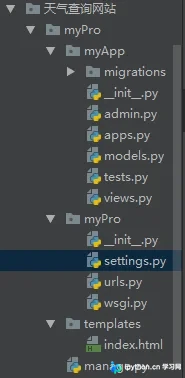
在文件settings.py中进行配置,主要涉及两项设置:
1. 注册应用模块(App)
2. 配置模板(templates)的查找路径
上述配置步骤在之前的教程中已有详细说明,此处不再重复赘述。
本示例使用的数据接口为:http://api.map.baidu.com/telematics/v3/weather?location=%E9%83%91%E5%B7%9E&output=json&ak=TueGDhCvwI6fOrQnLM0qmXxY9N0OkOiQ&callback=?
整体实现流程主要包含以下环节:
1. 调用接口获取天气数据,并通过文件将数据传递给页面。
2. 在页面中进行界面渲染与美化,提升用户体验。
3. 实现动态查询功能。
数据获取与传输部分在之前的电影查询案例中已详细讲解,本文重点阐述如何实现动态查询功能。
本例继续使用Form表单实现查询功能。若未指定method属性,默认使用GET请求。在首次加载页面展示数据后,
我们可以在Form表单中指定请求方式,并在后续请求时增加判断逻辑:将用户输入的
城市名称替换到请求参数中,从而发起新的查询请求。
具体实现代码如下:
视图文件views.py的核心代码逻辑如下:
from django.shortcuts import render
import requests
# Create your views here.
def index(request):
  if request.method == 'POST':
    city = request.POST['city']
    url = 'http://api.map.baidu.com/telematics/v3/weather?location={}&output=json&ak=TueGDhCvwI6fOrQnLM0qmXxY9N0OkOiQ&callback=?'.format(city)
  else:
    url = 'http://api.map.baidu.com/telematics/v3/weather?location=%E9%83%91%E5%B7%9E&output=json&ak=TueGDhCvwI6fOrQnLM0qmXxY9N0OkOiQ&callback=?'
  json_data = requests.get(url).json()
  weather = json_data['results'][0]['weather_data']
  today_weather = weather[0]
  t_weather = weather[1]
  tt_weather = weather[2]
  ttt_weather =weather[3]
  city = json_data['results'][0]['currentCity']
  context = {
    'today':today_weather,
    'city':city,
    'list':[t_weather,tt_weather,ttt_weather]
  }
  return render(request,'index.html',context)
路由配置文件urls.py的代码如下:
from django.contrib import admin
from django.urls import path
from myApp import views
urlpatterns = [
  path('admin/', admin.site.urls),
  path('index/',views.index),
  path('select/',views.index),
]
前端模板文件index.html的代码如下:
<!DOCTYPE html>
<html lang="en">
<head>
  <meta charset="UTF-8">
  <title>{{city}}天气信息</title>
  <style>
    html,body{
      height:100%;
      margin:0;
      color: white;
      text-align: center;
    }
    body{
      /*渐变色*/
      background: linear-gradient(#1078c7,#7196b4);
    }
    form{
      text-align: center;
    }
    main img{
      width: 80px;
    }
    h1{
      margin:5px;
    }
    footer{
      display: flex;
    }
    section{
      flex-grow: 1;
      border-right:1px solid greenyellow;
    }
    section:nth-child(3){
      border:none;
    }
  </style>
</head>
<body>
  <form action="/select/" method="POST">
    {% csrf_token %}
    <input name="city" type="text" placeholder="请输入城市">
    <button type="submit">查询</button>
  </form>
  <main>
    <h2>实时天气</h2>
    <img src="{{today.dayPictureUrl}}" alt="">
    <h1>{{today.temperature}}</h1>
    <div>
      {{today.weather}}<br>
      {{today.wind}}<br>
      {{today.date}}<br>
    </div>
  </main>
  <footer>
    {% for weather in list %}
      <section>
        <h4>{{weather.date}}</h4>
        <img src="{{weather.dayPictureUrl}}" alt="">
        <div>
          {{weather.temperature}}<br>
          {{weather.weather}}<br>
          {{weather.wind}}<br>
        </div>
      </section>
    {% endfor %}
  </footer>
</body>
</html>
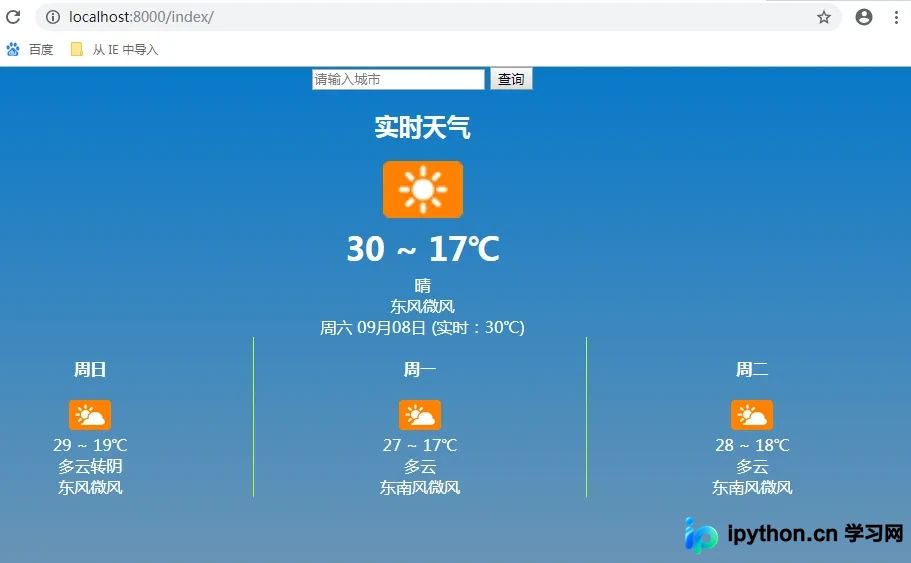
执行python manage.py runserver命令启动服务器,在浏览器中访问对应网址即可看到运行效果:
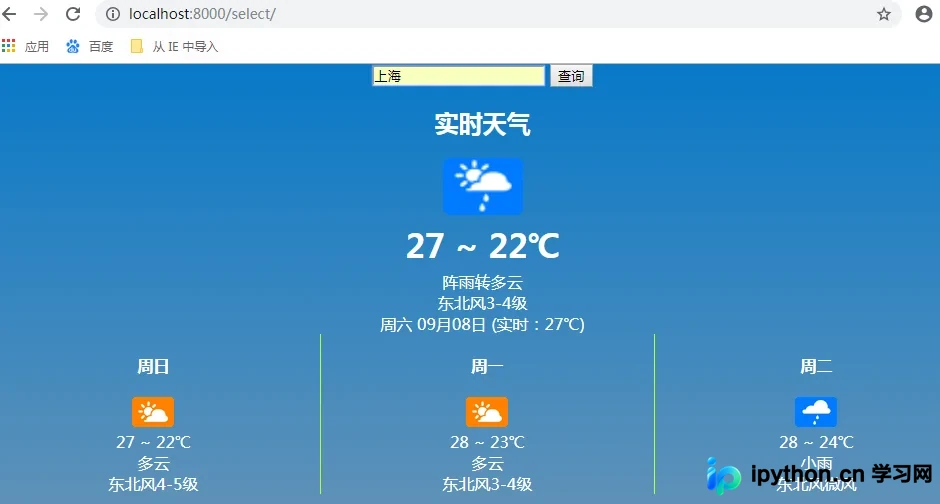
在查询框中输入目标城市名称并提交,即可获取该城市的天气信息:
总结
本文介绍了Django开发天气预报网站的全过程,希望内容对读者的学习或工作有所帮助。感谢支持,如需了解更多技术细节,请参阅相关链接。
免责声明:本文内容仅供参考,不代表本站观点。转载或引用请注明出处。









