Python常用代码模板:文件读写、网络请求与数据清洗

提供Python在本地文件读写、网络API请求与数据清洗环节的核心代码模板,包含编码处理、超时重试、缺失值清洗及综合串联流程。
假设你在日常工作中接到一个任务:每天从服务接口拉取一份用户行为数据,与本地的离线记录比对,清洗掉空值与非法格式,并导出为固定格式的表格交由业务系统处理。这类任务不需要复杂的系统架构,但代码如果缺乏规范的结构,容易在文件编码冲突、网络瞬时中断或脏数据渗入时中途崩溃。本文整理了针对文件读写、网络请求和数据清洗三个核心阶段的标准代码模板,解析关键参数与防护逻辑,帮助你快速写出稳健的数据处理脚本。
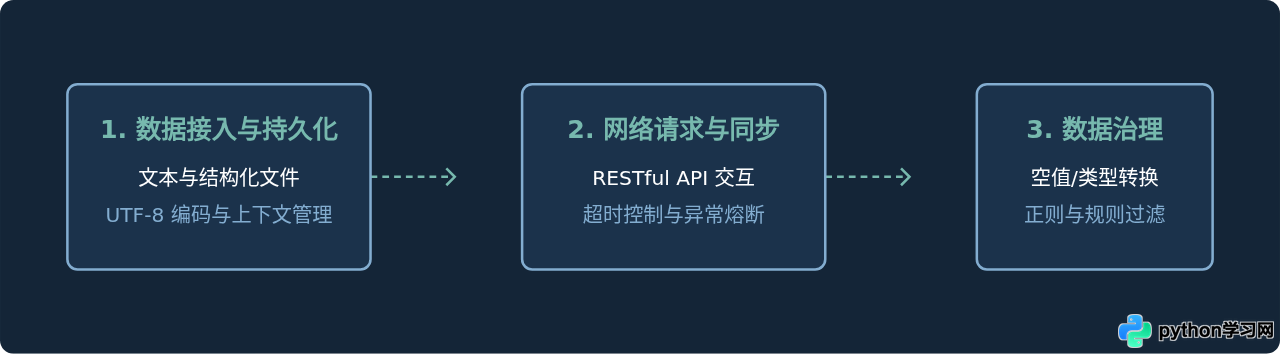
图1:三阶段数据流架构关系
一、文件读写:上下文与编码规范
文件读写中最常见的隐患有两个:一是未显式指定编码导致跨平台运行时抛出 UnicodeDecodeError;二是未安全释放系统句柄。Python 推荐使用 with 语句管理文件资源,并始终显式声明 encoding="utf-8"。
1. 常见文件类型的读写模板
以下代码包含了常规纯文本、JSON 配置文件及基于标准库 csv 模块读写结构化表格的通用写法:
import json
import csv
from pathlib import Path

# 1. 纯文本读取与写入
txt_path = Path("records.txt")
with open(txt_path, mode="w", encoding="utf-8") as f:
    f.write("status: active\ncount: 42\n")

with open(txt_path, mode="r", encoding="utf-8") as f:
    text_content = f.read()

# 2. JSON 读写(ensure_ascii=False 保持中文可读性)
payload = {"task_id": 101, "name": "测试任务", "passed": True}
json_path = Path("task.json")

with open(json_path, mode="w", encoding="utf-8") as f:
    json.dump(payload, f, ensure_ascii=False, indent=2)

with open(json_path, mode="r", encoding="utf-8") as f:
    data_loaded = json.load(f)

# 3. CSV 字典读写(newline="" 防止跨平台写入出现空行)
csv_path = Path("users.csv")
records = [
    {"id": "001", "name": "张三", "score": "95"},
    {"id": "002", "name": "李四", "score": "88"},
]

with open(csv_path, mode="w", encoding="utf-8", newline="") as f:
    writer = csv.DictWriter(f, fieldnames=["id", "name", "score"])
    writer.writeheader()
    writer.writerows(records)

with open(csv_path, mode="r", encoding="utf-8") as f:
    reader = csv.DictReader(f)
    csv_rows = [row for row in reader]
newline=""。若省略该参数,在 Windows 系统下写入文件可能会在每行之间插入多余的空行。
二、网络请求:超时控制与重试机制
依赖外部网络调用时,必须假设请求随时可能发生波动。直接调用 requests.get(url) 而不设置超时时间,可能导致程序无限期挂起;缺少错误捕获则会让整个批处理因某次瞬间网络丢包直接终止。
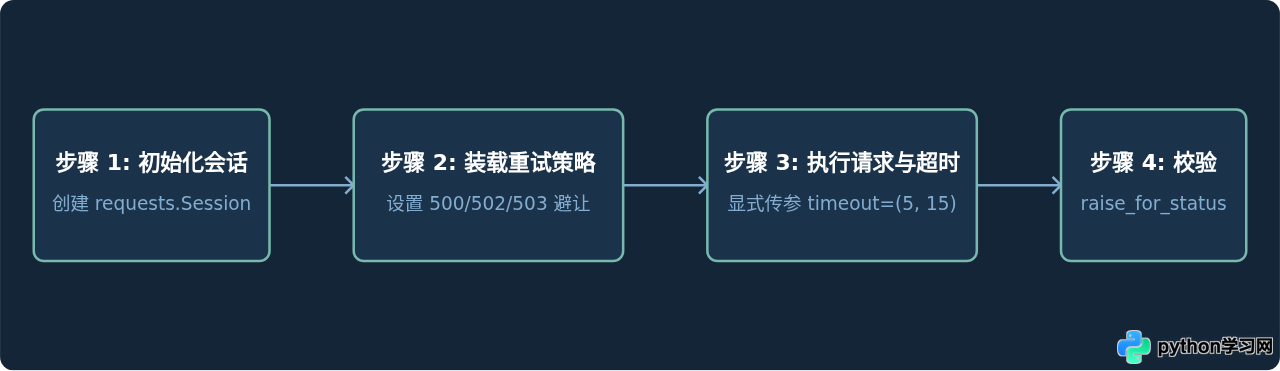
图2:高可用网络请求执行流程
2. 包含重试与错误捕获的请求模板
该模板借助 urllib3.util.Retry 与 requests.Session 搭配,在服务端返回指定异常状态码(如 500、502、504)或连接中断时自动进行退避重试:
import requests
from requests.adapters import HTTPAdapter
from urllib3.util import Retry

def create_resilient_session(retries: int = 3, backoff_factor: float = 0.5) -> requests.Session:
    """构建带有自动重试策略的 Session"""
    session = requests.Session()
    retry_strategy = Retry(
        total=retries,
        backoff_factor=backoff_factor,
        status_forcelist=[429, 500, 502, 503, 504],
        allowed_methods=["HEAD", "GET", "OPTIONS", "POST"]
    )
    adapter = HTTPAdapter(max_retries=retry_strategy)
    session.mount("https://", adapter)
    session.mount("http://", adapter)
    return session

def fetch_json(url: str, params: dict = None) -> dict:
    session = create_resilient_session()
    headers = {
        "User-Agent": "DataCollector/1.0",
        "Accept": "application/json"
    }
    try:
        # timeout 分别定义 (连接超时时间, 读取超时时间)
        response = session.get(url, params=params, headers=headers, timeout=(5.0, 15.0))
        response.raise_for_status()
        return response.json()
    except requests.exceptions.HTTPError as http_err:
        print(f"HTTP 状态码异常: {http_err},返回内容: {response.text[:200]}")
    except requests.exceptions.Timeout:
        print("请求超时,网络响应过慢或连接受阻")
    except requests.exceptions.RequestException as req_err:
        print(f"网络底层错误: {req_err}")
    return {}
三、数据清洗:Pandas 标准清洗套路
从本地或网络加载的数据往往夹杂脏数据:空值(NaN/None)、首尾无意空格、异常时间格式以及混合类型字段。使用 pandas 可以系统性地完成类型校正与格式归一化。
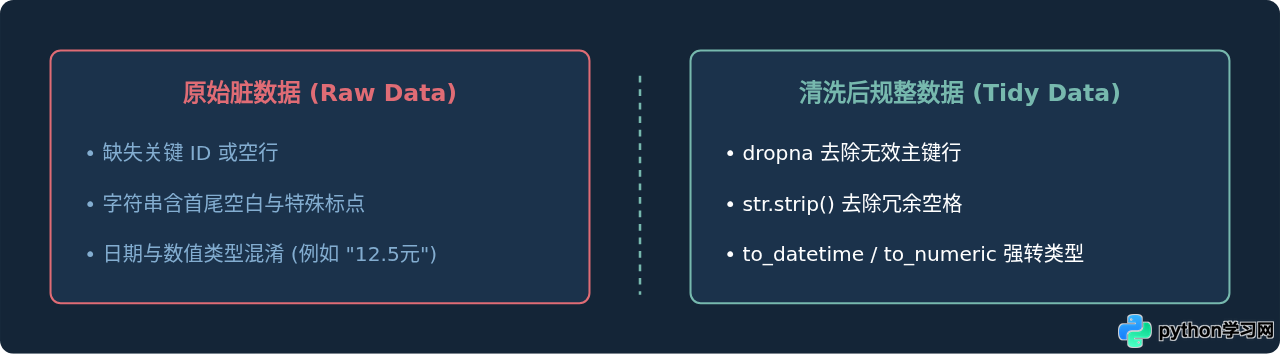
图3:数据清洗前后结构对比
3. 数据清洗核心模版
import pandas as pd
import numpy as np

def clean_dataframe(df: pd.DataFrame) -> pd.DataFrame:
    # 浅拷贝避免 SettingWithCopyWarning
    data = df.copy()

    # 1. 过滤主键缺失行,填充次要缺失值
    data = data.dropna(subset=["user_id"])
    data["score"] = data["score"].fillna(0.0)

    # 2. 清理字符串首尾多余空格
    string_cols = data.select_dtypes(include="object").columns
    for col in string_cols:
        data[col] = data[col].astype(str).str.strip()

    # 3. 类型强制转换与容错 (errors='coerce' 将解析失败的值转为 NaN)
    data["amount"] = pd.to_numeric(data["amount"], errors="coerce").fillna(0.0)
    data["created_at"] = pd.to_datetime(data["created_at"], errors="coerce")

    # 4. 去除完全重复行
    data = data.drop_duplicates(subset=["user_id", "created_at"])

    return data
四、工程化集成:全流程串联示例
在实际生产任务中,这三个模块通常按序衔接。下面提供一个脚本级模板,演示如何从远程接口获取数据,清洗后与本地历史 CSV 合并,并安全写回本地文件。
from pathlib import Path
import pandas as pd
# 引入前文封装的模块组件
# from network_module import fetch_json
# from clean_module import clean_dataframe

def run_pipeline():
    output_dir = Path("./data_output")
    output_dir.mkdir(parents=True, exist_ok=True)
    target_file = output_dir / "daily_report.csv"

    # 1. 网络拉取
    raw_payload = fetch_json("https://api.example.com/daily_metrics", params={"date": "latest"})
    if not raw_payload.get("items"):
        print("未获取到有效业务数据,流程终止")
        return

    # 2. 转为 DataFrame 并清洗
    df_new = pd.DataFrame(raw_payload["items"])
    df_cleaned = clean_dataframe(df_new)

    # 3. 结合本地现有数据进行增量持久化
    if target_file.exists():
        df_old = pd.read_csv(target_file, encoding="utf-8")
        df_merged = pd.concat([df_old, df_cleaned], ignore_index=True)
        df_final = df_merged.drop_duplicates(subset=["task_id"])
    else:
        df_final = df_cleaned

    # 4. 导出落盘
    df_final.to_csv(target_file, index=False, encoding="utf-8")
    print(f"数据处理完毕,共写入 {len(df_final)} 条记录到 {target_file}")

if __name__ == "__main__":
    run_pipeline()
五、排查清单与总结
当程序运行发生异常时,可以优先依据以下三个维度的清单快速排查问题根源:
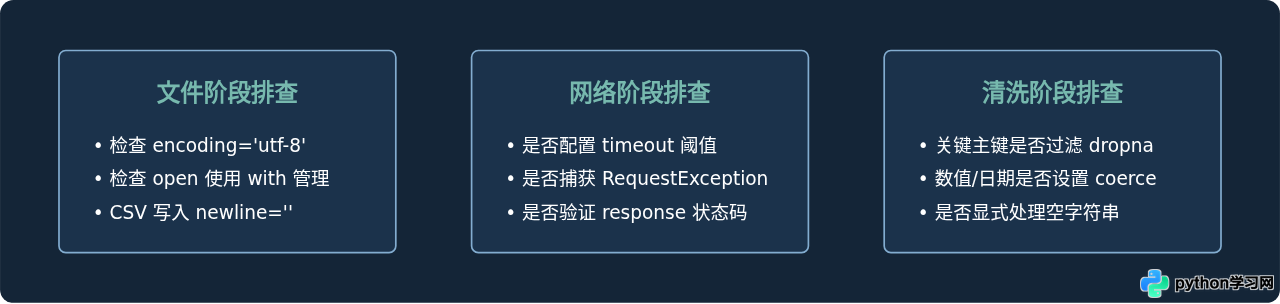
图4:关键检查项总结看板
- 编码一致性:无论文本还是结构化文件,务必显式声明
encoding="utf-8",避免因系统默认编码不同带来乱码。 - 网络确定性:永远设置
timeout,并通过Retry为偶尔的服务抖动保留恢复余地。 - 清洗防御性:类型转换使用
errors='coerce'防止因个别脏数据导致整个流程中断,确保清洗后的数据结构稳定可用。
免责声明:本文内容仅供参考,不代表本站观点。转载或引用请注明出处。