

Python数字图像处理:直方图计算、绘制与均衡化实战

本文详解Python中利用skimage和numpy进行数字图像直方图处理的方法。涵盖histogram函数的参数与返回值、matplotlib绘制直方图的常用参数及代码示例,以及RGB三通道直方图的叠加绘制。重点解析直方图均衡化原理及其通过exposure.equalize_hist实现图像对比度增强的完整流程与代码。
在数字图像处理领域,直方图是一项核心且极具实用价值的分析要素。
在skimage库中,直方图相关的处理功能被归类于exposure模块下。
1、计算直方图
函数定义:skimage.exposure.histogram(image,nbins=256)
此外,numpy库也提供了计算直方图的histogram()函数,两者功能基本一致。
该函数返回一个元组(hist, bins_center),其中前一个数组代表直方图的统计量,后一个数组表示每个bin(区间)的中心值。
import numpy as np
from skimage import exposure,data
image =data.camera()*1.0
hist1=np.histogram(image, bins=2)  #用numpy包计算直方图
hist2=exposure.histogram(image, nbins=2) #用skimage计算直方图
print(hist1)
print(hist2)
输出示例:
(array([107432, 154712], dtype=int64), array([ 0. , 127.5, 255. ])) (array([107432, 154712], dtype=int64), array([ 63.75, 191.25]))
当分为两个bin时,两者的统计量相同,但区别在于:numpy返回的是每个bin两端的范围值,而skimage返回的是每个bin的中心值。
2、绘制直方图
可以使用matplotlib.pyplot库进行绘图,其中的hist函数可直接用于绘制直方图。
调用方式如下:
hist函数参数众多,但常用仅六个,其中第一个参数为必填,其余四个为可选。
arr: 需要计算直方图的一维数组。
bins: 直方图的柱数,可选,默认为10。
normed: 是否将得到的直方图向量归一化,默认为0。
facecolor: 直方图的颜色。
edgecolor: 直方图边框的颜色。
alpha: 透明度设置。
histtype: 直方图的类型,可选值包括‘bar', ‘barstacked', ‘step', ‘stepfilled'。
返回值说明:
n: 直方图向量,是否归一化取决于normed参数的设定。
bins: 返回各个bin的区间范围。
patches: 返回每个bin内包含的数据,是一个列表。
from skimage import data
import matplotlib.pyplot as plt
img=data.camera()
plt.figure("hist")
arr=img.flatten()
n, bins, patches = plt.hist(arr, bins=256, normed=1,edgecolor='None',facecolor='red')
plt.show()
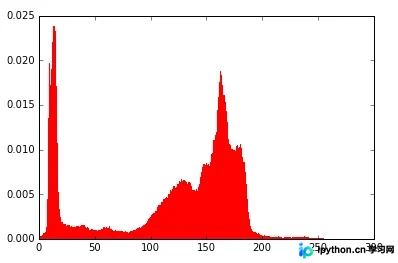
其中,flatten()函数属于numpy包,用于将二维数组展平为一维数组。
该操作按行序列进行,例如:
mat=[[1 2 3
4 5 6]]
经过 mat.flatten()处理后,结果变为:
mat=[1 2 3 4 5 6]
3、彩色图片三通道直方图
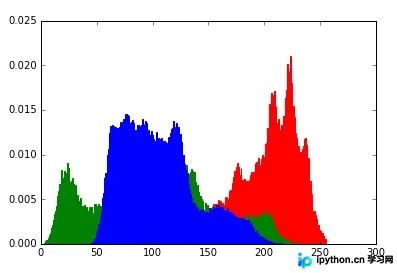
通常直方图针对灰度图,若要绘制RGB图像的三通道直方图,实际上是将三个直方图叠加显示。
from skimage import data
import matplotlib.pyplot as plt
img=data.lena()
ar=img[:,:,0].flatten()
plt.hist(ar, bins=256, normed=1,facecolor='r',edgecolor='r',hold=1)
ag=img[:,:,1].flatten()
plt.hist(ag, bins=256, normed=1, facecolor='g',edgecolor='g',hold=1)
ab=img[:,:,2].flatten()
plt.hist(ab, bins=256, normed=1, facecolor='b',edgecolor='b')
plt.show()
此处需添加参数hold=1,表示允许图形叠加。
4、直方图均衡化
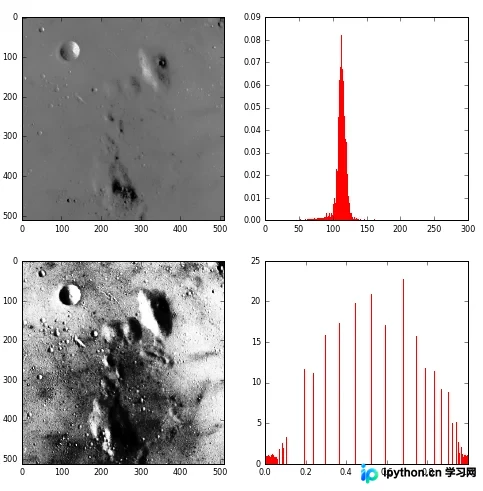
若图像像素占据大量灰度级且分布均匀,则该图像通常具有高对比度和丰富的灰度色调。直方图均衡化是一种仅依靠输入图像直方图信息自动实现此效果的变换函数。其基本思想是展宽像素个数多的灰度级,压缩像素个数少的灰度级,从而扩展取值动态范围,提高对比度和灰度色调变化,使图像更清晰。
from skimage import data,exposure
import matplotlib.pyplot as plt
img=data.moon()
plt.figure("hist",figsize=(8,8))

arr=img.flatten()
plt.subplot(221)
plt.imshow(img,plt.cm.gray) #原始图像
plt.subplot(222)
plt.hist(arr, bins=256, normed=1,edgecolor='None',facecolor='red') #原始图像直方图

img1=exposure.equalize_hist(img)
arr1=img1.flatten()
plt.subplot(223)
plt.imshow(img1,plt.cm.gray) #均衡化图像
plt.subplot(224)
plt.hist(arr1, bins=256, normed=1,edgecolor='None',facecolor='red') #均衡化直方图

plt.show()
以上就是本文的全部内容,希望对大家的学习有所帮助,也希望大家多多支持本站。
免责声明:本文内容仅供参考,不代表本站观点。转载或引用请注明出处。









