

Python使用Matplotlib绘制正态分布曲线详解

发布时间:2026-10-14| 5人浏览过
本文介绍如何使用Python的Matplotlib库绘制正态分布曲线。通过定义高斯函数,利用NumPy生成自变量,并计算不同均值和方差下的因变量,最终使用plt.plot绘制多条曲线,展示参数对分布形态的影响。
Python绘制正态分布曲线实现
借助Python中的matplotlib绘图工具,可以绘制正态分布曲线。
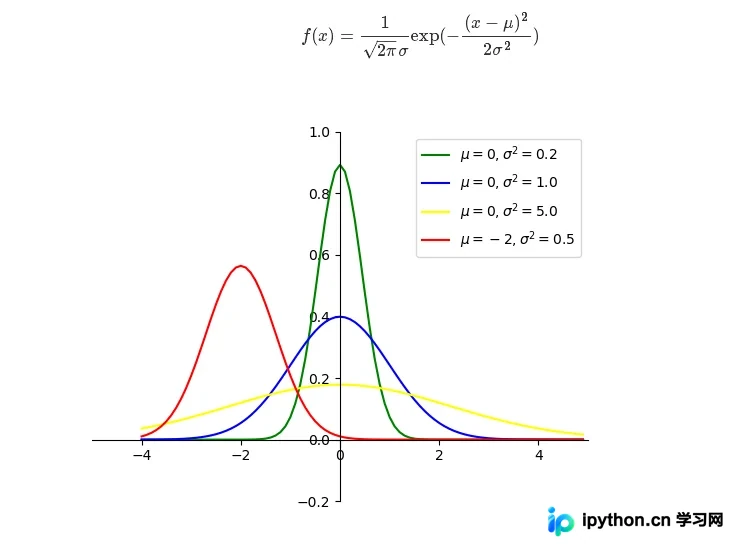
#-*-coding:utf-8-*-
"""
python绘制标准正态分布曲线
"""
# ==============================================================
import numpy as np
import math
import matplotlib.pyplot as plt


def gd(x, mu=0, sigma=1):
  """根据公式,由自变量x计算因变量的值

  Argument:
    x: array
      输入数据(自变量)
    mu: float
      均值
    sigma: float
      方差
  """
  left = 1 / (np.sqrt(2 * math.pi) * np.sqrt(sigma))
  right = np.exp(-(x - mu)**2 / (2 * sigma))
  return left * right


if __name__ == '__main__':
  # 自变量
  x = np.arange(-4, 5, 0.1)
  # 因变量(不同均值或方差)
  y_1 = gd(x, 0, 0.2)
  y_2 = gd(x, 0, 1.0)
  y_3 = gd(x, 0, 5.0)
  y_4 = gd(x, -2, 0.5)

  # 绘图
  plt.plot(x, y_1, color='green')
  plt.plot(x, y_2, color='blue')
  plt.plot(x, y_3, color='yellow')
  plt.plot(x, y_4, color='red')
  # 设置坐标系
  plt.xlim(-5.0, 5.0)
  plt.ylim(-0.2, 1)

  ax = plt.gca()
  ax.spines['right'].set_color('none')
  ax.spines['top'].set_color('none')
  ax.xaxis.set_ticks_position('bottom')
  ax.spines['bottom'].set_position(('data', 0))
  ax.yaxis.set_ticks_position('left')
  ax.spines['left'].set_position(('data', 0))

  plt.legend(labels=['$\mu = 0, \sigma^2=0.2$', '$\mu = 0, \sigma^2=1.0$', '$\mu = 0, \sigma^2=5.0$', '$\mu = -2, \sigma^2=0.5$'])
  plt.show()
以上是关于利用Python绘制正态分布曲线的详细内容,更多相关Python正态分布资料请查阅本站其他文章。
免责声明:本文内容仅供参考,不代表本站观点。转载或引用请注明出处。









