

Python查找子串所有下标及字符串常用操作方法详解

本文详解Python中查找主串内所有指定子串下标的方法,并系统梳理字符串常用操作。涵盖find、index、rfind、rindex等查找函数及count统计;介绍replace、split、join等修改技巧,以及大小写转换、空白处理、对齐填充等格式化手段。最后总结startswith、isalpha等判断方法,助您高效处理字符串。
Python如何获取主串中所有指定子串的下标
通过自定义函数可以实现显示字符串中指定子串所有出现位置(即每个匹配项的首字符下标)的功能。
def subStrIndex(substr,str):
    result = []
    index = 0
    while str.find(substr,index,len(str)) != -1:
        temIndex = str.find(substr,index,len(str))
        result.append(temIndex)
        index = temIndex + 1
    return result
在调用该函数时,第一个参数substr用于传入需要查找的目标子串,第二个参数str则为主字符串。
具体使用示例如下:
str = "我们去了天安门,天安门附近有很多人"
list = subStrIndex('天安门',str)
print(list)
输出结果为:[4,8]
其中数值4代表子串“天安门”第一次出现的下标位置,数值8代表第二次出现的下标位置(下标从0开始计数)。
Python字符串常用操作汇总
查找功能
1、find():用于检测某个子串是否包含在当前字符串中。如果包含,返回该子串开始的位置下标;如果不包含,则返回-1。
语法格式:字符串序列.find(子串, 开始位置下标, 结束位置下标)
mystr = "hello world and itcast and itheima and Python"
print(mystr.find('and')) # 12
print(mystr.find('and', 15, 30)) # 23
print(mystr.find('ands')) # -1
2、index():用于检测某个子串是否包含在当前字符串中。如果包含,返回该子串开始的位置下标;如果不包含,则会抛出异常。
语法格式:字符串序列.index(子串, 开始位置下标, 结束位置下标)
mystr = "hello world and itcast and itheima and Python"
print(mystr.index('and')) # 12
print(mystr.index('and', 15, 30)) # 23
print(mystr.index('ands')) # 报错
rfind():功能与find()相同,但查找方向是从字符串右侧开始向左进行。rindex():功能与index()相同,但查找方向是从字符串右侧开始向左进行。
3、count():用于返回某个子串在字符串中出现的总次数。
语法格式:字符串序列.count(子串, 开始位置下标, 结束位置下标)
mystr = "hello world and itcast and itheima and Python"
print(mystr.count('and')) # 3
print(mystr.count('ands')) # 0
print(mystr.count('and', 0, 20)) # 1
修改功能
1、replace():用于字符串替换操作。
语法格式:字符串序列.replace(旧子串, 新子串, 替换次数)
mystr = "hello world and itcast and itheima and Python"
# 结果:hello world he itcast he itheima he Python
print(mystr.replace('and', 'he'))
# 结果:hello world he itcast he itheima he Python
print(mystr.replace('and', 'he', 10))
# 结果:hello world and itcast and itheima and Python
print(mystr)
需要注意的是,字符串类型的数据在修改时不能直接改变原有字符串,因为字符串属于不可变类型(immutable type)。
2、split():用于按照指定的字符将字符串分割成列表。
语法格式:字符串序列.split(分割字符, num)
参数num表示指定分割字符出现的最大次数,最终返回的数据列表元素个数将为num+1个。
mystr = "hello world and itcast and itheima and Python"
# 结果:['hello world ', ' itcast ', ' itheima ', ' Python']
print(mystr.split('and'))
# 结果:['hello world ', ' itcast ', ' itheima and Python']
print(mystr.split('and', 2))
3、join():使用一个字符或子串将多个字符串合并为一个新的字符串。
语法格式:字符或子串.join(由多个字符串组成的序列)
list1 = ['chuan', 'zhi', 'bo', 'ke']

# 结果:chuan_zhi_bo_ke
print('_'.join(list1))
4、字符大小写转换
capitalize():将字符串中的第一个字符转换为大写。title():将字符串中每个单词的首字母转换为大写。lower():将字符串中的所有大写字母转换为小写。upper():将字符串中的所有小写字母转换为大写。
mystr = "hello world and itcast and itheima and Python"

# 结果:Hello world and itcast and itheima and python
print(mystr.capitalize())

# 结果:Hello World And Itcast And Itheima And Python
print(mystr.title())

# 结果:hello world and itcast and itheima and python
print(mystr.lower())

# 结果:HELLO WORLD AND ITCAST AND ITHEIMA AND PYTHON
print(mystr.upper())
lstrip():删除字符串左侧的空白字符。rstrip():删除字符串右侧的空白字符。strip():删除字符串两侧(左侧和右侧)的空白字符。

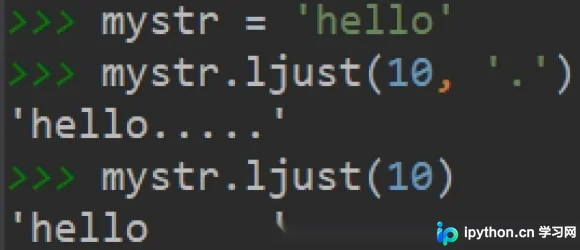
ljust():返回一个原字符串左对齐,并使用指定字符(默认为空格)填充至对应长度的新字符串。
语法格式:字符串序列.ljust(长度, 填充字符)
rjust():返回一个原字符串右对齐,并使用指定字符(默认为空格)填充至对应长度的新字符串,其语法与ljust()相同。center():返回一个原字符串居中对齐,并使用指定字符(默认为空格)填充至对应长度的新字符串,其语法与ljust()相同。
判断功能
startswith():检查字符串是否以指定子串开头。如果是,返回True;否则返回False。如果设置了开始和结束位置下标,则在指定范围内进行检查。
mystr = "hello world and itcast and itheima and Python "
# 结果:True
print(mystr.startswith('hello'))
# 结果False
print(mystr.startswith('hello', 5, 20))
endswith():检查字符串是否以指定子串结尾。如果是,返回True;否则返回False。如果设置了开始和结束位置下标,则在指定范围内进行检查。
mystr = "hello world and itcast and itheima and Python"
# 结果:True
print(mystr.endswith('Python'))
# 结果:False
print(mystr.endswith('python'))
# 结果:False
print(mystr.endswith('Python', 2, 20))
isalpha():如果字符串至少有一个字符,并且所有字符都是字母,则返回True;否则返回False。isdigit():如果字符串只包含数字,则返回True;否则返回False。isalnum():如果字符串至少有一个字符,并且所有字符都是字母或数字,则返回True;否则返回False。isspace():如果字符串中只包含空白字符,则返回True;否则返回False。
mystr1 = 'hello'
mystr2 = 'hello12345'
# 结果:True
print(mystr1.isalpha())
# 结果:False
print(mystr2.isalpha())
-----------------------------
mystr1 = 'aaa12345'
mystr2 = '12345'
# 结果: False
print(mystr1.isdigit())
# 结果:False
print(mystr2.isdigit())
-----------------------------
mystr1 = 'aaa12345'
mystr2 = '12345-'
# 结果:True
print(mystr1.isalnum())
# 结果:False
print(mystr2.isalnum())
-----------------------------
mystr1 = '1 2 3 4 5'
mystr2 = ' '
# 结果:False
print(mystr1.isspace())
# 结果:True
print(mystr2.isspace())
总结
以上为个人经验总结,希望能给大家一个参考,也希望大家多多支持本站。
免责声明:本文内容仅供参考,不代表本站观点。转载或引用请注明出处。









