

Python利用memory_profiler查看内存占用情况

本文介绍Python第三方库memory_profiler的使用方法,用于监视进程内存消耗及逐行分析。通过装饰器@profile和命令行模式两种方式进行内存检测,支持终端直接打印或输出至文件并自定义精度,帮助开发者定位内存占用高的代码段。
简介
memory_profiler是一个第三方Python模块,主要用于监控进程的内存使用情况,并提供Python程序逐行内存消耗的详细信息。该模块完全由Python编写,其运行依赖于psutil模块。
安装
pip install memory_profiler
使用方法
1、通过装饰器运行
@profile
def func1():
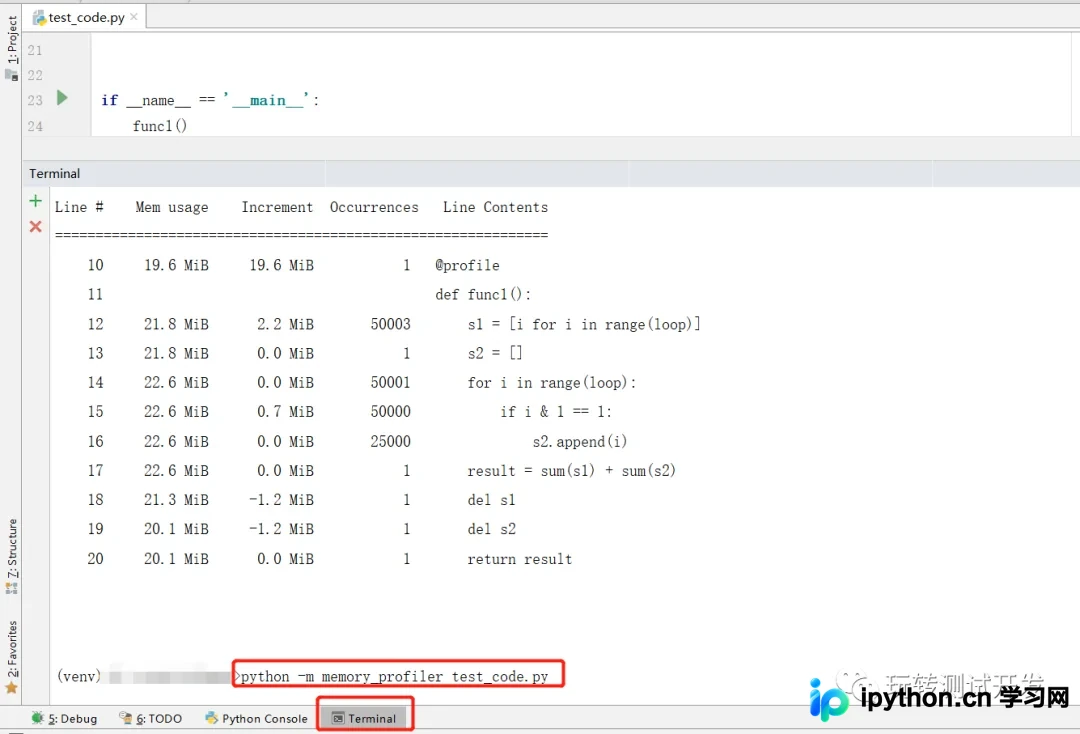
2、通过命令行运行
python -m memory_profiler test_code.py
案例源码:
# -*- coding: utf-8 -*-
# time: 2022/6/11 21:17
# file: test_code.py
# 公众号: 玩转测试开发
from memory_profiler import profile

loop = 50000


@profile
def func1():
    s1 = [i for i in range(loop)]
    s2 = []
    for i in range(loop):
        if i & 1 == 1:
            s2.append(i)
    result = sum(s1) + sum(s2)
    del s1
    del s2
    return result


if __name__ == '__main__':
    result = func1()
    print(result)
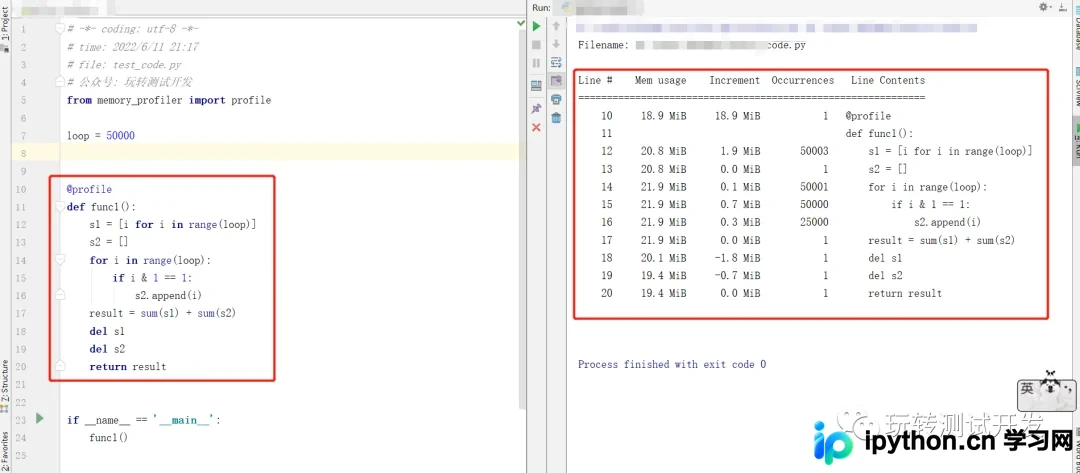
方法1运行结果:
方法2运行结果:
补充
下面小编为大家整理了一下memory_profiler的一些使用
1、直接打印结果到终端上
#coding:utf8
from memory_profiler import profile

@profile
def test1():
    c=list()
    for item in range(10000):
        c.append(item)


if __name__=='__main__':
    test1()
结果如下
Filename: D:/python/test_sip/test_check_es.py Line # Mem usage Increment Line Contents ================================================ 474 16.6 MiB 16.6 MiB @profile 475 def test1(): 476 16.6 MiB 0.0 MiB c=list() 477 17.0 MiB 0.0 MiB for item in range(10000): 478 17.0 MiB 0.1 MiB c.append(item)
2、定义输出到文件,定义结果保留的小数位
#coding:utf8
from memory_profiler import profile

@profile(precision=4,stream=open('memory_profiler.log','w+'))
def test1():
    c=list()
    for item in range(10000):
        c.append(item)


if __name__=='__main__':
    test1()
结果如下
Filename: D:/python/test_sip/test_check_es.py Line # Mem usage Increment Line Contents ================================================ 474 16.5391 MiB 16.5391 MiB @profile(precision=4,stream=open('memory_profiler.log','w+')) 475 def test1(): 476 16.5430 MiB 0.0039 MiB c=list() 477 16.8906 MiB 0.0039 MiB for item in range(10000): 478 16.8906 MiB 0.0391 MiB c.append(item)
到此这篇关于Python利用memory_profiler查看内存占用情况的文章就介绍到这了,更多相关Python memory_profiler查看内存占用内容请搜索本站以前的文章或继续浏览下面的相关文章希望大家以后多多支持本站!
免责声明:本文内容仅供参考,不代表本站观点。转载或引用请注明出处。









