

Python多进程实现异步任务与通信机制详解

本文深入解析Python中multiprocessing模块的多进程实现方式,涵盖Process类重写run、target传参及直接调用三种用法。重点对比Queue与Pipe在进程间通信(IPC)中的性能差异与应用场景,并通过数据清洗、模型推理等实际案例,展示如何利用进程池与异步通信机制高效处理高并发任务。
在深入探讨之前,需要明确的是,Python多进程编程对于缺乏实际应用场景或经验不足的用户而言,存在一定的学习门槛。笔者此前也较少接触此类场景,对多进程的具体应用较为陌生。经过对多个涉及多进程的业务场景进行实践与学习,认为有必要将相关知识点进行系统梳理与总结,以便更好地掌握这一技术。
一、Python多进程及通信基本用法
在Python开发中,多进程及其通信机制是核心且重要的内容,作为Python程序员,掌握这部分知识是基本要求。
1、多进程的基本实现
Python中多进程的创建主要依赖multiprocessing模块中的Process类和进程池(Pool)。其中,Process类的用法较为灵活,常见的基础函数包括:
p.start():用于启动一个已初始化的进程。
p.join():用于阻塞主进程,直到子进程执行完毕后再继续执行主进程的后续代码。
a、Process重写run方法
通过定义一个继承自multiprocessing.Process的类(如MultiOneProcess),并重写其run方法来实现具体的业务逻辑。在主程序中,可以启动10个这样的进程。
from multiprocessing import Process
count = 0
class MultiOneProcess(Process):
    def __init__(self,name):
        super().__init__()
        self.name = name
    def run(self) -> None:
        global count
        count += 1
        print('process name %s is running----count:%d'%(self.name, count))
if __name__ == '__main__':
    p_list = []
    for i in range(10):
        name = 'process_%d'%i
        p = MultiOneProcess(name = name)
        p.start()
        p_list.append(p)
    for p in p_list:
        p.join()
    print('this main process')
b、使用Process和target方法
在定义进程类时,可以在super()初始化中传入target函数,指定进程执行的具体任务。
from multiprocessing import Process
count = 0
class MultiTwoProcess(Process):
    def __init__(self,name):
        super().__init__(target=self.do_fun)
        self.name = name
    def do_fun(self):
        global count
        count += 1
        print('process name %s is running----count:%d' % (name, count))
if __name__ == '__main__':
    p_list = []
    for i in range(10):
        name = 'process_%d'%i
        p = MultiTwoProcess(name)
        p.start()
        p_list.append(p)
    for p in p_list:
        p.join()
    print('this main process')
例如,定义一个MultiTwoProcess类,并在其中定义do_fun函数,将该函数作为参数传递给target。
c、直接使用Process类
可以直接实例化Process类,传入target函数以及args参数。需要注意的是,args参数必须是一个元组,且即使只有一个元素,也必须保留末尾的逗号。
from multiprocessing import Process
count = 0
def do_fun(name):
    global count
    count += 1
    print('process name %s is running----count:%d' % (name, count))

if __name__ == '__main__':
    p_list = []
    for i in range(10):
        name = 'process_%d'%i
        p = Process(target=do_fun,args=(name,))
        p.start()
        p_list.append(p)

    for p in p_list:
        p.join()
    print('this main process')
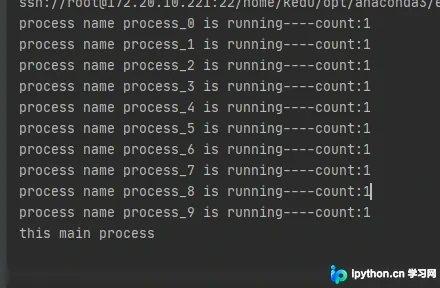
上述三种方式运行后的结果是一致的,具体输出如下:
2、多进程的通信
进程间通信(IPC)通常采用Queue和Pipe两种机制。两者的主要区别在于:Pipe仅支持两个进程之间的通信,而Queue支持多个进程间的通信。在效率方面,Pipe的效率更高,因为Queue是基于Pipe实现的,因此其效率略低于Pipe。
a、Queue
Queue常用的API包括:
存放数据
queue.put(obj, block=True, timeout=None)
当block=False时,如果Queue已满,将抛出Queue.Full异常;
当block=True且timeout为正数时,若Queue已满,Queue将阻塞timeout指定的时间,超时后同样抛出异常。
获取数据
queue.get(block=True, timeout=None)
当block=False时,如果Queue为空,将抛出Queue.Empty异常;
当block=True且timeout为正数时,若Queue为空,Queue将阻塞timeout指定的时间,超时后抛出异常。
上述两个API均为阻塞式操作;此外,还有两个非阻塞式API:
queue.put(obj, block=False) 与 queue.put_nowait(obj) 等效
queue.get(block=False) 与 queue.get_nowait() 等效
一个简单的示例是:一个进程发送数据,另外两个进程接收数据,此时可以使用Queue进行通信。
from multiprocessing import Process, Queue
def send(q):
    while True:
        q.put('发送一个数据')
def receive1(q):
    while True:
        s = q.get()
        print('receive1:', s)
def receive2(q):
    while True:
        s = q.get()
        print('receive2:', s)
if __name__ == '__main__':
    q = Queue()
    p1 = Process(target=send,args=(q,))
    p2 = Process(target=receive1,args=(q,))
    p3 = Process(target=receive2,args=(q,))
    p1.start()
    p2.start()
    p3.start()
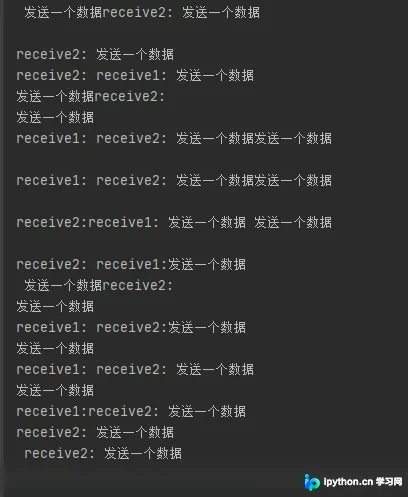
在示例中,p1进程不断向q中存放数据;p2和p3进程不断从q中取数据(存在竞争关系),因此打印结果是无序的。
b、Pipe
Pipe(duplex=True) 返回两个连通端点(p1, p2)。当duplex=True时,支持双向通信,即p1发送、p2接收,或者p2发送、p1接收。
当duplex=False时,为单向通信,p1只能发送,p2只能接收。
常用API为 pipe.send() 和 pipe.recv()。
from multiprocessing import Process, Pipe
def fun2(p):
    while True:
        s = p.recv()
        print('接收一个数据:',s)
def fun1(p):
    while True:
        print('发送一个数据:pipe')
        p.send('pipe')
if __name__ == '__main__':
    pi1,pi2 = Pipe(duplex=True)
    p1 = Process(target=fun1,args=(pi1,))
    p2 = Process(target=fun2,args=(pi2,))
    p1.start()
    p2.start()
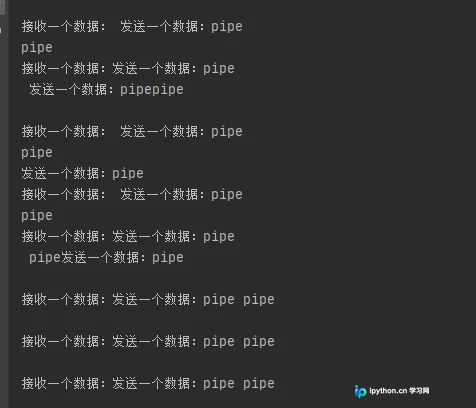
具体运行结果如下:
二、Python多进程实战
不同的业务场景下,多进程的使用方式和复杂度各不相同。以下结合笔者遇到的几个典型场景进行演示和说明。
1、使用进程池快速抽取数据
场景描述:假设有1000个Excel文件需要进行数据抽取和清洗,目标是过滤掉不符合需求的数据,保留高质量数据。每个Excel文件包含几十万甚至上百万条数据。如何快速完成这一任务?
从整体策略来看,可以将单个Excel文件的处理并行化。此时可以使用多进程,且由于需要返回结果(保留合格数据),使用进程池(Pool)是较为简便的选择,它能方便地返回处理结果,且返回值为生成器。若需进一步提升速度,可将单个Excel中每条数据的处理并行化。在代码层面,采用pool进程池完成任务(本文未详述进程池的具体使用方法和API),具体实现方式采用pool.imap()。
if __name__ == '__main__':
    #所有Excel的路径
    all_paths = glob('../data/original_data/*')
    sysInfo_list = ['我通过了好友请求,现在你俩可以开始聊天了', '我通过了你的朋友验证请求,现在我们可以开始聊天了', '已通过你的朋友验证请求,现在可以开始聊天了', '不支持此消息,请在手机上查看',
                    '微信红包']
    interval = 25
    if len(all_paths)//interval * interval < len(all_paths):
        k = len(all_paths)//interval + 1
    else:
        k = len(all_paths) // interval
    #分段处理,每段25个Excel
    for i in range(k):
        paths = all_paths[i*interval:(i+1)*interval]
        if i*interval >= 100 and i*interval < 200:
            params = []
            for path in tqdm(paths):
                params.append((path, sysInfo_list))
            #多进程处理——进程池、以及进度显示
            with Pool(20) as p:
                res = list(tqdm(p.imap(extract_data, params), total=len(params), desc='extract_data'))
            all_df = []
            for dfs in res:
                if len(dfs) > 0:
                    all_df.extend(dfs)
            df = pd.concat(all_df, axis=0)
            save_path = '../data/weikong_clean_data_'+str(i*interval)+'_'+str(i*interval+len(paths)-1)+'.xlsx'
            writer = pd.ExcelWriter(save_path)
            df.to_excel(writer, index=False)
            writer.save()
            writer.close()
2、多进程及通信完成数据清洗和保存
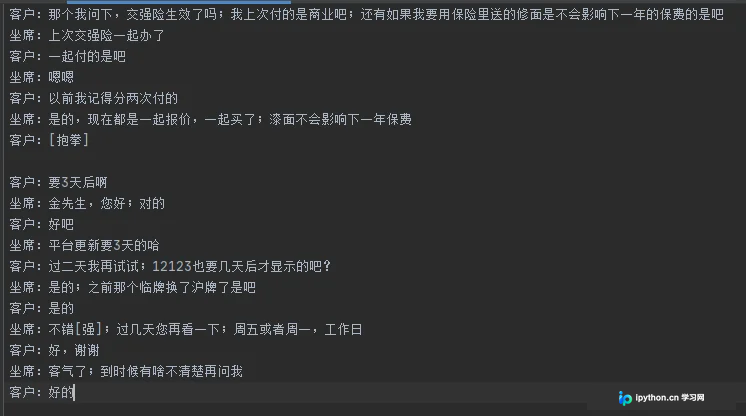
场景描述:从Excel中读取数据,数据格式为完整的对话记录,每通对话包含一定的轮数。需要将数据保存到两个txt文件中:一个保持顺序,另一个保持倒序。整体对话顺序不变,但每通对话内部顺序需倒序。
正序示例:
倒序示例:
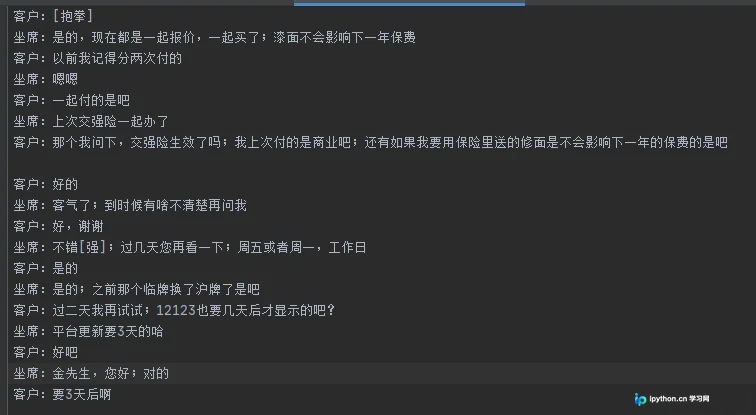
实现此类任务的一种粗暴方法是使用两个列表,一个保存正序数据,另一个保存倒序数据,然后分别写入文件。但如果数据量巨大且内存有限,无法同时容纳两个大列表时,该如何实现?
笔者的实现方式是开启两个进程:一个进程负责保存正序列表,在写入文件的同时对每条对话进行倒序处理,然后通过Queue或Pipe将倒序后的数据传递给另一个进程,由该进程负责写入文件。
def save_mmi_train_data(queue):
    with open('../data/finetune_mmi_data/train.txt','w',encoding='utf-8') as f:
        while True:
            save_list = queue.get()
            if len(save_list) == 0:
                break
            for line in save_list:
                f.write(line)
def save_mmi_val_data(queue):
    with open('../data/finetune_mmi_data/val.txt','w',encoding='utf-8') as f:
        while True:
            save_list = queue.get()
            if len(save_list) == 0:
                break
            for line in save_list:
                f.write(line)
def get_funtine_data(paths):
    all_groups = []
    for path in tqdm(paths,desc='load data from excle'):
        df = pd.read_excel(path)
        df.dropna(inplace=True)
        df.drop_duplicates(inplace=True, keep='first')
        groups = list(df.groupby(by=['坐席id', '客户微信id']))
        all_groups.extend(groups)
    print('len(all_groups)',len(all_groups))
    train, val = train_test_split(all_groups,test_size=10000/len(all_groups),random_state=1)
    print('len(train)', len(train))
    print('len(val)', len(val))
    train_std_path = '../data/finetune_std_data/train.txt'
    val_std_path = '../data/finetune_std_data/val.txt'
    train_mmi_queue = Queue()
    save_funtine_data(train, train_std_path,train_mmi_queue,save_mmi_train_data)
    val_mmi_queue = Queue()
    save_funtine_data(val, val_std_path, val_mmi_queue, save_mmi_val_data)
def save_funtine_data(groups,save_std_path,queue,fun):
    p = Process(target=fun,args=(queue,))
    p.start()
    with open(save_std_path,'w', encoding='utf-8') as f:
        for group in tqdm(groups, desc='find and save funtine dialogue datas'):
            new_df = group[1]
            df_roles = new_df['是否客服'].values.tolist()
            df_contents = new_df['消息内容'].values.tolist()
            roles = []
            contents = []
            for role,content in zip(df_roles,df_contents):
                content = content.replace('\n', '')
                content = emoji.replace_emoji(content, '')
                if len(content) > 0 and content != "":
                    roles.append(role)
                    contents.append(content)
            save_list = []
            save_str = ""
            for index, role in enumerate(roles):
                content = contents[index].replace('\n','')
                content = emoji.replace_emoji(content, '')
                if content[-1] not in punctuations:
                    content += ';'
                if index == 0:
                    if role == "是":
                        save_str += "坐席:"+content
                    else:
                        save_str += "客户:"+content
                else:
                    if role != roles[index-1]:
                        f.write(save_str[0:-1]+'\n')
                        save_list.append(save_str[0:-1]+'\n')
                        if role == "是":
                            save_str = "坐席:" + content
                        else:
                            save_str = "客户:" + content
                    else:
                        save_str += content
            if len(save_str) > 1:
                save_list.append(save_str[0:-1] + '\n')
                f.write(save_str[0:-1]+'\n')
            f.write('\n')
            # 切片反转
            save_list = save_list[::-1]
            save_list.append('\n')
            if len(save_list) > 0:
                queue.put(save_list)
    #注意传入一个空值,让倒序进程结束
    queue.put([])
    p.join()
需要注意的是,在倒序进程中使用了while True无限循环,必须传入一个空值,以便在正序进程结束时,倒序进程能感知到数据已写完并跳出循环。以上代码较为简单,此处不再逐一说明。
3、多进程及通信实现异步任务需求
场景描述:假设有一个模型推理系统,其中网络模块负责接收请求并传输数据,数据处理模块负责处理数据(如语音流或视频流,这些处理对CPU消耗较大),处理完成后将数据传输给模型推理模块;模型推理模块负责进行推理并将结果返回给网络模块。要求是网络模块、数据处理模块和模型推理模块相互独立,可以并行完成各自任务,且三个模块是异步的。实际上,可以使用多进程简化实现该系统。
每个模块可以用一个进程来表示,其内部逻辑可以开启子进程实现,模块间的数据传输则通过多进程通信机制实现。同时,创建一个全局的Queue变量,供各模块进程按需使用。
绘制了一个简单的结构和流程图,如下:
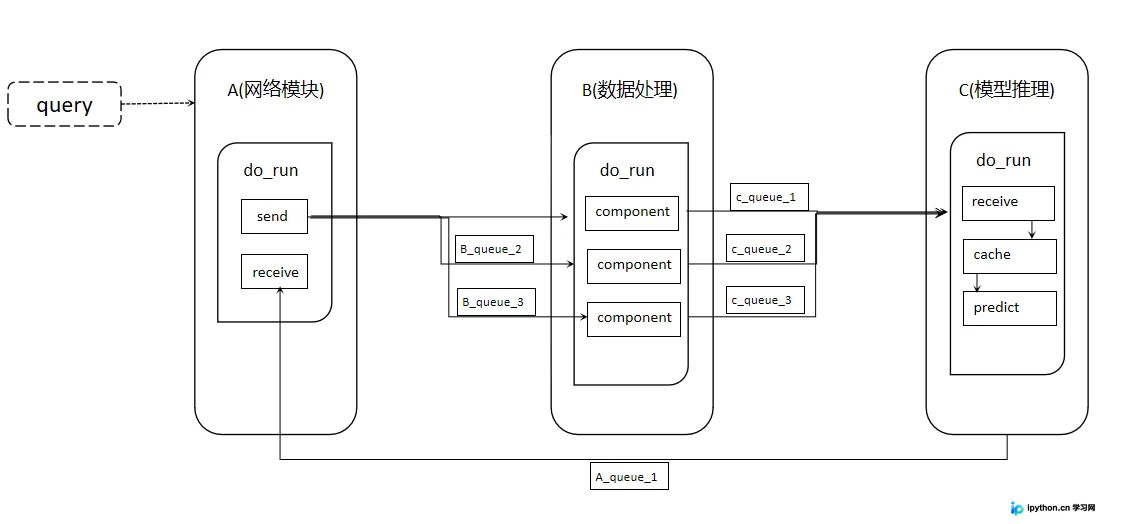
需要注意的是,模块间通过Queue传输数据时,数据量越小,效率越高。因此,可以在网络模块端提前对数据进行预处理。
函数入口文件代码如下:
import a
import b
import c
from whole_queue import WholeQueue
import os
if __name__ == '__main__':
    print("main process:",os.getpid())

    whole_queue = WholeQueue()
    b_pool_size = 2
    c_pool_size = 6
    Module_list = [
        a.A(whole_queue,b_pool_size),
        b.B(whole_queue,b_pool_size,c_pool_size),
        c.C(whole_queue,c_pool_size)
    ]

    for p in Module_list:
        p.start()
公共队列类代码如下:
class WholeQueue():
    def __init__(self):
        self.queues = dict()
    def register(self,queuename,queue):
        self.queues[queuename] =  queue
各个子模块类代码如下:
a部分代码:
from multiprocessing import Process,Queue
import time
import random
import os
class A(Process):
    def __init__(self,whole_queue,b_pool_size):
        super().__init__(target=self.do_run)
        self.whole_queue = whole_queue
        self.b_pool_size = b_pool_size
        self.queue_list = []
        queue = Queue()
        self.whole_queue.register('A', queue)
        self.queue_list.append(queue)
        self.count  = 0
    def do_run(self):
        print("A.do_run process:", os.getpid())
        a_send_pro = Process(target = self.send)
        a_send_pro.start()
        a_receive_pro = Process(target = self.receive)
        a_receive_pro.start()
    def send(self):
        print("A.send process:", os.getpid())
        while True:
            time.sleep(0.001)
            self.whole_queue.queues['B_%d'%(self.count%self.b_pool_size)].put_nowait(self.count)
            self.count += 1
    def receive(self):
        print("A.receive process:", os.getpid())
        while True:
            rece = self.whole_queue.queues['A'].get()
            print(rece)
b部分代码:
from multiprocessing import Process,Queue
import time
import random
import os
class B(Process):
    def __init__(self,whole_queue,b_pool_size,c_pool_size):
        super().__init__(target=self.do_run)
        self.whole_queue = whole_queue
        self.b_pool_size = b_pool_size
        self.c_pool_size = c_pool_size
        self.queue_list = []
        for i in range(self.b_pool_size):
            queue = Queue()
            self.whole_queue.register('B_%d'% i , queue)
            self.queue_list.append(queue)
        self.count  = 0
    def do_run(self):
        print("B.do_run process:", os.getpid())
        for i in range(self.b_pool_size):
            p = Process(target=self.component,args=(self.queue_list[i],))
            p.start()
    def component(self, queue):
        print("B.component process:", os.getpid())
        while True:
            time.sleep(0.01)
            info = queue.get()
            componext_info = 'component_' + str(info)
            self.whole_queue.queues['C_%d'%(info%self.c_pool_size)].put(componext_info)
c部分代码:
from multiprocessing import Process,Queue
from model import Model
import time
import random
import os
class C(Process):
    def __init__(self,whole_queue,c_pool_size):
        super().__init__(target=self.do_run)
        self.whole_queue = whole_queue
        self.c_pool_size = c_pool_size
        self.queue_list = []
        for i in range(self.c_pool_size):
            queue = Queue()
            self.whole_queue.register('C_%d'% i , queue)
            self.queue_list.append(queue)
        # self.cache_queue = None
        # self.result_queue = None
        # self.infer_queue = None
    def do_run(self):
        cache_queue = Queue()
        result_queue = Queue()
        infer_queue = Queue()
        print("C.do_run process:", os.getpid())
        for i in range(self.c_pool_size):
            p = Process(target=self.receive,args=(self.queue_list[i], cache_queue,))
            p.start()
        cache_p = Process(target=self.cache,args=(cache_queue, infer_queue,))
        cache_p.start()
        predict_p = Process(target=self.predict,args=(infer_queue, result_queue))
        predict_p.start()
        while True:
            res = result_queue.get()
            for ele in res:
                self.whole_queue.queues['A'].put(ele)
    def receive(self, queue,cache_queue):
        print("C.receive process:", os.getpid())
        while True:
            info = queue.get()
            receive_info = 'receive_' + info
            cache_queue.put(receive_info)
    def cache(self,cache_queue, infer_queue):
        timeLast = time.time()
        print("C.cache process:", os.getpid())
        caches = []
        while True:
            data = cache_queue.get()
            caches.append(data)
            if len(caches) > 128 or time.time() - timeLast > 1:
                timeLast = time.time()
                infer_queue.put(caches)
                caches = []
    def predict(self,infer_queue, result_queue):
        print("C.predict process:", os.getpid())
        # 模型必须在这里初始化
        model = Model()
        while True:
            data = infer_queue.get()
            result = model(data)
            result = [ 'modelpredict_' + ele for ele in result]
            time.sleep(random.uniform(0.1,0.5))
            result_queue.put(result)
代码逻辑较为清晰,但需注意:子进程在使用变量时(例如初始化后的模型),每个子进程应独立进行初始化,否则会导致报错。具体而言,C类中的模型初始化不应在__init__中完成后再传入各子进程,而应在每个子进程中单独初始化。
至此,关于Python多进程及通信实现异步任务需求的介绍已接近尾声。如需了解更多Python异步任务相关内容,请搜索本站往期文章或继续浏览后续文章。感谢大家的支持!
免责声明:本文内容仅供参考,不代表本站观点。转载或引用请注明出处。









