

Python破解压缩包密码实战:环境配置与多线程爆破脚本

发布时间:2026-10-15| 6人浏览过
本文详解使用Python破解RAR和ZIP压缩包密码的完整流程。内容涵盖PyCharm环境配置、依赖库安装及Windows系统下Rar.exe的放置要求。重点解析如何判断文件类型及加密状态,并提供基于多线程的Python爆破脚本源码。此外,还包含CMD命令行操作指南与在线调试建议,帮助用户快速掌握压缩包密码恢复技术。
简介:
本文旨在介绍如何利用Python工具破解RAR和ZIP格式的压缩包密码。操作环境建议在Windows系统下使用PyCharm集成开发工具进行开发与调试。
1.步骤
1.环境
- 首先通过pip install指令安装必要的Python依赖库。
- 若需处理rar文件,必须将rar安装包目录下的Rar.exe和UnRar.exe可执行文件,复制到项目虚拟环境路径\venv\Scripts下,以确保程序能调用外部解压工具。
- 若在代码中遇到import失败的情况,需进入File->Settings->Project Interpreter菜单,手动添加缺失的模块以解决依赖问题。
2.判断文件格式
 type = os.path.splitext(path)[-1][1:]
if type == "zip":
elif type == "rar":
3.判断是否有密码
 type = os.path.splitext(path)[-1][1:]
        if type == "zip":
                fileGet = zipfile.ZipFile(path)
                with fileGet as z:
                    for l in z.infolist():
                        is_encrypted = l.flag_bits & 0x1
                        if is_encrypted:
                            print("have password ")
                            break
                        else:
                            pass

        elif type == "rar":
            fileGet = rarfile.RarFile(path)
            with fileGet as z:
                if z.needs_password():
                    print("have password ")
                else:
                    print("no password")
                    return
4.密码字典 自己写或者下载相应的软件生成。
5.解压文件
1.zip和rar
fileGet = zipfile.ZipFile(path)fileGet = rarfile.RarFile(path)2.解压
fileExtr.extractall(pwd=password)2.代码
import sys
import zipfile
import rarfile
import threading
import datetime
import os
import subprocess
import  getopt
i = 0
fileGet = ""
class MyThread(threading.Thread):
    def __init__(self, func, args, name=''):
        threading.Thread.__init__(self)
        self.name = name
        self.func = func
        self.args = args
        self.result = self.func(*self.args)
    def get_result(self):
        try:
            return self.result
        except Exception:
            return None
def extractFile(fileExtr, password, fileType):
    try:
        encodestr = str.encode(password)
        if (fileType == "zip"):
           fileExtr.extractall(pwd=str.encode(password))
        else:
            fileExtr.extractall(pwd=password)
        global i
        i = i + 1
        print("search count : %d,real password is : %s" % (i, password))
        return password
    except:
        i = i + 1
        print("search count : %d,test password : %s, err:%s" % (i, password, sys.exc_info()[0]))
        pass
def mainStep():
    path = input("please input path:")
    try:
        if os.path.exists(path) == False:
            print("%s : path error!"%(path))
            return
        type = os.path.splitext(path)[-1][1:]
        if type == "zip":
                fileGet = zipfile.ZipFile(path)
                with fileGet as z:
                    for l in z.infolist():
                        is_encrypted = l.flag_bits & 0x1
                        if is_encrypted:
                            print("have password ")
                            break
                        else:
                            pass
                fileGet = zipfile.ZipFile(path)
        elif type == "rar":
            fileGet = rarfile.RarFile(path)
            with fileGet as z:
                if z.needs_password():
                    print("have password ")
                else:
                    print("no password")
                    return
        else:
            print("file not right")
            return
        pwdLists = open("D:\Python工程\mutou.txt")
        startTime = datetime.datetime.now()
        for line in pwdLists.readlines():
            Pwd = line.strip('\n')
            t = MyThread(extractFile, (fileGet, Pwd, type))
            t.start()
            if (t.get_result() is Pwd):
                break
        endTime = datetime.datetime.now()
        timeSpan = endTime - startTime
        print("search time:%ss" % (timeSpan.total_seconds()))
    except:
       print("err:%s" % sys.exc_info()[0])
if __name__ == '__main__':
    mainStep()
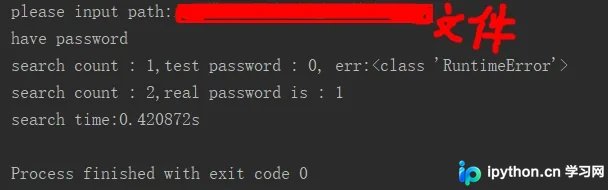
1.在线调试
2.脚本运行
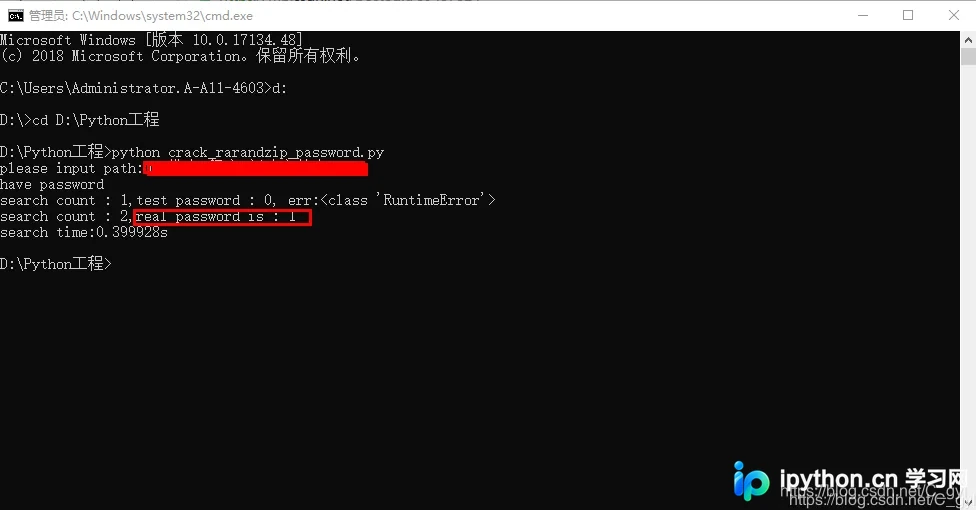
- cmd 窗口打开方式:右键开始菜单,选择‘命令提示符(管理员)’即可。或者从开始菜单->运行->输入cmd,回车。
- 关于 cd 命令:用于改变当前目录路径。使用方式:cd[空格][路径]。例如 cd d:/Python27/Mytest 转到该路径下。
- 注意:如果当前盘符不是 D 盘,需要先转到 D 盘,输入 d: 回车即可。然后才可以使用 cd d:/Python27/Mytest 。
- 输入python test.py。test.py是对应的文件名。
到此这篇关于Python如何破解压缩包密码的文章就介绍到这了,更多相关Python破解压缩包密码内容请搜索本站以前的文章或继续浏览下面的相关文章希望大家以后多多支持本站!
免责声明:本文内容仅供参考,不代表本站观点。转载或引用请注明出处。









