

Python NetworkX库生成并绘制带权无向图

发布时间:2026-10-16| 3人浏览过
本文介绍如何使用Python的NetworkX库生成Erdős-Rényi随机图并添加均匀分布的权重。通过spring_layout算法实现2D力导向布局,利用边宽映射权重值进行可视化;同时展示基于numpy和matplotlib的3D空间布局绘制方法,完整覆盖从图构建到多维可视化的操作流程。
NetworkX是一个功能强大的网络科学工具库,它不仅封装了图的数据结构,还提供了多种经典图算法,并内置了丰富的可视化函数供开发者直接调用。
1. 随机图生成
最经典的随机图模型是前文《Erdos-Renyi随机图的生成方式及其特性》中提到的Erdős-Rényi随机图。此处我们采用Gnp模型形式,通过调用相应的API来生成图形。
G = nx.erdos_renyi_graph(10, 0.3, seed=1)
上述代码表示生成一个包含10个顶点的图,其中每条边以0.3的概率独立存在。
默认生成的图不包含权重信息。若需在此基础上为边均匀随机初始化[0, 0.4]区间内的权重,可参考以下实现方式:
G = nx.Graph()
for u, v in nx.erdos_renyi_graph(10, 0.3, seed=1).edges():
    G.add_edge(u, v, weight=random.uniform(0, 0.4))
2. 2D布局可视化
随机图生成后,需进行可视化展示。首先计算节点在图中的位置,经典Fruchterman-Reingold力导向算法可完成此任务,对应NetworkX中的spring_layout函数。
pos = nx.spring_layout(G, iterations=20) #我们设算法迭代次数为20次
随后,分别绘制图的边、节点以及节点标签,具体代码如下:
nx.draw_networkx_edges(G, pos, edge_color="orange")
nx.draw_networkx_nodes(G, pos, node_color="black")
nx.draw_networkx_labels(G, pos, font_color="white")
plt.show()
绘图结果如下所示:
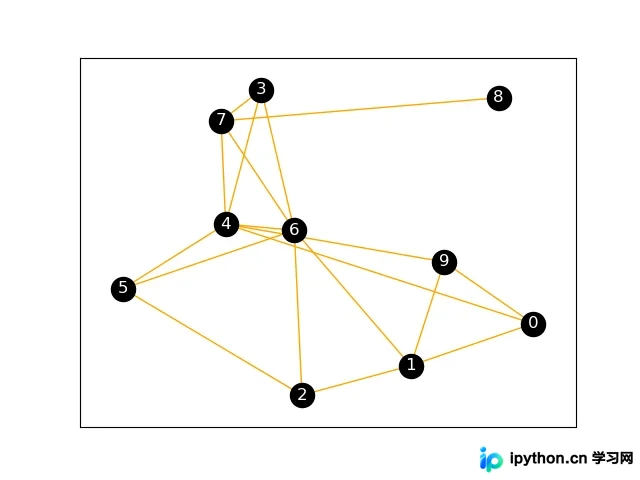
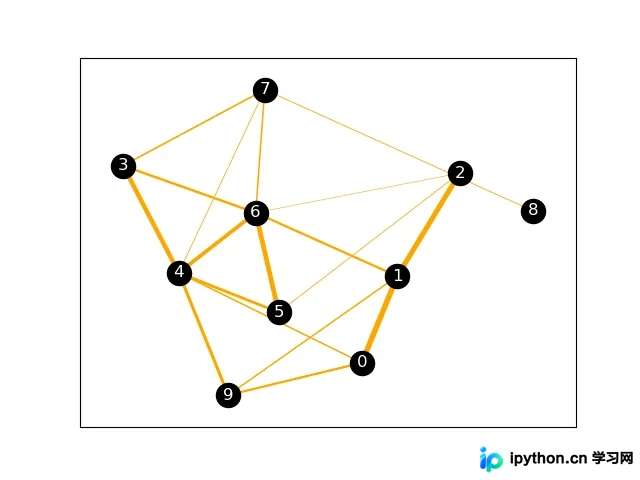
上述结果无法直观体现图的权值。若需将权值可视化,可通过设置边的宽度来反映权值大小,具体实现如下:
nx.draw_networkx_edges(G,pos, width=[float(d['weight']*10) for (u,v,d) in G.edges(data=True)], edge_color="orange")
nx.draw_networkx_nodes(G,pos, node_color="black")
nx.draw_networkx_labels(G, pos, font_color="white")
plt.show()
此时的绘图结果如下所示:
3. 3D布局可视化
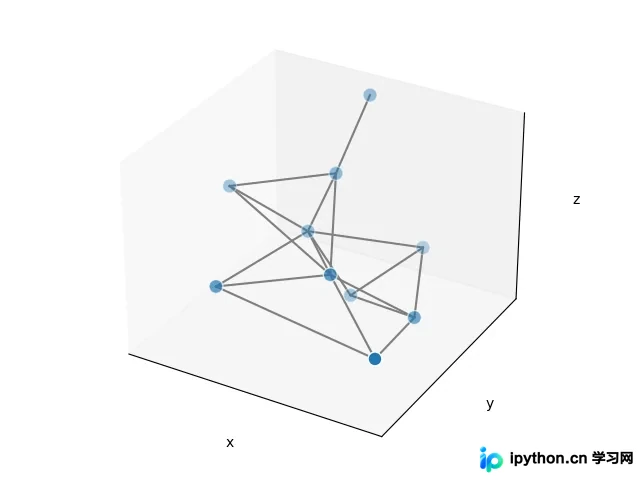
若觉得2D布局过于扁平,难以直观体现节点间的拓扑关系,可使用以下代码对图进行三维可视化处理:
# 3d spring layout
pos = nx.spring_layout(G, dim=3, seed=779)
# Extract node and edge positions from the layout
node_xyz = np.array([pos[v] for v in sorted(G)])
edge_xyz = np.array([(pos[u], pos[v]) for u, v in G.edges()])
# Create the 3D figure
fig = plt.figure()
ax = fig.add_subplot(111, projection="3d")
# Plot the nodes - alpha is scaled by "depth" automatically
ax.scatter(*node_xyz.T, s=100, ec="w")
# Plot the edges
for vizedge in edge_xyz:
    ax.plot(*vizedge.T, color="tab:gray")
def _format_axes(ax):
    """Visualization options for the 3D axes."""
    # Turn gridlines off
    ax.grid(False)
    # Suppress tick labels
    for dim in (ax.xaxis, ax.yaxis, ax.zaxis):
        dim.set_ticks([])
    # Set axes labels
    ax.set_xlabel("x")
    ax.set_ylabel("y")
    ax.set_zlabel("z")
_format_axes(ax)
fig.tight_layout()
plt.show()
此时的3D绘图结果如下所示:
参考
- [1] https://networkx.org/documentation/stable/reference/
以上就是Python NetworkX库生成并绘制带权无向图的详细内容,更多关于NetworkX库绘制带权无向图的资料请关注本站其它相关文章!
免责声明:本文内容仅供参考,不代表本站观点。转载或引用请注明出处。









