

Python异步爬取知乎热榜:从DOM解析到JS数据提取

发布时间:2026-10-16| 3人浏览过
本文分享使用Python异步库aiohttp爬取知乎热榜的完整流程。针对直接解析DOM无法获取摘要和详细链接的问题,通过审查JS代码定位数据源,利用正则表达式提取JSON数据并解析,最终实现标题、热度、摘要、链接及图片的高效抓取。
首先展示一段存在问题的代码,主要缺陷在于无法正确获取文章摘要和详细页面的URL。
import asyncio
from bs4 import BeautifulSoup
import aiohttp

headers={
    'user-agent': 'Mozilla/5.0 (Windows NT 6.1; Win64; x64) AppleWebKit/537.36 (KHTML, like Gecko) Chrome/86.0.4240.198 Safari/537.36',
    'referer': 'https://www.baidu.com/s?tn=02003390_43_hao_pg&isource=infinity&iname=baidu&itype=web&ie=utf-8&wd=%E7%9F%A5%E4%B9%8E%E7%83%AD%E6%A6%9C'
}
async def getPages(url):
    async with aiohttp.ClientSession(headers=headers) as session:
        async with session.get(url) as resp:
            print(resp.status)  # 打印状态码
            html=await resp.text()
    soup=BeautifulSoup(html,'lxml')
    items=soup.select('.HotList-item')
    for item in items:
        title=item.select('.HotList-itemTitle')[0].text
        try:
            abstract=item.select('.HotList-itemExcerpt')[0].text
        except:
            abstract='No Abstract'
        hot=item.select('.HotList-itemMetrics')[0].text
        try:
            img=item.select('.HotList-itemImgContainer img')['src']
        except:
            img='No Img'
        print("{}\n{}\n{}".format(title,abstract,img))

if __name__ == '__main__':
    url='https://www.zhihu.com/billboard'
    loop=asyncio.get_event_loop()
    loop.run_until_complete(getPages(url))
    loop.close()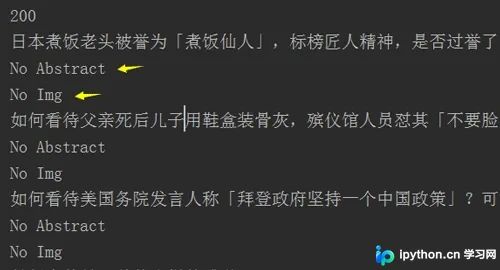
接下来分析网页的JavaScript代码结构。
通过开发者工具观察发现,详细链接、图片地址以及问题摘要等关键信息均封装在JS返回的数据中。在此过程中,CSDN的开发者助手插件提供了较大便利。
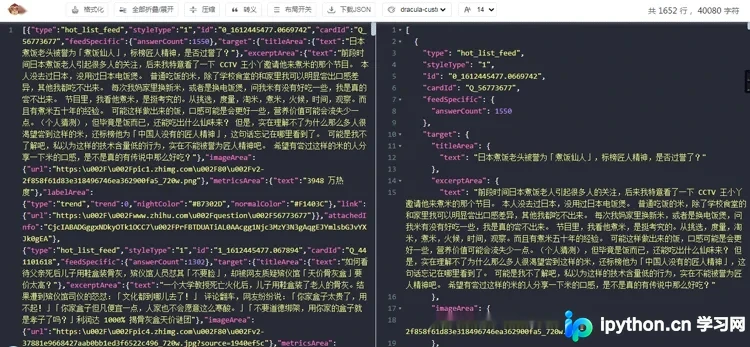
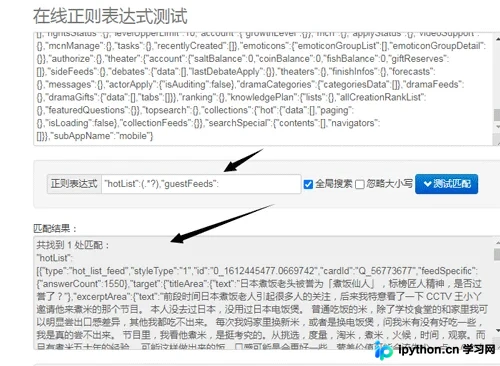
为了从JS数据中提取上述信息,需要编写相应的正则表达式进行匹配。
以下是修正后的完整代码实现。
import asyncio
import json
import re
import aiohttp

headers={
    'user-agent': 'Mozilla/5.0 (Windows NT 6.1; Win64; x64) AppleWebKit/537.36 (KHTML, like Gecko) Chrome/86.0.4240.198 Safari/537.36',
    'referer': 'https://www.baidu.com/s?tn=02003390_43_hao_pg&isource=infinity&iname=baidu&itype=web&ie=utf-8&wd=%E7%9F%A5%E4%B9%8E%E7%83%AD%E6%A6%9C'
}
async def getPages(url):
    async with aiohttp.ClientSession(headers=headers) as session:
        async with session.get(url) as resp:
            print(resp.status)  # 打印状态码
            html=await resp.text()

    regex=re.compile('"hotList":(.*?),"guestFeeds":')
    text=regex.search(html).group(1)
    # print(json.loads(text))   # json换成字典格式
    for item in json.loads(text):
        title=item['target']['titleArea']['text']
        question=item['target']['excerptArea']['text']
        hot=item['target']['metricsArea']['text']
        link=item['target']['link']['url']
        img=item['target']['imageArea']['url']
        if not img:
            img='No Img'
        if not question:
            question='No Abstract'
        print("Title:{}\nPopular:{}\nQuestion:{}\nLink:{}\nImg:{}".format(title,hot,question,link,img))

if __name__ == '__main__':
    url='https://www.zhihu.com/billboard'
    loop=asyncio.get_event_loop()
    loop.run_until_complete(getPages(url))
    loop.close()
以上就是关于Python异步爬取知乎热榜的实例分享。如需了解更多Python异步相关技术内容,欢迎查阅本站往期文章或继续浏览后续内容,感谢大家的支持。
免责声明:本文内容仅供参考,不代表本站观点。转载或引用请注明出处。









