

Python结合MediaPipe与OpenCV实现视频人脸检测

发布时间:2026-10-16| 3人浏览过
本文介绍如何使用Python的MediaPipe和OpenCV库进行视频人脸检测。通过安装依赖库,利用mp_face_detection模块实现实时人脸捕捉,并展示基础代码实现与效果。此外,还探讨了结合threadpool提升图片人脸采集效率的方法,适用于需要高效处理大量图像的场景。
首先,需要安装必要的Python库。在终端或命令行中执行以下命令以安装MediaPipe:
pip install mediapipe接下来是具体的代码实现部分。该脚本导入了cv2和mediapipe库,并初始化了绘图工具和人脸检测模型。代码设置了绘图规格,包括线条粗细和圆圈半径。视频源被指定为一个本地视频文件路径,也可以改为摄像头输入。在循环中,程序读取视频帧,若读取成功则进行人脸检测。检测到的面部区域会被标记并显示在窗口中,按ESC键可退出程序。
# -*- coding: utf-8 -*-
"""
@Time    : 2022/3/18 14:43
@Author  : liwei
@Description:
"""
import cv2
import mediapipe as mp

mp_drawing = mp.solutions.drawing_utils
mp_face_mesh = mp.solutions.face_mesh
mp_face_detection = mp.solutions.face_detection
# 绘制人脸画像的点和线的大小粗细及颜色(默认为白色)
drawing_spec = mp_drawing.DrawingSpec(thickness=1, circle_radius=1)
cap = cv2.VideoCapture("E:\\video\\test\\test.mp4")# , cv2.CAP_DSHOW
# For webcam input:
# cap = cv2.VideoCapture(0)
with mp_face_detection.FaceDetection(
    model_selection=0, min_detection_confidence=0.5) as face_detection:
  while cap.isOpened():
    success, image = cap.read()
    if not success:
      print("Ignoring empty camera frame.")
      # If loading a video, use 'break' instead of 'continue'.
      break

    # To improve performance, optionally mark the image as not writeable to
    # pass by reference.
    image.flags.writeable = False
    image = cv2.cvtColor(image, cv2.COLOR_BGR2RGB)
    results = face_detection.process(image)

    # Draw the face detection annotations on the image.
    image.flags.writeable = True
    image = cv2.cvtColor(image, cv2.COLOR_RGB2BGR)
    if results.detections:
      box = results.detections[0].location_data.relative_bounding_box
      xmin = box.xmin
      ymin = box.ymin
      width = box.width
      height = box.height
      xmax = box.xmin + width
      ymax = ymin + height
      cv2.rectangle(image, (int(xmin * image.shape[1]),int(ymin* image.shape[0])), (int(xmax* image.shape[1]), int(ymax* image.shape[0])), (0, 0, 255), 2)
      # for detection in results.detections:
      #   mp_drawing.draw_detection(image, detection)
    # Flip the image horizontally for a selfie-view display.
    cv2.imshow('MediaPipe Face Detection', cv2.flip(image, 1))
    if cv2.waitKey(5) & 0xFF == 27:
      break
cap.release()
运行上述代码后,可以看到视频窗口中实时显示检测到的人脸及其关键点。
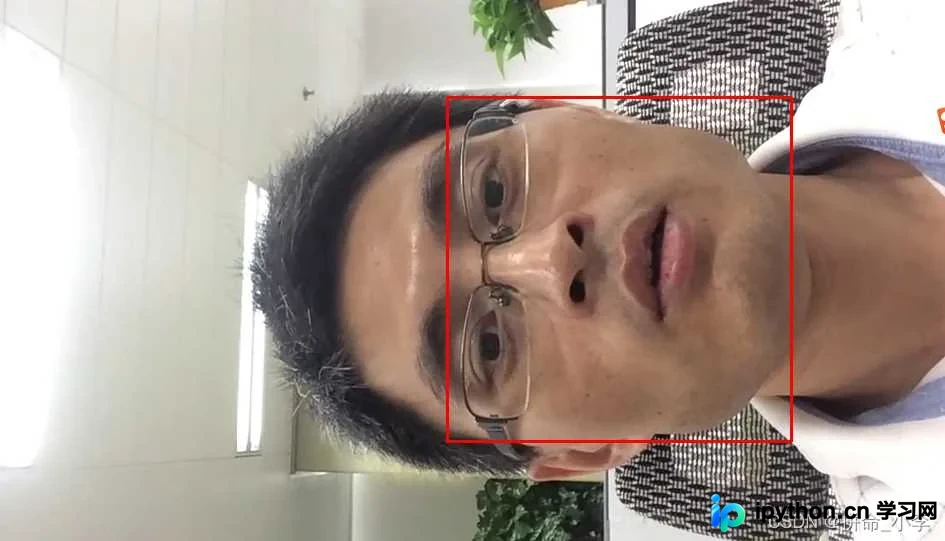
为了进一步提升处理效率,特别是针对静态图片的人脸采集,可以结合threadpool多线程技术与MediaPipe和OpenCV。相比dlib,这种组合在处理批量图片时具有更高的效率。具体实现包括定义保存路径和源图片目录,使用线程池并行处理图片列表中的每一张图片。对于每张图片,读取后转换颜色空间,利用FaceDetection模型进行人脸检测,若检测到人脸则裁剪并保存至指定目录。
# -*- coding: utf-8 -*-
"""
@Time    : 2022/3/23 13:43
@Author  : liwei
@Description:
"""
import cv2 as cv
import mediapipe as mp
import os
import threadpool
mp_drawing = mp.solutions.drawing_utils
mp_face_mesh = mp.solutions.face_mesh
mp_face_detection = mp.solutions.face_detection

savePath = "E:\\saveImg\\"
basePath = "E:\\img\\clear\\20220301\\"
def cut_face_img(file):
    # print(basePath + file)
    img = cv.imread(basePath + file)
    with mp_face_detection.FaceDetection(
            model_selection=0, min_detection_confidence=0.5) as face_detection:
        img.flags.writeable = False
        image = cv.cvtColor(img, cv.COLOR_RGB2BGR)
        results = face_detection.process(image)
        image = cv.cvtColor(image, cv.COLOR_RGB2BGR)
        image.flags.writeable = True
        if results.detections:
            box = results.detections[0].location_data.relative_bounding_box
            xmin = box.xmin
            ymin = box.ymin
            width = box.width
            height = box.height
            xmax = box.xmin + width
            ymax = ymin + height
            x1, x2, y1, y2 = int(xmax * image.shape[1]), int(xmin * image.shape[1]), int(
                ymax * image.shape[0]), int(ymin * image.shape[0])
            cropped = image[y2:y1, x2:x1]

            if cropped.shape[1] > 200:
                cv.imwrite(savePath + file, cropped)
                print(savePath + file)

if __name__ == '__main__':
    data = os.listdir(basePath)
    pool = threadpool.ThreadPool(3)
    requests = threadpool.makeRequests(cut_face_img, data)
    [pool.putRequest(req) for req in requests]
    pool.wait()
至此,关于使用Python结合MediaPipe和OpenCV进行视频人脸检测的介绍已完成。如需了解更多相关内容,可参考本站过往文章或继续浏览后续内容。感谢支持!
免责声明:本文内容仅供参考,不代表本站观点。转载或引用请注明出处。









