

利用Python prometheus_client库进行Prometheus监控测试

发布时间:2026-10-15| 2人浏览过
本文介绍如何使用Python官方prometheus_client库搭建Prometheus监控测试环境。内容涵盖客户端库的安装、基于Summary指标创建HTTP服务、后台运行客户端,以及在Prometheus配置文件中添加scrape_configs以抓取本地8080端口的指标数据,最终验证监控链路的有效性。
Python Prometheus客户端测试环境搭建
为了更直观地理解Prometheus的工作机制,本文将通过Python编写的客户端库进行相关功能的测试验证。
该Python客户端库的GitHub项目地址为https://github.com/prometheus。
根据官方提示,需使用pip命令安装prometheus_client库。
pip3 install prometheus_client
随后参考文档提供的示例代码并进行适当修改,以运行一个基础的客户端服务。
将示例代码保存为文件prometheus_python_client.py。
from prometheus_client import start_http_server, Summary
import random
import time
import sys

# Create a metric to track time spent and requests made.
REQUEST_TIME = Summary ('request_processing_seconds', 'Time spent processing request')


# Decorate function with metric.
@REQUEST_TIME.time ( )
def process_request(t):
    """A dummy function that takes some time."""
    time.sleep (t)


if __name__ == '__main__':
    try:
        if sys.argv[1].isdigit():
            port = sys.argv[1]
        else:
            port = 8080
    except:
        port = 8080

    # Start up the server to expose the metrics.
    start_http_server (8080)
    # Generate some requests.
    while True:
        process_request (random.random ( ))
在后台启动该客户端程序。
pytho3 prometheus_python_client.py 8080 &
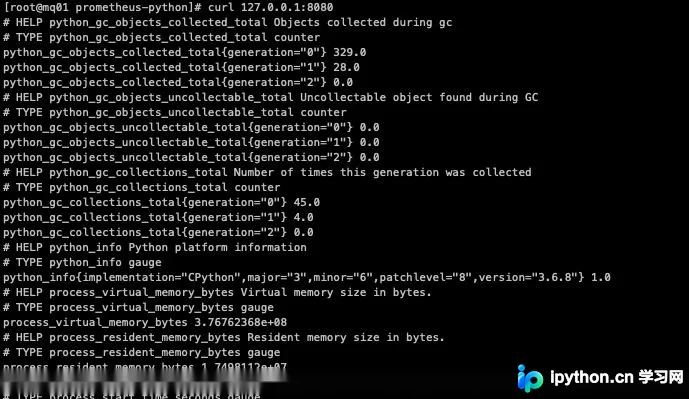
此时访问本机8080端口,即可查看到相应的监控指标数据。
curl 127.0.0.1:8080/metrics
访问结果如图所示。
Prometheus服务端配置与指标验证
为了在Prometheus中监控此8080端口的目标,需要对Prometheus的配置文件prometheus.yml进行相应修改。
在scrape_configs配置块中新增一个作业(job)配置。
scrape_configs:
  # The job name is added as a label `job=<job_name>` to any timeseries scraped from this config.
  - job_name: "prometheus"
    # metrics_path defaults to '/metrics'
    # scheme defaults to 'http'.
    static_configs:
      - targets: ["localhost:9090"]
  - job_name: 'python-client'
    scrape_interval: 5s
    static_configs:
      - targets: ['localhost:8080']
        labels:
          group: 'python-client-group'
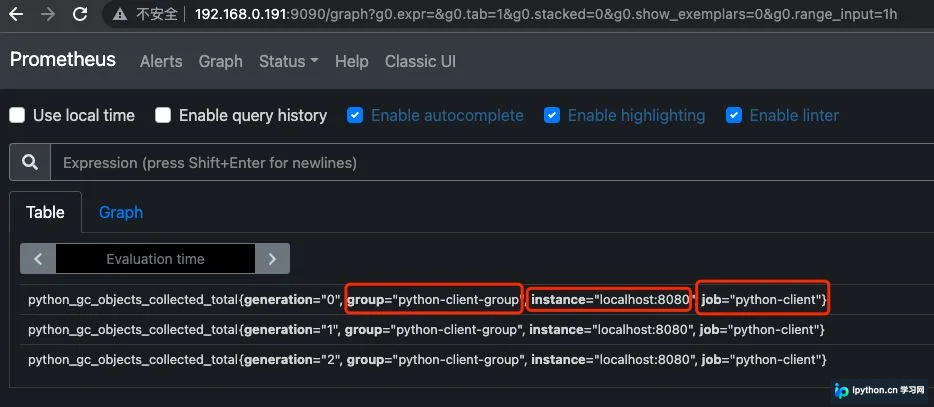
重启Prometheus服务后,访问其Web界面,在Expression输入框中输入Python客户端的指标名称并执行查询。
可以看到查询结果与scrape_configs中配置的指标一致。
至此,关于使用Python测试Prometheus实现的文章介绍完毕,更多相关Python测试Prometheus内容请搜索本站以前的文章或继续浏览下面的相关文章希望大家以后多多支持本站!
免责声明:本文内容仅供参考,不代表本站观点。转载或引用请注明出处。









