

Python实现简易购物车程序完整教程

发布时间:2026-10-15| 2人浏览过
本文详细介绍如何使用Python编写一个简单的购物车小程序。通过定义商品列表、获取用户工资及购买选择,程序实现了商品展示、余额校验、购物车添加及退出查看功能。文章包含完整源代码及运行结果截图,适合Python初学者学习列表遍历、条件判断及输入处理等基础语法。
Python购物车程序概述
本示例展示了使用Python语言开发简易购物车小程序的具体实现方案,供读者参考学习。
功能需求说明
功能需求说明
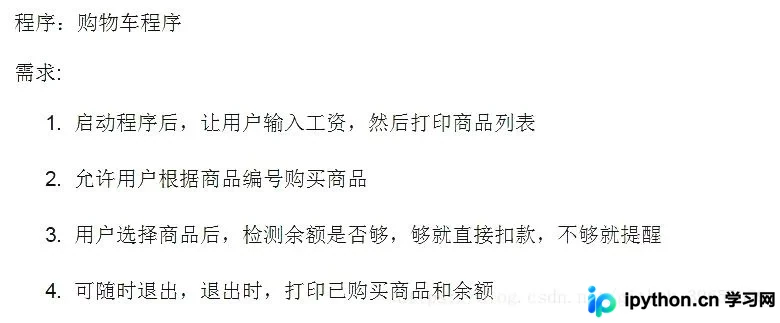
代码实现细节
程序核心逻辑实现
核心代码逻辑
# --*--coding:utf-8--*--
# Author: 村雨

import pprint

productList = [('Iphone 8', 10000),
               ('GTX2080', 8000),
               ('Z7KP7-GT', 6000),
               ('Mac pro', 15000),
               ('Honor 10', 2800),
               ('Iphone XR', 12000),
               ('Mi 8', 2999)
               ]

shoppingList = []

print('输入你的工资:')
salary = input()
if not salary.isdigit():
    print('请输入整数')
else:
    salary = int(salary)
    while True:
        for index, item in enumerate(productList):
            print(index + 1, item)
        print('输入你要买的商品的序号:')
        userWant = input()
        if userWant.isdigit():
            userWant = int(userWant)
            if userWant <= len(productList) and userWant > 0:
                print('你要购买的是:', productList[userWant - 1][0])
                if salary >= productList[userWant - 1][1]:
                    shoppingList.append(productList[userWant - 1][0])
                    salary -= productList[userWant - 1][1]
                    print('你已经购买了' + productList[userWant - 1][0] + ', 你的余额为 ' + str(salary))
                else:
                    print('对不起,你的余额不足!请努力工作吧!')
                    print('你当前所购买的商品为:')
                    for brought in shoppingList:
                        pprint.pprint(brought)
                    print('你当前余额为:', salary)
                    exit()
            else:
                print('你输入的商品序号有错,请重新输入')
        elif userWant == 'q':
            print('-----------Shopping List----------')
            for brought in shoppingList:
                pprint.pprint(brought)
            print('你的余额为 ', salary)
            exit()
        else:
            print('Invalid input!!!')
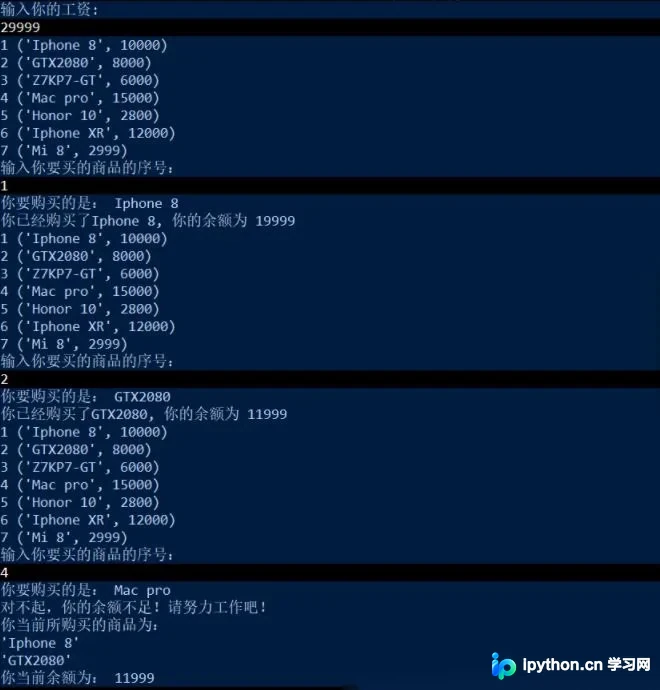
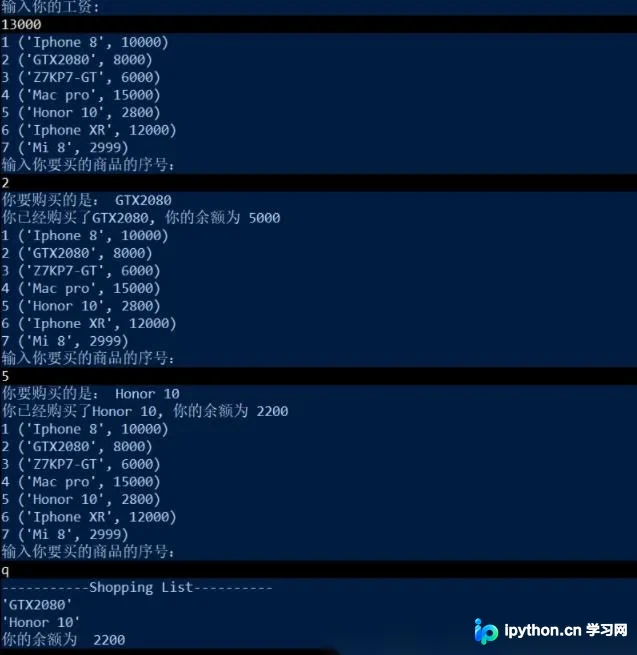
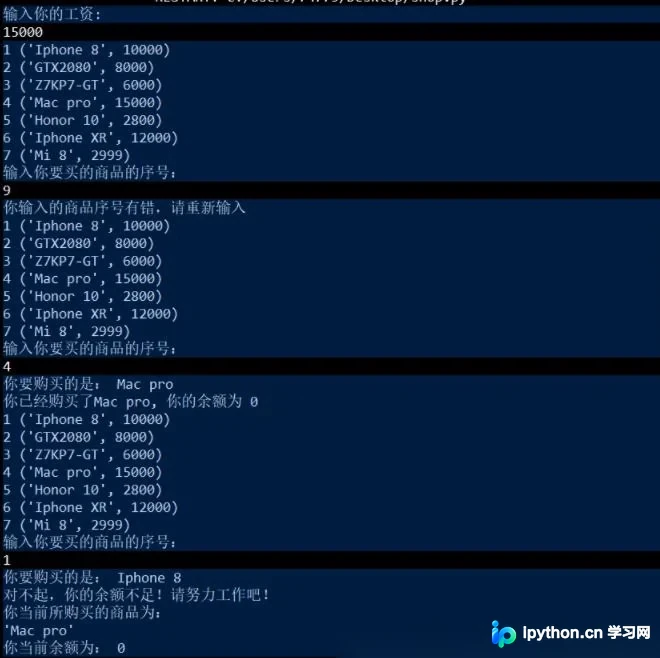
运行结果展示
程序运行效果展示
总结与致谢
以上内容为本次Python购物车程序实现的完整分享,旨在帮助读者掌握相关编程技巧。若内容对您有帮助,欢迎继续支持本站获取更多技术资源。
免责声明:本文内容仅供参考,不代表本站观点。转载或引用请注明出处。









