

MySQL基础:约束、索引、存储引擎与表关系详解

发布时间:2026-10-15| 4人浏览过
本文系统讲解MySQL数据库的核心基础概念。首先介绍字符类型与时间类型的差异,重点阐述主键、唯一索引及联合唯一索引的创建与使用规范。随后深入解析MyISAM与InnoDB存储引擎在锁机制、事务支持及外键功能上的区别,并梳理一对一、一对多及多对多表关系的建模方法,帮助开发者构建规范的数据库结构。
在MySQL中,数据类型的选择直接影响存储效率与查询性能。字符类型方面,char为定长字符,最大长度255;varchar为变长字符,最大长度21845。时间类型包括date(年月日)、time(时分秒)、year(年份)以及datetime(年月日时分秒)。其中,timestamp类型具有自动更新特性,记录修改时间时无需手动写入,但需注意其时间戳范围限制在2038年之前。此外,约束条件用于限制数据录入规范,包括unsigned(无符号)、not null(非空)、default(默认值)以及unique(唯一性)。
# ### char varchar (补充)
char    字符长度   255个
varchar 字符长度 21845个
# ### part1  时间类型
date  YYYY-MM-DD 年月日 (节假日,纪念日)
time  HH:MM:SS   时分秒 (体育竞赛,记录时间)
year  YYYY       年份   (历史,酒的年份)
datetime  YYYY-MM-DD HH:MM:SS  年月日 时分秒 (上线时间,下单时间)
	create table t1(d date, t time , y year , dt datetime);
	insert into t1 values("2020-11-3","9:19:30","2020","2020-11-3 9:19:30");
	insert into t1 values(now(),now(),now(),now());
timestamp YYYYMMDDHHMMSS(时间戳)  自动更新时间 (不需要手动写入,自动实现更新记录,[用作记录修改的时间])
	create table t2(dt datetime , ts timestamp);
	insert into t2 values(20201103092530 , 20201103092530);
	insert into t2 values(null,null); # 区别 timestamp 自动更新时间(以当前时间戳) datetime没有
	insert into t2 values(20390102101010 , 20390102101010); error # 超越2038
# ### part2 约束 : 对编辑的数据进行类型的限制,不满足约束条件的报错
	unsigned   :    无符号
	not null   :    不为空
	default    :    默认值
	unique     :    唯一值,加入唯一索引
	(索引相当于字典目录,索引的提出是为了加快速度,一味地乱加索引不会提高查询效率)
	primary key:    主键
	auto_increment: 自增加一
	zerofill   :    零填充
	foreign key:    外键
# unsigned 无符号
	create table t3(id int unsigned);
	insert into t3 values(-1); error
	insert into t3 values(4000000000); success

# not null   :    不为空
	create table t4(id int not null , name varchar(11));
	insert into t4 values(1,"张宇");
	insert into t4 values(null,"张宇"); error
	insert into t4(name) values("李四"); error

# default    :    默认值
	create table t5(id int not null  , name varchar(11) default "沈思雨" );
	insert into t5 values(1,null);
	insert into t5(id) values(2);
	create table t5_2(id int not null  default "1111" , name varchar(11) default "沈思雨" );
	insert into t5_2 values(); # 在values里面不写值,默认使用默认值;

# unique     :    唯一值,加入唯一索引(索引的提出是为了加快速度,一味地乱加索引不会提高查询效率)
	# 唯一 可为null  标记成: UNI
	create table t6(id int unique , name char(10) default "赵万里" );
	insert into t6(id) values(1);
	insert into t6(id) values(1); error
	insert into t6(id) values(null);
	insert into t6(id) values(null); # id变成了多个null
# primary key:    主键 [ 唯一 + 不为null ]   PRI 标记数据的唯一特征
	"""一个表中,只能设置一个字段为一个主键,unique唯一约束可以设置多个"""
	# 创建主键
	create table t7(id int primary key , name varchar(10) default "赵沈阳");
	insert into t7(id) values(1);
	insert into t7(id) values(1); error
	insert into t7(id) values(null); error
	# unique + not null => PRI
	create table t8(id int unique not null ,  name varchar(10) default "赵沈阳" );
	# primary key  / unique + not null  => 优先把primary key 作为主键;
	create table t9(id1 int unique not null ,  id2 int primary key );
	# 一个表只能设置单个字段为一个主键;
	create table t10(id1 int  primary key  ,  id2 int primary key ); error

# auto_increment: 自增加一 (一般配合 主键或者unique 使用)
	create table t11(id int primary key auto_increment , name varchar(255) default "敬文栋");
	insert into t11 values(1,"张三");
	insert into t11 values(null,"李四");
	insert into t11(id) values(null);
	# 使用默认值或者自增插入数据
	insert into t11 values();
	# 删除数据
	delete from t11;
	# 删除数据 + 重置id
	truncate table t11;

# zerofill   :    零填充 (配合int使用,不够5位拿0来填充)
	create table t12(id int(5) zerofill);
	insert into t12 values(1234567);
	insert into t12 values(12);
索引分为主键索引(PRI)、唯一索引(UNI)和普通索引(MUL)。联合唯一索引允许对多个字段组合进行唯一性校验,例如(ip, port)组合不能重复。需注意,若字段允许为空,unique约束下可能出现多个空值,这在设计时需特别留意。通过create table语句定义表结构时,可明确指定unique约束,并在insert操作中验证数据唯一性,确保业务逻辑的完整性。
# ### part3"""主键索引 : PRI    [primary key]唯一索引 : UNI    [unique]普通索引 : MUL    [index]"""# 1.联合唯一索引"""unique(字段1,字段2,字段3 ..... )  合在一起,该数据不能重复"""# unique + not nullcreate table t1_server(id int , server_name varchar(10)  not null , ip varchar(15) not null , port int not null , unique(ip,port) );insert into t1_server values(1,"阿里","192.168.11.251",3306);insert into t1_server values(1,"阿里","192.168.11.251",80);insert into t1_server values(1,"阿里","192.168.11.252",80);insert into t1_server values(1,"阿里","192.168.11.252",80); error# unique : 有可能出现多个空值的情况要注意;create table t2_server(id int , server_name varchar(10)  not null , ip varchar(15) , port int , unique(ip,port) );insert into t2_server values(1,"腾讯","192.168.11.251",3306);insert into t2_server values(1,"腾讯","192.168.11.251",3306); errorinsert into t2_server values(1,"腾讯",null,null); # 注意点: 允许插入多个空值;+------+-------------+----------------+------+| id   | server_name | ip             | port |+------+-------------+----------------+------+|    1 | 腾讯        | 192.168.11.251 | 3306 ||    1 | 腾讯        | NULL           | NULL ||    1 | 腾讯        | NULL           | NULL ||    1 | 腾讯        | NULL           | NULL ||    1 | 腾讯        | NULL           | NULL |+------+-------------+----------------+------+# 2.联合唯一主键create table t3_server(id int ,server_name varchar(10)  not null , ip varchar(15) , port int  , primary key(ip,port) );insert into t3_server values(1,"华为","192.168.11.251",3306);insert into t3_server values(1,"华为","192.168.11.251",3307);"""总结:primary key(字段1,字段2 ... )   联合唯一主键 , 单个字段情况,可以设置一个主键,如果是多个字段只能设置成联合主键,合在一起表达一个主键概念;unique(字段1,字段2 ... )    联合唯一索引index(字段1,字段2 ... )    联合普通索引"""# 3.foreign key:    外键,把多张表通过一个关联字段联合在一起 (该字段可以设置成外键,作用是可以联级更新或者联级删除)"""  语法:foreign key(classid) references class1(id)  条件:被关联的字段,必须具备唯一属性;"""student1:id  name          age    classid      1  wangtongpei   58     12   liuyifeng     85     13   wangwen       18     2class1:id classname 1  python322  python33# 创建class1create table class1(id int , classname varchar(255));# 添加唯一索引alter table class1 add unique(id);# 删除索引create table class222(id int unique, classname varchar(255));alter table class1 drop index id;# 创建student1create table student1(id int primary key auto_increment,name varchar(255),age int,classid int,foreign key(classid) references class1(id));# 添加数据insert into class1 values(1,"python32");insert into class1 values(2,"python33");insert into class1 values(3,"python34");insert into student1 values(null,"wangtongpei",58,1);insert into student1 values(null,"liuyifeng",85,1);insert into student1 values(null,"wangwen",18,2);# 没有关联的数据可以直接删除delete from class1 where id = 1;# 有关联的数据不能直接删除,要先把关联的数据删掉之后再删除delete from student1 where id = 3;delete from class1 where id = 2;# 联级更新 , 联级删除 ( 谨慎使用 )"""联级删除 on delete cascade联级更新 on update cascade"""# 创建class2create table class2(id int primary key auto_increment, classname varchar(255));# 创建student2create table student2(id int primary key auto_increment,name varchar(255),age int,classid int,foreign key(classid) references class2(id) on delete cascade on update cascade #区别);# 添加数据insert into class2 values(1,"python32");insert into class2 values(2,"python33");insert into class2 values(3,"python34");insert into student2 values(null,"wangtongpei",58,1);insert into student2 values(null,"liuyifeng",85,1);insert into student2 values(null,"wangwen",18,2);# 联级删除 (把所有关联数据全部删除,谨慎;)delete from class2 where id = 1;# 联级更新 (把所有关联数据全部更新,谨慎;)update class2 set id = 100 where classname="python33# ### part3
"""
主键索引 : PRI    [primary key]
唯一索引 : UNI    [unique]
普通索引 : MUL    [index]
"""
# 1.联合唯一索引
	"""unique(字段1,字段2,字段3 ..... )  合在一起,该数据不能重复"""
	# unique + not null
	create table t1_server(id int , server_name varchar(10)  not null , ip varchar(15) not null , port int not null , unique(ip,port) );
	insert into t1_server values(1,"阿里","192.168.11.251",3306);
	insert into t1_server values(1,"阿里","192.168.11.251",80);
	insert into t1_server values(1,"阿里","192.168.11.252",80);
	insert into t1_server values(1,"阿里","192.168.11.252",80); error
	# unique : 有可能出现多个空值的情况要注意;
	create table t2_server(id int , server_name varchar(10)  not null , ip varchar(15) , port int , unique(ip,port) );
	insert into t2_server values(1,"腾讯","192.168.11.251",3306);
	insert into t2_server values(1,"腾讯","192.168.11.251",3306); error
	insert into t2_server values(1,"腾讯",null,null); # 注意点: 允许插入多个空值;
	+------+-------------+----------------+------+
	| id   | server_name | ip             | port |
	+------+-------------+----------------+------+
	|    1 | 腾讯        | 192.168.11.251 | 3306 |
	|    1 | 腾讯        | NULL           | NULL |
	|    1 | 腾讯        | NULL           | NULL |
	|    1 | 腾讯        | NULL           | NULL |
	|    1 | 腾讯        | NULL           | NULL |
	+------+-------------+----------------+------+

# 2.联合唯一主键
	create table t3_server(id int ,server_name varchar(10)  not null , ip varchar(15) , port int  , primary key(ip,port) );
	insert into t3_server values(1,"华为","192.168.11.251",3306);
	insert into t3_server values(1,"华为","192.168.11.251",3307);
	"""
	总结:
		primary key(字段1,字段2 ... )   联合唯一主键 , 单个字段情况,可以设置一个主键,如果是多个字段只能设置成联合主键,合在一起表达一个主键概念;
		unique(字段1,字段2 ... )	    联合唯一索引
		index(字段1,字段2 ... )		    联合普通索引
	"""

# 3.foreign key:    外键,把多张表通过一个关联字段联合在一起 (该字段可以设置成外键,作用是可以联级更新或者联级删除)
	"""
		语法:	foreign key(classid) references class1(id)
		条件:	被关联的字段,必须具备唯一属性;
	"""
	student1:
		id  name          age    classid
		1  	wangtongpei   58     1
		2   liuyifeng     85     1
		3   wangwen       18     2
	class1:
		id classname
		1  python32
		2  python33

	# 创建class1
	create table class1(id int , classname varchar(255));
	# 添加唯一索引
	alter table class1 add unique(id);
	# 删除索引
	create table class222(id int unique, classname varchar(255));
	alter table class1 drop index id;
	# 创建student1
	create table student1(
	id int primary key auto_increment,
	name varchar(255),
	age int,
	classid int,
	foreign key(classid) references class1(id)
	);
	# 添加数据
	insert into class1 values(1,"python32");
	insert into class1 values(2,"python33");
	insert into class1 values(3,"python34");
	insert into student1 values(null,"wangtongpei",58,1);
	insert into student1 values(null,"liuyifeng",85,1);
	insert into student1 values(null,"wangwen",18,2);
	# 没有关联的数据可以直接删除
	delete from class1 where id = 1;
	# 有关联的数据不能直接删除,要先把关联的数据删掉之后再删除
	delete from student1 where id = 3;
	delete from class1 where id = 2;

	# 联级更新 , 联级删除 ( 谨慎使用 )
	"""
	联级删除 on delete cascade
	联级更新 on update cascade
	"""
	# 创建class2
	create table class2(id int primary key auto_increment, classname varchar(255));
	# 创建student2
	create table student2(
	id int primary key auto_increment,
	name varchar(255),
	age int,
	classid int,
	foreign key(classid) references class2(id) on delete cascade on update cascade #区别
	);
	# 添加数据
	insert into class2 values(1,"python32");
	insert into class2 values(2,"python33");
	insert into class2 values(3,"python34");
	insert into student2 values(null,"wangtongpei",58,1);
	insert into student2 values(null,"liuyifeng",85,1);
	insert into student2 values(null,"wangwen",18,2);
	# 联级删除 (把所有关联数据全部删除,谨慎;)
	delete from class2 where id = 1;
	# 联级更新 (把所有关联数据全部更新,谨慎;)
	update class2 set id = 100 where classname="python33";
MySQL存储引擎决定了数据的存储结构与访问方式。MyISAM采用表级锁,适用于5.5版本前的默认引擎,不支持事务与外键;InnoDB则支持事务处理、行级锁及外键,是5.5版本后的默认引擎,适合高并发场景。MEMORY引擎将数据置于内存,适用于临时缓存;BLACKHOLE引擎则丢弃所有写入数据。表间关系主要分为一对一、一对多(多对一)及多对多。多对多关系需通过中间关系表实现,将关联字段设为外键,分别引用主表的id,从而建立清晰的关联映射。
# ### part4 表与表之间的关系
(1) 一对一 : id name age sex address guanlian    id userid mother father ....
(2) 一对多(多对一) : 班级和学生之间的关系 一个班级可以对应多个学生,反过来,多个学生对应一个班级;
(3) 多对多 : 一个学生可以同时学习多个学科,一个学科同时可以被多个学生学习
			 一本书可以被多个作者共同编写,一个作者可以写多本书
xueke (表1)
id  name
1   math
2   english
3   wuli
student (表2)
id  name
1   wangwen
2   wangwei
3   wangtongpei
relation (关系表3)
"""
把 xid 和 sid 这两个关联字段设置成外键,
关联xueke表里的id(对应的xid) ,
关联student表里的id(对应的sid)
"""
xid sid
1   1
1   2
1   3
2   1
2   2
2   3

# ### part5 存储引擎 : 存储数据的一种结构方式
# 概念:
表级锁 :  只要有一个线程执行修改表中的相关操作,就会上锁,其他线程默认等待;
行级锁 :  针对于当前表中的这条记录,这一行进行上锁,其他数据仍然可以被其他线程修改,实现高并发,高可用;
事务处理: 执行sql语句时,必须所有的操作全部成功,才最终提交数据,有一条失败,直接回滚,恢复到先前状态
begin     : 开启事务
commit    : 提交数据
rollback  : 回滚数据

MyISAM: 表级锁    			  (5.5版本之前的默认存储引擎)
InnoDB: 事务处理,行级锁,外键 (5.5版本之后的默认存储引擎)
MEMORY: 把数据放在内存中,临时缓存;
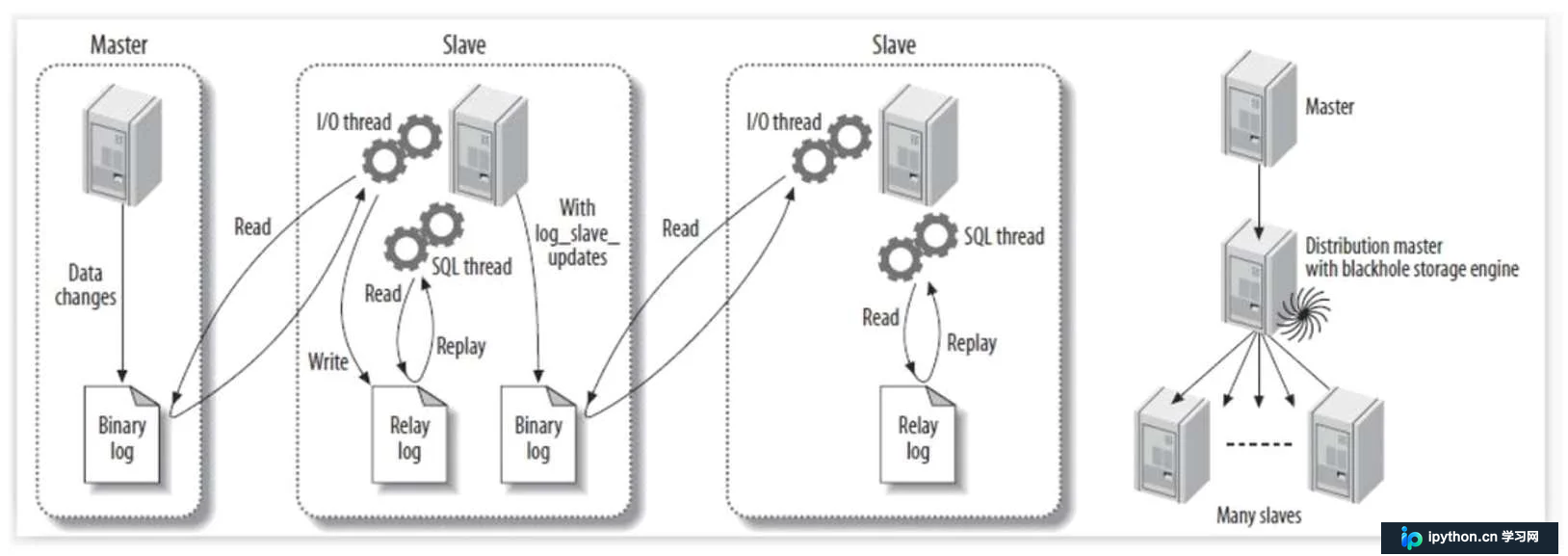
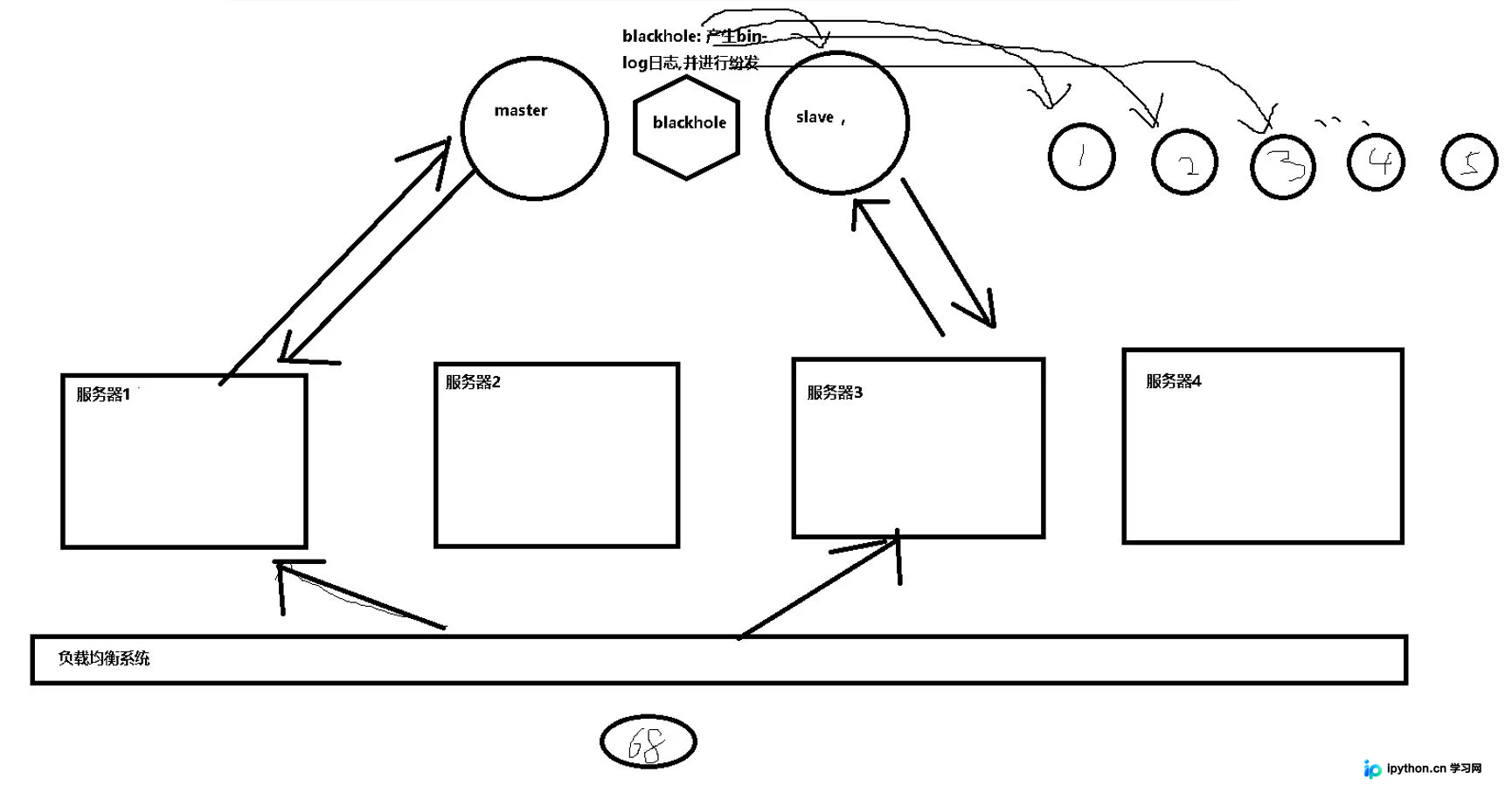
BLACKHOLE: anything you write to it disappears
		   一般用于同步主从数据库;(放在主数据库和从数据库之间的一台服务器;产生binlog日志进行分发,减轻master的压力)
"""
主数据库: 增删改
从数据库: 查询
配置: 一主一从 , 一主多从 , 多主多从
"""
"""
show engins;  # 查看存储引擎
show create table memary1; # 查看创建数据库的结构
desc + 表名;  # 查看表结构
"""
create table myisam1( id int ) engine=MyISAM;
.frm 表结构
.MYD 表数据
.MYI 表索引
create table innodb1( id int ) engine=InnoDB;
.frm 表结构
.ibd 表数据+表索引
create table memory1( id int ) engine=MEMORY;
.frm 只有表结构 , 数据存放在内存中
create table blackhole( id int ) engine=BLACKHOLE;
.frm 只有表结构 , 所有的数据都不会存储;

# ### 额外补充
# 关于约束的添加和删除
# 1 添加/删除 约束 not null
	#alter table 表名 modify 字段名 类型
	alter table t1 modify id int not null
	alter table t1 modify id int
# 2 添加/删除 unique 唯一索引
	# alter table 表名 add unique(id)
	alter table t1 add unique(id)
	alter table t1 drop index id
# 3 添加/删除 primary key
	# alter table 表名 add primary key(id);
	alter table t1 add primary key(id);
	alter table t1 drop primary key;
# 4 添加/删除 foreign key 外键 (先通过desc 表 找到外键名字,然后再删)
	alter table student1 drop foreign key student1_ibfk_1; #删除
	alter table student1 add foreign key(classid) references class1(id) #添加
本文涵盖了MySQL基础中的关键知识点,包括数据类型、约束条件、索引类型、存储引擎特性及表关系设计。掌握这些内容有助于构建高效、规范的数据库结构,为后续的高级应用开发奠定坚实基础。
感谢阅读,希望本文能为您提供帮助。欢迎持续关注本站,获取更多技术内容!
免责声明:本文内容仅供参考,不代表本站观点。转载或引用请注明出处。









