

Python自动化处理Word民主评议:读取表格、计算汇总并导出Excel

本文介绍利用Python自动化处理年度民主评议表的完整方案。通过docx解析Word文档中的评价表格,使用pandas进行数据汇总与加权计分,最终将结果写入Excel文件。代码不足80行,涵盖从安装依赖、读取目录、解析表格、计算评分到导出文件的全流程,适用于批量处理员工评价数据。
前言
临近春节,公司年度员工评级工作随之展开。与往年相同,每位员工需填写民主评议表,对同事进行评价打分,随后由部门统一收集并汇总统计。面对数十人的评价表,手动将数据录入Excel进行汇总计算不仅耗时费力,且极易出错。为此,编写一个Python小程序来自动化处理这些繁琐工作显得尤为必要。该程序可重复使用,每年评级时均可调用,大幅节省人力成本。
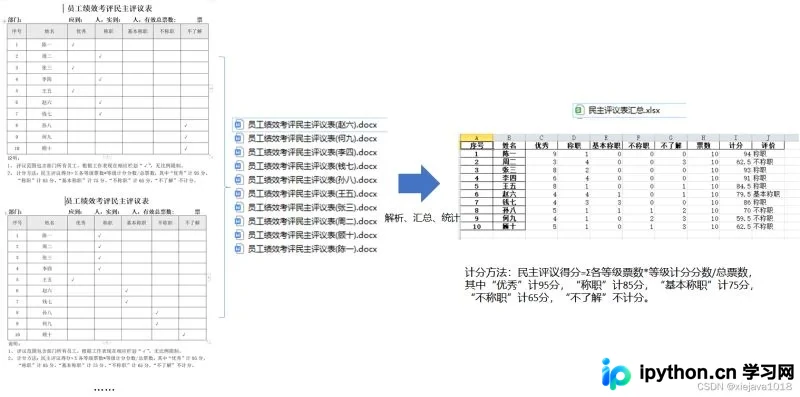
核心任务包括:读取指定文件夹内的Word文档,提取其中的评价表格数据,依据预设规则对所有表格数据进行汇总计算,得出每位员工的最终评分及对应的评价等级,最后将统计结果写入Excel文件。
使用Python处理此类任务确实高效便捷,正如其口号“人生苦短,我用Python”所言,它能显著简化数据处理流程。
本方案主要依赖两个Python库:使用docx包解析Word文档,使用pandas库进行数据处理及Excel写入操作。
一、首先导入包
pip install docx
pip install pandas
由于pandas写入Excel文件依赖openpyxl引擎,因此需要额外安装并导入该包。
pip install openpyxl
二、读评价表所在的目录文件
利用Python的os模块列出文件夹内容,并筛选出扩展名为.docx的文件。
files=os.listdir(filepah)
for file in files:
    if file.find('.docx')>0:
        docfilepah=filepah+file
三、读word文件,处理word中的表格数据
data=[]
#读word的docx评议表文件,并读取word中的表格数据
def procdoc(docfilepath):
    document=Document(docfilepath)
    tables=document.tables
    table=tables[0]
    for i in range(1,len(table.rows)):
        id=int(table.cell(i,0).text)
        name=table.cell(i,1).text
        excellent=0
        if table.cell(i,2).text!='' and table.cell(i,2).text is not None:
            excellent=1
        competent = 0
        if table.cell(i, 3).text!='' and table.cell(i, 3).text is not None:
            competent=1
        basicacompetent=0
        if table.cell(i, 4).text!='' and table.cell(i, 4).text is not None:
            basicacompetent=1
        notcompetent = 0
        if table.cell(i, 5).text!='' and table.cell(i, 5).text is not None:
            notcompetent=1
        dontunderstand =0
        if table.cell(i, 6).text!='' and table.cell(i, 6).text is not None:
            dontunderstand=1
        appraisedata=[id,name,excellent,competent,basicacompetent,notcompetent,dontunderstand]
        data.append(appraisedata)
四、统计计算
利用pandas直接对提取的数据进行统计计算,避免了传统繁琐的循环处理逻辑。
df = pd.DataFrame(data,columns=['序号','姓名','优秀','称职','基本称职','不称职','不了解'])
df=df.groupby(['序号','姓名']).sum() #汇总每个人每一项的评分
df['票数'] = df.apply(lambda x: x.sum(), axis=1) #统计票数
df['计分'] = (df['优秀']*95+df['称职']*85+df['基本称职']*75+df['不称职']*65+df['不了解']*0)/len(df)#根据规则计分
df['评价']=df['计分'].map(getscore) #根据规则评价评级
计分规则如下:民主评议得分 = Σ(各等级票数 × 等级计分分数) / 总票数。具体分值标准为:“优秀”计95分,“称职”计85分,“基本称职”计75分,“不称职”计65分,“不了解”不计分(计0分)。
#根据评分规则计算评级
def getscore(x):
    if x>=95:
        score='优秀'
    elif x>=80 and x<95:
        score='称职'
    elif x>=75 and x<80:
        score='基本称职'
    elif x<75:
        score='不称职'
    return score
五、将统计计算结果写入汇总Excel
通过pandas库,可以直接将处理好的DataFrame对象写入Excel文件。
#将汇总计算好的数据写入Excel
def write2excle(exclefile,dataframe):
    writer = pd.ExcelWriter(exclefile)
    dataframe.to_excel(writer)
    writer.save()
    print('输出成功')
完整代码
使用不到80行Python代码,即可实现从读取Word文档、处理表格数据、汇总计算到写入Excel的全流程自动化。
完整的代码如下:
import os
import pandas as pd
from docx import Document

data=[]
#读word的docx评议表文件,并读取word中的表格数据
def procdoc(docfilepath):
    document=Document(docfilepath)
    tables=document.tables
    table=tables[0]
    for i in range(1,len(table.rows)):
        id=int(table.cell(i,0).text)
        name=table.cell(i,1).text
        excellent=0
        if table.cell(i,2).text!='' and table.cell(i,2).text is not None:
            excellent=1
        competent = 0
        if table.cell(i, 3).text!='' and table.cell(i, 3).text is not None:
            competent=1
        basicacompetent=0
        if table.cell(i, 4).text!='' and table.cell(i, 4).text is not None:
            basicacompetent=1
        notcompetent = 0
        if table.cell(i, 5).text!='' and table.cell(i, 5).text is not None:
            notcompetent=1
        dontunderstand =0
        if table.cell(i, 6).text!='' and table.cell(i, 6).text is not None:
            dontunderstand=1
        appraisedata=[id,name,excellent,competent,basicacompetent,notcompetent,dontunderstand]
        data.append(appraisedata)

#读取评议表的目录,并处理目录中的docx文件,根据评议表计算评分,写入汇总表。
def readfile(filepah):
    files=os.listdir(filepah)
    for file in files:
        if file.find('.docx')>0:
            docfilepah=filepah+file
            procdoc(docfilepah)
    df = pd.DataFrame(data,columns=['序号','姓名','优秀','称职','基本称职','不称职','不了解'])
    print(df)
    df=df.groupby(['序号','姓名']).sum()
    df['票数'] = df.apply(lambda x: x.sum(), axis=1)
    df['计分'] = (df['优秀']*95+df['称职']*85+df['基本称职']*75+df['不称职']*65+df['不了解']*0)/len(df)
    df['评价']=df['计分'].map(getscore)
    print(df)
    write2excle('民主评议\\民主评议表汇总.xlsx',df)

#根据评分规则计算评级
def getscore(x):
    if x>=95:
        score='优秀'
    elif x>=80 and x<95:
        score='称职'
    elif x>=75 and x<80:
        score='基本称职'
    elif x<75:
        score='不称职'
    return score

#将汇总计算好的数据写入Excel
def write2excle(exclefile,dataframe):
    writer = pd.ExcelWriter(exclefile)
    dataframe.to_excel(writer)
    writer.save()
    print('输出成功')

if __name__ == '__main__':
    readfile('民主评议\\')
全部源代码托管于GitHub:https://github.com/xiejava1018/pythonprocword
总结
至此,关于利用Python实现读取Word表格、计算汇总并写入Excel的教程介绍完毕。如需了解更多Python读取Word、计算汇总及写入Excel的相关内容,建议搜索本站历史文章或继续浏览后续相关文章。感谢大家的支持!
免责声明:本文内容仅供参考,不代表本站观点。转载或引用请注明出处。









