

解决Tkinter中button按钮未按却主动执行command函数的问题

发布时间:2026-10-15| 4人浏览过
本文解决Tkinter中Button按钮在初始化时command函数立即执行而非点击执行的问题。原因是command直接调用了带参函数,正确做法是使用lambda表达式包装函数调用,如command=lambda: self.click_button(1),从而在点击时才执行逻辑。
在使用Tkinter进行界面开发时,开发者可能会遇到一个常见现象:
程序启动后,按钮尚未被用户点击,其绑定的响应函数就已经执行了。
例如以下代码示例:
from Tkinter import *
class App:
 def __init__(self,master):
  frame = Frame(master)
  frame.pack()
  Button(frame,text='1', command = self.click_button(1)).grid(row=0,column=0)
  Button(frame,text='2', command = self.click_button(2)).grid(row=0,column=1)
  Button(frame,text='3', command = self.click_button(1)).grid(row=0,column=2)
  Button(frame,text='4', command = self.click_button(2)).grid(row=1,column=0)
  Button(frame,text='5', command = self.click_button(1)).grid(row=1,column=1)
  Button(frame,text='6', command = self.click_button(2)).grid(row=1,column=2)
 def click_button(self,n):
  print 'you clicked :',n

root=Tk()
app=App(root)
root.mainloop()
运行上述程序后,会出现如下情况:
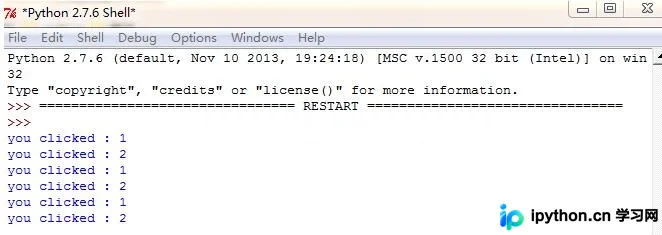
尽管六个按钮均未被点击,但绑定的command函数却已执行。
经过查阅相关资料,发现该问题的根源在于command参数中传递了带有参数的函数。
在Tkinter中,由按钮(或其他控件)触发的command回调函数,其本身不应直接包含参数传递逻辑,否则会在实例化时立即求值。
若需向回调函数传递参数,应在command参数前使用lambda表达式进行封装。
修正后的程序代码如下:
from Tkinter import *
class App:
 def __init__(self,master):
  frame = Frame(master)
  frame.pack()
  Button(frame,text='1', command = lambda: self.click_button(1)).grid(row=0,column=0)
  Button(frame,text='2', command = lambda: self.click_button(2)).grid(row=0,column=1)
  Button(frame,text='3', command = lambda: self.click_button(1)).grid(row=0,column=2)
  Button(frame,text='4', command = lambda: self.click_button(2)).grid(row=1,column=0)
  Button(frame,text='5', command = lambda: self.click_button(1)).grid(row=1,column=1)
  Button(frame,text='6', command = lambda: self.click_button(2)).grid(row=1,column=2)
 def click_button(self,n):
  print 'you clicked :',n
root=Tk()
app=App(root)
root.mainloop()
补充说明:Tkinter Button组件如何调用带参数的函数。
此处需利用Python的lambda函数。lambda用于创建匿名函数,冒号前为参数列表,冒号后为单行表达式。
调用lambda表达式将返回该表达式的结果。
首先定义一个简单函数fun(x):
def fun(x):
    print x
接着创建一个Button组件(此处省略Tkinter基础初始化代码,仅展示关键部分):
Button(root, text='Button', command=lambda :fun(x))然后定义一个变量x=1:
x = 1最后点击该Button,控制台将打印出数字1。
以上为个人经验分享,希望能对大家有所帮助,也欢迎大家继续支持本站。
免责声明:本文内容仅供参考,不代表本站观点。转载或引用请注明出处。









