

Python pymysql 增删改查完整指南:连接、事务与注意事项

本文详细介绍如何使用Python的pymysql库进行MySQL数据库的增删改查操作。涵盖安装配置、数据库连接参数设置(如端口、字符集、时区)、建表、插入、更新、查询及删除的具体代码实现。重点解析事务提交与回滚机制,以及自动递增主键、字段规范、驱动冲突等常见注意事项,帮助开发者避免常见错误。
首先,在命令行环境中执行 pip install pymysql 命令以安装 pymysql 库。
若需移除该库,可在命令行中执行 pip uninstall pymysql 进行卸载。
数据库连接配置
在建立数据库连接时,需注意 port 参数不应使用引号包裹,且 charset 应指定为 utf8 而非 utf-8。
# 获取数据库连接对象
connection = pymysql.connect(host='localhost', port=3306, user='root', passwd='2732195202', db='book', charset='utf8')
# 获取一个游标
driver = connection.cursor()
# 执行一条sql
driver.execute("select version()")
# 获取执行sql的返回值
resultData=driver.fetchall()
print(resultData)

# 关闭数据库
connection.close()
创建数据库表
import pymysql

#获取数据库连接对象
connection = pymysql.connect(host='localhost', port=3306, user='root', passwd='2732195202', db='book', charset='utf8')
#获取一个游标
driver=connection.cursor()
# 如果该数据库存在就删除
driver.execute("drop table if exists t_emp ")
# 定义sql语句
sql=""" CREATE TABLE `t_emp` (
  `id` int(11) NOT NULL AUTO_INCREMENT COMMENT '主键',
  `department` varchar(20) DEFAULT NULL COMMENT '部门',
  `salary` decimal(10,2) DEFAULT NULL COMMENT '工资',
  `age` int(11) DEFAULT NULL COMMENT '年龄',
  `sex` varchar(4) DEFAULT NULL COMMENT '性别',
  PRIMARY KEY (`id`)
)ENGINE=InnoDB DEFAULT CHARSET=utf8;

"""
# 执行sql
driver.execute(sql)

# 关闭数据连接
connection.close()
向数据库中添加数据
编写 SQL 语句时应遵循规范,明确列出所有需要赋值的字段,避免依赖默认映射。
提交事务的对象应为数据库连接对象,而非游标对象。
在使用 PyCharm 连接 MySQL 时,若使用的驱动版本较高,需在 JDBC URL 中显式指定时区,例如添加 serverTimezone=GMT%2B8 参数。
若表的主键设置为自动递增,则插入数据时不得手动指定该主键的值,应省略该字段以允许系统自动增长。
# 获取数据库连接对象
connection=pymysql.connect(host='localhost',port=3306,user='root',passwd='2732195202',db='book',charset='utf8')

# 获取一个游标
driver=connection.cursor()

# 定义sql语句
sql=""" insert into t_emp(name,department,salary,age,sex)
        values("tom","开发部",8000,25,"男"), ("tom","开发部",8000,25,"男")

 """

# 尝试捕捉错误
try:
    # 执行SQL,并返回收影响行数
    result=driver.execute(sql)
    # 提交事务
    connection.commit()
    print("sql(insert)->error")
except:
    # 如果发生错误 则回滚事务
    print("sql(insert)->error")
    driver.rollback()
# 关闭数据库连接
connection.close()
修改表中的数据
执行数据库操作前,必须确认已成功获取数据库连接,并已正确选中目标数据库。
如需卸载第三方库,可在命令行执行 pip uninstall pymysql 命令。
#获取数据库连接对象 autocommit=True:设置数据库自动提交
connection=pymysql.connect(host="localhost",port=3306,user='root',passwd='2732195202',db='book',charset='utf8',autocommit=True)
# 获取游标对象
driver=connection.cursor()
# 定义sql
sql="update t_emp set salary=%s,name=%s where id=%s;"
# 如果sql错误就执行回滚操作,成功就提交
try:
    # 执行sql,并且返回影响的行数
    result=driver.execute(sql,[6000,"admin",19])
    connection.commit()
    print("sql(update)->success")
except:
    print("sql(update)->error")
    connection.rollback()

# 关闭数据库连接对象
connection.close()
查询数据
确保项目中的 .py 文件名不与 Python 标准库或已安装库中的模块名冲突,否则可能导致导入异常。
# 获取数据库连接对象
connection=pymysql.connect(host='localhost',port=3306,user='root',passwd='2732195202',db='book',charset='utf8')
# 获取一个游标对象
driver=connection.cursor()
#定义sql
sql="select id, name, department, salary, age, sex from t_emp where id>%s and sex=%s"

# 只能获取一次,获取多次的时候会获取到null 如果是多个参数,需要传递一个元组
try:
    driver.execute(sql,(1,"女"))
    # 获取所有的查询结果 返回一个元组
    resultAll=driver.fetchall()
    print("resultAll:", resultAll)
    # 获取2条数据
    resultTwo=driver.fetchmany(2)
    print("resultTwo:", resultTwo)
    # 获取一条数据
    resultOne=driver.fetchone()
    print("resultThree:", resultOne)

    print("sql(select)->success")
except:
    connection.rollback()
    print("sql(select)->error")

# 关闭数据库连接
connection.close()
删除表中的记录
import  pymysql

# 获取数据库连接对象
connection = pymysql.connect(host='localhost', port=3306, user='root', passwd='2732195202', db='book', charset='utf8')
# 获取一个游标
driver = connection.cursor()
# 定义sql
sql="delete from t_emp where id=%s"

try:
    # 执行一条sql
    driver.execute(sql, (21))
    # 提交事务
    connection.commit()
    print("sql(delete)->success")
except  Exception as e:
    # 回滚事务
    connection.rollback()
    print("sql(delete)->error")
    print(e)

#关闭数据库连接
connection.close()
事务操作
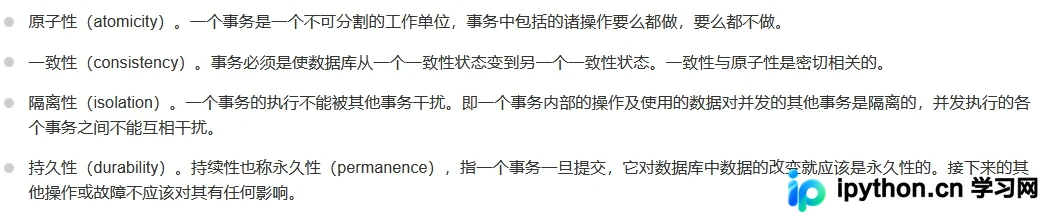
提交事务需调用 connection.commit() 方法。
若需回滚事务,应调用 connection.rollback() 方法。
总结
本文介绍了基于 pymysql 实现 Python 对 MySQL 数据库的增删改查功能。如需了解更多相关内容,可参考本站过往文章或继续浏览后续教程,感谢支持。
免责声明:本文内容仅供参考,不代表本站观点。转载或引用请注明出处。









