

Pytest 使用简介

本文详细介绍 Python 第三方单元测试框架 Pytest 的安装与核心用法。内容涵盖从环境搭建到简单测试用例编写,深入解析 fixture 的作用域(scope)与 yield 清理机制,以及通过 conftest 实现跨文件共享。此外,还讲解了如何利用 pytest-rerunfailures 插件处理网络或环境不稳定导致的测试失败,提供装饰器与命令行两种重试方案,帮助开发者提升测试效率与稳定性。
前言
近期在极客时间的课程中,讲师对 pytest 框架给予了高度推崇,同时对 unittest 框架持保留态度。查阅相关资料后,发现存在一条 Python 测试框架的鄙视链:pytest 优于 unittest,而 unittest 又优于 robotframework。
作为 Python 的第三方单元测试框架,pytest 相比内置的 unittest 更加简洁高效,且支持超过 315 种插件,同时完全兼容 unittest 框架。这意味着在将现有代码从 unittest 迁移至 pytest 时,无需重写测试代码。下文将详细分析 pytest 简洁高效的具体用法。
一、安装
首先,通过 pip 命令安装 pytest 框架。
pip3 install pytest安装完成后,验证 pytest 是否安装成功。
pip3 show pytest二、简单使用
1. 创建名为 test_sample.py 的文件,具体代码如下:
#!/usr/bin/env python
# coding=utf-8
import pytest

def inc(x):
    return x + 1

def test_answer():
    assert inc(3) == 5

if __name__ =="__main__":
    pytest.main()
执行上述代码后的结果如下:
test_sample.py F [100%]
================================== FAILURES =================================== _________________________________ test_answer _________________________________
def test_answer(): > assert inc(3) == 5 E assert 4 == 5 E + where 4 = inc(3)
test_sample.py:19: AssertionError ============================== 1 failed in 0.41s ==============================
从上述示例可以看出,pytest 中的断言直接使用 assert 关键字,这与 unittest 中需要使用 self.assert* 系列方法有所不同。
2. 总结使用 pytest 执行测试时需遵循的规则:
- .py 测试文件必须以 test_ 开头,或者以 _test 结尾。
- 测试类必须以 Test 开头,且该类中不能包含 __init__ 方法。
- 测试方法必须以 test_ 开头。
- 断言必须使用 assert 语句。
三、fixture
pytest 提供的 fixture 功能实现了 unittest 中 setup 和 teardown 的功能,可在每个用例执行前初始化数据。与 unittest 不同的是,fixture 可以仅在特定的几个用例执行前运行,只需在调用用例时指定即可,因此比 setup/teardown 更加灵活。
1. fixture scope 作用范围
首先查看 fixture 函数的定义方式:
def fixture(scope="function", params=None, autouse=False, ids=None, name=None):
    """
    :arg scope:    可选四组参数:function(默认)、calss、module、package/session
    :arg params:   一个可选的参数列表,它将导致多个参数调用fixture函数和所有测试使用它。
    :arg autouse:  如果为True,则fixture func将为所有测试激活可以看到它。如果为False(默认值),则需要显式激活fixture。
    :arg ids:      每个参数对应的字符串id列表,因此它们是测试id的一部分。如果没有提供id,它们将从参数中自动生成。
    :arg name:     fixture的名称。 这默认为装饰函数的名称。 如果fixture在定义它的同一模块中使用,夹具的功能名称将被请求夹具的功能arg遮蔽; 解决这个问题的一种方法是将装饰函数命名 “fixture_ <fixturename>”然后使用”@ pytest.fixture(name ='<fixturename>')”。
  """
重点说明 scope 参数的四组取值含义:
- function:每个测试函数(方法)都会执行一次。
- class:每个测试类只执行一次。即使类中包含多个测试方法,也仅在第一个方法调用时执行。
- module:一个 .py 文件执行一次。一个 .py 文件中可能包含多个类和多个方法。
- package/session:多个文件调用一次,支持跨 .py 文件共享。
在需要调用的函数前添加装饰器 @pytest.fixture()。以下是一个简单示例:
#!/usr/bin/env python
# coding=utf-8
import pytest

@pytest.fixture(scope='function')
def login():
    print("登录")

def test_1():
    print('测试用例1')

def test_2(login):
    print('测试用例2')


if __name__ =="__main__":
    pytest.main(['test_sample.py','-s'])
执行结果如下:
test_sample.py 测试用例1 . 登录 测试用例2 .
============================== 2 passed in 0.07s ==============================
2. yield
前文实现了在每个用例执行前进行初始化操作,若需要在用例执行完毕后清除数据或还原状态,可以使用 yield 来实现。
#!/usr/bin/env python
# coding=utf-8
import pytest

@pytest.fixture(scope='function')
def login():
    print("登录")
    yield
    print("注销登录")

def test_1():
    print('测试用例1')

def test_2(login):
    print('测试用例2')

if __name__ =="__main__":
    pytest.main(['test_sample.py','-s'])
执行结果如下:
test_sample.py 测试用例1 . 登录 测试用例2 .注销登录
============================== 2 passed in 0.08s ==============================
3. conftest
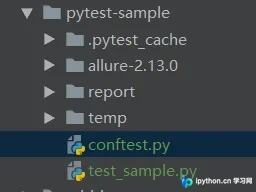
上述案例均编写在同一个 .py 文件中。如果多个 .py 文件需要调用 login() 方法,则必须将 login() 方法提取到外部,此时可引入 conftest.py 配置文件。在 test_xxx.py 测试文件中无需显式 import conftest,pytest 会自动搜索同级目录下的 conftest.py 文件。
conftest.py 与测试文件的目录层级关系如下图所示:
# 新建conftest.py,和 test_sample.py 同级目录
import pytest

@pytest.fixture(scope='function')
def login():
    print("登录")


# test_sample.py 代码如下
import pytest

def test_1():
    print('测试用例1')

def test_2(login):
    print('测试用例2')

if __name__ =="__main__":
    pytest.main(['test_sample.py','-s'])
执行结果如下:
test_sample.py 测试用例1 . 登录 测试用例2 .
============================== 2 passed in 0.01s ==============================
四、重试机制
有时用例执行失败,排查后发现并非代码逻辑问题,而是由环境或网络不稳定引起。此时可引入重试机制,以排除外部因素干扰。
1. 安装 pytest-rerunfailures 插件。
pip3showpytest-rerunfailures2. 介绍两种重试方法:
1)使用装饰器 @pytest.mark.flaky(reruns=5, reruns_delay=2)。
reruns:指定最大重试次数。
reruns_delay:指定重试间隔时间,单位为秒。
#!/usr/bin/env python
# coding=utf-8
import pytest


@pytest.mark.flaky(reruns=5, reruns_delay=2)
def test():
    assert 0==1

if __name__ =="__main__":
    pytest.main(['test_sample.py','-s'])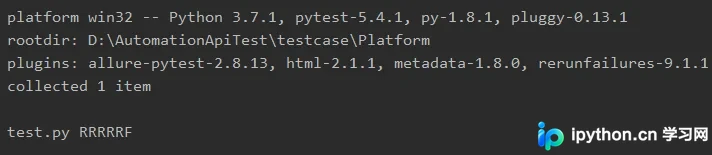
输出中的 R 表示用例失败后正在重试,此处尝试 5 次。
2)也可使用命令行参数 pytest --reruns 5 --reruns-delay 2 -s,其参数与装饰器 @pytest.mark.flaky 一致,此处不再赘述。
至此,关于 Pytest 使用简介的文章介绍完毕。如需了解更多 Pytest 相关内容,请搜索本站历史文章或继续浏览后续文章,希望大家以后多多支持本站!
免责声明:本文内容仅供参考,不代表本站观点。转载或引用请注明出处。









