

Python基于Tkinter实现2048游戏图形界面开发

发布时间:2026-10-15| 4人浏览过
本文详细介绍如何使用Python的Tkinter库从零开发一款2048图形界面游戏。通过定义Board和Game两个核心类,实现网格渲染、数字合并逻辑、随机生成及键盘事件监听。文章涵盖项目依赖、代码结构解析及核心算法实现,帮助开发者掌握GUI编程与游戏逻辑结合的技巧。
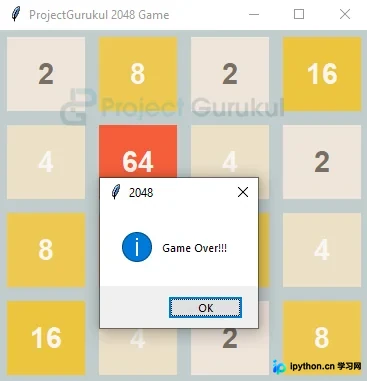
2048游戏输出
项目先决条件
开发该项目需要满足以下前提条件:
1. Python环境 2. Tkinter库
创建main.py
代码:
from tkinter import *
from tkinter import messagebox
import random

class Board:
 bg_color={

 '2': '#eee4da',
 '4': '#ede0c8',
 '8': '#edc850',
 '16': '#edc53f',
 '32': '#f67c5f',
 '64': '#f65e3b',
 '128': '#edcf72',
 '256': '#edcc61',
 '512': '#f2b179',
 '1024': '#f59563',
 '2048': '#edc22e',
 }
 color={
  '2': '#776e65',
 '4': '#f9f6f2',
 '8': '#f9f6f2',
 '16': '#f9f6f2',
 '32': '#f9f6f2',
 '64': '#f9f6f2',
 '128': '#f9f6f2',
 '256': '#f9f6f2',
 '512': '#776e65',
 '1024': '#f9f6f2',
 '2048': '#f9f6f2',
 }

 def __init__(self):
 self.window=Tk()
 self.window.title('ProjectGurukul 2048 Game')
 self.gameArea=Frame(self.window,bg= 'azure3')
 self.board=[]
 self.gridCell=[[0]*4 for i in range(4)]
 self.compress=False
 self.merge=False
 self.moved=False
 self.score=0

 for i in range(4):
  rows=[]
  for j in range(4):
  l=Label(self.gameArea,text='',bg='azure4',
  font=('arial',22,'bold'),width=4,height=2)
  l.grid(row=i,column=j,padx=7,pady=7)

  rows.append(l)
  self.board.append(rows)
 self.gameArea.grid()

 def reverse(self):
 for ind in range(4):
  i=0
  j=3
  while(i<j):
  self.gridCell[ind][i],self.gridCell[ind][j]=self.gridCell[ind][j],self.gridCell[ind][i]
  i+=1
  j-=1

 def transpose(self):
 self.gridCell=[list(t)for t in zip(*self.gridCell)]

 def compressGrid(self):
 self.compress=False
 temp=[[0] *4 for i in range(4)]
 for i in range(4):
  cnt=0
  for j in range(4):
  if self.gridCell[i][j]!=0:
   temp[i][cnt]=self.gridCell[i][j]
   if cnt!=j:
   self.compress=True
   cnt+=1
 self.gridCell=temp

 def mergeGrid(self):
 self.merge=False
 for i in range(4):
  for j in range(4 - 1):
  if self.gridCell[i][j] == self.gridCell[i][j + 1] and self.gridCell[i][j] != 0:
   self.gridCell[i][j] *= 2
   self.gridCell[i][j + 1] = 0
   self.score += self.gridCell[i][j]
   self.merge = True

 def random_cell(self):
 cells=[]
 for i in range(4):
  for j in range(4):
  if self.gridCell[i][j] == 0:
   cells.append((i, j))
 curr=random.choice(cells)
 i=curr[0]
 j=curr[1]
 self.gridCell[i][j]=2

 def can_merge(self):
 for i in range(4):
  for j in range(3):
  if self.gridCell[i][j] == self.gridCell[i][j+1]:
   return True

 for i in range(3):
  for j in range(4):
  if self.gridCell[i+1][j] == self.gridCell[i][j]:
   return True
 return False

 def paintGrid(self):
 for i in range(4):
  for j in range(4):
  if self.gridCell[i][j]==0:
   self.board[i][j].config(text='',bg='azure4')
  else:
   self.board[i][j].config(text=str(self.gridCell[i][j]),
   bg=self.bg_color.get(str(self.gridCell[i][j])),
   fg=self.color.get(str(self.gridCell[i][j])))


class Game:
 def __init__(self,gamepanel):
 self.gamepanel=gamepanel
 self.end=False
 self.won=False

 def start(self):
 self.gamepanel.random_cell()
 self.gamepanel.random_cell()
 self.gamepanel.paintGrid()
 self.gamepanel.window.bind('<Key>', self.link_keys)
 self.gamepanel.window.mainloop()

 def link_keys(self,event):
 if self.end or self.won:
  return

 self.gamepanel.compress = False
 self.gamepanel.merge = False
 self.gamepanel.moved = False

 presed_key=event.keysym

 if presed_key=='Up':
  self.gamepanel.transpose()
  self.gamepanel.compressGrid()
  self.gamepanel.mergeGrid()
  self.gamepanel.moved = self.gamepanel.compress or self.gamepanel.merge
  self.gamepanel.compressGrid()
  self.gamepanel.transpose()

 elif presed_key=='Down':
  self.gamepanel.transpose()
  self.gamepanel.reverse()
  self.gamepanel.compressGrid()
  self.gamepanel.mergeGrid()
  self.gamepanel.moved = self.gamepanel.compress or self.gamepanel.merge
  self.gamepanel.compressGrid()
  self.gamepanel.reverse()
  self.gamepanel.transpose()

 elif presed_key=='Left':
  self.gamepanel.compressGrid()
  self.gamepanel.mergeGrid()
  self.gamepanel.moved = self.gamepanel.compress or self.gamepanel.merge
  self.gamepanel.compressGrid()

 elif presed_key=='Right':
  self.gamepanel.reverse()
  self.gamepanel.compressGrid()
  self.gamepanel.mergeGrid()
  self.gamepanel.moved = self.gamepanel.compress or self.gamepanel.merge
  self.gamepanel.compressGrid()
  self.gamepanel.reverse()
 else:
  pass

 self.gamepanel.paintGrid()
 print(self.gamepanel.score)

 flag=0
 for i in range(4):
  for j in range(4):
  if(self.gamepanel.gridCell[i][j]==2048):
   flag=1
   break

 if(flag==1): #found 2048
  self.won=True
  messagebox.showinfo('2048', message='You Wonnn!!')
  print("won")
  return

 for i in range(4):
  for j in range(4):
  if self.gamepanel.gridCell[i][j]==0:
   flag=1
   break

 if not (flag or self.gamepanel.can_merge()):
  self.end=True
  messagebox.showinfo('2048','Game Over!!!')
  print("Over")

 if self.gamepanel.moved:
  self.gamepanel.random_cell()

 self.gamepanel.paintGrid()


gamepanel =Board()
game2048 = Game( gamepanel)
game2048.start()
解释:
在代码实现中,我们定义了两个主要类:
1.Board类:
变量说明:
- Bg_color:这是一个字典,用于映射每个单元格数值对应的背景颜色。
- Color:这是一个字典,用于存储每个单元格数字的前景色。
- Window:这是tkinter的主窗口实例。
- gameArea:这是一个tkinter框架(Frame)小部件,用于容纳游戏区域。
- gridCell:这是一个4×4的整数矩阵,用于存储所有单元格的实际数值。
- Board:这是tkinter标签(Label)小部件组成的4×4网格,负责在窗口中显示单元格值。它根据gridCell的值动态配置单元格的背景和前景样式。
- Score:用于存储玩家的当前得分。
其余变量为状态标志,用于记录移动或合并操作。
功能方法:
- __init__(self):构造函数。它使用默认值初始化所有变量,例如gridCell初始化为0,移动和合并标志初始化为False等。
- Reverse:用于反转gridCell矩阵,辅助处理右移和下移逻辑。
- Transpose:利用zip函数对gridCell矩阵进行转置,辅助处理上移和下移逻辑。
- CompressGrid:将所有非空单元格向左压缩,使数值紧凑排列,便于后续合并操作。
- mergeGrid:检查相邻单元格,若gridCell值相同,则将它们的值相加并更新。
- Random_cell:首先收集所有空单元格索引,然后从列表中随机选择一个位置,将其gridCell值设为2。
- Can_merge:返回布尔值,判断是否还能进行合并操作。仅当存在相邻且gridCell值相同的单元格时,方可合并。
- paintGrid:根据gridCell的值,为4×4网格中的每个单元格分配对应的前景色和背景色,实现界面刷新。
2.Game类:
此类变量较少,主要包含一些布尔变量用于指示游戏状态(如是否结束)。
功能方法:
- __init__(self):构造函数。使用适当的默认值初始化所有变量。
- start:调用random_cell两次,将两个随机单元格的gridCell值设为2,绘制初始网格,并调用link_keys绑定上、下、左、右键的键盘事件。
- link_keys:首先检查游戏是否已赢或已输,若状态结束则直接返回;否则继续执行后续逻辑。
移动操作处理:
- 左移:先对gridCell矩阵进行压缩,然后合并,若压缩或合并操作有效(即矩阵值发生变化),则再次压缩网格以确保数值紧凑。
- 上移:先对矩阵进行转置,执行左移操作,再次转置以恢复原始方向。
- 下移:逻辑与上移类似,但在转置前需先反转矩阵。
- 右移:逻辑与左移类似,但在压缩前需先反转矩阵。
- 每次操作后,需检查游戏状态。若所有单元格被占用且无法进行任何合并(即没有动作能改变矩阵状态),则游戏结束。
若任一单元格值达到2048,玩家获胜,屏幕弹出消息框宣布胜利。
总结
我们已成功使用Python开发了流行的2048游戏。亲手开发游戏而非仅仅游玩,具有独特的乐趣,现在我们可以运行并体验自己开发的游戏。
以上就是Python基于Tkinter制作图形界面2048游戏的详细内容,更多关于Python图形界面2048游戏的资料请关注本站其它相关文章!
免责声明:本文内容仅供参考,不代表本站观点。转载或引用请注明出处。









