

Python matplotlib subplot 多图画布绘制详解

发布时间:2026-10-14| 5人浏览过
本文介绍如何使用 Python matplotlib 库的 subplot 函数在单一画布中同时绘制多张图表。详细解析 subplot 三个参数的含义,并通过示例展示如何设置主次刻度、添加竖线及调整坐标轴范围,实现复杂数据的可视化展示。
subplot(arg1, arg2, arg3)
arg1 参数指定垂直方向上排列的子图数量。
arg2 参数指定水平方向上排列的子图数量。
arg3 参数指定当前操作针对的是第几张子图。
plt.figure()另起一张新的画布
from PIL import Image
import matplotlib.pyplot as plt
image1 = Image.open('1.jpg')
image2 = Image.open('2.jpg')
plt.subplot(121)
plt.imshow(image1)
plt.subplot(122)
plt.imshow(image2)
plt.show()
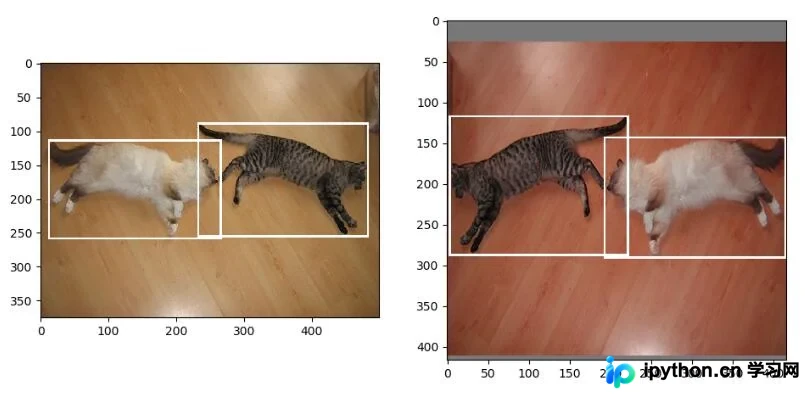
补充说明:利用 matplotlib 在同一个画布中绘制多张图时,可以灵活设置主次刻度以及添加竖线标记。
以下直接展示相关代码实现。
import matplotlib.pyplot as plt
import seaborn as sns
sns.set()
# 要分析的数据
profit = df_profit.groupby('release_year')['profit'].agg(['mean','sum','count'])
# 在同一个画布中绘制两张图
plt.figure(figsize=(15,15))
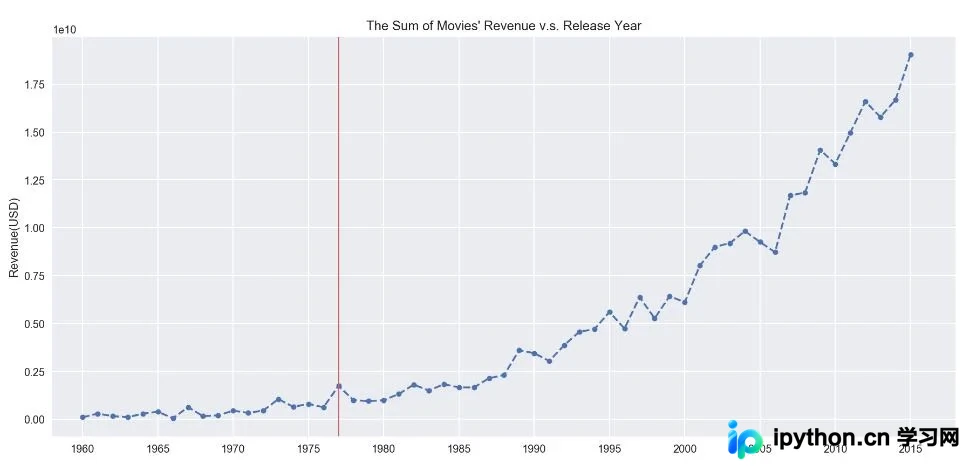
# 图一:每年上映电影的总收入
ax = plt.subplot(211)
# 设置x轴 范围
ax.set_xlim(1958,2018)
# 设置x轴 主刻度,(次刻度设置minor=True)
ax.set_xticks(np.arange(1960,2018,5), minor=False)
# 画图
ax.plot(profit['sum'], linestyle='--', marker='o', markersize=5)
ax.set_title('The Sum of Movies\' Revenue v.s. Release Year')
ax.set_ylabel('Revenue(USD)')
# 增加竖线
ax.axvline(x=1977, color='#d46061', linewidth=1);
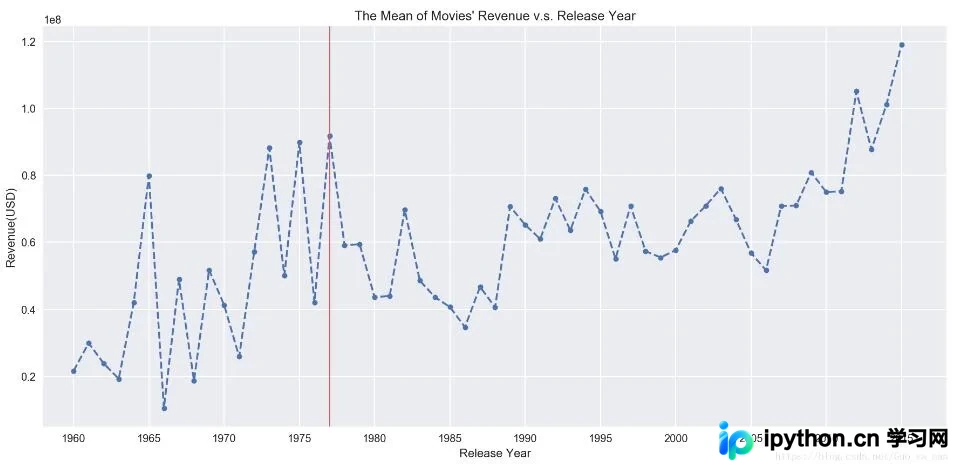
# 图二:每年上映电影的平均收入
ax = plt.subplot(212)
# 设置x轴 范围
ax.set_xlim(1958,2018)
# 设置x轴 主刻度
ax.set_xticks(np.arange(1960,2018,5))
# 画图
ax.plot(profit['mean'], linestyle='--', marker='o', markersize=5);
ax.set_title('The Mean of Movies\' Revenue v.s. Release Year')
ax.set_xlabel('Release Year')
ax.set_ylabel('Revenue(USD)')
# 增加竖线
ax.axvline(x=1977, color='#d46061', linewidth=1);
以上为个人经验,希望能给大家一个参考,也希望大家多多支持本站。如有错误或未考虑完全的地方,望不吝赐教。
免责声明:本文内容仅供参考,不代表本站观点。转载或引用请注明出处。









