

Python使用requests库爬取返回空值的解决方案

发布时间:2026-10-14| 5人浏览过
本文详解Python使用requests库爬取网页时返回空内容的常见原因及解决方法。通过修改User-Agent和Cookie模拟浏览器请求,成功绕过360搜索的反爬限制,并结合BeautifulSoup库提取表格数据,完整展示从请求到数据提取的全过程。
Python爬虫requests返回空值问题解析
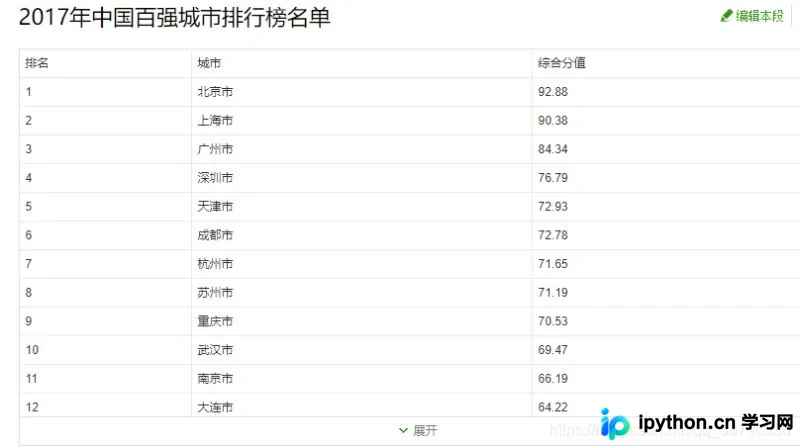
本文以360搜索百科中城市排名前20的数据为例,介绍具体的爬取过程。目标网址为:https://baike.so.com/doc/24368318-25185095.html
我们需要从该页面中提取的核心内容如下:
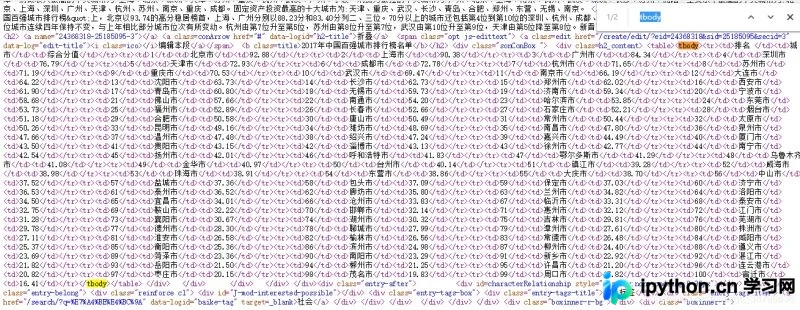
对应的HTML结构字段分析:
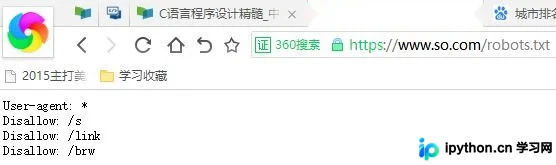
检查目标网站的robots协议:
接下来,我们使用Python IDLE环境开始执行爬取操作。

import requests
r = requests.get("https://baike.so.com/doc/24368318-25185095.html")
r.status_code
r.text
修改headers绕过反爬限制
初步测试结果显示,虽然能够成功访问该网页,但无法获取有效的网页内容。这是因为请求被360搜索识别为非法爬虫,因此我们需要修改请求头(headers)以模拟正常浏览器访问。
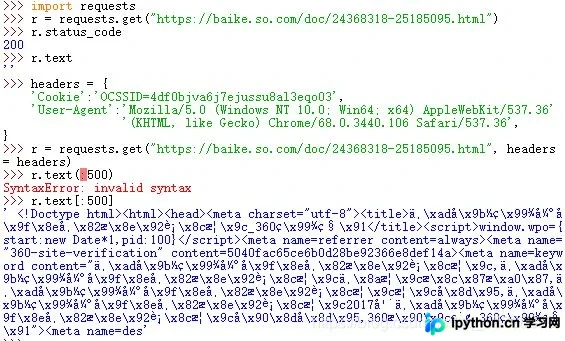
在输出过程中出现了一个小插曲:由于网页内容较多,原本计划只输出前500个字符,但第一次尝试时格式设置错误。
import requests
headers = {
  'Cookie':'OCSSID=4df0bjva6j7ejussu8al3eqo03',
  'User-Agent':'Mozilla/5.0 (Windows NT 10.0; Win64; x64) AppleWebKit/537.36'
         '(KHTML, like Gecko) Chrome/68.0.3440.106 Safari/537.36',
}
r = requests.get("https://baike.so.com/doc/24368318-25185095.html", headers = headers)
r.status_code
r.text
使用BeautifulSoup提取数据
随后,我们对所需内容进行精准爬取。利用(.find)方法定位目标内容位置,通过(.children)方法进行下行遍历以获取具体内容,并使用(isinstance)方法对内容进行类型筛选:
import requests
from bs4 import BeautifulSoup
import bs4
headers = {
  'Cookie':'OCSSID=4df0bjva6j7ejussu8al3eqo03',
  'User-Agent':'Mozilla/5.0 (Windows NT 10.0; Win64; x64) AppleWebKit/537.36'
         '(KHTML, like Gecko) Chrome/68.0.3440.106 Safari/537.36',
}
r = requests.get("https://baike.so.com/doc/24368318-25185095.html", headers = headers)
r.status_code
r.encoding = r.apparent_encoding
soup = BeautifulSoup(r.text, "html.parser")
for tr in soup.find('tbody').children:
	if isinstance(tr, bs4.element.Tag):
		tds = tr('td')
		print([tds[0].string, tds[1].string, tds[2].string])
最终得到的结果如下所示:
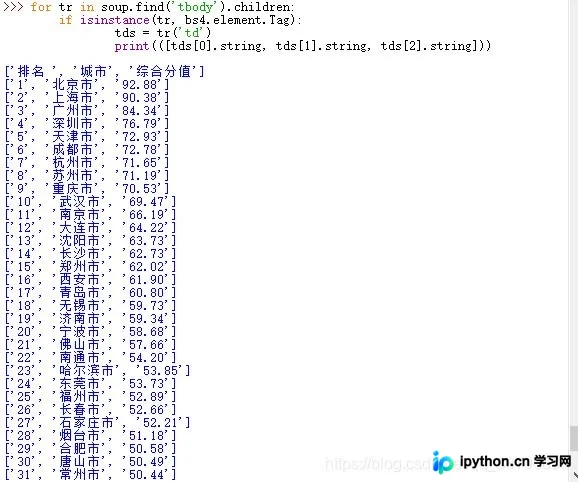
完整代码实现与结果输出
为了调整输出数量,我们使用Clist列表来存储所有城市的排名数据,并输出前20个结果,具体代码如下:
import requests
from bs4 import BeautifulSoup
import bs4
Clist = list() #存所有城市的列表
headers = {
  'Cookie':'OCSSID=4df0bjva6j7ejussu8al3eqo03',
  'User-Agent':'Mozilla/5.0 (Windows NT 10.0; Win64; x64) AppleWebKit/537.36'
         '(KHTML, like Gecko) Chrome/68.0.3440.106 Safari/537.36',
}
r = requests.get("https://baike.so.com/doc/24368318-25185095.html", headers = headers)
r.encoding = r.apparent_encoding #将html的编码解码为utf-8格式
soup = BeautifulSoup(r.text, "html.parser") #重新排版
for tr in soup.find('tbody').children:   #将tbody标签的子列全部读取
	if isinstance(tr, bs4.element.Tag):  #筛选tb列表,将有内容的筛选出啦
	  tds = tr('td')
	  Clist.append([tds[0].string, tds[1].string, tds[2].string])
for i in range(21):
  print(Clist[i])
最终运行结果:
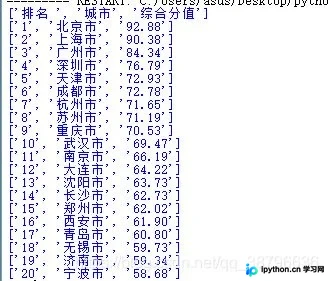
至此,关于Python使用requests库爬取返回空值的解决办法介绍完毕。如需了解更多Python requests返回为空的相关内容,请搜索本站历史文章或继续浏览后续文章,希望对大家有所帮助!
免责声明:本文内容仅供参考,不代表本站观点。转载或引用请注明出处。









