

Python调用itchat库发送微信消息及定时任务实现

发布时间:2026-10-14| 4人浏览过
本文介绍如何利用Python的itchat库通过网页版微信接口发送消息。详细说明了联网、好友关系及扫码登录三个必要前提条件。提供了发送单条消息的具体代码示例,并展示了如何结合requests库获取每日一句及实现定时发送功能的完整脚本,包含异常处理机制。
使用Python通过itchat库发送微信消息,需满足以下前提条件:
第一,设备必须能够正常访问互联网。
第二,目标接收者必须是你的微信好友。
第三,必须支持通过扫描二维码登录网页版微信。
以下是发送消息的具体代码示例:
# 使用微信接口给微信好友发送消息,
import itchat

# 自动登录方法,hotReload=True可以缓存,不用每次都登录,但是第一次执行时会出现一个二维码,需要手机微信扫码登录
itchat.auto_login(hotReload=False)

# 搜索好友,search_friends("xxx"),其中"xxx"为好友昵称,备注或微信号不行
userfinfo = itchat.search_friends("顾正")   # "智能群管家014"为好友昵称
print("userfinfo:",userfinfo)
# print(userfinfo),获取userinfo中的UserName参数
userid = userfinfo[0]["UserName"]   # 获取用户id

# 调用微信接口发送消息
itchat.send("陈军是不是傻?", userid)  # 通过用户id发送信息
# 或
itchat.send_msg(msg='好像是的', toUserName=userid)  # 发送纯文本信息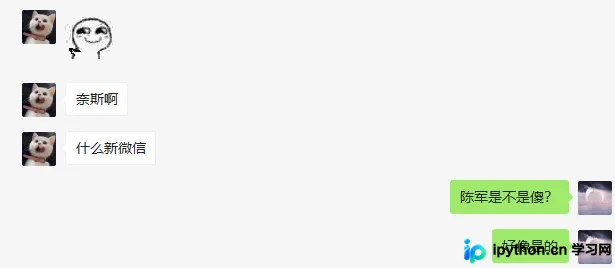
若需实现定时发送消息,可参考以下完整脚本:
# -*- coding: UTF-8 -*-
import itchat
import time
import requests
#获取金山词霸每日一句
def get_new():
    url="http://open.iciba.com/dsapi"
    r=requests.get(url)
    contents=r.json()['content']
    note=r.json()['note']
    return contents,note
def send_news():
    try:
        itchat.auto_login(hotReload=True)
        my_friend=itchat.search_friends(name=u'卡2')
        FriendName=my_friend[0]["UserName"]
        message1=get_new()[0]
        #因为会出现进程报错,所以我加上了 pass
        pass
        message2=get_new[1]
        pass
        message3=u"来自你的朋友"
        pass
        itchat.send(message1,toUserName=FriendName)
        itchat.send(message2, toUserName=FriendName)
        itchat.send(message3, toUserName=FriendName)
        #每个1天发送消息
        t=time(86400,send_news())
        t.start()

    except:
        #如果上面其中一条消息没有发送成功,就会发送本条消息
        message4=u"你的朋友出bug了"
        itchat.send(message4,toUserName=FriendName)

if __name__=="__main__":
    send_news()
以上即为使用Python发送微信消息的详细内容,更多关于python 发送微信消息的资料请关注本站其它相关文章!
免责声明:本文内容仅供参考,不代表本站观点。转载或引用请注明出处。









