

Python实现自定义行列的图片切割脚本

发布时间:2026-10-14| 7人浏览过
本文介绍了一个使用Python和PIL库进行图片切割的示例程序。该脚本允许用户指定输入图片路径、输出目录以及切割的行数和列数,自动将原图分割为指定数量的小图片并保存。代码包含参数合法性校验及路径处理逻辑,适用于需要批量处理图像分块的场景。
Python自定义行列图片切割实现
本示例程序支持用户自定义设定切割的行数与列数,从而对图片进行分割处理。
核心代码逻辑解析
import os
from PIL import Image

def splitimage(src, rownum, colnum, dstpath):
  img = Image.open(src)
  w, h = img.size
  if rownum <= h and colnum <= w:
    print('Original image info: %sx%s, %s, %s' % (w, h, img.format, img.mode))
    print('开始处理图片切割, 请稍候...')

    s = os.path.split(src)
    if dstpath == '':
      dstpath = s[0]
    fn = s[1].split('.')
    basename = fn[0]
    ext = fn[-1]

    num = 0
    rowheight = h // rownum
    colwidth = w // colnum
    for r in range(rownum):
      for c in range(colnum):
        box = (c * colwidth, r * rowheight, (c + 1) * colwidth, (r + 1) * rowheight)
        img.crop(box).save(os.path.join(dstpath, basename + '_' + str(num) + '.' + ext), ext)
        num = num + 1

    print('图片切割完毕,共生成 %s 张小图片。' % num)
  else:
    print('不合法的行列切割参数!')

src = input('请输入图片文件路径:')
if os.path.isfile(src):
  dstpath = input('请输入图片输出目录(不输入路径则表示使用源图片所在目录):')
  if (dstpath == '') or os.path.exists(dstpath):
    row = int(input('请输入切割行数:'))
    col = int(input('请输入切割列数:'))
    if row > 0 and col > 0:
      splitimage(src, row, col, dstpath)
    else:
      print('无效的行列切割参数!')
  else:
    print('图片输出目录 %s 不存在!' % dstpath)
else:
  print('图片文件 %s 不存在!' % src)
运行效果展示
程序运行时的实际效果展示如下。
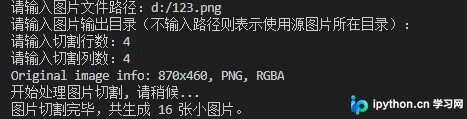
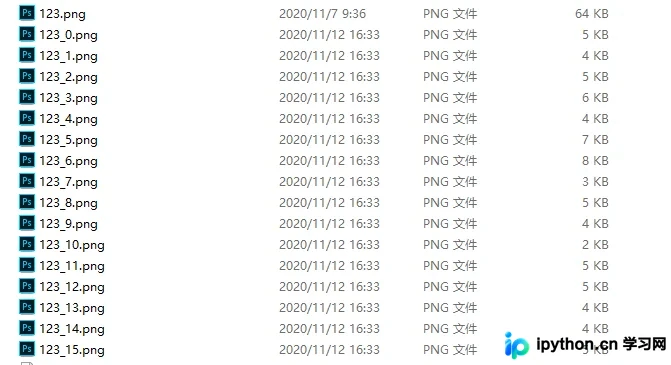
以上即为使用Python进行图片切割的完整示例介绍,如需了解更多关于Python图片处理的相关资讯,建议关注本站发布的其他技术文章。
免责声明:本文内容仅供参考,不代表本站观点。转载或引用请注明出处。









