

Python使用Paramiko库通过SSH执行Shell命令及SFTP传输详解

发布时间:2026-10-14| 3人浏览过
本文详细介绍如何利用Python的Paramiko库实现远程服务器的SSH连接与命令执行。内容涵盖基于用户名密码及公钥认证的两种连接方式,演示SFTPClient进行文件上传下载的代码示例,并提供一个支持多线程批量执行Shell命令的完整脚本,帮助开发者高效管理远程主机。
# -*- coding: utf-8 -*-

import paramiko
import threading

def run(host_ip, username, password, command):
  ssh = paramiko.SSHClient()
  try:
    ssh.set_missing_host_key_policy(paramiko.AutoAddPolicy())
    ssh.connect(host_ip, 22, username, password)

    print('===================exec on [%s]=====================' % host_ip)


    stdin, stdout, stderr = ssh.exec_command(command, timeout=300)
    out = stdout.readlines()
  for o in out:
      print (o.strip('\n'))
  except Exception as ex:
    print('error, host is [%s], msg is [%s]' % (host_ip, ex.message))
  finally:
    ssh.close()


if __name__ == '__main__':

  # 将需要批量执行命令的host ip地址填到这里
  # eg: host_ip_list = ['IP1', 'IP2']

  host_ip_list = ['147.116.20.19']
  for _host_ip in host_ip_list:

    # 用户名,密码,执行的命令填到这里
    run(_host_ip, 'tzgame', 'tzgame@1234', 'df -h')
    run(_host_ip, 'tzgame', 'tzgame@1234', 'ping -c 5 220.181.38.148')
环境依赖与安装准备
在使用paramiko模块之前,需要先安装其依赖库pycrypto。因此,第一步是确保环境中已正确下载并安装pycrypto,以便paramiko能够正常运行。
pip3 install pycrypto
pip3 install paramiko
SSH连接与命令执行
第一种连接方式是基于用户名和密码的认证模式。这种方式适用于大多数常规场景,配置简单直观。
import paramiko

# 创建SSH对象
ssh = paramiko.SSHClient()

# 允许连接不在know_hosts文件中的主机
ssh.set_missing_host_key_policy(paramiko.AutoAddPolicy())

# 连接服务器
ssh.connect(hostname='c1.salt.com', port=22, username='GSuser', password='123')

# 执行命令
stdin, stdout, stderr = ssh.exec_command('ls')

# 获取命令结果
result = stdout.read()

# 关闭连接
ssh.close()
第二种连接方式是基于公钥和私钥的认证模式。这种方式安全性更高,适合对安全有较高要求的生产环境。
import paramiko

private_key = paramiko.RSAKey.from_private_key_file('/home/auto/.ssh/id_rsa')

# 创建SSH对象
ssh = paramiko.SSHClient()

# 允许连接不在know_hosts文件中的主机
ssh.set_missing_host_key_policy(paramiko.AutoAddPolicy())

# 连接服务器
ssh.connect(hostname='c1.salt.com', port=22, username='wupeiqi', key=private_key)

# 执行命令
stdin, stdout, stderr = ssh.exec_command('df')

# 获取命令结果
result = stdout.read()

# 关闭连接
ssh.close()
SFTP文件传输操作
SFTPClient类主要用于建立与远程服务器的SFTP连接,从而实现文件的上传和下载功能。
该类提供了便捷的方法来处理远程文件操作,是进行文件传输任务的核心组件。
第一种SFTP传输方式同样支持基于用户名和密码的认证,适合快速测试或内部网络环境。
import paramiko

transport = paramiko.Transport(('hostname',22))
transport.connect(username='GSuser',password='123')

sftp = paramiko.SFTPClient.from_transport(transport)

# 将location.py 上传至服务器 /tmp/test.py
sftp.put('/tmp/location.py', '/tmp/test.py')

# 将remove_path 下载到本地 local_path
sftp.get('remove_path', 'local_path')

transport.close()
第二种SFTP传输方式支持基于公钥私钥的认证,提供了更安全的文件传输通道。
import paramiko

private_key = paramiko.RSAKey.from_private_key_file('/home/auto/.ssh/id_rsa')

transport = paramiko.Transport(('hostname', 22))
transport.connect(username='GSuser', pkey=private_key )

sftp = paramiko.SFTPClient.from_transport(transport)

# 将location.py 上传至服务器 /tmp/test.py
sftp.put('/tmp/location.py', '/tmp/test.py')

# 将remove_path 下载到本地 local_path
sftp.get('remove_path', 'local_path')

transport.close()
多线程批量执行脚本
接下来展示一个支持多线程执行的版本,旨在提高批量处理远程命令的效率。
#!/usr/bin/python
#coding:utf-8
import threading
import subprocess
import os
import sys


sshport = 13131
log_path = 'update_log'
output = {}

def execute(s, ip, cmd, log_path_today):
  with s:
    cmd = '''ssh -p%s root@%s -n "%s" ''' % (sshport, ip, cmd)

    ret = subprocess.Popen(cmd, shell=True, stdout=subprocess.PIPE, stderr=subprocess.STDOUT)
    output[ip] = ret.stdout.readlines()


if __name__ == "__main__":
  if len(sys.argv) != 3:
    print "Usage: %s config.ini cmd" % sys.argv[0]
    sys.exit(1)

  if not os.path.isfile(sys.argv[1]):
    print "Usage: %s is not file!" % sys.argv[1]
    sys.exit(1)

  cmd = sys.argv[2]

  f = open(sys.argv[1],'r')
  list = f.readlines()
  f.close()
  today = datetime.date.today()
  log_path_today = '%s/%s' % (log_path,today)
  if not os.path.isdir(log_path_today):
    os.makedirs(log_path_today)

  threading_num = 100
  if threading_num > len(list):
    threading_num = len(list)

  s = threading.Semaphore(threading_num)

  for line in list:
    ip = line.strip()
    t = threading.Thread(target=execute,args=(s, ip,cmd,log_path_today))
    t.setDaemon(True)
    t.start()

  main_thread = threading.currentThread()
  for t in threading.enumerate():
    if t is main_thread:
      continue
    t.join()

  for ip,result in output.items():
    print "%s: " % ip
    for line in result:
      print "  %s" % line.strip()

  print "Done!"
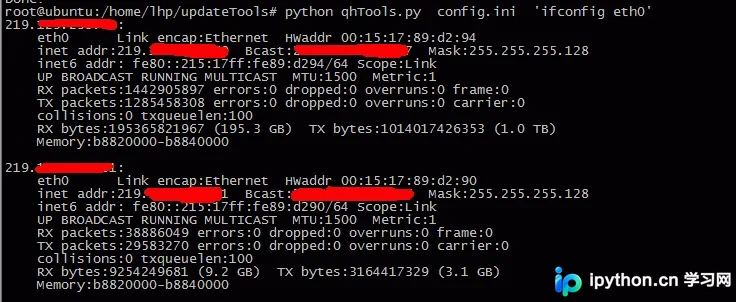
该脚本接收两个命令行参数:第一个参数是指定包含远程主机IP地址的文本文件路径,第二个参数是需要执行的Shell命令字符串。
脚本运行后的实际输出效果如下所示,展示了各主机命令执行的结果反馈。
# -*- coding:utf-8 -*-
import requests
from requests.exceptions import RequestException
import os, time
import re
from lxml import etree
import threading

lock = threading.Lock()
def get_html(url):

  response = requests.get(url, timeout=10)
  # print(response.status_code)
  try:
    if response.status_code == 200:

      # print(response.text)
      return response.text
    else:
       return None
  except RequestException:
    print("请求失败")
    # return None


def parse_html(html_text):

  html = etree.HTML(html_text)

  if len(html) > 0:
    img_src = html.xpath("//img[@class='photothumb lazy']/@data-original") # 元素提取方法
    # print(img_src)
    return img_src

  else:
    print("解析页面元素失败")

def get_image_pages(url):
  html_text = get_html(url) # 获取搜索url响应内容
  # print(html_text)
  if html_text is not None:
    html = etree.HTML(html_text) # 生成XPath解析对象
    last_page = html.xpath("//div[@class='pages']//a[last()]/@href") # 提取最后一页所在href链接
    print(last_page)
    if last_page:
      max_page = re.compile(r'(\d+)', re.S).search(last_page[0]).group() # 使用正则表达式提取链接中的页码数字
      print(max_page)
      print(type(max_page))
      return int(max_page) # 将字符串页码转为整数并返回
    else:
      print("暂无数据")
      return None
  else:
    print("查询结果失败")


def get_all_image_url(page_number):
  base_url = 'https://imgbin.com/free-png/naruto/'
  image_urls = []

  x = 1 # 定义一个标识,用于给每个图片url编号,从1递增
  for i in range(1, page_number):
    url = base_url + str(i) # 根据页码遍历请求url
    try:
      html = get_html(url) # 解析每个页面的内容
      if html:
        data = parse_html(html) # 提取页面中的图片url
        # print(data)
        # time.sleep(3)
        if data:
          for j in data:
            image_urls.append({
              'name': x,
              'value': j
            })
            x += 1 # 每提取一个图片url,标识x增加1
    except RequestException as f:
      print("遇到错误:", f)
      continue
  # print(image_urls)
  return image_urls

def get_image_content(url):
  try:
    r = requests.get(url, timeout=15)
    if r.status_code == 200:
      return r.content
    return None
  except RequestException:
    return None

def main(url, image_name):
  semaphore.acquire() # 加锁,限制线程数
  print('当前子线程: {}'.format(threading.current_thread().name))
  save_path = os.path.dirname(os.path.abspath('.')) + '/pics/'
  try:
    file_path = '{0}/{1}.jpg'.format(save_path, image_name)
    if not os.path.exists(file_path): # 判断是否存在文件,不存在则爬取
      with open(file_path, 'wb') as f:
        f.write(get_image_content(url))
        f.close()

        print('第{}个文件保存成功'.format(image_name))

    else:
      print("第{}个文件已存在".format(image_name))

    semaphore.release() # 解锁imgbin-多线程-重写run方法.py

  except FileNotFoundError as f:
    print("第{}个文件下载时遇到错误,url为:{}:".format(image_name, url))
    print("报错:", f)
    raise

  except TypeError as e:
    print("第{}个文件下载时遇到错误,url为:{}:".format(image_name, url))
    print("报错:", e)

class MyThread(threading.Thread):
  """继承Thread类重写run方法创建新进程"""
  def __init__(self, func, args):
    """

    :param func: run方法中要调用的函数名
    :param args: func函数所需的参数
    """
    threading.Thread.__init__(self)
    self.func = func
    self.args = args

  def run(self):
    print('当前子线程: {}'.format(threading.current_thread().name))
    self.func(self.args[0], self.args[1])
    # 调用func函数
    # 因为这里的func函数其实是上述的main()函数,它需要2个参数;args传入的是个参数元组,拆解开来传入


if __name__ == '__main__':
  start = time.time()
  print('这是主线程:{}'.format(threading.current_thread().name))

  urls = get_all_image_url(5) # 获取所有图片url列表
  thread_list = [] # 定义一个列表,向里面追加线程
  semaphore = threading.BoundedSemaphore(5) # 或使用Semaphore方法
  for t in urls:
    # print(i)

    m = MyThread(main, (t["value"], t["name"])) # 调用MyThread类,得到一个实例

    thread_list.append(m)

  for m in thread_list:

    m.start() # 调用start()方法,开始执行

  for m in thread_list:
    m.join() # 子线程调用join()方法,使主线程等待子线程运行完毕之后才退出


  end = time.time()
  print(end-start)
  # get_image_pages(https://imgbin.com/free-png/Naruto)
以上就是Python通过SSH执行Shell命令的完整示例,更多相关技术资料请持续关注本站发布的其他文章。
免责声明:本文内容仅供参考,不代表本站观点。转载或引用请注明出处。









